Cura: Specify layer height for parts of the model independently
It doesn't seem to be possible to specify layer height for different parts of the model independently. It would allow to shorten the print time significantly, while high accuracy would still be guarnteed on the parts that matter.
 relseah
All 6 comments
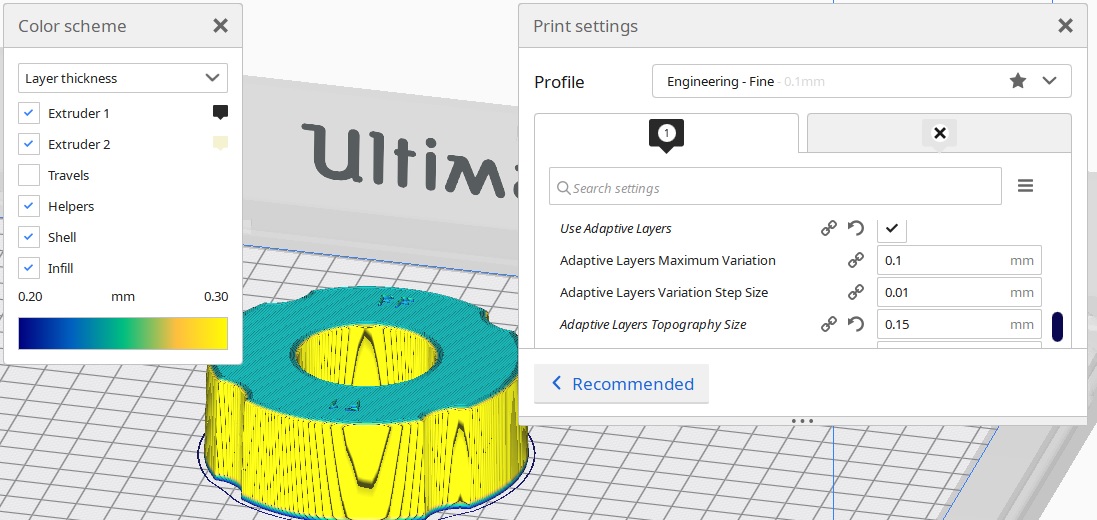
We didn't implement it that way. Instead you can use our experimental feature called "Adaptive layer height" that chooses the layer height for you depending on the angle. You can enable this feature in the experimental section by activating the "Use adaptive layers".
Take a look and let's see if it is sufficient for your purposes.
 diegopradogesto
on 31 Aug 2018
diegopradogesto
on 31 Aug 2018
Chosing different layer height for different layers manually would be great. Adaptive layer is good, but not always
 Psychokiller1888
on 1 Sep 2018
Psychokiller1888
on 1 Sep 2018
Adaptive layers might be handy, but sometimes you just want to set the values on the height bar.
Example usecase: print a bolt. Thicker layer height for the bolt head and thinner layer for the threaded shank. Explicitly setting this will take a second or less, and having to wait while the engine calculates the adaptive layers for the whole model will sure last for much longer.
On the other hand, automatic algorithms may not always provide good results. That means you have to tune the constraints (max. variation, variation step size, threshold, and the mesh itself) until the algorithm adapts the layers in a proper way.
That being said and keeping in mind that you often change the print settings and slice one same project for a lot of times, the total spent time decrement would do save quite some nerves for a wast amount of users. Specifically for those, who have a low-grade hardware which can't provide fast slicing.
Bottom line: there are cases when explicit manual control is more efficient than automatic control.
 Naiten
on 3 Apr 2020
Naiten
on 3 Apr 2020
Function with variable layer height in a certain part of the model I would welcome. In some cases, this reduces printing time by 80%. Adjusting the adaptive layer is complicated and adjusts the height of the layers even where it doesn't fit.
 Radomir3Dbaze
on 21 Apr 2020
Radomir3Dbaze
on 21 Apr 2020
I'm correcting, it should have been 40%.
Radomir3Dbaze
on 21 Apr 2020
I absolutely need the ability to manually change my layer heights. Prusa does this rather elegantly, but honestly I just need a simple text based input box that I can specify from/to, and layer height and that's it. Adaptive layer heights very often messes up and finely slices the WRONG thing
 thanhtacles
on 13 Jul 2020
thanhtacles
on 13 Jul 2020
Related issues
 DmitryBychkov
·
3Comments
DmitryBychkov
·
3Comments
 ferociousdiablo
·
3Comments
ferociousdiablo
·
3Comments
 muhammadelmogy
·
3Comments
muhammadelmogy
·
3Comments
 probonopd
·
3Comments
probonopd
·
3Comments
 mnswamp1
·
3Comments
mnswamp1
·
3Comments
Most helpful comment
Chosing different layer height for different layers manually would be great. Adaptive layer is good, but not always