Cura: big issue with the "TOWER" which changed from square to cylinder
Application Version
3.3.#
Platform
OSX
Printer
ULTIMAKER 3
Steps to Reproduce
print with 2 materials (PLA/CPE)
Actual Results
I'm using either PLA or CPE as a support material because it releases very nicely from the other.
In previous versions of CURA, the 'tower' printed in the right back corner was a square based tower which held nicely but with latest release of CURA, this has become a round cylinder tower and this one detaches/breaks systematically as it gets higher than 4cm, it then drags threads towards the model and screws it up systematically :(
Expected results
the tower should be stronger, back to the square version asap please !!
Additional Information

 gfox72
All 11 comments
Direct to your problem:
"Circular Prime Tower" is a hidden option. Enable and deselect it and you can go back to square.
Other suggestions:
Filling the square tower with a concentric pattern might fix it.
Also, the circular tower takes a lot of fiddling with "width" to get it to fill in with the concentric lines touching each other.
Probably the Prime Tower Minimum Volume should supersede the Prime Tower Size, or at least warn if minimum volume can't be reached. Another crazy thought was to let the nozzles have dissimilar volumes, so the PLA could dribble at the larger diameter than the PVA, re-enforcing things.
===============
I commented on this in the forums. A solid base would work. I've been printing an ooze shield and just letting the tower fail, making a virtual waste bucket.
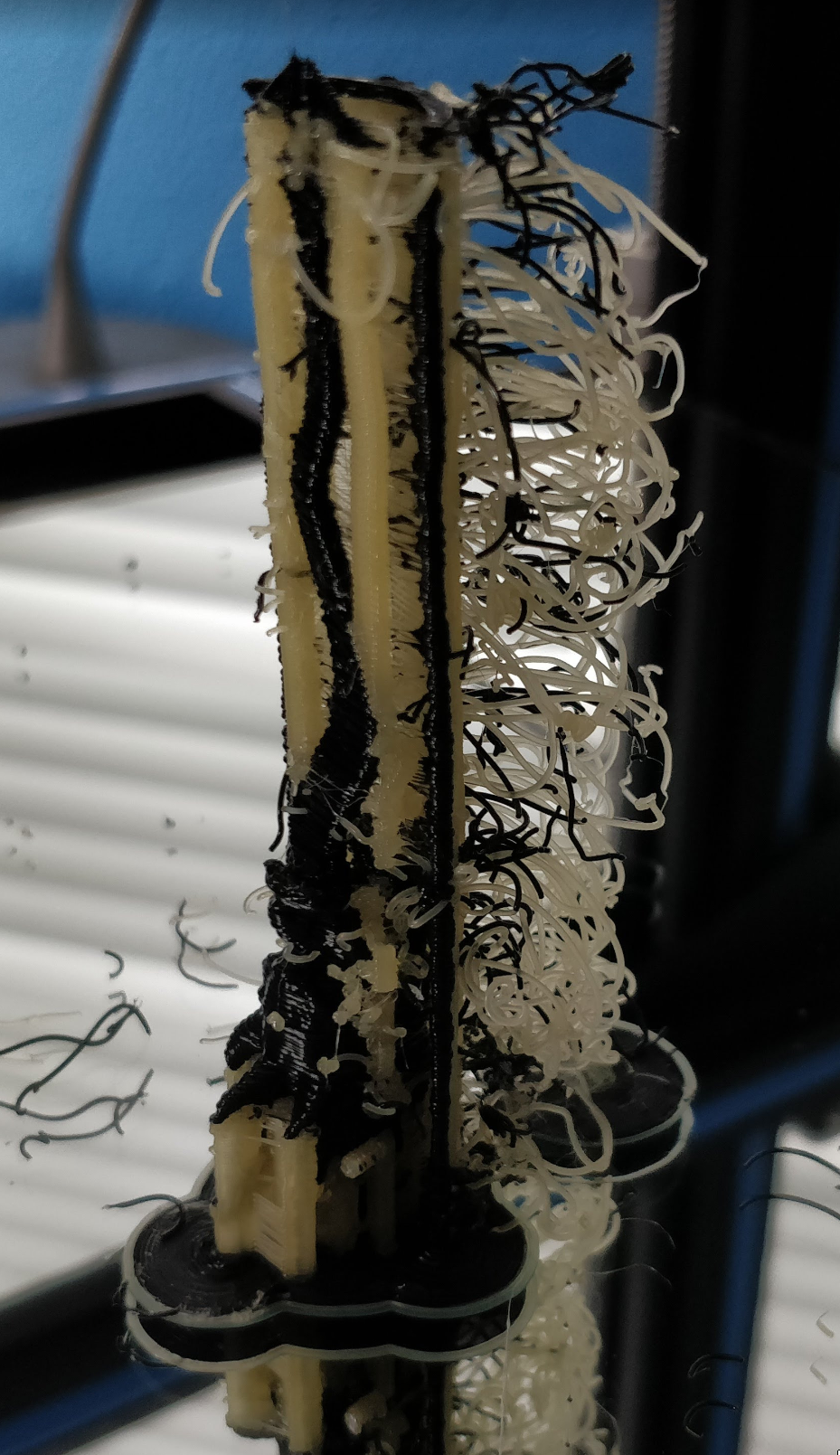
Semi-circular shield and tower that failed a few layers in. A solid core (1 extruder) would likely solve the problem.
 AbeFM
on 12 May 2018
AbeFM
on 12 May 2018
The circular prime tower was a requirement of the material department in order to avoid sudden movements when creating the tower infill. With the circular prime tower the movements of the head are smoother and it tries to avoid the tower to detach from the build plate. That was recently implemented and after being tested internally, was set by default instead of the square tower.
However, a new setting was added ("Circular Prime Tower") that you can enable or disable. If you disable it, then you go back to the square tower.
 diegopradogesto
on 13 May 2018
diegopradogesto
on 13 May 2018
Could the circular tower infill be modified as described in my previous post - making it solid instead of concentric single walled cylindrical shells?
Similarly a small pla only core would hold tower up where it fails.
Similarly, a tower for each material would solve my problems - poor adhesion between dissimilar materials would cease interfering.
AbeFM
on 13 May 2018
Probably the Prime Tower Minimum Volume should supersede the Prime Tower Size, or at least warn if minimum volume can't be reached.
No, the prime tower width should be automatically computed to satisfy the prime tower minimum volume of all extruders.
That's how it worked for the square prime tower and that's how it should work for a circular prime tower as well.
 BagelOrb
on 13 May 2018
BagelOrb
on 13 May 2018
As far as I know, that was not the case even for the square prime tower, since Cura need that width to compute the disallowed areas.
What you can do is to increase the width and then increase the min volume of the prime tower. When you see the warning (orange) in the min volume, then you know that the prime tower will be solid.
diegopradogesto
on 14 May 2018
I think we are confusing two settings: prime tower size and prime tower
width/thickness.
The size is independent, but the thickness of the hollow prime tower is
calculated from the main volume. That's the whole raisin d'être for the
minimum volume setting.
Is the thickness still automatically calculated for the circular tower?
On Mon, 14 May 2018, 09:26 Diego Prado Gesto, notifications@github.com
wrote:
As far as I know, that was not the case even for the square prime tower,
since Cura need that width to compute the disallowed areas.
What you can do is to increase the width and then increase the min volume
of the prime tower. When you see the warning (orange) in the min volume,
then you know that the prime tower will be solid.—
You are receiving this because you commented.
Reply to this email directly, view it on GitHub
https://github.com/Ultimaker/Cura/issues/3801#issuecomment-388721589,
or mute the thread
https://github.com/notifications/unsubscribe-auth/AIe9EXx8mtjBtcRlRpfEO5Cvv0WrmVt9ks5tyTGIgaJpZM4T7q-0
.
BagelOrb
on 14 May 2018
Yes, it is.
diegopradogesto
on 14 May 2018
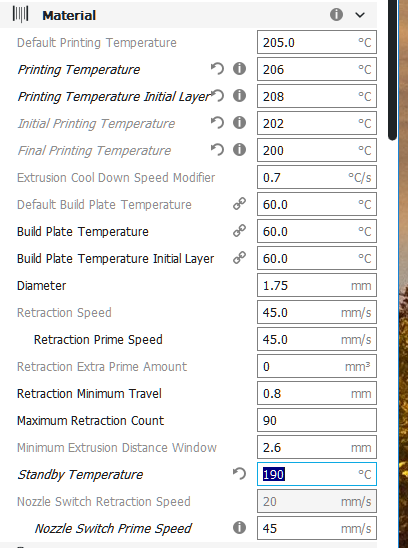
Oh, wow. Ok, most of the (temperature) settings I was begging for are actually there, I just didn't see them as they were hidden.
The size is independent, but the thickness of the hollow prime tower is
calculated from the main volume. That's the whole raisin d'être for the
minimum volume setting.
Is the thickness still automatically calculated for the circular tower?
Yes, it is.
Really? It doesn't update when I change the size. The thickness is something I have to tweak, look at the preview for gaps, re-tweak, re-look. Over and over.
I'm on 3.3.1, but it is the only behavior I've seen. You get it oragned when you have a thickness more than half of the tower size.
The annoying part is both thickness and tower volume (both imporant things) get ignored to maintain tower size which is coincidental, it's only real effect that I can see is a small amount of gained stability. Otherwise I just want to know it won't overlap with my part and that enough material was ejected.
The purpose of the priming tower isn't to end up with a multicolored stick, it's to make the print come out nice - and I'm still getting cold prints and bad layer adhesion.
I hope this is all coming off as helpful, it is meant to be. I do print the last 20 seconds of each layer at-or-below my "standby" temp because CURA is lowering the print temp well ahead of the end of the layer. It would be nice if I had access to that time. Similarly the first ten seconds of each layer is spent well below print temp, even with Standby set HIGHER than print temp, which I'm guessing is ignored.
AbeFM
on 14 May 2018
What you can do is to increase the width and then increase the min volume of the prime tower. When you see the warning (orange) in the min volume, then you know that the prime tower will be solid.
Why not pick the volume you want, and warn if the tower size isn't big enough to contain that volume?
It seems a LOT more direct, lets you set what you actually care about.
AbeFM
on 14 May 2018
I do print the last 20 seconds of each layer at-or-below my "standby" temp because CURA is lowering the print temp well ahead of the end of the layer. It would be nice if I had access to that time.
It sounds like your problem is not with the circular prime tower at all.
If you are having some other issue besides the prime tower shape then please make a separate ticket for that.
If you don't like the circular prime tower then disable the setting Circular Prime Tower. That should answer this ticket.
BagelOrb
on 14 May 2018
Why not pick the volume you want, and warn if the tower size isn't big enough to contain that volume?
This is exactly how it works. You pick the minimum volume that it needs to prime in the prime tower. If that volume is more than the volume that fits in one layer of a solid prime tower the setting becomes orange.
 Ghostkeeper
on 13 Jun 2018
Ghostkeeper
on 13 Jun 2018
Related issues
 tomoinn
·
3Comments
tomoinn
·
3Comments
 dstulken
·
3Comments
dstulken
·
3Comments
 konvoj
·
3Comments
konvoj
·
3Comments
 ferociousdiablo
·
3Comments
ferociousdiablo
·
3Comments
 thopiekar
·
3Comments
thopiekar
·
3Comments
Most helpful comment
No, the prime tower width should be automatically computed to satisfy the prime tower minimum volume of all extruders.
That's how it worked for the square prime tower and that's how it should work for a circular prime tower as well.