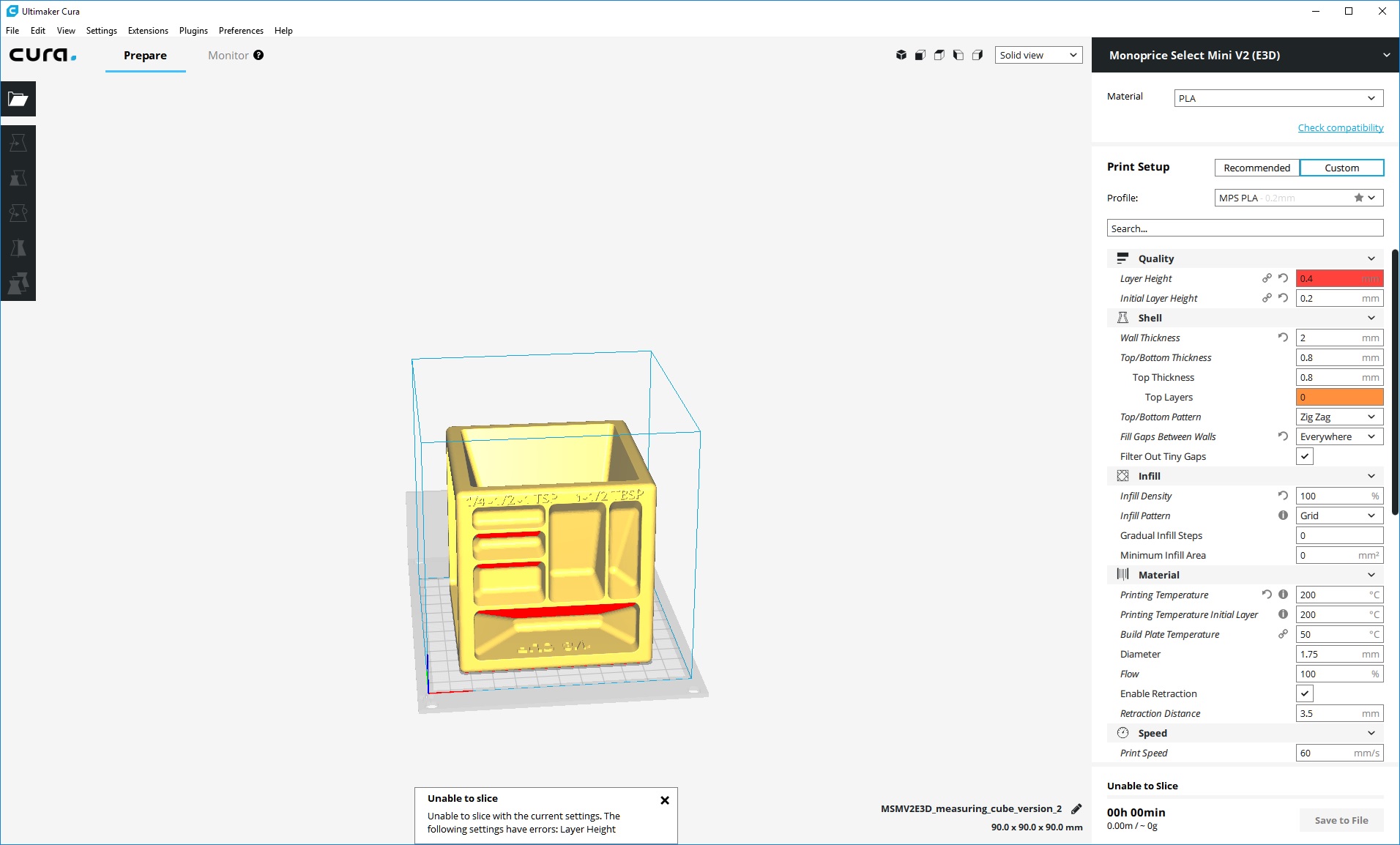
Cura: [3.2.0] Unable to slice above 0.35mm layer height.
Application Version
3.2
Platform
Windows 10
Display Driver
nvidia 388.13, GTX 1060 DX12
Steps to Reproduce
Change layer height to value above 0.35
Actual Results
Object is not sliced. Error message:
"Unable to slice with the current settings. The following settings have errors: Layer Height"
Expected results
Expected results are for the thing to work correctly.
Additional Information
Pic related. Have tried changing nozzle size, restarting after doing so. Issue does not appear to be present in 3.1. Doesn't seem to matter what model is loaded, even a simple cube will not slice.
 Douggie-J
All 13 comments
What nozzle size do you use?
 Appesteijn
on 27 Feb 2018
Appesteijn
on 27 Feb 2018
Setting any size of nozzle makes no difference, no matter how much larger than 0.35.
Amusingly, it will still happily slice 0.35mm layers with a 0.1mm nozzle.
Douggie-J
on 27 Feb 2018
If you use a Custom FDM printer, it will slice?
Appesteijn
on 27 Feb 2018
It does seem to work with a custom printer, actually.
Douggie-J
on 27 Feb 2018
@ianpaschal this is not an engine bug. It's about a setting becoming red, which makes the frontend not call the engine. It's probably somewhere in fdmprinter.def.json
 BagelOrb
on 6 Mar 2018
BagelOrb
on 6 Mar 2018
@tylergibson decided to put a hard limit on the layer height.
The culprit is in the following line in malyan_m200.def.json :
"layer_height": { "minimum_value": "0.04375", "maximum_value": "machine_nozzle_size * 0.875", "maximum_value_warning": "machine_nozzle_size * 0.48125 + 0.0875", "default_value": 0.13125 },
Solving this 'problem' is not up to Ultimaker. We look forward to a pull request - if needed.
BagelOrb
on 6 Mar 2018
@Douggie-J @BagelOrb The MP Select Mini cannot reliably print above .35mm layer heights, which is why there is no profile setting for it. The nozzle and heater cartridge cannot maintain temp above that layer height.
 tylergibson
on 6 Mar 2018
tylergibson
on 6 Mar 2018
@tylergibson I don't know about the V1 or plastics requiring higher temperatures, but I had no trouble printing stuff with a 0.4mm layer height in PLA with a 0.8mm nozzle at 50mm/sec, 195C.
Also, @BagelOrb, am I just blind, or is there something there I'm missing? That snippet makes it look like the maximum value should be dependent on the nozzle size set in the machine "maximum_value": "machine_nozzle_size * 0.875", but changing the nozzle size does not increase the maximum layer height.
Thanks for picking it out, either way. Changing the maximum value in the file manually provides a good workaround for me.
Douggie-J
on 7 Mar 2018
Yeah that does look weird. Are you sure you changed the setting Nozzle Size?
BagelOrb
on 8 Mar 2018
Yes, multiple times. Even closed Cura and opened it back up to check that it stayed. Had no effect.
Changing the default nozzle size in the malyan_m200.def.json file here:
"machine_nozzle_size": {
           "default_value": 0.4,
           "minimum_value": 0.15
       },
...does increase the layer height maximum in proportion to the new value.
Douggie-J
on 8 Mar 2018
@Douggie-J I see now. The config files for the MP printers are all solely for using the default 0.4mm nozzle size. Since Monoprice doesn't officially support other nozzle sizes, they aren't provided out of the box for the Cura profile.
To make changes yourself, you'll need to make the settings changes in the def.json, save it, clear the settings cache, then relaunch Cura and you should see updated values.
settings in AppData\Roaming\cura\3.2\definitions and
cache in AppData\Local\cura\3.2\cache\definitions\3.2.1
on Windows.
tylergibson
on 9 Mar 2018
The inheritance from nozzle size doesn't work because the nozzle size is per-extruder and the layer height setting is global.
Our normal approach when a certain setting will clearly lead to bad results is to give a warning value (in orange) rather than actually preventing the user from slicing with that setting. I'll change the profile to make it a warning value instead of an error value.
 Ghostkeeper
on 20 Mar 2018
Ghostkeeper
on 20 Mar 2018
I think we should consider that to be the fix then. It's more in line with Cura's normal behaviour to give warnings instead of preventing the user from doing something.
Ghostkeeper
on 30 Mar 2018
Related issues
 dstulken
·
3Comments
dstulken
·
3Comments
 Nemernemer
·
3Comments
Nemernemer
·
3Comments
 Liger0
·
3Comments
Liger0
·
3Comments
 probonopd
·
3Comments
probonopd
·
3Comments
 ferociousdiablo
·
3Comments
ferociousdiablo
·
3Comments