Cura: [Feature Request] Do not connect USB automatically.
I can't imagine I'm the first one to bring this up, but I can't find any other topic on this searching the issues...
I'd be great if there was a simple switch in the settings 'Connect over USB automatically' just like there is 'Slice automatically' switch.
(And a button next to this setting to connect the USB manually'.
Use Case:
I never ever ever use Cura for USB printing. After all, one does not want to rely on such a connection for CNC applications if it can be helped. Either I tether wirelessly or SD card....
And while Cura is open, I cannot connect any other host - be it for testing some functions by pushing in gcode from terminal (Cura does not have that) or flashing firmware with Arduino IDE.
It seems an overkill to have to close Cura to connect anything else over USB.
(Yet I like to use Cura for firmware flashing... )
Rebuttals:
Curious what those are. Other than that it's work to implement this and the niche of users that would appreciate this is small (but it should be all the devs ;-) )
 filipgoc
All 6 comments
I once made a proposal to rework how USB connections are handled: https://github.com/Ultimaker/Cura/issues/1049. Later I got about halfway done implementing this: https://github.com/Ultimaker/Cura/pull/1688. I have been meaning to revisit this and get it working. Not connecting on startup would be part of this.
Discussion about this goes all the way back to #70
 fieldOfView
on 28 Jan 2018
fieldOfView
on 28 Jan 2018
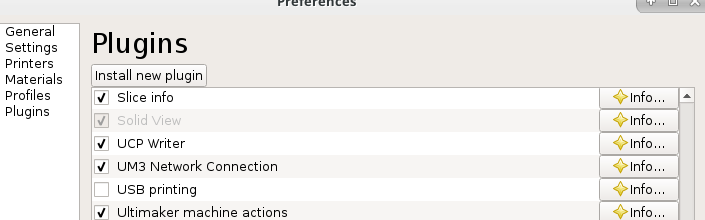
Err, why not do what I do and just disable the plugin?
 smartavionics
on 28 Jan 2018
smartavionics
on 28 Jan 2018
That's not really an option if you actually want to use USB printing. Another possible workaround is unplugging the printer, until you want to print with it. Cura detects plugging in the serial port, so you can then continue to print over USB without restarting Cura. Both are workarounds, at best.
fieldOfView
on 28 Jan 2018
True, but the OP says
I never ever ever use Cura for USB printing.
I have various other USB serial devices plugged into my PC and it's a real pain when Cura tries to talk to them so I just disable the plugin.
smartavionics
on 28 Jan 2018
@smartavionics I did NOT think of that. Brilliant!
This made my day.
I do like to use cura to flash hex files every now and then, but of course there are other options or I can just enable the plugin for that.
Of course sometimes in the far future Cura will surely feature a gcode terminal, so this will be a bit less of an issue.
filipgoc
on 28 Jan 2018
@fieldOfView thanks for your attempts to get a more flexible and powerful USB handling. While I'll just disable the plugin, your solutions would be less of a hack...
filipgoc
on 28 Jan 2018
Related issues
 mnswamp1
·
3Comments
mnswamp1
·
3Comments
 mubarak111nsu
·
3Comments
mubarak111nsu
·
3Comments
 wi1k1n
·
3Comments
wi1k1n
·
3Comments
 timherrm
·
3Comments
timherrm
·
3Comments
 JRRN
·
3Comments
JRRN
·
3Comments
Most helpful comment
Err, why not do what I do and just disable the plugin?