Like mentioned in https://github.com/Ultimaker/Cura/issues/2634#issuecomment-351688863 after installing the AppImage (using AppImageD) I notice I couldn't open stl's with Cura. It's not listed in the Open with > Other Application > Select Application.
@probonopd mentioned that the AppImage lacks the necessary usr/share/mime/packages/cura.xml file that would associate the files with these MIME types, e.g., .stl files with the MIME type application/sla.
But I actually found the cura.sharedmimeinfo file, which is used in the cmake file. Is this used by the AppImage?
I'm running Elementary OS Loki (build on Ubuntu 16.04.3 LTS).
 peteruithoven
All 20 comments
I am not sure about this, this file might be not used. For building Cura you can check repository "cura-build"
 alekseisasin
on 20 Dec 2017
alekseisasin
on 20 Dec 2017
There is an optional daemon called appimaged which can register file types with the system, but this only works if the AppImage contains the respective files in the usr/share/ hierarchy which seems not to be the case for the Cura AppImages yet. Let's get those into the AppImage, then it should work.
 probonopd
on 20 Dec 2017
probonopd
on 20 Dec 2017
@alekseisasin do you think I should "move" this issue to cura-build?
peteruithoven
on 20 Dec 2017
The other files listed there are in the CMake file mentioned by Peter are also not in the archive. Except the cura.desktop file which is (correctly?) in the root of the AppImage archive and the cura-icon.png file which is not in any subdirectory but (incorrectly?) also in root.
 Ghostkeeper
on 15 Jan 2018
Ghostkeeper
on 15 Jan 2018
In order for the AppImage to work, you need the desktop file and icon the the top-level directory, as they are now.
In order for appimaged to work correctly, you need to also have the usual usr/share/... filesystem hierarchy inside the AppImage, e.g., for setting up the MIME type to associate .stl files with the MIME type that Cura can open as per its desktop file.
probonopd
on 15 Jan 2018
I couldn't open stl's with Cura. It's not listed in the Open with > Other Application > Select Application
Fwiw, this is _already_ working in XFCE when the optional appimaged daemon is used. I have more than one Cura AppImage on my system:
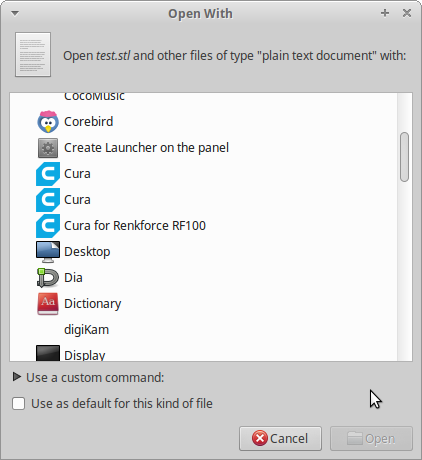
So that part is possibly an elementary OS issue?
But once everything is done correctly and if the optional appimaged daemon has registered the AppImage, then in the future it should not be necessary to do this _manually_, as .stl files should then get the correct MIME type, which the Cura desktop file in turn defines as files Cura can open - resulting in the system opening these files with Cura _automatically_.
probonopd
on 15 Jan 2018
Cura's Desktop file mentions the following MIME types:
- application/sla (.stl)
- application/vnd.ms-3mfdocument (.3mf)
- application/prs.wavefront-obj (.obj)
- image/bmp (.bmp)
- image/gif (.gif)
- image/jpeg (.jpg)
- image/png (.png)
- model/x3d+xml (.x3d)
So it looks like it's something with Elementary OS. Perhaps someone else using Elementary can confirm this bug?
Ghostkeeper
on 29 Jan 2018
Hope this is useful, the .desktop file that adds Cura to elementary's Applications launch menu does indeed contain those MIME types.
.stl files seem to indeed have application/sla as Mimetype.
What might be interesting is that the Cura AppImage versions also don't appear in the list that's shown when clicking "View All Applications". So maybe this isn't an Mimetype issue. (Cura 2.7, installed from the ppa is shown in this list. )
I've asked the question on elementary OS's StackExchange: https://elementaryos.stackexchange.com/questions/14578/open-with-cura-appimage-issue
peteruithoven
on 29 Jan 2018
It appears that one of the issues is that the .desktop file doesn't support opening files. It's Exec rule is missing an argument like %F, which is for example included in the Cura 2.7, from the ppa, desktop file.
After changing
Exec=/home/peteruithoven/Downloads/Cura-3.2.0-BETA.AppImage
to
Exec=/home/peteruithoven/Downloads/Cura-3.2.0-BETA.AppImage %F
it now at least appears in the "View all Applications" list.
Credits go to @davidmhewitt for helping me figure this out on the elementary OS Slack channel.
Update: I've also updated appimaged:
$ appimaged --version
appimaged, continuous build (commit continuous-3-gb0ec1cb), build 1431 built on 2018-01-26 15:17:36 UTC
This looks like the problem to me:
https://github.com/AppImage/AppImageKit/blob/appimagetool/master/src/shared.c#L437
appimaged doesn't add field codes to the desktop file as per the spec:
https://specifications.freedesktop.org/desktop-entry-spec/latest/ar01s07.html
So even if cura has a correct desktop file, appimaged does not create an equivalent version to launch the appimage version of cura with arguments.
 davidmhewitt
on 29 Jan 2018
davidmhewitt
on 29 Jan 2018
@davidmhewitt @Ghostkeeper I've developed a fix after @peteruithoven reported the issue in our issue tracker and filed a PR: https://github.com/AppImage/AppImageKit/pull/643
Please try again with this build of appimaged, built on Travis CI from said PR: https://transfer.sh/98OXT/appimaged-x86_64.AppImage (build log: https://travis-ci.org/AppImage/AppImageKit/jobs/335588465)
@peteruithoven reported that this AppImage isn't working yet, though, and crashes from time to time. I'm working on finding the cause for this.
But be assured that the issue is now known, and parameters within (Try)Exec= are handled properly now.
 TheAssassin
on 31 Jan 2018
TheAssassin
on 31 Jan 2018
From what I understand from @TheAssassin is that the Cura AppImage is lacking the %F parameter.
The desktop file inside the AppImage is lacking the parameter.
Could this be true? How is the AppImage's desktop file generated?
The .desktop file in this repo has the parameter:
https://github.com/Ultimaker/Cura/blob/master/cura.desktop.in#L8
The .desktop file in the cura-build doesn't:
https://github.com/Ultimaker/cura-build/blob/master/packaging/cura.desktop#L7
peteruithoven
on 31 Jan 2018
@peteruithoven you can check this yourself. Cura still use type 1 AppImages (I already suggested them to change to type 2 in https://github.com/Ultimaker/cura-build/issues/136), therefore you need the AppImageExtract tool to extract this AppImage. You can get it onb GitHub: https://github.com/AppImage/AppImageKit/releases/download/6/AppImageExtract_6-x86_64.AppImage
Alternatively, you can mount the AppImage, as it is an ISO file. Just call sudo mount -o loop <path/to/AppImage> <path/to/mountpoint> (adapt to suit your needs).
TheAssassin
on 31 Jan 2018
Sent a pull request.
probonopd
on 31 Jan 2018
Thanks for letting us know. I didn't know that (on some desktops such as apparently elementary) the lack of %F prevents the application from being shown in the "open with" dialog. As shown above, it is working in other desktops without this (such as in XFCE).
Thank you very much for the investigation, highly appreciated.
probonopd
on 2 Feb 2018
@probonopd elementary isn't the odd one out here, that %F argument and the other possible field codes are quite important for ensuring applications are launched with the correct type of arguments.
I think you'll find that fixing this issue will also fix the "open with" dialog in GNOME amongst others.
davidmhewitt
on 2 Feb 2018
I merged that PR that adds the %F argument. I hope that'll fix it for you, but you are going to have to wait for a build (the 3.3 beta is planned in about 4 weeks) or make a build yourself in order to test it.
Ghostkeeper
on 26 Feb 2018
@Ghostkeeper any chance a nightly might show up on http://software.ultimaker.com/Cura_open_beta/?C=M;O=D before that?
probonopd
on 26 Feb 2018
Probably not. Something with the marketing department making a bigger impact; they don't want to have buggy dev-state builds going around too much. But we can put a nightly here if there's a special reason for it, such as testing a bug. Try this one: http://dulek.net/work/Cura-3.2.99-master.20180307014633.AppImage
Keep in mind that this is a buggy version. We recently made a large refactor regarding to how profiles/materials/etc get selected and filtered. It shouldn't affect the open-with functionality though and the %F should be in there.
Ghostkeeper
on 7 Mar 2018
That seems to work :tada:
I did have to go through Open with > Other application, show all applications to select Cura.
peteruithoven
on 7 Mar 2018
Related issues
 rudowinger
·
3Comments
rudowinger
·
3Comments
 ferociousdiablo
·
3Comments
ferociousdiablo
·
3Comments
 mubarak111nsu
·
3Comments
mubarak111nsu
·
3Comments
 konvoj
·
3Comments
probonopd
·
3Comments
konvoj
·
3Comments
probonopd
·
3Comments
Most helpful comment
That seems to work :tada:
I did have to go through Open with > Other application, show all applications to select Cura.