Cura: Extruder gets cooled down before end of print
Hi,
I have a diamond hotend, taking 3 filaments in.
On the last layer Cura generates "M104 T2 S0" before the end of the print, i.e. the print is finalising last skin with T0.
On diamond hotend setup though M104 controls the temp for THE extruder, so heating is shut down completely :(
I can surely upload project and gcode if you require it and tell me where to put it.
Cherio,
Mikael
 MB3Y
MB3Y
All 18 comments
We don't have a diamond hotend, so this is almost impossible for us to test. We can't provide any support for this unfortunately.
 nallath
on 15 Dec 2017
nallath
on 15 Dec 2017
I think the firmware should actually handle this, Cura is not aware that all hot-ends are on the same extruder (T). The firmware should prevent using T1 or T2 to disable the heating.
 ChrisTerBeke
on 15 Dec 2017
ChrisTerBeke
on 15 Dec 2017
You could also (as a workaround) add a Search-and-Replace post-processing script that replaces M104 S\d+ T with ;<removed M104>
 Ghostkeeper
on 2 Jan 2018
Ghostkeeper
on 2 Jan 2018
I'd love that.. but don't know how to couple a post processor directly into Cura? Is there a user guide as of how to make and couple such yourself?
MB3Y
on 2 Jan 2018
It's under Extensions -> Post-Processing -> Modify G-Code.
Ghostkeeper
on 2 Jan 2018
@Ghostkeeper : that was the part I already figured out :) - my questions are about where to put a script, having an example script, how to couple it such that it appears in this list, etc. I assume these scripts are in Python? Are there other alternatives?
MB3Y
on 2 Jan 2018
Ha... figured @Ghostkeeper 's suggestion out - I thought I had to make myself a plugin to do such thing... Which I still would like, such that I can group and process more Geeetech Rostock 301 "misbehaviors" and "shortcuts".
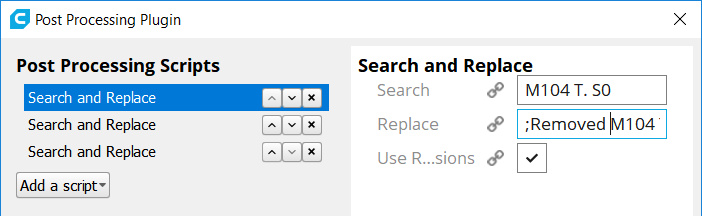
Goto Extensions -> Post-Procession -> Modify G-Code and select "Search And Replace" as modification.
Next one can do the following for correct replacement:
- Search: "M104 T. S0"
- Replace ";Removed M104 T. S0"
- RegExp: "Yes"
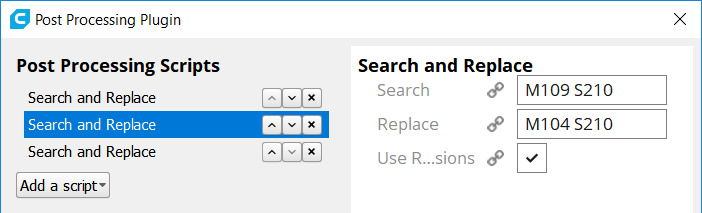
Another pretty annoying one on the Diamons hotend is all the M109's during the print. If for any reason your temp drops, or your hotend can't fully keep up, then you'll get pauses, oozing and blobs on the location of that pause.
The following replacement can help - without interferring too much in the code
- Search: "M109"
- Replace "M104"
- RegExp: "No"
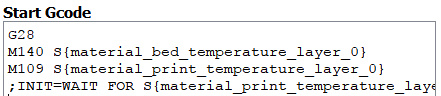
As this also removes your inital heating up of the nozzle, one should update the start script to include a ";INIT=WAIT FOR S{material_print_temperature_layer_0}"
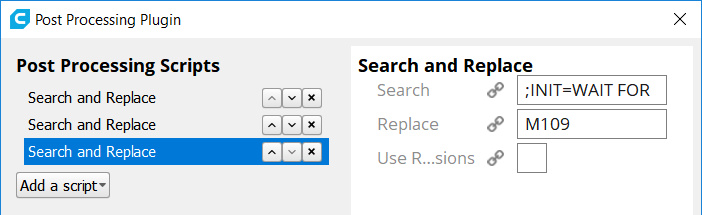
and next a third replacement
So the following replacement makes such that you keep the necessary command
- Search: ";INIT=WAIT FOR "
- Replace "M109"
- RegExp: "No"
I didn't want to remove the original M109 S{material_print_temperature_layer_0} as this could have unwanted side-effects as I got pointed out lately that Cura does check if the start script contains the necessary temp preparation commands - else inserts them him/her-self after your own start script.
...Now I hope Cura will remember my favorit replacement throughtout sessions, reboots etc...
MB3Y
on 14 Jan 2018
Turning off last unused extruder temp MUST BE configurable in end_gcode or anyhow like this
 karabas
on 7 Mar 2018
karabas
on 7 Mar 2018
@karabas : I don't get your comment? Turning off temps in end_gcode is possible afaik.
MB3Y
on 7 Mar 2018
You cannot control turning off prelast extruder. Cura does NOT allow it.
karabas
on 15 Mar 2018
Yes, Cura turns off the heating for an extruder that will no longer be used for the remainder of the print (something like M104 T1 S0). If there is only one extruder and one heater, then the printer just ignores the T1 and sees M104 S0 and this then turns off the heating currently printing nozzle, causing the print to fail.
To fix this we'd need a machine setting that indicates whether the current machine has separate heaters for each nozzle or not, and then some refactoring to allow the engine to act on that.
Ghostkeeper
on 16 Mar 2018
Our project manager took this off of our planning. We'll likely not get around to implementing this soon. For now I suggest to keep all nozzle temperatures the same at your desired printing temperature.
Ghostkeeper
on 15 May 2018
I'd like to reopen issue. It's really necessary to have machine configuration with 2 extruders and 1 hotend.
Code generated by cura (3.6) creates total mess, even when both extruders are set to same temperature it still cool down current one. I just used one extruder but machine was configured with two.
This is how filament switch works in Prusa.
 pmarkiewicz
on 16 Dec 2018
pmarkiewicz
on 16 Dec 2018
I'd like to support the reopening. I have a E3D Cyclops hotend that use one hotend-2 extruder setup and I need this functionality as well.
 JesperKrogPoulsen
on 27 Jan 2019
JesperKrogPoulsen
on 27 Jan 2019
There's two major reasons why the main developers from Ultimaker aren't spending time on this:
- We don't have a printer with this type of nozzle, which you'd need to get an idea on how to make this work elegantly.
- Ultimaker wants us to prioritise issues that have some value for Ultimaker's printers, and this doesn't.
Of course we'll gladly help other people get this in via a pull request, but otherwise I don't see it happening. The issue is still open here on Github, but unless there is no mandate from Ultimaker I won't be able to spend any time on it.
Ghostkeeper
on 13 Feb 2019
Does anyone fixed this Problem?
I tried to change the gcode. Maybe I did something wrong or it's just senseless to make the "search and replace move" with the 104?
 rich2art
on 20 Jan 2020
rich2art
on 20 Jan 2020
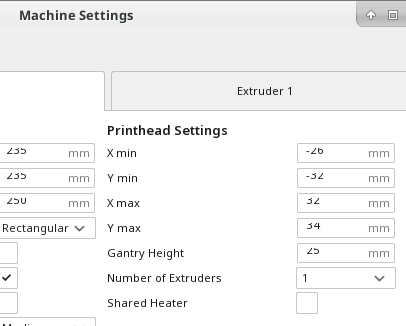
I added a setting to the machine settings dialog that let's you specify that the printer's extruders share a heater. I don't think that setting is in the UM releases (yet) but you can install one of my releases to try it out. You can find them at https://www.dropbox.com/sh/s43vqzmi4d2bqe2/AAADdYdSu9iwcKa0Knqgurm4a?dl=0. Please read the README.md file there.
 smartavionics
on 20 Jan 2020
smartavionics
on 20 Jan 2020
Thanks for the report, this is fixed as of 4.5 so I will close this issue. The fix is the same as smartavionics, using a shared heater checkbox
 mahtDFR
on 20 Jan 2020
mahtDFR
on 20 Jan 2020
Related issues
 ferociousdiablo
·
3Comments
ferociousdiablo
·
3Comments
 DamianSepczuk
·
3Comments
DamianSepczuk
·
3Comments
 jellewie
·
3Comments
jellewie
·
3Comments
 thopiekar
·
3Comments
thopiekar
·
3Comments
 muhammadelmogy
·
3Comments
muhammadelmogy
·
3Comments
Most helpful comment
Ha... figured @Ghostkeeper 's suggestion out - I thought I had to make myself a plugin to do such thing... Which I still would like, such that I can group and process more Geeetech Rostock 301 "misbehaviors" and "shortcuts".
Goto Extensions -> Post-Procession -> Modify G-Code and select "Search And Replace" as modification.
Next one can do the following for correct replacement:
Another pretty annoying one on the Diamons hotend is all the M109's during the print. If for any reason your temp drops, or your hotend can't fully keep up, then you'll get pauses, oozing and blobs on the location of that pause.
The following replacement can help - without interferring too much in the code
As this also removes your inital heating up of the nozzle, one should update the start script to include a ";INIT=WAIT FOR S{material_print_temperature_layer_0}"

and next a third replacement
So the following replacement makes such that you keep the necessary command
I didn't want to remove the original M109 S{material_print_temperature_layer_0} as this could have unwanted side-effects as I got pointed out lately that Cura does check if the start script contains the necessary temp preparation commands - else inserts them him/her-self after your own start script.
...Now I hope Cura will remember my favorit replacement throughtout sessions, reboots etc...