I was thinking that it would be great if Cura has an enhanced layer view that shows not just the layer but also all the lines within a layer. This is something that I see very helpful when testing or debugging CuraEngine features and improvements.
Indeed, other 3D slicing/visualizing software already have it ;-)
I will work on it during internal research.
 diegopradogesto
All 22 comments
I'm not clear on what enhancements you are talking about. Maybe sketch a little before/after comparison? Please share more details as you dig into the research :smile:
 nickthetait
on 2 Nov 2017
nickthetait
on 2 Nov 2017
As far as I understood it, it's about making it possible to also "walk through" the paths inside a layer, so you can see the order. It's a bit like the S3D feature to simulate the printing.
 nallath
on 3 Nov 2017
nallath
on 3 Nov 2017
Yes, that is. I saw it in a lot of 3D slicing software (such as S3D or CraftWare) and I'd like to implement something similar in Cura. With this improvement, the user will be able to see the travels and lines generated in the gcode, and see the right order in which those are executed. Then is easier to see what will happen in the printer and probably catch some errors before printing the model.
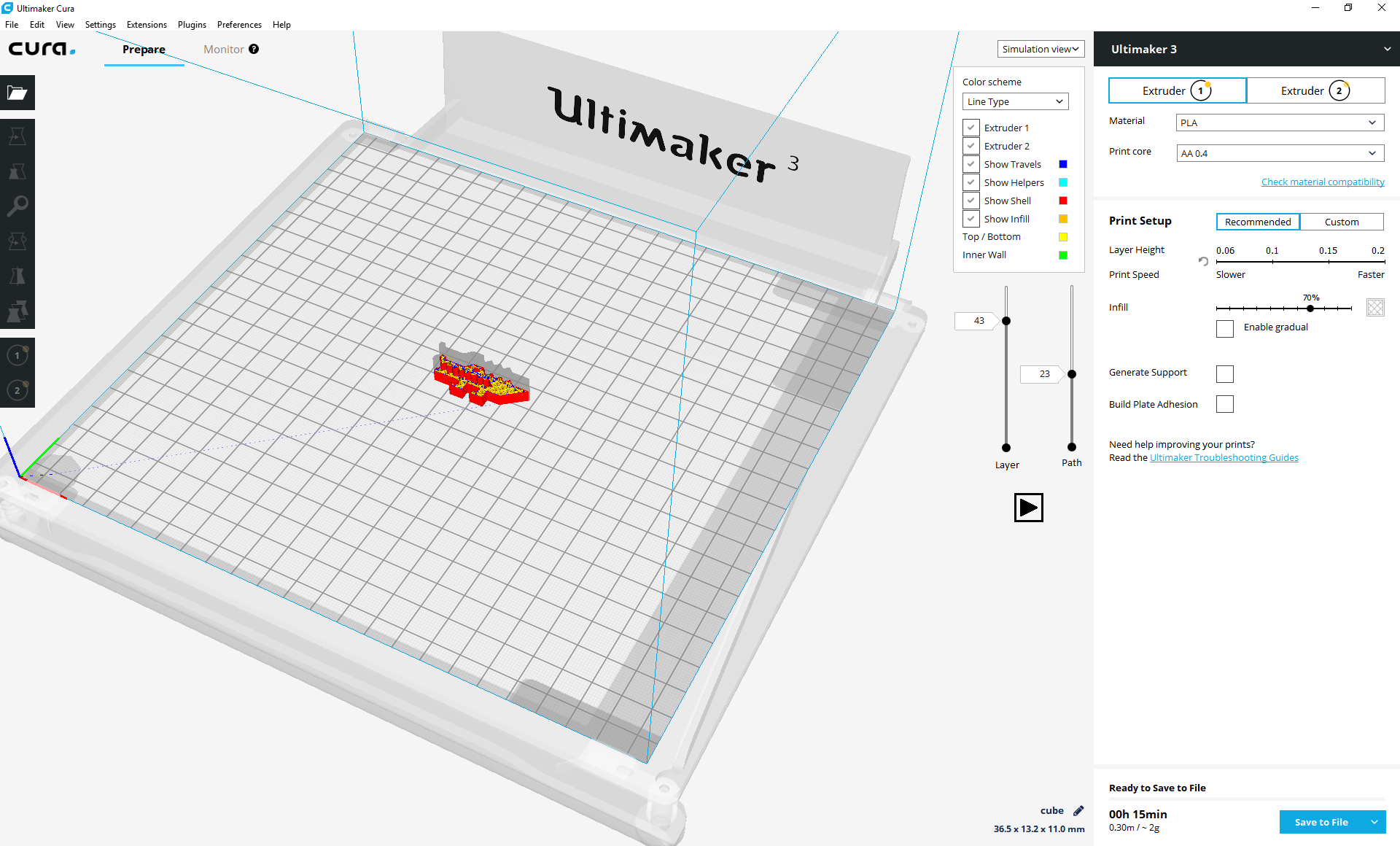
I attach an image of how it will look like in the UI (it's a mock, not yet implemented). You can see two sliders: one for the layers and one for the paths within a layer. Also I want to add a "Play" button that shows all the paths from the beginning to the end (or until the user press stop) in order to see a simulation.
diegopradogesto
on 3 Nov 2017
Gotcha. Check out this for a few ideas too: gcode.ws https://github.com/hudbrog/gCodeViewer. I believe this is used by OctoPrint.
nickthetait
on 3 Nov 2017
@diegopradogesto and @nickthetait:
If I may give my comment also on this:
This kind of feature I never saw, BUT, since I am only used for Cura 3D Prinitng SW, because I am very new on 3D printing, I would also like to have use and see this feature in this software, since I always think: 'why does the printer walk that (very unefficiant) way for printing?'. So, I would like to correct his way of walking through the printing model before real print out.
So, what is the stat on this issue?
Thanks and kind regards,
Roger
 RogerWeihrauch
on 4 Nov 2017
RogerWeihrauch
on 4 Nov 2017
.. and I think one can improve printing quality, especially on hang-over parts.
RogerWeihrauch
on 4 Nov 2017
Thanks @nickthetait, I already know about gcode.ws, but as far as I know, the line by line visualisation is only in 2D. I want to do it in 3D.
@RogerWeihrauch, that's the point, sometimes you choose some settings but you really don't know how this affect the gcode (and the print). Viewing line by line, you can figure out what has changed after applying some settings. In our case, sometimes we improve the CuraEngine but the improvements are minimal and are very difficult to debug. This will help in those cases to do a visual check.
At this moment, I'm creating a plugin, that is working but still needs more work. Indeed I need some modifications in Cura so once I finish, I will create a PR for it.
I'll keep you posted!
diegopradogesto
on 6 Nov 2017
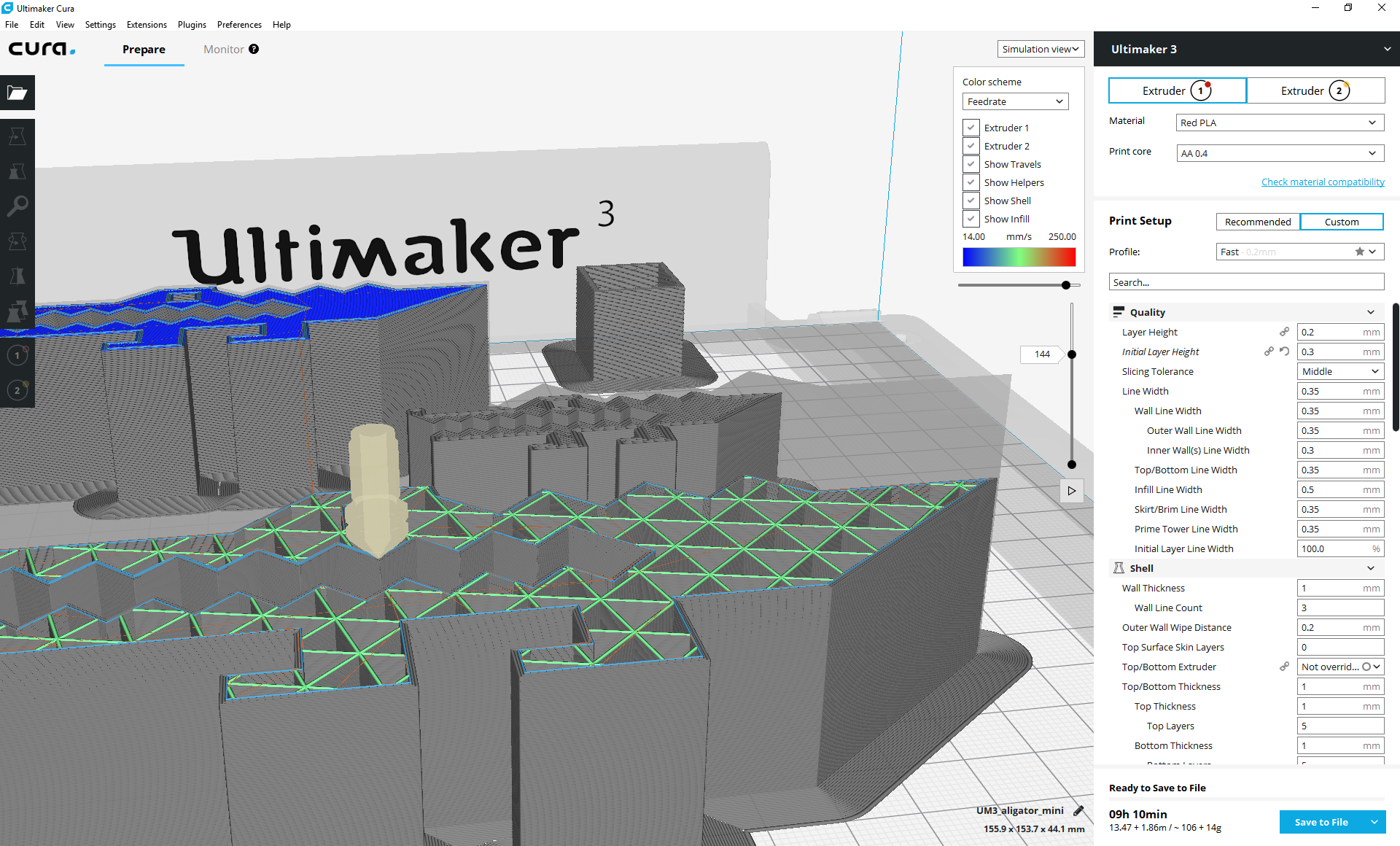
Here is a screenshot as the view plugin is right now. The vertical slider is still used for the layers and the horizontal is now used for seeing the lines within a layer. Using the layer's slider has the same behavior as it was in the Layer View. There is also a "Play" button to simulate the print from the current position till the end (or till you press Pause)
diegopradogesto
on 15 Nov 2017
Is it polished enough to be merged?
nallath
on 15 Nov 2017
Once the research sprint finishes, I will create some related PR. Somebody in the team must review it and test it. But hopefully we can include it for the next 3.1 release :-P
diegopradogesto
on 15 Nov 2017
Here is the Simulation View plug-in: https://github.com/diegopradogesto/SimulationViewPlugin
I also need two extra PR to be merged:
- In Cura: https://github.com/Ultimaker/Cura/pull/2787
- In CuraEngine: https://github.com/Ultimaker/CuraEngine/pull/654
diegopradogesto
on 15 Nov 2017
looks pretty nifty :heart_eyes:
nickthetait
on 15 Nov 2017
The print simulation view is now "on air", in the Ultimaker Cura 3.1 beta version. We know about some small bugs that are either already fixed or planned to be fixed for the upcoming release.
I would like to hear from your suggestions once you test the tool. Feedback is highly appreciated.
diegopradogesto
on 23 Nov 2017
Just found a few minutes to kick the tires. Functionally, it seems to be doing a great job, the play/pause component is especially nice!
A few ideas for improvement:
- I am not sure that many users would discover the feature without it being explicitly pointed out to them.
- Must click/drag the bubble to change layer or simulation step, cant click just anywhere on the whole slider.
- Something about the location of the play button in relation to where the sliders are placed seems off to me, not sure how to better organize.
- Playing through a simulation of ALL layers is not currently possible.
nickthetait
on 27 Nov 2017
Thanks for the feedback. Some comments:
- We wanted to keep the UI clean with not a lot of new items and maybe that makes the feature quite hidden.
- The bar can't be clicked, but on the other hand you can select the handle (click on it) and then use the left/right keyboard arrow to scroll the lines (also using Shift for scrolling 10 lines at a time)
- The location of the play/pause button will change once the PR #2856 is approved. The button will be on the left of the horizontal slider.
- You simulate the entire model: set the layer handle pointing to the first layer and click play (and wait till the end)
:-)
diegopradogesto
on 28 Nov 2017
Very cool feature would be nice to have some sort of 2x or 4x option as well to see the whole thing at a bit higher speed as is the playback seems to be slower than real print speed.
 shusain
on 26 Dec 2017
shusain
on 26 Dec 2017
The playback has a fixed delay per line, regardless of it being a short line or a long line, so if it's a short line it'll be slower than real print speed and if it's a long line it'll be faster.
 Ghostkeeper
on 15 Jan 2018
Ghostkeeper
on 15 Jan 2018
Let's put possible improvements in new issues when they arise.
 ChrisTerBeke
on 2 Mar 2018
ChrisTerBeke
on 2 Mar 2018
When in the simulation view, I would really like to know what line number in the gcode the printer is currently on. I want to insert a pause in the middle of a gcode layer, not at the beginning of the layer, and if I could easily see what line number was the beginning of a move (current nozzle position) I could do this pretty easily.
 quarky42
on 27 Apr 2020
quarky42
on 27 Apr 2020
Let's put possible improvements in new issues when they arise.
Ghostkeeper
on 29 Apr 2020
Ok. I thought it was directly related to this.
quarky42
on 29 Apr 2020
I mean, yes it is, but PR this is when the Simulation View was added back in 2017. This is a feature of Cura that we keep making improvements to. It wouldn't be very easy to oversee the issues and feature requests if they all get grouped together in one long thread.
Ghostkeeper
on 29 Apr 2020
Related issues
 tomoinn
·
3Comments
tomoinn
·
3Comments
 mubarak111nsu
·
3Comments
mubarak111nsu
·
3Comments
 ferociousdiablo
·
3Comments
ferociousdiablo
·
3Comments
 mnswamp1
·
3Comments
mnswamp1
·
3Comments
 timherrm
·
3Comments
timherrm
·
3Comments
Most helpful comment
Here is a screenshot as the view plugin is right now. The vertical slider is still used for the layers and the horizontal is now used for seeing the lines within a layer. Using the layer's slider has the same behavior as it was in the Layer View. There is also a "Play" button to simulate the print from the current position till the end (or till you press Pause)
