Cura: Support under floating molten filament
Can this be avoided?
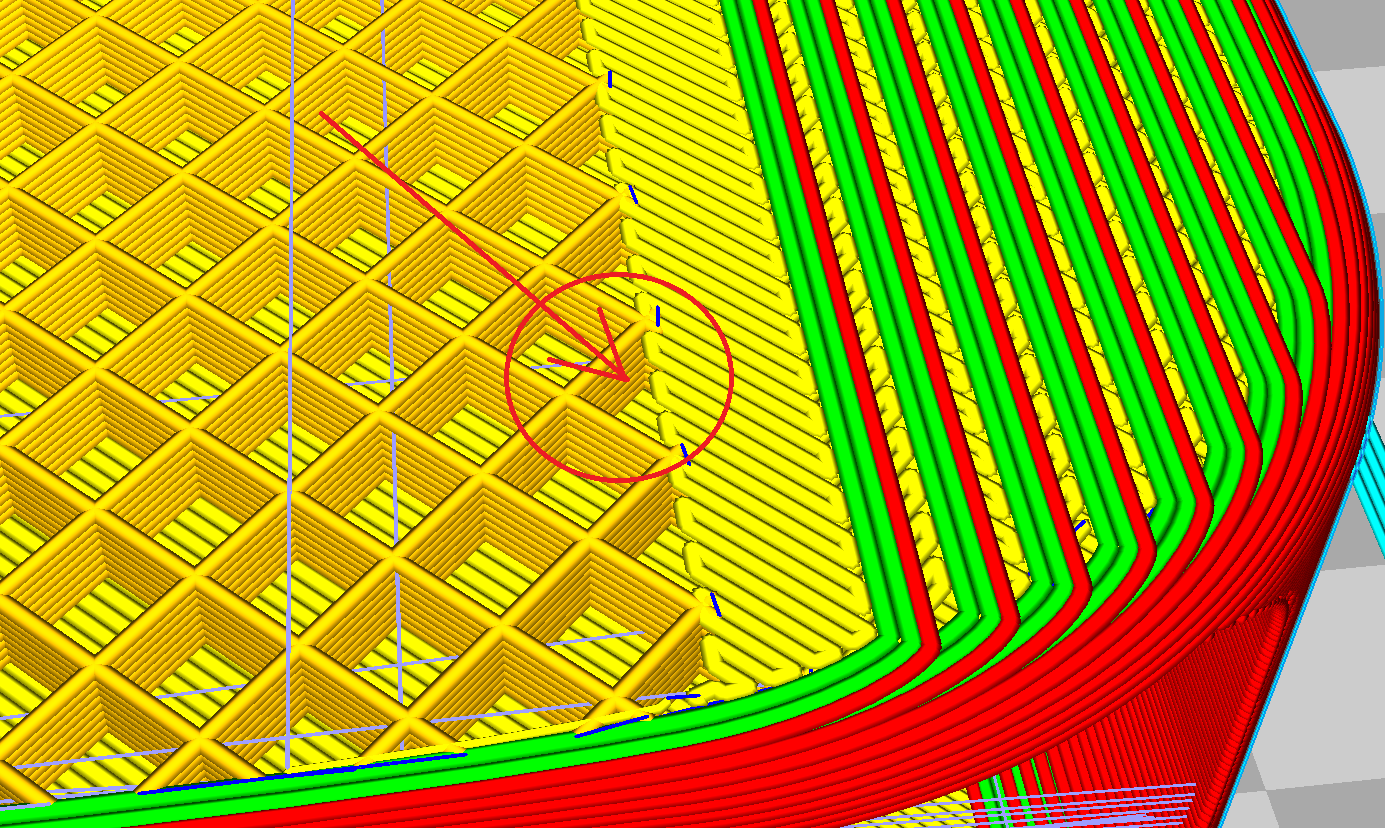
Can Cura change / add support under Z steps where filament oozes in mid-air?
EDIT:
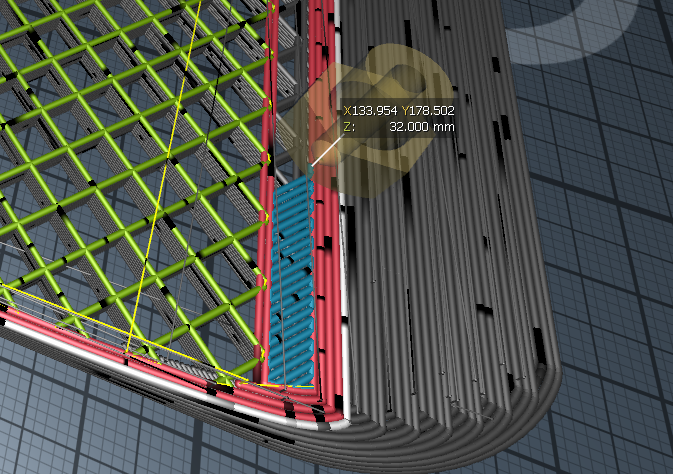
Problem solved using Extra Skin Wall Count in the experimental section:
 Thisismydigitalself
All 15 comments
One of the reasons that the Expand Skins Into Infill setting was created was avoid problems caused by skin drooping into the gaps when the infill density is low. I would have thought looking at the image above that the skin was sufficiently expanded to the left to avoid a problem. But if not, all you have to do is increase the skin expand distance. Of course, you could also increase the number of skin layers.
 smartavionics
on 11 Sep 2017
smartavionics
on 11 Sep 2017
Thank U.
I played with Expand skins and more layers. This is nice but not what i was looking for as this adds more print time, more material, heavier part but at the end it does not solve this problem. i was under the impression that the infill algorithm would know and structure the support in such a way that it will foresee this and fill the gaps.
"Mind the gap"
Thisismydigitalself
on 12 Sep 2017
I can see that expanding the skins takes longer and weighs more (you don't get something for nothing) but why does it not solve the problem? The finished skin should not show blemishes due to the gaps between the infill.
As far as I am aware, the infill mechanism is not aware of the structure above that it is supporting and so the positioning of the strands of infill is not influenced at all by what is above.
smartavionics
on 12 Sep 2017
I had issues with this feature in the past. If the infill is sparse (say 10%) and there is shallow angle of the top layer, then Expand Skins tend to curl up which can lead to hitting the hotend and losing of steps -> failed print.
Some strategy to add perimeters rather than zig-zag pattern would solve this completely.
 konvoj
on 12 Sep 2017
konvoj
on 12 Sep 2017
I had issues with this feature in the past. If the infill is sparse (say 10%) and there is shallow angle of the top layer, then Expand Skins tend to curl up which can lead to hitting the hotend and losing of steps -> failed print.
I have never had that happen but I can see how it could be possible with some filaments, maybe temperature related?
Some strategy to add perimeters rather than zig-zag pattern would solve this completely.
That's an interesting thought.
smartavionics
on 12 Sep 2017
Some strategy to add perimeters rather than zig-zag pattern would solve this completely.
+1
Thisismydigitalself
on 12 Sep 2017
Have you tried setting the Extra Skin Wall Count in the experimental section?
smartavionics
on 12 Sep 2017
Didn't know this feature exists.
Let me check..
Thisismydigitalself
on 12 Sep 2017
Nice!
This seems to have the potential of meeting the challenge 👍 . What i am missing is a way to animate the gcode to know the sequence and what comes first. How do I know if the inner green wall will take place before zigzag takes place? I've got "Infill before walls" unchecked so hoping this will do the trick for me.
I guess i need to invest some time learning about all those Experimental features..
Thisismydigitalself
on 12 Sep 2017
Looking at the code, it should generate the walls before the skin.
I have recently discovered a free slicer that has a really good gcode viewer called CraftWare. You can load your Cura generated gcode into that and wizz through the lines on each layer seeing exactly the order in which stuff is printed.
smartavionics
on 12 Sep 2017
BTW, they have just moved that setting from the experimental to the wall section so that's where it will be in the next release.
smartavionics
on 12 Sep 2017
Cool stuff!
I had CraftWare installed but never really used it as i didn't find it intuitive as Cura is.
You are correct - Gcode shows walls comes before the chicken, Oops... I meant to say the Zigzag.
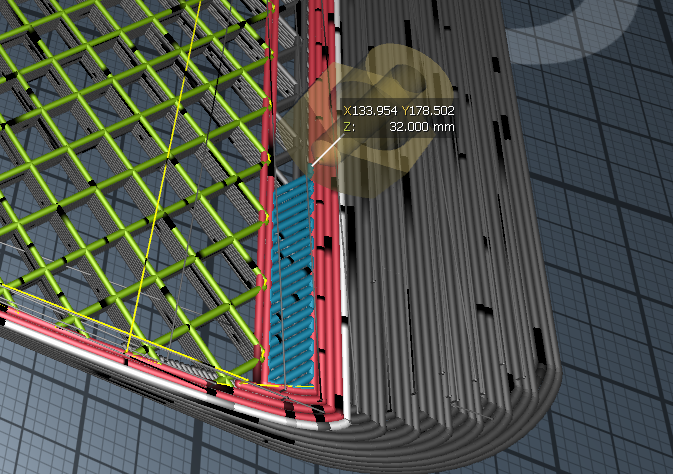
Boy, now i wish for Cura to have such an amazing gcode animator.
Thisismydigitalself
on 12 Sep 2017
+1
Looks pretty cool.
konvoj
on 12 Sep 2017
I was so blown away by Carftware engine that i tried again to work with it and again.. it just don't talk to me. the GUI looks amazing, the Gcode Animator is nothing less than genius but.. User interface not even remotely close to the intuitive GUI of Cura. I don't know why - Craftware just don't speak my language.
BIG thank you for all those who contribute to Cura. great job. All you need now is to surprise us with a gcode animator :)
Thisismydigitalself
on 13 Sep 2017
Animating the g-code is hard™ because it can be so much data. They did a good job in Craftware to get that working so efficiently.
 Ghostkeeper
on 20 Sep 2017
Ghostkeeper
on 20 Sep 2017
Related issues
 StanislavJochman
·
3Comments
StanislavJochman
·
3Comments
 rudowinger
·
3Comments
rudowinger
·
3Comments
 dstulken
·
3Comments
dstulken
·
3Comments
 jornada812
·
3Comments
jornada812
·
3Comments
 muhammadelmogy
·
3Comments
muhammadelmogy
·
3Comments