
Just installed Cura 2.7 on OSX. Getting the strange font issue in the attached screenshot.
I've included my system info incase that helps someone.
Happy to provide more details if required.
 nicholaswagner
All 30 comments
Oh wow. That's the first time i've seen it do something like that. @Appesteijn Could you check if it does the same on your machine?
 nallath
on 30 Aug 2017
nallath
on 30 Aug 2017
same on my system. Cura 2.7.0. OS 10.12.6
 supersoulman
on 1 Sep 2017
supersoulman
on 1 Sep 2017
Perhaps the text is no longer pixel-aligned due to the screen DPI.
 Ghostkeeper
on 10 Sep 2017
Ghostkeeper
on 10 Sep 2017
I'm having the same issue on Mac 10.12.6 (caveat, running hackintosh, though not had this been an issue in any software):

 prankard
on 22 Sep 2017
prankard
on 22 Sep 2017
I also run 10.12.6 but haven't seen this kind of font issue. If you change your resolution and restart Cura, does it still look like this? We do have a new version of Cura coming out in a few weeks, not sure if this is fixed in there.
 Appesteijn
on 22 Sep 2017
Appesteijn
on 22 Sep 2017
Thanks for looking into the issue, the fonts on load appear to be fine, but updating values (like when slicing) the values change and it reloads the fonts and becomes an issue.
Tested scaled at 720p and default for display (1080p).
I am running 3 physical monitors and cura is on the second screen. I'll try unplugging the other two and see if the problem persists.
prankard
on 22 Sep 2017
Tested with one monitor.
It happens less frequently when updating values than on 3 monitors, but when loading/reloading a model it can appear more on the blue status bar, then eventually can happen on print time remaining.
By the way I'm using GTX 960 with Nvidea Web Drivers 378.05.05.25f01.
prankard
on 22 Sep 2017
Previously I upgraded from 2.4.0 which font worked correctly.
Deleted the 2.7.
I tested 2.6.2 and that version font works correctly on my machine, deleted that version and downloaded installed 2.7 and it has the same issue.
Deleted that app, and installed 2.7.0-BETA and it has the same issue also.
prankard
on 22 Sep 2017
The problem that Nicolaswagner has is recognisable. Seen it before. It's text being misaligned. But the problem that Prankard has seems quite different to me. The rendering seems jumbled up.
the fonts on load appear to be fine, but updating values (like when slicing) the values change and it reloads the fonts and becomes an issue.
Since 2.6 didn't have the issue and 2.7 did, I'm guessing that Prankard has found a Qt bug. I can't find any previously reported bug about it though, and I'm not able to verify that it is a Qt bug since it doesn't happen on my computers.
Ghostkeeper
on 26 Sep 2017
Has 3.0 or 3.1 been any improvement for you?
 ChrisTerBeke
on 22 Jan 2018
ChrisTerBeke
on 22 Jan 2018
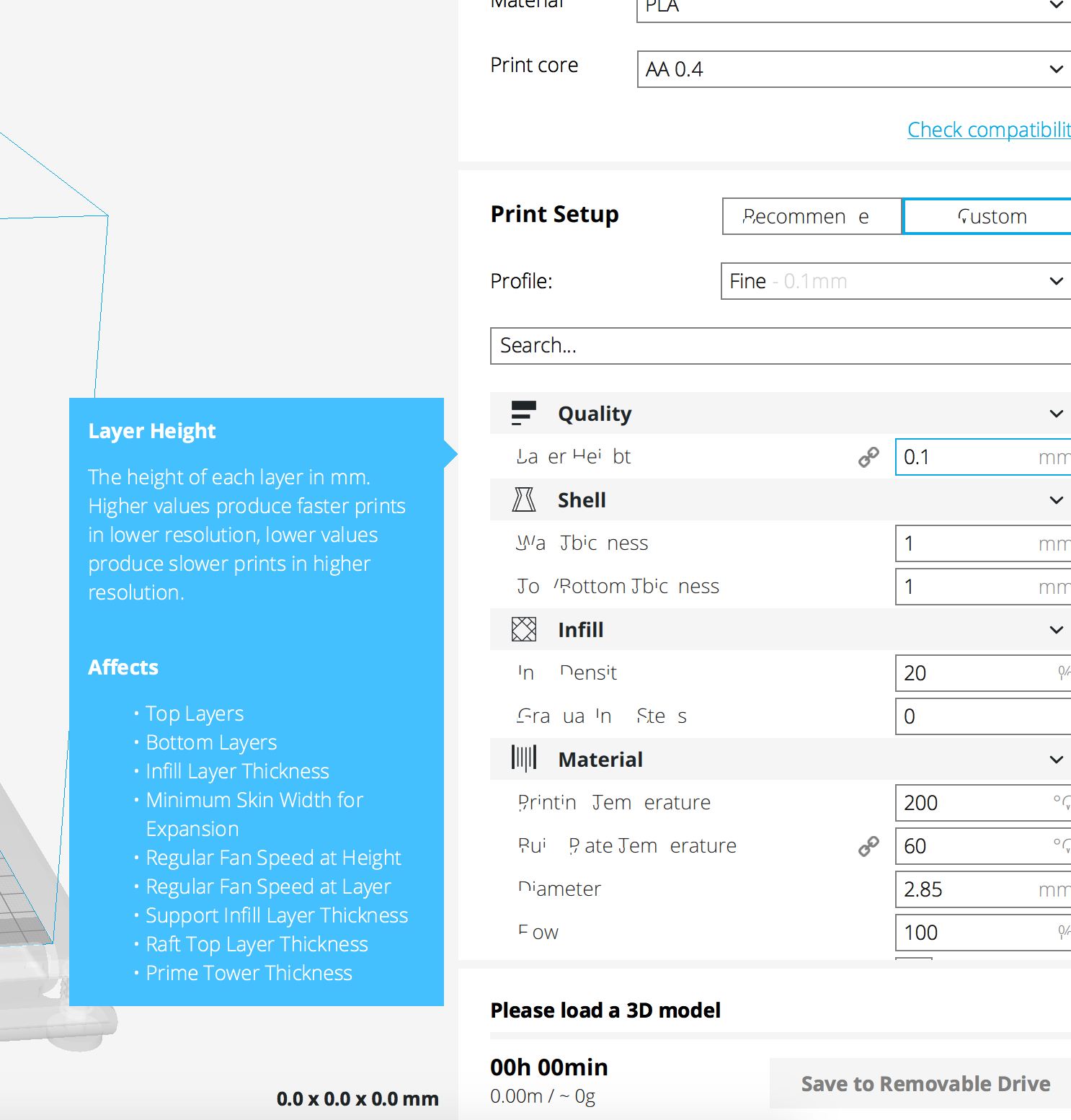
Another MacOS font issue popped up, it looks familiar but affects almost all text in the sidebar!
Any updates on this?
Cura version: 3.2
OS: Mac OS 10.13.2 (High Sierra)
Graphics: Nvidia Geforce GT650M
Screenshot:
 Jerooney
on 7 Feb 2018
Jerooney
on 7 Feb 2018

Still have the issue on 3.2 on my Hackintosh Mac NVidea GTX960 running 10.12.6
I now have Hackintosh Laptop (with intel chipset graphics) which doesn't have the font issue.
prankard
on 7 Feb 2018
We plan changing the font in the next sprint. We hope this will also solve this weirdness.
Appesteijn
on 7 Feb 2018
We hope this will also solve this weirdness.
That hypothesis can be tested fairly easily.
@prankard, can you open Cura, then go to Help -> Show Configuration Folder. In the folder that opens, there should be a folder named "themes". In that themes folder, create a new folder named "default_font".
Download theme.json from this page https://gist.github.com/fieldOfView/3e94440bcc66acfd014dd2f71f6a4885, and place it in the "default_font" folder.
Next, restart Cura and go into the preferences and select the newly added theme "Default font". You will have to restart Cura again after that. Once you do, Cura should use the system default font instead of the font supplied with Cura. If that fixes the issue, then @Appesteijn's idea of changing the font in Cura to fix this issue has merrit.
 fieldOfView
on 7 Feb 2018
fieldOfView
on 7 Feb 2018
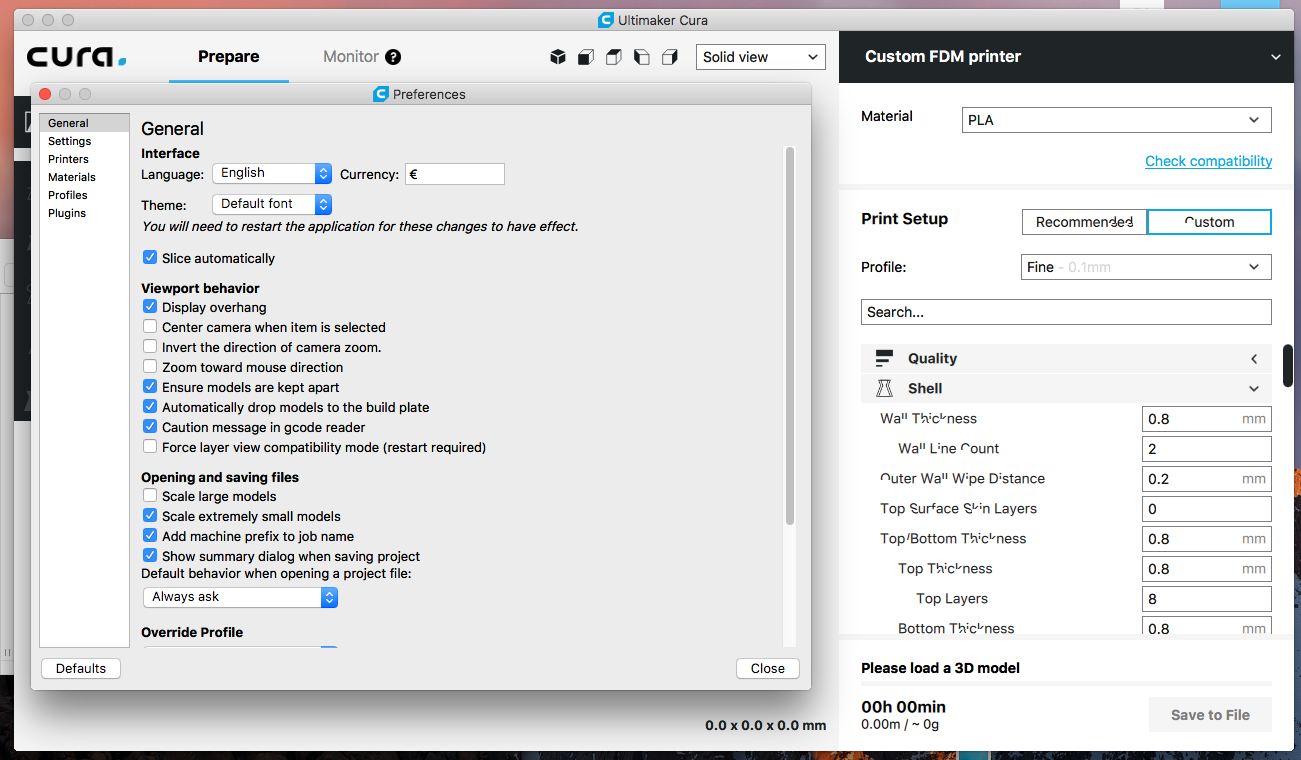
@fieldOfView I've just tried creating, selecting and restarting with the default_font theme enabled but still have the same issue:
prankard
on 7 Feb 2018
Thanks for testing. That likely means that switching the default font in the coming sprint will not fix this issue.
fieldOfView
on 7 Feb 2018
Can we validate the hypothesis if updating to Qt 5.10 & PyQt 5.10 will solve this?
Appesteijn
on 7 Feb 2018
@Appesteijn , could you assign someone to validate the hypothesis you mentioned? I have not enough knowledge to do this.
Jerooney
on 9 Feb 2018
@Appesteijn Not sure if it belongs in this sprint, but something I could look into today while fiddling with fonts?
 ianpaschal
on 9 Feb 2018
ianpaschal
on 9 Feb 2018
Devs see CURA-4941.
I just made https://github.com/Ultimaker/Cura/pull/3270 hopefully this will fix it but I can't test it on my machine (as everything looks good there).
Appesteijn
on 9 Feb 2018
@Appesteijn Happy to test here but with a compiled build if you are willing to provide.
prankard
on 9 Feb 2018
Could you try Cura 3.2.1: https://stack.mybacklog.info/s/MgLnKXLL0P9ro4M ?
Appesteijn
on 9 Feb 2018
Font renders well in build 3.2.1. Congrats :)
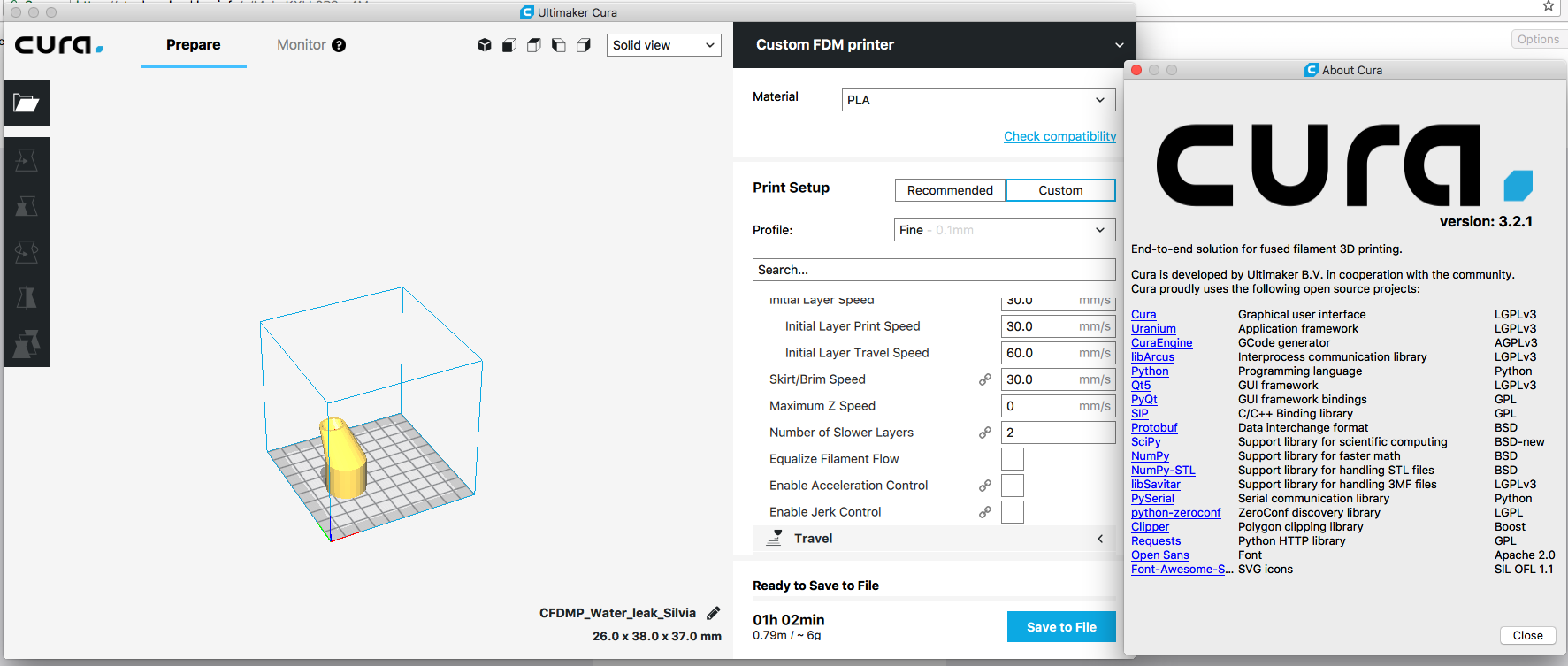
Tested loading model, moving model to force slicing of model which previously messed up the fonts before. Opening closing grouped settings tabs and hovering over descriptions. All good!
prankard
on 9 Feb 2018
Thanks for testing @prankard! Just for our reference, is this working on a 72 dpi screen or a ~Retina~ high dpi one?
ianpaschal
on 9 Feb 2018
Working on a hackintosh with GTX 960, with three Benq GL2450 24inch Screens each running at 1080p.
prankard
on 9 Feb 2018
Could you try: https://stack.mybacklog.info/s/LDltcUP2BXur7AZ ?
Appesteijn
on 13 Feb 2018
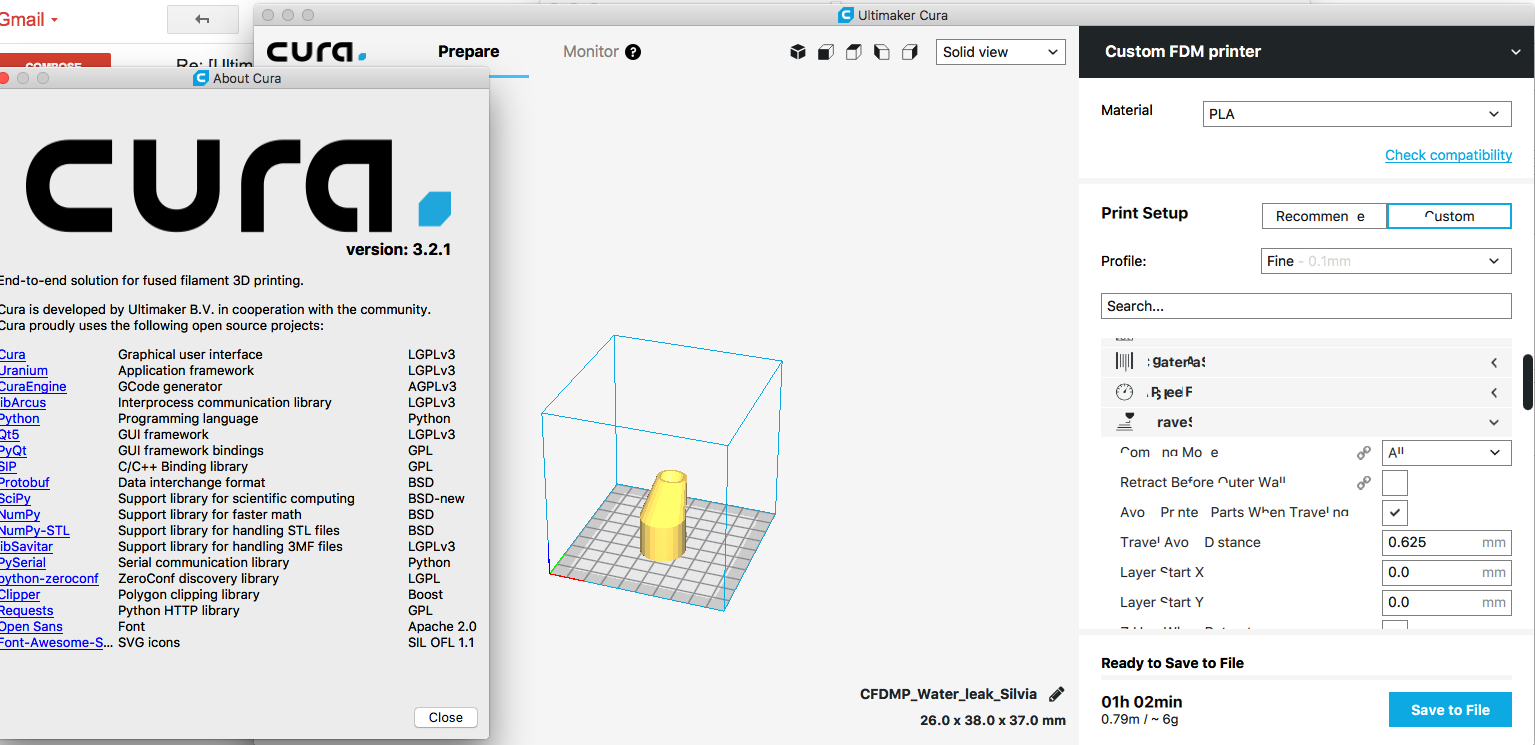
@Appesteijn Tried that build, but it's not so good with the fonts.
prankard
on 13 Feb 2018
Ok I reverted the change. Thank you for testing.
Appesteijn
on 13 Feb 2018
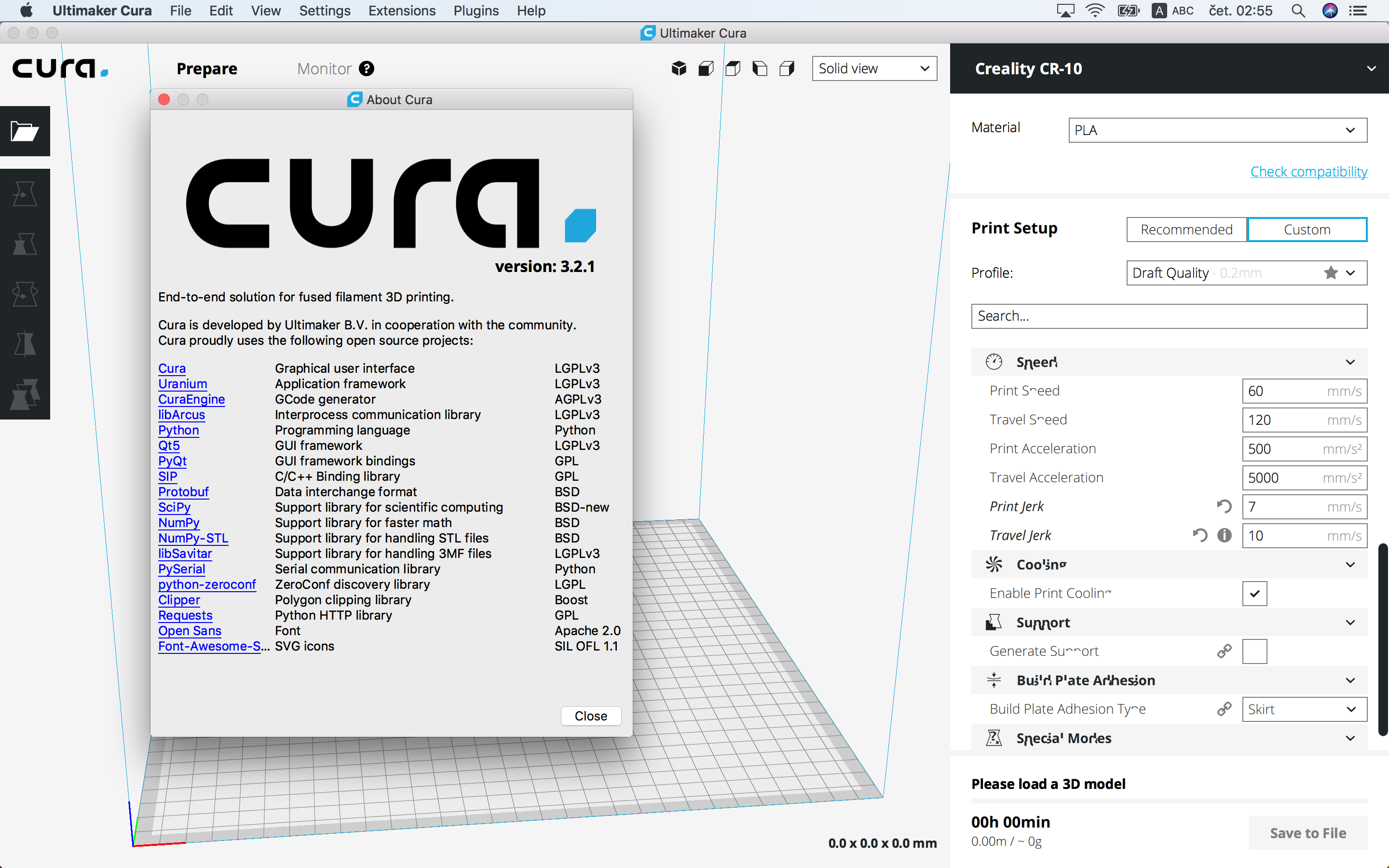
Same thing with my MacBook Pro Retina Mid-2012 (GT 650M)
 aivanis
on 22 Feb 2018
aivanis
on 22 Feb 2018
I believe this will be fixed in 3.3 with recent changes. If it's not, comment and we'll re-open.
ianpaschal
on 27 Feb 2018
Related issues
 muhammadelmogy
·
3Comments
muhammadelmogy
·
3Comments
 jellewie
·
3Comments
jellewie
·
3Comments
 Nemernemer
·
3Comments
Nemernemer
·
3Comments
 DmitryBychkov
·
3Comments
DmitryBychkov
·
3Comments
 dstulken
·
3Comments
dstulken
·
3Comments