Cura: open gcode file get a wrong position
happends in Ultimaker Original+, Robo 3D R1 and lots of other machines
I sliced stl file, then the position of the gcode is correct in LayerView, but if I save the gcode to local,
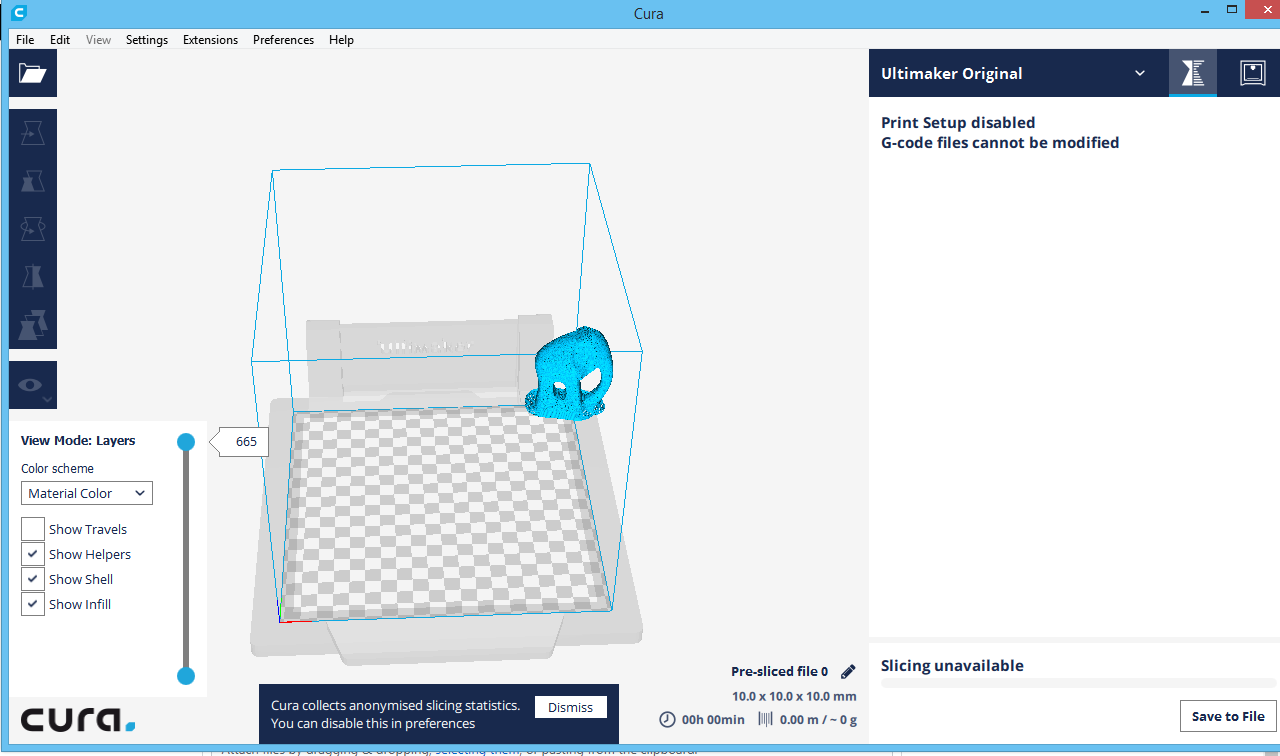
and then load it using Cura then the visulisation of gcode is always in the top right corner...
LayerView visulisation after slice gcode

after loading saved gcode, it becomes

 ynotstartups
All 17 comments
Could you post the .gcode file? It will likely help the developers figure out the problem.
 nickthetait
on 14 Jul 2017
nickthetait
on 14 Jul 2017
Just in case the problem is because of my local file, I delete cura folder in AppDataLocal and AppDataRoaming and installed the lasted Cura version 2.6.2.
My system is Windows 8, 64 bit.
I open Cura, select Ultimaker Original, slice an elephant stl at the center of the bed and save the gcode, when I open the gcode it goes to the top right corner.
Stl file and gcode file are attached --> stl_gcode.zip
ynotstartups
on 17 Jul 2017
Yup, reproduces here too. Here's the file: test.gcode.zip
It's very easy to reproduce:
- Add UMO.
- Load any model. Let it slice.
- Save the g-code.
- Open the g-code file again.
 Ghostkeeper
on 20 Jul 2017
Ghostkeeper
on 20 Jul 2017
The actual print is in the correct place. It seems to be only our g-code viewer.
Ghostkeeper
on 20 Jul 2017
Our project manager just removed this from our planning for being older than 12 weeks.
Ghostkeeper
on 6 Nov 2017
Anybody out there experience this problem and like to see it fixed? Comment here with something like "this affects me too"
nickthetait
on 6 Nov 2017
thisaffectsmetoo
 fieldOfView
on 6 Nov 2017
fieldOfView
on 6 Nov 2017
Haven't seen it yet. Maybe @diegopradogesto can have a quick look as he's working with the G-code previewing currently anyways?
 ChrisTerBeke
on 6 Nov 2017
ChrisTerBeke
on 6 Nov 2017
As I have checked now, seems to be some problem when generating gcode in some printers. This happens if the gcode is generated for the UMO for instance. Then, importing the gcode in a UM3 is also wrong.
On the other hand, if the gcode is generated in an UM3 for instance, and we open the gcode in the UMO seems to be OK.
I'm working in some improvements for the Layer View (in #2713) but at this moment, just after slicing, not focusing in the gcode. I'll keep you posted if I can figure out what happen there.
 diegopradogesto
on 6 Nov 2017
diegopradogesto
on 6 Nov 2017
I think I know what happen here, the problem is when the GCode uses relative positioning (G91) that is not taken into account in the GCodeReader. I will create an issue and try to fix it for the next release.
diegopradogesto
on 16 Nov 2017
Devs: CURA-4577
diegopradogesto
on 16 Nov 2017
This issue is fixed in the new 3.1 release.
diegopradogesto
on 22 Nov 2017
This is happening to me in Cura 3.3.1 for a Prusa i3 MK2. @diegopradogesto
My start Gcode is as follows:
; START GCODE
G21 ; set units to millimeters
G90 ; use absolute positioning
M82 ; absolute extrusion mode

M117 Yendo a casa
G28 W ; home all without mesh bed level
M117 MBL
G80 ; mesh bed leveling
G28 ; auto home
M420 S1; PABLO
GZ 2.0 ;

M117 Calentando...
M140 S{material_bed_temperature_layer_0} ; set bed temp
M190 S{material_bed_temperature_layer_0} ; wait for bed temp
M104 S{material_print_temperature_layer_0} ; set extruder temp
M109 S{material_print_temperature_layer_0} ; wait for extruder temp

M117 Limpieza...
G92 E0.0 ; reset extruder distance position
G0 Z0.3 ; altura de limpieza
G1 Y-3.0 F1000.0 ; go outside print area
G1 X60.0 E9.0 F1000.0 ; intro line
G1 X100.0 E21.5 F1000.0 ; intro line
G0 Z0.0 ; altura de impresión
G92 E0.0 ; reset extruder distance position

M117 Imprimiendo...
EDIT: the GCODE (generated for this Prusa i3) shows OK if I choose another printer (Creality Cr10) in Cura. So I think it's related to some under the hood printer metadata.
 aguadopd
on 21 Jun 2018
aguadopd
on 21 Jun 2018
Was the gcode generated for the Prusa i3 MK2? Can you send me the complete gcode?
diegopradogesto
on 22 Jun 2018
@diegopradogesto : yes, it was generated for the Prusa. Here it goes:
bugreport-PI3MK2_logovinci-2-v2.gcode.txt
I correct my last edit: if I load this gcode but with the CR10 selected, it still has an offset. In both cases the zero point is showed in the center of the bed. Anyway, the file prints in the correct position. For both printers, the 'Origin in bed center' option is unchecked.
I attach screenshots. When I load it with the Prusa:

When I load it with the CR10:

aguadopd
on 23 Jun 2018
I have checked and it looks fine in version 3.4 BETA, so this case was fixed in between 3.3 and 3.4.
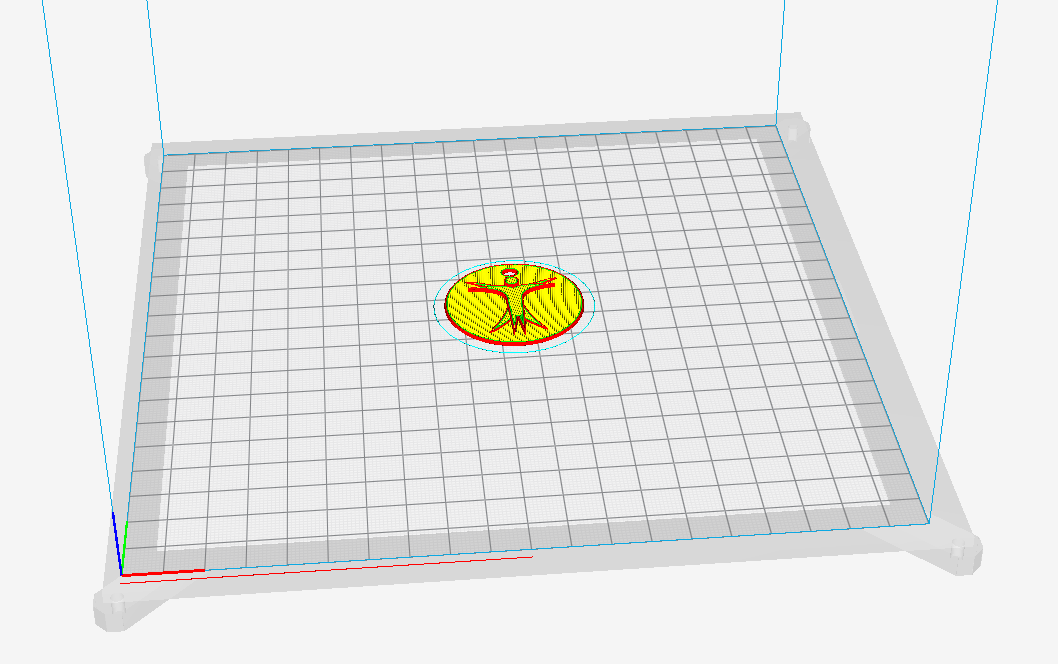
We plan to release the stable 3.4 version tomorrow so you can try if this is solved.
diegopradogesto
on 25 Jun 2018
@diegopradogesto , solved indeed. Thank you!
aguadopd
on 1 Jul 2018
Related issues
 thopiekar
·
3Comments
thopiekar
·
3Comments
 Liger0
·
3Comments
Liger0
·
3Comments
 rudowinger
·
3Comments
rudowinger
·
3Comments
 probonopd
·
3Comments
probonopd
·
3Comments
 DmitryBychkov
·
3Comments
DmitryBychkov
·
3Comments
Most helpful comment
thisaffectsmetoo