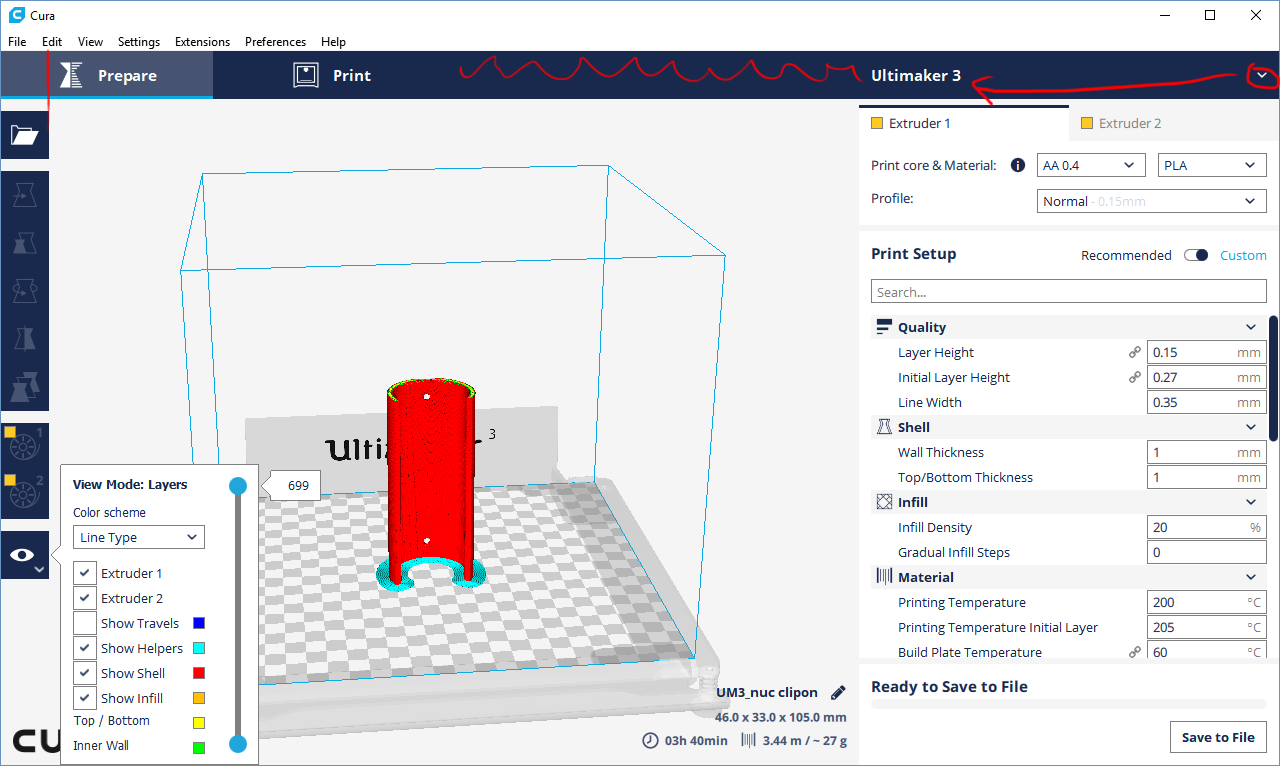
(annotations in red)
Purely aesthetically speaking, there's a disregard for alignment between the toolbar and the icons in the top bar that irks me. Also note that literally _nothing_ else in the UI is centered. Consistency is important, not just for aesthetic reasons ("design patterns" are a thing in UX too, for a reason). But lets not dwell on aesthetics.
The topbar adds a lot of wasted space. This will annoy users with smaller screens; Cura is often run on "left-over" computers, so we cannot assume everybody has a high resolution screen. But even on fairly modern "retina" screens, the resolution is effectively 1280x800 pixels. Substract the menubar, titlebar and dock area, and those 800 pixels become very cramped.
The added room in the top of the sidebar adds a disconnect between the printer name and the dropdown indicator. This decreases the "affordance" to click the printer name, in other words: fewer people will figure out you can click the printer name. Similarly because the top area of the titlebar is now one large button, the white highlight border is becoming even less discerning.
I think I know what the UX team is trying to do; introduced a "task-based" workflow in the UI. First you prepare the models, then you print the models. Unfortunately the current overall design is not great at providing that workflow. For one thing, _there is no button to start the print_ on the "Print" tab! That is because it was conceived and implemented as a "Monitor" tab.
In a true task-based workflow design, I would expect the workflow to be
Open - Prepare - Preview - Print
Note that this would require much more than just introducing a bar along the top of the screen; the viewmodes would have to be rethought.
- I would integrate Solid View and X-Ray View and add a legend with options much like the Layer View currently has (ie: X-Ray View is an option just like Material / Layer Type in layer view, show overhang would be a checkbox when X-Ray View is not enabled).
- The difference between Prepare and Preview would be switching between the combined Solid/X-Ray and Layer view.
- Finally the Print tab/task would have a "Print" button if it is not currently printing and there is gcode available.
Then again, if I wanted it all my way, I shouldn't have left the building.
 fieldOfView
All 10 comments
I've sent your feedback to the UX guys. I also suggested adding the open button to the top bar, but i thought of that when actually implementing the bar, so it was too late for this iteration.
 nallath
on 5 Jul 2017
nallath
on 5 Jul 2017
We understand these concerns you have and we are glad you think along with us in these clear navigation paradigm. With the top bar we are creating some space for future items that are coming to Cura. We take small steps at the time and this on was first. Changing the position of the _Open_ items is obvious, that one of the thing we do next.
We trying to understand what is the real user value for having preview as a separate items as its not mandatory to have within the our current work flow.
 mennoberg
on 5 Jul 2017
mennoberg
on 5 Jul 2017
what is the real user value for having preview as a separate items
Because we want to encourage users to check the output before committing to a many-hour print. Having it in a suggested workflow is no more mandatory than it is now, but layerview and xray view are often overlooked and can prevent/explain printing problems. We have to explain why models print the way they do very often (I'm speaking of _many_ posts on ultimaker.com forums, github issue queue, reddit).
fieldOfView
on 5 Jul 2017
@mennoberg: good intentions aside, I don't think the current iteration is a good step forward. In this case it is worse to have half a feature than to not have the feature.
fieldOfView
on 5 Jul 2017
I agree with @fieldOfView that we have lost screen real estate but have not (yet) gained any new functionality.
 nickthetait
on 5 Jul 2017
nickthetait
on 5 Jul 2017
Another issue I have with the topbar-implementation of the task-based workflow is that it now suggests that you first prepare a print, then print, and finally select a printer.
fieldOfView
on 6 Jul 2017
Can I hide this top bar? I save gcode on sd card, so I do not use this buttons.
Can the main menu also be hidden?
 1nt
on 9 Aug 2017
1nt
on 9 Aug 2017
Can I hide this top bar?
No, you cannot :/. Not easily anyway. Or can you...
Ok, this does not work 100% correctly, but you could make a new theme that shoves the topbar under the carpet. In your configuration folder, there should already be a "themes" folder. In that folder create a new folder named "cura-compact". In that folder create a new file named "styles.json", with the following contents:
{
    "metadata": {
        "name": "No top bar",
        "inherits": "cura"
    },
    "sizes": {
        "sidebar_header": [0.0, -1.0],
        "topbar_button": [0, 0]
    }
}
Restart Cura, and in the preferences select the new "theme" named "No top bar". Restart Cura again, and the top bar will be gone (leaving behind a few artifacts).
fieldOfView
on 9 Aug 2017
new "theme" named "No top bar"
I have created this file "~/.local/share/cura/2.7/themes/cura-compact/theme.json" with same contents.
It's working!
1nt
on 13 Aug 2017
This is now the default in Cura.
 ianpaschal
on 25 May 2018
ianpaschal
on 25 May 2018
Related issues
 muhammadelmogy
·
3Comments
muhammadelmogy
·
3Comments
 Liger0
·
3Comments
Liger0
·
3Comments
 StanislavJochman
·
3Comments
StanislavJochman
·
3Comments
 rudowinger
·
3Comments
rudowinger
·
3Comments
 konvoj
·
3Comments
konvoj
·
3Comments
Most helpful comment
Another issue I have with the topbar-implementation of the task-based workflow is that it now suggests that you first prepare a print, then print, and finally select a printer.