I've been having problems for a while now where the UI isn't sized/aligned properly.
I am running 2.6.1 and had the same problem in 2.6.
A good example of it is this:
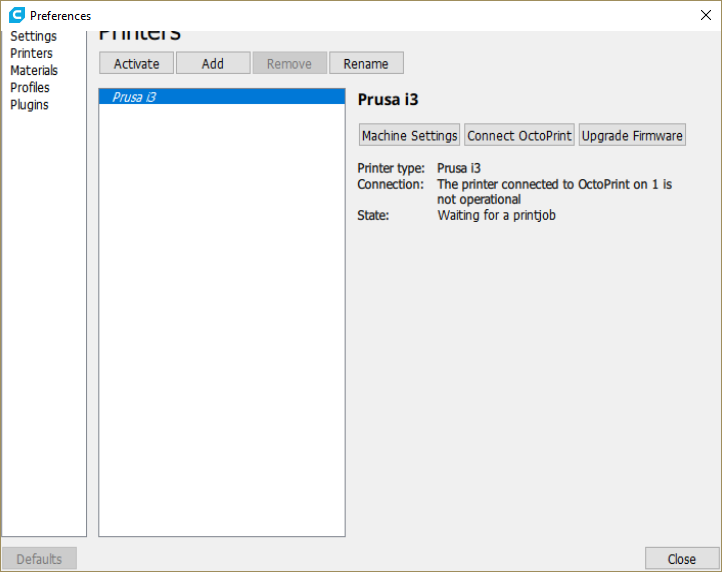
When clicking on anything in the UI, I have to click much lower than the actual control. It happened when I plugged one of my monitors into the internal graphics card rather than my nvidia card but doesn't matter what monitor I use the app in.
Cura 2.6.1
Windows 10 Pro x64
Kaby Lake CPU w/ HD 630 Graphics (using this is when it happened)
2x Nvidia GTX 1070
2560x1400 monitor resolution
I made a gif of the interaction here (http://i.imgur.com/cEobWL4.gifv) , you can see I have to click lower than where expected and I get a lot of inaccurate clicks unless I move in just the right spot. I have found waiting to see the blue highlight is the only way to effectively do anything accurately.
 Givemeyourgits
All 16 comments
I am also having this issue.
Intel i7-6770HQ
Intel Iris 580
1920 x 1080 resolution
Top Menu bar is not being displayed.
 SystemIdleProcess
on 13 Jul 2017
SystemIdleProcess
on 13 Jul 2017

This is weird...
 Ghostkeeper
on 17 Jul 2017
Ghostkeeper
on 17 Jul 2017
What is happening is that Qt (the UI framework we are using) thinks the UI items are positioned at a certain location and all input handling actually handles that correctly, but the rendering happens to be positioned a bit higher. This also causes the cut-off top of the UI, since the rendered area is shifted to the top somehow. I am inclined to blame this on the Intel graphics driver, because this seems to be happening at a lower level than Qt. Since you mention your computer also has an Nvidia card, what happens if you run Cura using that card for rendering? Assuming you can force that in the first place.
 awhiemstra
on 17 Jul 2017
awhiemstra
on 17 Jul 2017
It works fine on the Nvidia cards, but they are busy as I use them for computing (machine learning) and when I'm running jobs I switch to the integrated Intel card for my main monitor which is when it happens.
Givemeyourgits
on 17 Jul 2017
Sure, it just means that it definitely is a driver problem, which is not something we can do a lot about unfortunately. I do not even know if Intel has a bug tracker you could submit a bug to.
awhiemstra
on 18 Jul 2017
Apparently a new Intel driver was released yesterday, might want to try that and see if it fixes the issue.
awhiemstra
on 18 Jul 2017
The new Intel Driver fixed it!
Thanks for the suggestion.
Givemeyourgits
on 19 Jul 2017
@Givemeyourgits There's multiple people running into this issue now. Perhaps, do you know what driver version you've now installed that fixed the problem?
Ghostkeeper
on 23 Aug 2017
After updating my machine to the HP-recommended version 21.20.16.4664 of the Intel HD Graphics driver, I have the same issue. It is not just Cura, but some other applications based on Qt5 5.7 as well (eg MeshMixer). Applications based on Qt5 5.6 are not affected. So it is an issue between specific versions of the Intel driver and specific versions of Qt.
I'll see if I can find a compatible driver to confirm it has been fixed upstream by Intel. Since I did not have the issue before the update to the aforementioned driver version, downgrading the driver is probably also an option.
Update: Intel driver 22.20.16.4729 fixes the problem (21.20.16.4678 does not). Note that on the Intel download page (eg https://downloadcenter.intel.com/product/96551/Intel-HD-Graphics-620 for the HD Graphics 620 driver) you must click on "Show more" to see that driver version.
 fieldOfView
on 25 Aug 2017
fieldOfView
on 25 Aug 2017
Looks like I am running version 22.20.16.4729 which solved the problem for Cura 2.6.1
 steemypete
on 26 Aug 2017
steemypete
on 26 Aug 2017
I have an Intel Graphics 530 HD, when I go to the intel site for this, or the 620 link above, the most recent version I can see is 15.46.05.4771. I have 21.20.16.4664 installed right now. However, switching this to use the Nvidia Quattro card fixed the problem.
 dannystaple
on 23 Sep 2017
dannystaple
on 23 Sep 2017
Intel does something weird with their driver version numbering (something like 15.46.xxx.xxx is the platform driver, but it includes GPU driver 21.20.xxx.xxx). It seems the last 4 digits matter most.
fieldOfView
on 23 Sep 2017
I have had this bug on all Cura 2.x versions i believe and it is still there on Cura 3.0.
The way to fix in (on my Dell XPS 15 with GTX 960M GPU and 4k screen) is to force Cura to use the 960M instead of the integrated Intel GPU:
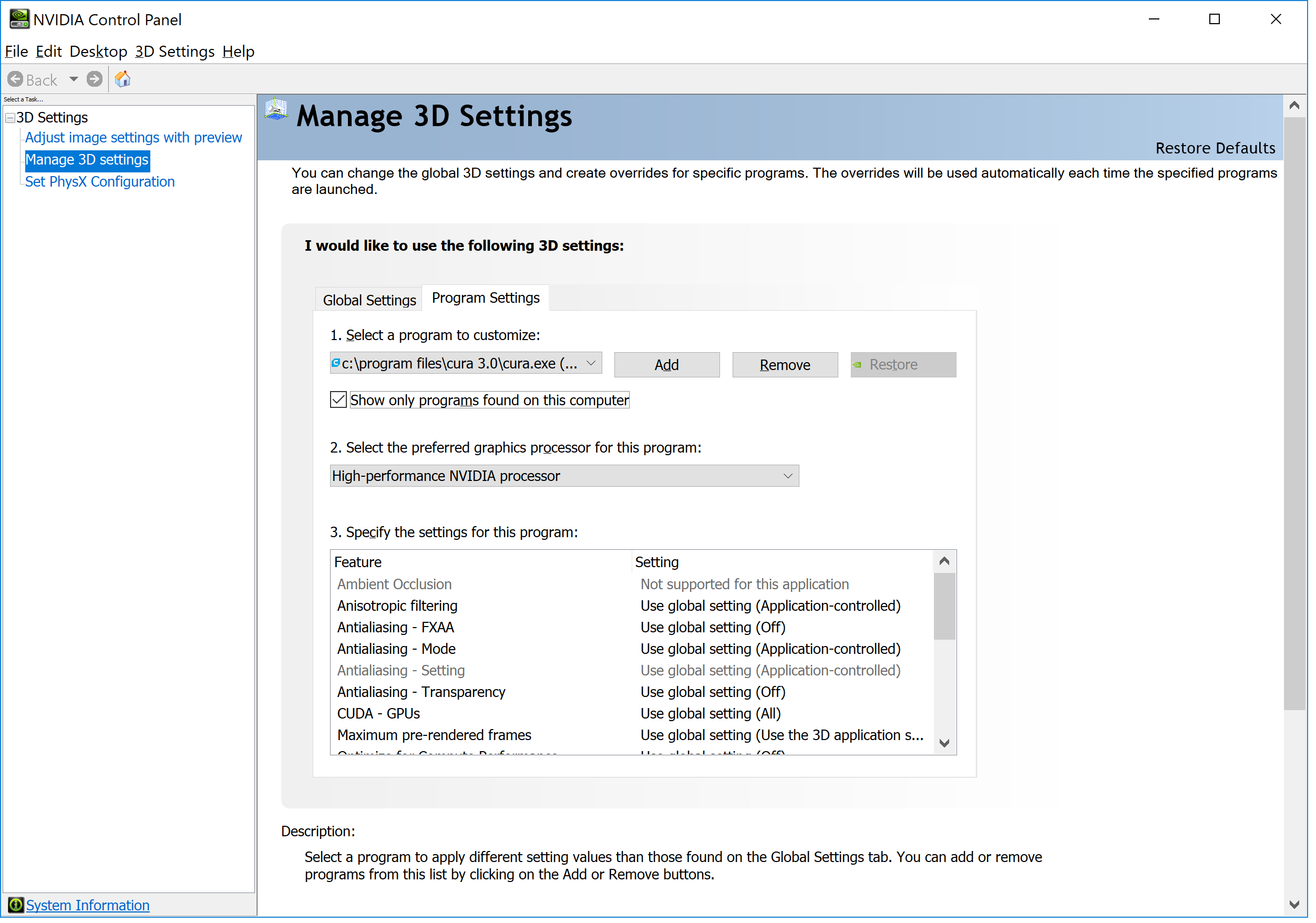
Strangely, Cura 2.x/3.x is the only software that has this problem, all other software including Cura 1.x works just fine (!).
My laptop is upgraded with the latest drivers so whatever causes the bug seems not to be resolved on my machine in November 2017 at least.
 andersolsson
on 8 Nov 2017
andersolsson
on 8 Nov 2017
Hi @andersolsson, have you tried looking for newer Intel GPU drivers like I suggested a couple of comments above? (https://github.com/Ultimaker/Cura/issues/2068#issuecomment-324917547). So not through Windows Update, but through the Intel website.
If you could tell me what intel gpu you use, and what driver version, I can point you to the download site for a newer version. Downgrading to an older version of the Intel GPU driver may also work, but chances are that Windows 10 will try to be helpful and auto-update you to the "newer" ("broken") version again after a couple of days.
Like I mentioned before, the issue is caused by a bug between a specific set of Intel drivers and the specific version of the gui framework Qt used by Cura. Note that I also saw the issue with MeshMixer (which uses the same version of Qt).
If you let the nvidia driver handle the application instead of the intel driver, then that circumvents the issue in the intel driver, so that also fixes the problem like you discovered. But not everybody with an intel gpu has that luxury.
Comparing how Cura 2.x/3.x run with Cura "1.x" is of little use, because they hardly share any code (or even the gui framework).
fieldOfView
on 8 Nov 2017
@fieldOfView Sorry, I was pointed here by someone else to explain how I solved my issues and I didn't read carefully through the previous posts, I am in a bit of a rush here.
My computer has the Intel HD 530 using the 21.20.16.4664 driver, which is a bit odd in fact because I am 100% sure it auto-updated the Intel GPU driver just a few weeks ago.
I will download the latest driver from here and try: https://www.intel.com/content/www/us/en/support/products/88345/graphics-drivers/graphics-for-6th-generation-intel-processors/intel-hd-graphics-530.html
For my particular laptop, I had a feeling that Cura was rendering large models faster with the Nvidia GPU though, so in the end I might stick with forcing Cura to use the performance GPU myself.
It is strange by the way that there is very little information about this issue, just a few months back no one I talked to had heard about it even though there must be loads of laptops with these chipsets.
I was sure it had to do with a combination of my 4k screen and the driver until I read this thread, but apparently it happens on lower resolution screens too.
andersolsson
on 8 Nov 2017
It is fairly likely that the Nvidia GPU performs faster than the Intel GPU (that's the main reason your computer has that Nvidia GPU). So if that works for you, and it does not affect your battery life too much, by all means use the Nvidia GPU with Cura.
One of the reasons why not everybody is affected is that laptop manufacturers often have their own sanctioned version of the Intel drivers. You hardly ever get the latest version from Intel installed, but instead some version that passed through Dell, HP, Acer, etc. Unfortunately this means that there are peope who only now get "updated" to a driver that has a bug in it, though Intel have had drivers that fix that bug for months. And depending on the laptop manufacturer, a fixed "sanctioned" driver may be months away again :-/
fieldOfView
on 9 Nov 2017
Related issues
 rudowinger
·
3Comments
rudowinger
·
3Comments
 jellewie
·
3Comments
jellewie
·
3Comments
 konvoj
·
3Comments
konvoj
·
3Comments
 probonopd
·
3Comments
probonopd
·
3Comments
 muhammadelmogy
·
3Comments
muhammadelmogy
·
3Comments
Most helpful comment
I have had this bug on all Cura 2.x versions i believe and it is still there on Cura 3.0.
The way to fix in (on my Dell XPS 15 with GTX 960M GPU and 4k screen) is to force Cura to use the 960M instead of the integrated Intel GPU:

Strangely, Cura 2.x/3.x is the only software that has this problem, all other software including Cura 1.x works just fine (!).
My laptop is upgraded with the latest drivers so whatever causes the bug seems not to be resolved on my machine in November 2017 at least.