Cudf: [BUG] `len` after `fillna` operation uses way more memory than expected
I have a dataframe that occupies ~700-800 MB when persisted. I fill all the nulls in the Dataframe using fill_na and call len on the new Dataframe. I notice an explosion in memory usage.
Reproducer:
# Create a dataframe and write to file
import numpy as np
import pandas as pd
import dask.dataframe

pdf = pd.DataFrame()
for i in range(80):
    pdf[str(i)] = pd.Series([12,None]*100000)
ddf = dask.dataframe.from_pandas(pdf,1)
ddf.to_parquet('temp_data.parquet')

# Read the dataframe from file
import os
import dask
import dask_cudf
import cudf

path = 'temp_data.parquet/'
files = [fn for fn in os.listdir(path) if fn.endswith('.parquet')]
parts= [dask.delayed(cudf.io.parquet.read_parquet)
         (path=path+fn) for fn in files]

temp = dask_cudf.from_delayed(parts)
Now when I do len(temp)
Nvidia-smi usage shoots to a max state here:
| NVIDIA-SMI 410.104      Driver Version: 410.104      CUDA Version: 10.0     |
|-------------------------------+----------------------+----------------------+
| GPU  Name        Persistence-M| Bus-Id        Disp.A | Volatile Uncorr. ECC |
| Fan  Temp  Perf  Pwr:Usage/Cap|         Memory-Usage | GPU-Util  Compute M. |
|===============================+======================+======================|
|   0  Tesla T4            Off  | 00000000:3B:00.0 Off |                    0 |
| N/A   47C    P0    28W /  70W |    685MiB / 15079MiB |      0%      Default |
+-------------------------------+----------------------+----------------------+
|   1  Tesla T4            Off  | 00000000:5E:00.0 Off |                    0 |
| N/A   33C    P8    10W /  70W |     10MiB / 15079MiB |      0%      Default |
+-------------------------------+----------------------+----------------------+
|   2  Tesla T4            Off  | 00000000:AF:00.0 Off |                    0 |
| N/A   32C    P8    10W /  70W |     10MiB / 15079MiB |      0%      Default |
+-------------------------------+----------------------+----------------------+
|   3  Tesla T4            Off  | 00000000:D8:00.0 Off |                    0 |
| N/A   32C    P8     9W /  70W |     10MiB / 15079MiB |      0%      Default |
+-------------------------------+----------------------+----------------------+

+-----------------------------------------------------------------------------+
| Processes:                                                       GPU Memory |
|  GPU       PID   Type   Process name                             Usage      |
|=============================================================================|
|    0    404162      C   /conda/envs/rapids/bin/python                841MiB |
+-----------------------------------------------------------------------------+
Now for the fill_na operation
%%time
for col in temp.columns:
    temp[col] = temp[col].fillna(-1)
CPU times: user 35.6 s, sys: 1.26 s, total: 36.8 s
Wall time: 38.7 s (Which is slow)
(No change in memory usage leading me to believe this operation is only done at a metadata level but not on the complete data)
Finally:
len(temp)
Nvidia-smi usage
| NVIDIA-SMI 410.104      Driver Version: 410.104      CUDA Version: 10.0     |
|-------------------------------+----------------------+----------------------+
| GPU  Name        Persistence-M| Bus-Id        Disp.A | Volatile Uncorr. ECC |
| Fan  Temp  Perf  Pwr:Usage/Cap|         Memory-Usage | GPU-Util  Compute M. |
|===============================+======================+======================|
|   0  Tesla T4            Off  | 00000000:3B:00.0 Off |                    0 |
| N/A   46C    P0    28W /  70W |  13681MiB / 15079MiB |      2%      Default |
+-------------------------------+----------------------+----------------------+
|   1  Tesla T4            Off  | 00000000:5E:00.0 Off |                    0 |
| N/A   33C    P8    10W /  70W |     10MiB / 15079MiB |      0%      Default |
+-------------------------------+----------------------+----------------------+
|   2  Tesla T4            Off  | 00000000:AF:00.0 Off |                    0 |
| N/A   32C    P8     9W /  70W |     10MiB / 15079MiB |      0%      Default |
+-------------------------------+----------------------+----------------------+
|   3  Tesla T4            Off  | 00000000:D8:00.0 Off |                    0 |
| N/A   32C    P8     9W /  70W |     10MiB / 15079MiB |      0%      Default |
+-------------------------------+----------------------+----------------------+

+-----------------------------------------------------------------------------+
| Processes:                                                       GPU Memory |
|  GPU       PID   Type   Process name                             Usage      |
|=============================================================================|
|    0    404162      C   /conda/envs/rapids/bin/python              13755MiB |
+-----------------------------------------------------------------------------+
Which is more than a 16x spike in memory usage. Not sure if my approach is wrong or there is some other underlying issue.
Environment Info
cudf: Built from source at commit: rapidsai/cudf@79af3a8806bbe01a
dask-cudf:Built from source at commit 24798dd8cf9502
 ayushdg
All 22 comments
Does this only happen with dask-cudf, or does it happen if you use just
cudf?
On Fri, May 31, 2019 at 1:02 AM Ayush Dattagupta notifications@github.com
wrote:
I have a dataframe that occupies ~700-800 MB when persisted. I fill all
the nulls in the Dataframe using fill_na and call len on the new
Dataframe. I notice an explosion in memory usage.Reproducer:
Create a dataframe and write to file
import numpy as np
import pandas as pd
import dask.dataframepdf = pd.DataFrame()
for i in range(80):
pdf[str(i)] = pd.Series([12,None]*100000)
ddf = dask.dataframe.from_pandas(pdf,1)
ddf.to_parquet('temp_data.parquet')Read the dataframe from file
import os
import dask
import dask_cudf
import cudfpath = 'temp_data.parquet/'
files = [fn for fn in os.listdir(path) if fn.endswith('.parquet')]
parts= [dask.delayed(cudf.io.parquet.read_parquet)
(path=path+fn) for fn in files]temp = dask_cudf.from_delayed(parts)
Now when I do len(temp)
Nvidia-smi usage shoots to a max state here:
+-----------------------------------------------------------------------------+
| NVIDIA-SMI 410.104 Driver Version: 410.104 CUDA Version: 10.0 |
|-------------------------------+----------------------+----------------------+
| GPU Name Persistence-M| Bus-Id Disp.A | Volatile Uncorr. ECC |
| Fan Temp Perf Pwr:Usage/Cap| Memory-Usage | GPU-Util Compute M. |
|===============================+======================+======================|
| 0 Tesla T4 Off | 00000000:3B:00.0 Off | 0 |
| N/A 47C P0 28W / 70W | 685MiB / 15079MiB | 0% Default |
+-------------------------------+----------------------+----------------------+
| 1 Tesla T4 Off | 00000000:5E:00.0 Off | 0 |
| N/A 33C P8 10W / 70W | 10MiB / 15079MiB | 0% Default |
+-------------------------------+----------------------+----------------------+
| 2 Tesla T4 Off | 00000000:AF:00.0 Off | 0 |
| N/A 32C P8 10W / 70W | 10MiB / 15079MiB | 0% Default |
+-------------------------------+----------------------+----------------------+
| 3 Tesla T4 Off | 00000000:D8:00.0 Off | 0 |
| N/A 32C P8 9W / 70W | 10MiB / 15079MiB | 0% Default |
+-------------------------------+----------------------+----------------------++-----------------------------------------------------------------------------+
| Processes: GPU Memory |
| GPU PID Type Process name Usage |
|=============================================================================|
| 0 404162 C /conda/envs/rapids/bin/python 841MiB |
+-----------------------------------------------------------------------------+Now for the fill_na operation
%%time
for col in temp.columns:
temp[col] = temp[col].fillna(-1)CPU times: user 35.6 s, sys: 1.26 s, total: 36.8 s
Wall time: 38.7 s (Which is slow)(No change in memory usage leading me to believe this operation is only
done at a metadata level but not on the complete data)Finally:
len(temp)Nvidia-smi usage
+-----------------------------------------------------------------------------+
| NVIDIA-SMI 410.104 Driver Version: 410.104 CUDA Version: 10.0 |
|-------------------------------+----------------------+----------------------+
| GPU Name Persistence-M| Bus-Id Disp.A | Volatile Uncorr. ECC |
| Fan Temp Perf Pwr:Usage/Cap| Memory-Usage | GPU-Util Compute M. |
|===============================+======================+======================|
| 0 Tesla T4 Off | 00000000:3B:00.0 Off | 0 |
| N/A 46C P0 28W / 70W | 13681MiB / 15079MiB | 2% Default |
+-------------------------------+----------------------+----------------------+
| 1 Tesla T4 Off | 00000000:5E:00.0 Off | 0 |
| N/A 33C P8 10W / 70W | 10MiB / 15079MiB | 0% Default |
+-------------------------------+----------------------+----------------------+
| 2 Tesla T4 Off | 00000000:AF:00.0 Off | 0 |
| N/A 32C P8 9W / 70W | 10MiB / 15079MiB | 0% Default |
+-------------------------------+----------------------+----------------------+
| 3 Tesla T4 Off | 00000000:D8:00.0 Off | 0 |
| N/A 32C P8 9W / 70W | 10MiB / 15079MiB | 0% Default |
+-------------------------------+----------------------+----------------------++-----------------------------------------------------------------------------+
| Processes: GPU Memory |
| GPU PID Type Process name Usage |
|=============================================================================|
| 0 404162 C /conda/envs/rapids/bin/python 13755MiB |
+-----------------------------------------------------------------------------+Which is more than a 16x spike in memory usage. If my approach is wrong or
there is some other underlying issue.—
You are receiving this because you are subscribed to this thread.
Reply to this email directly, view it on GitHub
https://github.com/rapidsai/dask-cudf/issues/267?email_source=notifications&email_token=AACKZTDJKB4KDKZ75JV7VDLPYDLRRA5CNFSM4HRVZH52YY3PNVWWK3TUL52HS4DFUVEXG43VMWVGG33NNVSW45C7NFSM4GW4VHJA,
or mute the thread
https://github.com/notifications/unsubscribe-auth/AACKZTHU7QJGVUP74BXWL2TPYDLRRANCNFSM4HRVZH5Q
.
 mrocklin
on 31 May 2019
mrocklin
on 31 May 2019
Tried the same with cudf:
import cudf
import os
path = 'temp_data.parquet/'
files = [fn for fn in os.listdir(path) if fn.endswith('.parquet')]
temp_cdf = cudf.io.parquet.read_parquet(path+files[0])
%%time
for col in temp_cdf.columns:
    temp_cdf[col] = temp_cdf[col].fillna(-1)
CPU times: user 796 ms, sys: 336 ms, total: 1.13 s
Wall time: 1.49 s
Memory usage did not cross ~700 MiB
_Updated environment details in original issue_
ayushdg
on 31 May 2019
@ayushdg mentioned that calling map_partitions with cudf.fillna worked fine. Probably the thing to do here is to walk through the dask.dataframe.DataFrame.fillna implementation and see what branch it takes that is different from just that.
I would probably do this by putting a breakpoint in that method definition and stepping through things.
mrocklin
on 3 Jun 2019
Looking at this now
 quasiben
on 4 Jun 2019
quasiben
on 4 Jun 2019
I profiled the code with snakeviz and below are a few snapshots:
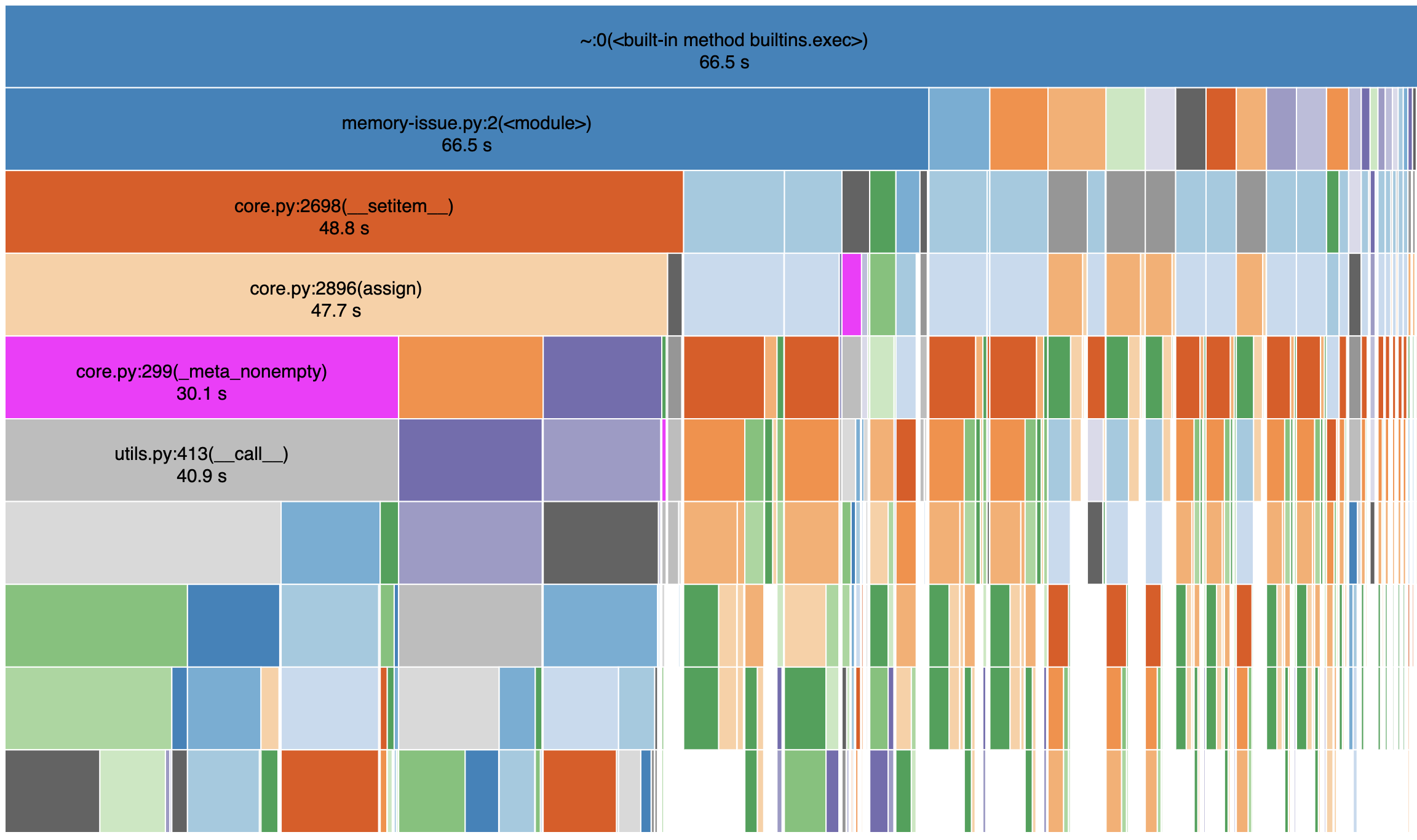
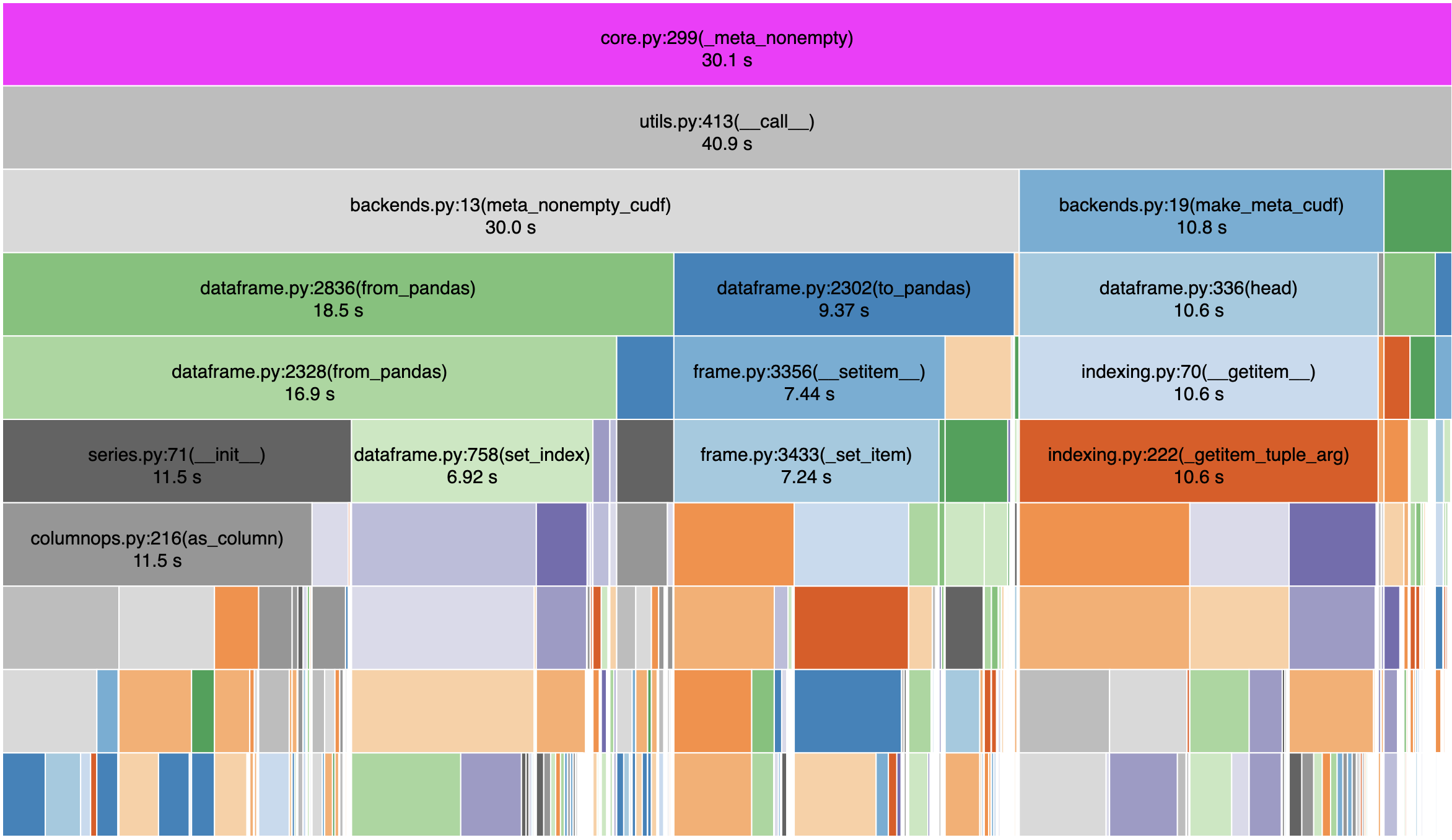
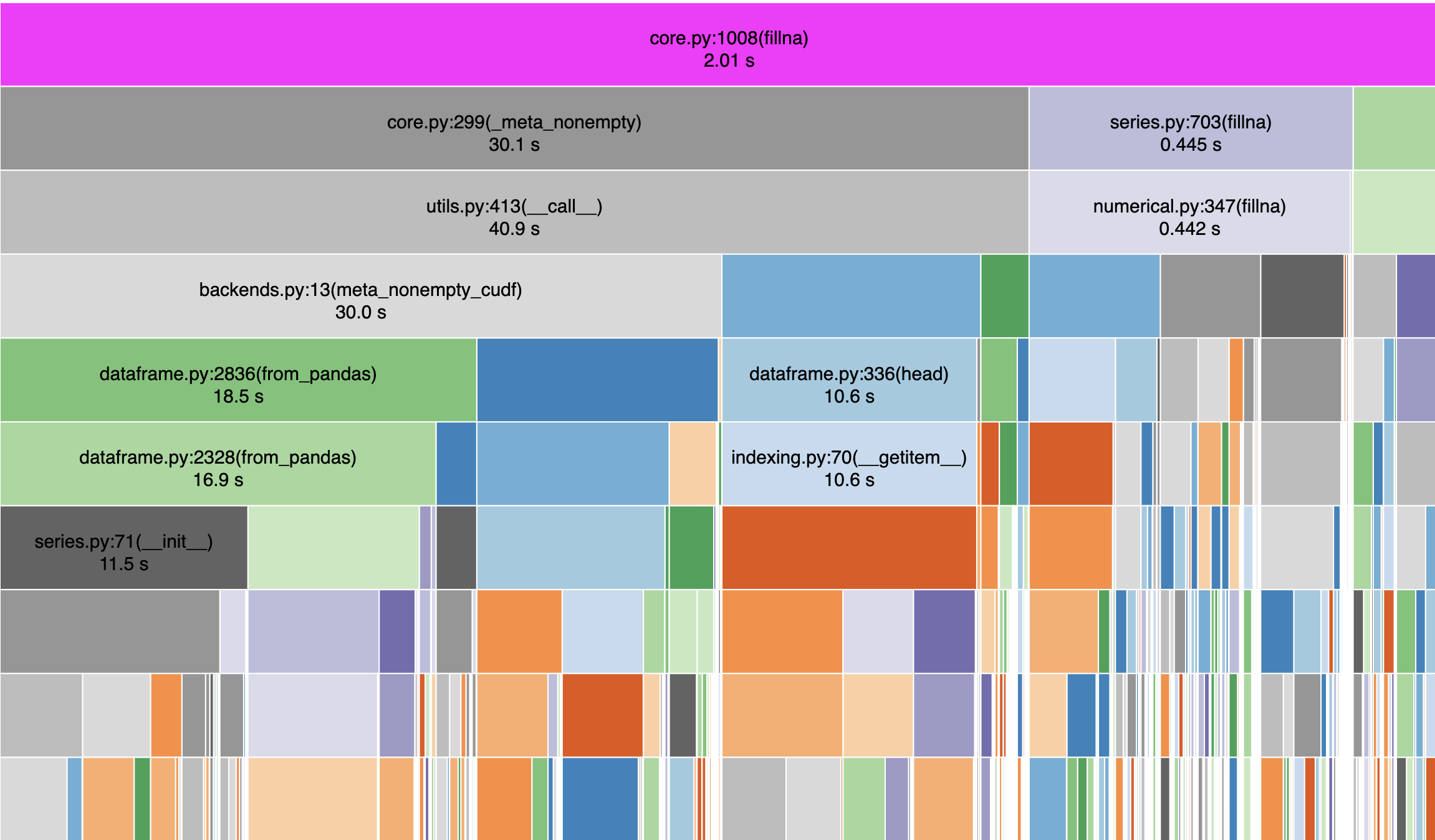
My read of this is that the dask_cudf call to fillna spends a fair amount of time with meta_nonempty_cudf . with map_partitions this doesn't happen, correct ?
Below is another look at what is happening inside fillna
quasiben
on 4 Jun 2019
I've never seen a more colorful github issue
 datametrician
on 4 Jun 2019
datametrician
on 4 Jun 2019
@quasiben That is correct:
%%time
def udf(temp):
    for col in temp.columns:
        temp[col] = temp[col].fillna(-1)
    return temp
temp = temp.map_partitions(udf)
CPU times: user 1.01 s, sys: 52 ms, total: 1.06 s
Wall time: 1.05 s
And then len(temp) the memory usage does not shoot beyond ~700 MiB
ayushdg
on 4 Jun 2019
Any reason for the meta calculation we're going to/from Pandas? https://github.com/rapidsai/dask-cudf/blob/branch-0.8/dask_cudf/backends.py#L15
 kkraus14
on 4 Jun 2019
kkraus14
on 4 Jun 2019
I think we could replace meta_nonempty with iloc as the todo says
quasiben
on 4 Jun 2019
But, meta_nonempty for indexes is non-trivial:
quasiben
on 4 Jun 2019
Why are we spending 30s in meta_nonempty? Are we calling it many times? Are individual calls very expensive? If "yes" to either of those, then why is that happening?
If there is some workaround with iloc, then great, but it sounds like there might also be some larger issue here that might be worth exposing.
mrocklin
on 4 Jun 2019
The code above calls fillna() 80 times because there are 80 columns. Writing this out makes me smile :)
@ayushdg, why not call fillna on the dataframe ?
temp.fillna(-1)
quasiben
on 4 Jun 2019
I used a simplified example where the dtype of the whole dataframe was the same. In reality the dataframe I'm working on has a mixture of strings, date times, numeric etc. So my fillna value depends on the col dtype.
Additionally based on the groupby aggregation I want to perform on the column downstream, my fillna value changes. Eg: for some numeric columns I might want to fillna with a really small value and for others with a really large value.
ayushdg
on 4 Jun 2019
In that case i would recommend passing in a dictionary keys->columns and values->fillna-vals
A dict can be used to provide different values to fill nulls in different columns.
ipdb> df.fillna({'0': -1, '2': -9999}).compute().head().to_pandas()
      0     1       2     3     4     5     6     7     8     9    10  ...    69    70    71    72    73    74    75    76    77    78    79
0  12.0  12.0    12.0  12.0  12.0  12.0  12.0  12.0  12.0  12.0  12.0  ...  12.0  12.0  12.0  12.0  12.0  12.0  12.0  12.0  12.0  12.0  12.0
1  -1.0   NaN -9999.0   NaN   NaN   NaN   NaN   NaN   NaN   NaN   NaN  ...   NaN   NaN   NaN   NaN   NaN   NaN   NaN   NaN   NaN   NaN   NaN
2  12.0  12.0    12.0  12.0  12.0  12.0  12.0  12.0  12.0  12.0  12.0  ...  12.0  12.0  12.0  12.0  12.0  12.0  12.0  12.0  12.0  12.0  12.0
3  -1.0   NaN -9999.0   NaN   NaN   NaN   NaN   NaN   NaN   NaN   NaN  ...   NaN   NaN   NaN   NaN   NaN   NaN   NaN   NaN   NaN   NaN   NaN
4  12.0  12.0    12.0  12.0  12.0  12.0  12.0  12.0  12.0  12.0  12.0  ...  12.0  12.0  12.0  12.0  12.0  12.0  12.0  12.0  12.0  12.0  12.0
Great! I tried this approach out for this smaller example and everything worked as expected with no memory overhead.
If the performance is as expected and the original example in the issue is an inefficient way to do fillna the issue can probably be closed.
If @quasiben and others feel there is some merit in digging a bit further to see why the performance degrades so drastically in this case that would be great, especially if some bigger issue is uncovered with how things are being handled.
ayushdg
on 4 Jun 2019
Great! I tried this approach out for this smaller example and everything worked as expected with no memory overhead.
If the performance is as expected and the original example in the issue is an inefficient way to do
fillnathe issue can probably be closed.If @quasiben and others feel there is some merit in digging a bit further to see why the performance degrades so drastically in this case that would be great, especially if some bigger issue is uncovered with how things are being handled.
I think this uncovered a bigger issue around the meta_nonempty using considerable memory unnecessarily.
kkraus14
on 4 Jun 2019
@kkraus14 agreed. I can take a look at meta_nonempty later tonight
quasiben
on 5 Jun 2019
%%time
for col in temp.columns:
    temp[col] = temp[col].fillna(-1)
```
mrocklin
on 5 Jun 2019
%%time
for col in temp.columns:
    temp[col] = temp[col].fillna(-1)
Just checking here. Do dd.DataFrame and cudf.DataFrame support a fillna method as well? For example would the following work?
temp[temp.columns] = temp[temp.columns].fillna(-1)
We should also try to reduce the cost of creating a small empty cudf dataframe, but I thought I'd ask about this as well.
mrocklin
on 5 Jun 2019
%%time for col in temp.columns: temp[col] = temp[col].fillna(-1)Just checking here. Do
dd.DataFrameandcudf.DataFramesupport afillnamethod as well? For example would the following work?temp[temp.columns] = temp[temp.columns].fillna(-1)We should also try to reduce the cost of creating a small empty cudf dataframe, but I thought I'd ask about this as well.
temp[temp.columns].fillna(-1) should definitely work, but I'm unsure if the dataframe setter method you're using works for multiple columns yet 😅
kkraus14
on 5 Jun 2019
In the current state of https://github.com/rapidsai/dask-cudf/pull/270 I've shaved off 14 seconds.
quasiben
on 6 Jun 2019
I believe this is resolved and this issue is stale so closing. Feel free to reopen if it's still an issue.
kkraus14
on 29 May 2020
Related issues
 jrhemstad
·
3Comments
jrhemstad
·
3Comments
 yasmina-altair
·
3Comments
yasmina-altair
·
3Comments
 razajafri
·
3Comments
kkraus14
·
3Comments
razajafri
·
3Comments
kkraus14
·
3Comments
 AjayThorve
·
3Comments
AjayThorve
·
3Comments