Cudatext: plugin 'Complete from text' don't support HTML lexer
For this html
<!DOCTYPE HTML PUBLIC "-//W3C//DTD HTML 4.01 Transitional//EN" "http://www.w3.org/TR/html4/loose.dtd">
<html lang="cs">
<head>
  <meta http-equiv="content-type" content="text/html; charset=windows-1250">
  <meta name="generator" content="SynWrite editor">
    <title>Untitled Glossary</title>
</head>

<body>


<h1>
    <a id="GlossTop">Glossary of Terms</a>
</h1>

<hr>

<!-- Glossary Toolbar -->
<textarea readonly disabled ></textarea>
<h3>
<button type="submit"></button>
    <a href="#GlossA >A</a>
    <a href="#GlossB">B</a>
    <a href="#GlossC">C</a>
    <a href="#GlossD">D</a>
    <a href="#GlossE">E</a>
    <a href="#GlossF">F</a>
    <a href="#GlossG">G</a>
    <a href="#GlossH">H</a>
    <a href="#GlossI">I</a>
    <a href="#GlossJ">J</a>
    <a href="#GlossK">K</a>
    <a href="#GlossL">L</a>
    <a href="#GlossM">M</a>
    <a href="#GlossN">N</a>
    <a href="#GlossO">O</a>
    <a href="#GlossP">P</a>
    <a href="#GlossQ">Q</a>
    <a href="#GlossR">R</a>
    <a href="#GlossS">S</a>
    <a href="#GlossT">T</a>
    <a href="#GlossU">U</a>
    <a href="#GlossV">V</a>
    <a href="#GlossW">W</a>
    <a href="#GlossX">X</a>
    <a href="#GlossY">Y</a>
    <a href="#GlossZ">Z</a>
</h3>

<hr>

<!--  A -->
<h1><a id="GlossA"> A </a></h1>

<dl>
    <dt><a id="Algol"><b>Algol</b></a>
    <dd>Algorithmic Oriented Language.
</dl>

<small><a href="#GlossTop">Top</a></small>

<hr>
some plain text here.

<!--  B -->
<h1><a id="GlossB"> B </a></h1>
<dl>
    <dd>
</dl>
<small><a href="#GlossTop">Top</a></small>
<hr>

<!--  C -->
<h1><a id="GlossC"> C </a></h1>
<dl>
    <dd>
</dl>
<small><a href="#GlossTop">Top</a></small>
<hr>

<!--   D -->
<h1><a id="GlossD"> D </a></h1>
<dl>
    <dd>
</dl>
<small><a href="#GlossTop">Top</a></small>
<hr>

<!--   E -->
<h1><a id="GlossE"> E </a></h1>
<dl>
    <dd>
</dl>
<small><a href="#GlossTop">Top</a></small>
<hr>

<!--   F -->
<h1><a id="GlossF"> F </a></h1>
<dl>
    <dd>
</dl>
<small><a href="#GlossTop">Top</a></small>

</body>
</html>
plugin finds only these words
['body', 'button', 'content', 'disabled', 'equiv', 'head', 'href', 'html', 'http', 'lang', 'link', 'meta', 'name', 'readonly', 'rel', 'script', 'small', 'src', 'textarea', 'title', 'type']
Ie words from tags.
Wanted: plugin finds words out of html tags, ie plain text.
Maybe also words from HTML comments.
Plg must handle HTML specially.
 Alexey-T
All 9 comments
So a separate options needed like no_strings and no_comments, but only for html? Am I understanding correctly?
 halfbrained
on 15 Aug 2021
halfbrained
on 15 Aug 2021
Not separate options, I suggest to find text words in HTML by special algorithm- ignoring lexer stuff, parse HTML, and find plain text.
(all lexers which names begin with 'HTML')
Alexey-T
on 15 Aug 2021
Isn't that what those options do? With them turned off I get all the words from the html doc
halfbrained
on 15 Aug 2021
but then, autocompletion for <a h|ref suggests something, and <b| suggests something. the idea - that plugin must not mess with usual HTML autocompletion.
Alexey-T
on 15 Aug 2021
So for html.* in strings and comments autocomplete from strings and comments, and outside - autocomplete without strings and comments?
halfbrained
on 15 Aug 2021
In strings - do or don't autocomplete (not sure why we need to complete in "val")
In text out of tags - do
In comments - do
Others- skip plugin's work
Alexey-T
on 15 Aug 2021
Sorry for the pause. Let us continue? :)
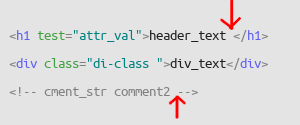
The terminology is not clear to me... am I understanding correctly, plugin needs to auto-complete only in marked places with all the words from the whole document?
halfbrained
on 18 Aug 2021
picture is OK. it has 2 marks -
a) position of plain text. (my terminology).
b) position in comment.
on autocomplete, plg must do this-
a) don't work if inside tags (pass this work to Pascal auto-complete)
b) if outside tags, or if in comment, (your 2 marks), work: scan all document outside of tags, and find all words. suggest found words to user.
Alexey-T
on 18 Aug 2021
@eltonfabricio10 @miroslavmatas @JairoMartinezA @ildarkhasanshin
New plugin is made, to solve the issue.
It can work together with 'Complete from text' and with builtin HTML completion.
'Complete HTML Text'.
Pls see if interested, report bugs in new topics.
Alexey-T
on 19 Aug 2021
Related issues
Alexey-T
·
5Comments
 JairoMartinezA
·
7Comments
Alexey-T
·
4Comments
Alexey-T
·
7Comments
JairoMartinezA
·
7Comments
Alexey-T
·
4Comments
Alexey-T
·
7Comments
 rhinolophus
·
5Comments
rhinolophus
·
5Comments