Cudatext: Some HTML color value background coloring make numbers hard to read
Where in the CudaText code is the foreground determined for a given background?
Some of the existing foreground choices make the numbers hard to read.
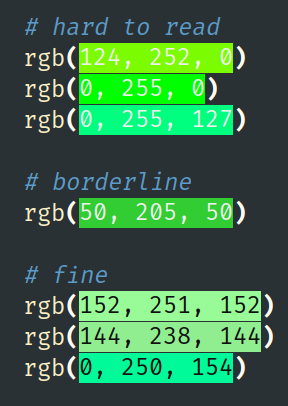
I did a quick search, but I'm not sure what I should be looking for.
Some algorithm like this:
for each background red/green/blue 0 to 255 level:
if background < 128, foreground = 255
if background > 127, foreground = 0
Would always result in a readable combination, but the result would be 8 different foreground colors being used.
There would likely be a way to reduce the number of foreground colors used (or just use the average of all 3 from the above algorithm, and if the result is < 128 use white, and greater than 128, use black).
This is a suggestion for an enhancement. I'm willing to do the work and submit a PR. but I'd like to discuss it here first and get an idea of where in the code to look.
 bogen85
All 12 comments
So, I decided to start here: https://wiki.freepascal.org/CudaText#HTML_color_codes_underlining
Searching for "underline_color_files" led me here: https://github.com/Alexey-T/CudaText/blob/master/app/formmain_loadsave.inc#L994
Which led to: https://github.com/Alexey-T/CudaText/blob/master/app/formframe.pas#L880
And I ended up in this area: https://github.com/Alexey-T/CudaText/blob/master/app/formframe.pas#L969
      if bColorizeBack then
      begin
        C.Font.Color:= _ContrastColor(NColor);
        C.Font.Style:= [];
        C.Brush.Color:= NColor;
        CanvasTextOutSimplest(C, X1, AY, Copy(AStr, NStartPos, NLen));
      end
      else
      begin
        C.Brush.Color:= NColor;
        C.FillRect(X1, Y-NLineWidth, X2, Y);
      end;
And _ContrastColor is here: https://github.com/Alexey-T/CudaText/blob/master/app/formframe.pas#L858
function _ContrastColor(AColor: TColor): TColor;
var
  bLight: boolean;
begin
  bLight:= ((AColor and $FF) + (AColor shr 8 and $FF) + (AColor shr 16 and $FF)) >= $180;
  Result:= UiOps.HtmlBackgroundColorPair[bLight];
end;
OK, so the existing code is based on an average, and determining black or white... ($180 is sum of $80+80+$80)
bogen85
on 3 Aug 2021
For the green, the first hard to read hard in my example, 124+252+0 = $178, so white is chosen...
Likely hard to read, because green is perceived as a higher brightness than red or blue.
So maybe each of red/green/blue should be scaled differently...
bogen85
on 3 Aug 2021
Yes, it seems like one does need to scale each one differently to get the perceived brightness...
Calculating the Perceived Brightness of a Color
HSP Color Model — Alternative to HSV (HSB) and HSL
The Naïve RGB Algorithm

If RGB 0,0,0 is black and RGB 255,255,255 is white then R+B+G
should give us a good approximation of the color brightness,
shouldn’t it?

The problem is that some colors are brighter than others,
red is brighter then blue and green is brighter then red
From the W3 page, color brightness is determined by the following formula:
((Red value X 299) + (Green value X 587) + (Blue value X 114)) / 1000
So maybe we could say Red gets scaled by 3, Green by 6, and blue by 1.
So rather than $80+$80+$80 and using $180 (384), we use ($80 * 3) + ($80 * 6) + ($80 * 1) or $80 * 10 = $500 (1280)
I may give that a try, but would like some feedback first.
bogen85
on 3 Aug 2021
Alright, I went ahead and tried it...
function _ContrastColor(AColor: TColor): TColor;
var
  bLight: boolean;
  red, green, blue: integer;
begin
  red := AColor and $FF;
  green := AColor shr 8 and $FF;
  blue := AColor shr 16 and $FF;
  bLight := (red*2) + (green*6) + blue > $500;
  // bLight:= ((AColor and $FF) + (AColor shr 8 and $FF) + (AColor shr 16 and $FF)) >= $180;
  Result:= UiOps.HtmlBackgroundColorPair[bLight];
end;
All the greens that were hard to read before look much more readable now:
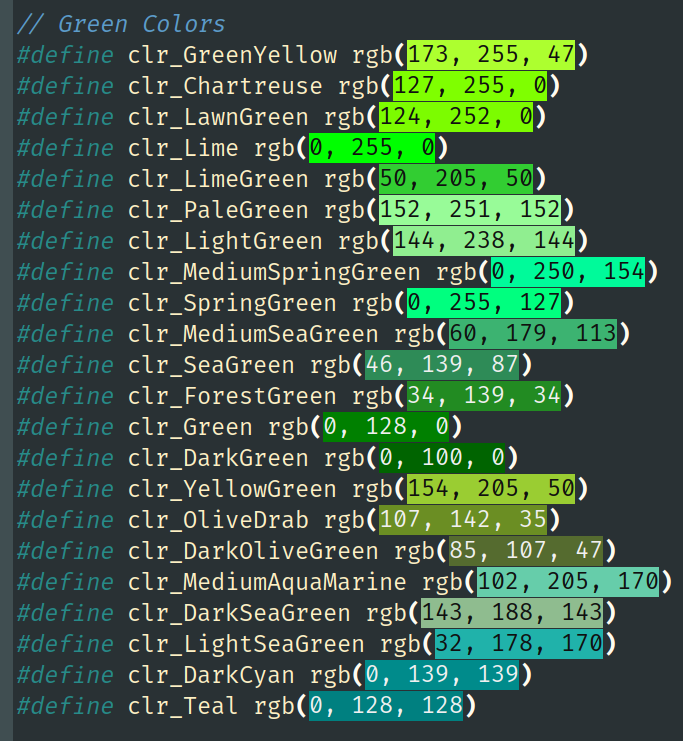
I plan to submit a PR.
bogen85
on 3 Aug 2021
Alright, created the PR...
bogen85
on 3 Aug 2021
Oh, I see I messed up (red *2, instead of red*3). I'll withdraw the PR and redo it tomorrow.
I'll also likely use the scaling given by W3: ((Red value X 299) + (Green value X 587) + (Blue value X 114)
bogen85
on 3 Aug 2021
Alright, I submitted PR #3636
bogen85
on 3 Aug 2021
Thanks for the finding; applied the PR.
 Alexey-T
on 3 Aug 2021
Alexey-T
on 3 Aug 2021
Related issues
 jczanfona
·
5Comments
Alexey-T
·
3Comments
jczanfona
·
5Comments
Alexey-T
·
3Comments
 JairoMartinezA
·
7Comments
Alexey-T
·
7Comments
Alexey-T
·
4Comments
JairoMartinezA
·
7Comments
Alexey-T
·
7Comments
Alexey-T
·
4Comments