Cudatext: Terminal+ issue and questions, etc
Issue:
i have floating terminal window and i've added key binding F5 to "execute selected text in terminal". and this key binding works correctly only if empty terminal+ panel is shown at bottom. but i don't need this empty panel, because i have floating terminal. as a workaround i keep them both opened: empty terminal+ panel and terminal+ floating window.Question:
is it possible to somehow disable terminal window horizontal auto-scrolling? when i have big amount of text outputting by my command terminal jumps/scrolls horizontally to the right side and it's annoying for my case.Suggestion:
when you are entering command in terminal you can press Up/Down keys to search for commands in history. but it also conflicts with vertical terminal scroll action. i have edited .py file (of terminal+ addon) and disabled scroll on up/down keys so it never conflicts with history search. I think it is nice to have this conflict disabled by default.
 veksha
All 22 comments
- Suggestions:
- is it possible to add new action like "execute last command in last terminal"?
veksha
on 26 Jul 2021
@halfbrained
 Alexey-T
on 26 Jul 2021
Alexey-T
on 26 Jul 2021
- Fixed
- context menu is an alright place for this, right? 'Lock horizontal position'
- at the moment
Up/Downonly scroll terminal text (you are probably using an old version?) Maybe I should addAlt+Up/Downto cycle through history? - Is there anyone opposed to a popup here? :) To show the command to be executed (and path?)
 halfbrained
on 26 Jul 2021
halfbrained
on 26 Jul 2021
- thank you!
- yes, as long as this will be saved in a config, so it stays even after restarting. this horizontal scrollbar appears even if i enable word wrap. so strange. :)
- i think my version is the latest 1.139.2.1
look, this line is scrolling through history when terminal is already at bottom.
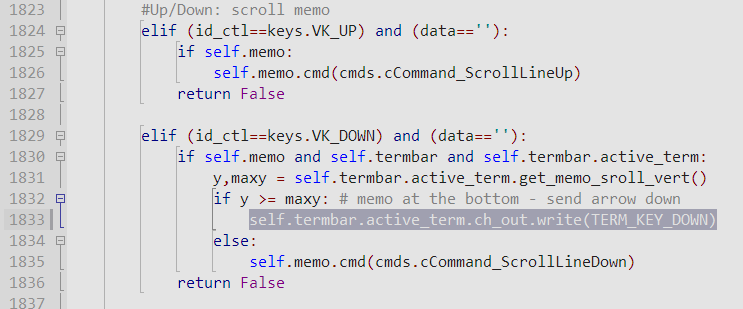
i replaced it with "pass" statement now because it seems that terminal+ already has ctrl-Down key to show command history. maybe it is only me who is annoyed by this little "conflict". my personal opinion: terminal+ has page-up/page-down to scroll and ctrl-down to show history, so it is redundant to have Up/Down key for scrolling memo and down key for scrolling through history when this memo is at full bottom. it is more usual for me when up/down keys are scrolling through command history, like in all other terminals out there.
so anyways, we can leave it as it is. :-) it is not hard to do this little modifications on my side.
i will prefer silent action. just press one key and command is done. (program compilation, for example)
also i found another bug: if there is an opened tab in terminal+ that is tied to a non existent file - you will not be able to close this tab, there will be some silent error and tab hanging.
veksha
on 26 Jul 2021
Horz scrollbar behaviour is from here, maybe
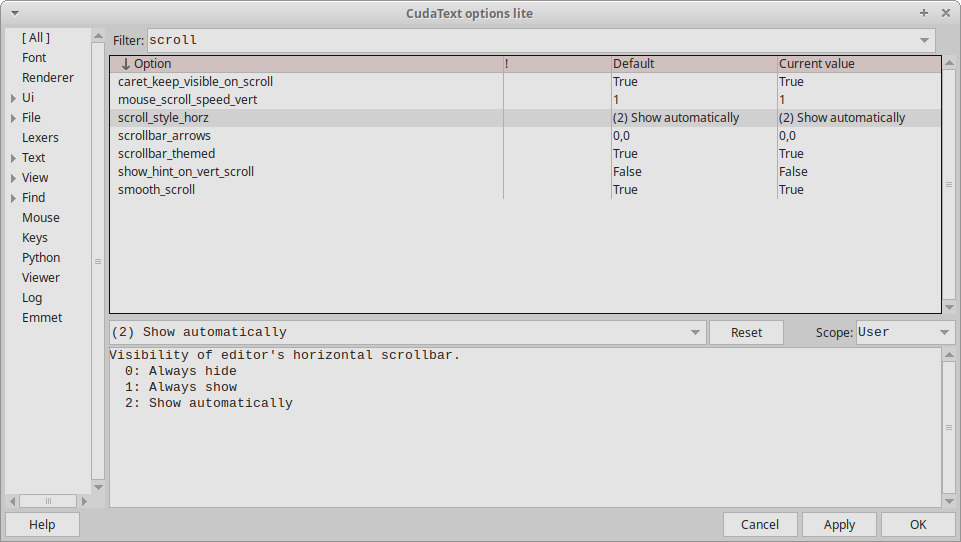
ie plugin's editor inherits that option.
@halfbrained
'Last cmd in last terminal' in contxt menu? I am ok with just a new command in the 'plugins'.
Alexey-T
on 26 Jul 2021
look, this line is scrolling through history when terminal is already at bottom.
I see what you mean now. That is needed for some interactive scrollers like less, so I can't remove it.
@Alexey-T whold you mind providing a decisive vote on whether popup is needed display the terminal-command for "execute last command in last terminal". You can potentially run a wrong command with this
'Last cmd in last terminal' in contxt menu? I am ok with just a new command in the 'plugins'.
No, 'Lock horizontal scroll position' in context menu.
halfbrained
on 26 Jul 2021
popup is needed display the terminal-command for "execute last command in last terminal".
yes, confirmation popup is needed.
Alexey-T
on 26 Jul 2021
Horz scrollbar behaviour is from here, maybe
ie plugin's editor inherits that option.
yes. now it's gone completely. thank you for showing this setting!
but locking horizontal scroll will still be a nice option when i disable word wrap, for example.
@halfbrained
'Last cmd in last terminal' in contxt menu? I am ok with just a new command in the 'plugins'.
Will I be able to assign a hotkey to it?
veksha
on 26 Jul 2021
to assign a hotkey to it?
If it will be an item in the 'plugins', then of course yes.
Alexey-T
on 26 Jul 2021
Horz scrollbar behaviour is from here, maybe
ie plugin's editor inherits that option.
unfortunately the memo still automatically scrolls sideways a little even with horizontal scrollbar hidden. so the lock is must have. maybe some bug makes this possible.
veksha
on 26 Jul 2021
Then it is the plugin who scrolls it..
Alexey-T
on 26 Jul 2021
- also i found another bug: ...
Thanks, should be fixed now
Added command to repeat last command. Will be back tomorrow to see to horizontal scrolling
halfbrained
on 26 Jul 2021
Added lock_horizontal_scroll option. Decided against adding it to the context menu, just a config option
halfbrained
on 27 Jul 2021
thank you! where can I download nightly build of CudaText?
veksha
on 27 Jul 2021
you don't need the new Cud build, just the plugin,
https://github.com/halfbrained/cuda_terminal_plus
Alexey-T
on 27 Jul 2021
you don't need the new Cud build, just the plugin,
halfbrained/cuda_terminal_plus
working nice so far!
veksha
on 27 Jul 2021
Ok, updated plugin in addons.
Alexey-T
on 27 Jul 2021
question: can terminal+ support ctrl-c to abort the current task?
veksha
on 27 Jul 2021
@halfbrained Maybe you can support ctrl+C, by adding on_key_down event in the form, and using "keypreview":True as form prop.
Alexey-T
on 27 Jul 2021
Also it would be cool if "cls" command would work too. 😊 (for Windows it should clear terminal window. it's "clear" for Linux, i believe). is it possible?
veksha
on 27 Jul 2021
added cls, and mapped Ctrl+C to "Break" button (restarting the shell) -- hope that's fine, I would rather not complicate things with sending signals :)
halfbrained
on 27 Jul 2021
topic is overheated, so closing. pls post new wishes to another issue.
Alexey-T
on 27 Jul 2021
Related issues
Alexey-T
·
4Comments
Alexey-T
·
7Comments
 JairoMartinezA
·
5Comments
JairoMartinezA
·
5Comments
 rhinolophus
·
5Comments
rhinolophus
·
5Comments
 EchedeyLR
·
3Comments
EchedeyLR
·
3Comments
Most helpful comment
added
cls, and mappedCtrl+Cto "Break" button (restarting the shell) -- hope that's fine, I would rather not complicate things with sending signals :)