Cudatext: 'Select all' don't work with "Hi" option in Find dialog [1.133.6.1]

 JairoMartinezA
All 26 comments
Also the find-next don’t work.. it is by design, Hi mode performs internal find-first call which makes its selection.
I should disable
Find-prev
Find-next
Select-all
with Hi option on.
 Alexey-T
on 5 Jun 2021
Alexey-T
on 5 Jun 2021
Hi Alex,
I think the two features "Hi" and "Selects" don't need to be mutually exclusive IMHO, what you think @xcme, @halfbrained?
JairoMartinezA
on 5 Jun 2021
Also the find-next don’t work.. it is by design, Hi mode performs internal find-first call which makes its selection.
Do you mean in latest beta, after changing the logic according #3422 and #3385)? It works in 1.132.0.5 but seems completely broken in latest beta. For example, it doesn't work by selecting these menu items on the screen, but works by pressing hotkeys (F3, Shift+F3).
@JairoMartinezA, sure, they don't. Moreover, I expect that highlight all should be enabled by default. :)
 xcme
on 5 Jun 2021
xcme
on 5 Jun 2021
I think the two features "Hi" and "Selects" don't need to be mutually exclusive IMHO,
yes, but we have now "incremental search" is embedded to "Hi" and incremental search is incompatible with "select all".
Alexey-T
on 5 Jun 2021
@xcme
For example, it doesn't work by selecting these menu items on the screen, but works by pressing hotkeys
yes, see my reply to Jairo. it's the reason. 'select all' don't work with 'Hi'.
Alexey-T
on 5 Jun 2021
@xcme To solve this for you, vote for #3431 - you will turn off the inc-search and 'select all' will work for you
Alexey-T
on 5 Jun 2021
try new beta
cudatext-win-x64-1.133.6.1b.zip
which has disabled 'select-all' with 'Hi'.
Alexey-T
on 5 Jun 2021
try new beta
Could you, please, enable Find Next/Prev/Select all to test it? F3/Shift+F3 work, but not from menu.
And what exactly does Alt+E do when you are on the search dialog? It moves caret but I don't understand the logic.
xcme
on 5 Jun 2021
Alt+E is calling 'select all' (I see it in the 'more' menu). select-all is disabled with "Hi" as it conflicts with incremental search...
Alexey-T
on 5 Jun 2021
Alt+E is calling 'select all' (I see it in the 'more' menu). select-all is disabled with "Hi" as it conflicts with incremental search...
How could it be? It perfectly works with hotkeys.
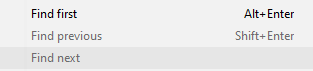
Do these find Next/Prev do the same as

?
xcme
on 9 Jun 2021
disabled 2 items on 1st pictiure by mistake. reverting.
Alexey-T
on 9 Jun 2021
And how could it be that find prev has Shift+Enter, where here I see:
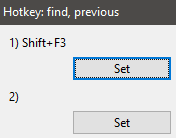
?
Does it mean that Shift+Enter is hardcoded?
xcme
on 9 Jun 2021
'shift+enter' is a hotkey local to Find dialog! not app wide.
Alexey-T
on 9 Jun 2021
select-all is disabled with "Hi" as it conflicts with incremental search...
inc-search is embedded to 'Hi' option in tthe last beta. it is 'find-first' from 'initial caret pos', where 'initial carret pos' is remembered on Find dlg showing. (to reset it, hide dlg+ show dlg).
We don't need to remember initial caret pos with 'find all' because caret will be placed on every match. If these search function are really incompatible, could you try a workaround, when CT temporarily disables 'hi', perform 'search all' and then enables it again? I
xcme
on 9 Jun 2021
why do we need a workaround? it works like in ST3 now.
find-all don't need the initial-pos, but "find-next" needs it - find-next is running after the find-all found all matches.
Alexey-T
on 9 Jun 2021
'Hi' works in 2 stages
1- find-all and placing borders on mathces
2- find-next from 'initial-pos' to show caret on next match
@tmsg-gh FYI
Alexey-T
on 9 Jun 2021
why do we need a workaround? it works like in ST3 now.
Generally, yes, except that fact that ST3 supports 'highlight all' and 'fill all' at the same time.
Without HL:
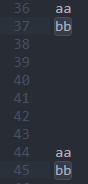
With HL:
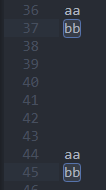
find-all don't need the initial-pos, but "find-next" needs it
Exactly, but we don't need 'find-next' if we are trying to perform 'select all', because all matches are selected and caret is placed everywhere:
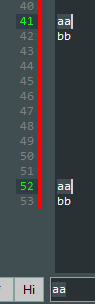
(This is from CT)
In that particular case initial-pos doesn't matter and it's doesn't matter was the initial-pos on line XX or not. Correct?
xcme
on 9 Jun 2021
Thus, we know that 'select all' basically works. And this:
'Hi' works in 2 stages
1- find-all and placing borders on mathces
works as well. So, 'find-next' is not needed, because only border is absent. All other job has been done already, right?
xcme
on 9 Jun 2021
Stage-2 is indeed not needed for 'select-all', so I need to rewrite 'stage 2' for this, maybe todo for me.
Alexey-T
on 9 Jun 2021
So, at the end Alex, will it be mutually inclusive the "Hi" and "Select all" options?
Currently in 1.133.6.4b I cannot select all matches, in comparison with ST, ST allows it.
JairoMartinezA
on 10 Jun 2021
I will work on it (little later).
Alexey-T
on 10 Jun 2021
I added this, select-all works now. it may cause some regressions though, pls test.
Alexey-T
on 10 Jun 2021
Looks nice, but found something to discuss/fix.
Highlighting sometimes doesn't work during changing text on search string
Hi is "on", text isbb bb b b, Ctrl+F, type "zb", then remove "z". The "b" letter should be highlighted but usually it isn'tHighlighting doesn't work during changing source text (old issue)
Hi is "on", text isb. Ctrl+F, type "b", Alt+E, Ctrl+F, "z" (replacing "b"), Ctrl+Z. Now "b" is here but is not highlightedNon obvious logic with multiselection (old issue)
Text isbb bb b b, Ctrl+F, type "b", then Alt+E, Ctrl+F. Press "z". How many "z" would you get? 6 or 4?
xcme
on 10 Jun 2021
Points 1,2: cannot repro (seems editor event OnChange don;t work for you. I will try it on win10 later.)
Pls post a new issue?
Point 3: 4 'z' as result. it's OK: because adjacent selections are merged (so we had 4 selections)
Alexey-T
on 10 Jun 2021
posted as 2 new issues, thanks, it's not related to Subj.
Alexey-T
on 10 Jun 2021
Cud release 1.133.7.
Alexey-T
on 11 Jun 2021
Related issues
Alexey-T
·
7Comments
JairoMartinezA
·
5Comments
 charliewales
·
4Comments
JairoMartinezA
·
5Comments
charliewales
·
4Comments
JairoMartinezA
·
5Comments
 junguler
·
5Comments
junguler
·
5Comments