Cudatext: Save bookmarks to different history file
currently are bookmarks saved per session (it mean that session remember bookmarks for related files…)
but!
there is file at favorites… and I open that file at different sessions… bookmarks are changed and opening that file show "confused" list of bookmarks…
/edit this file, add new bookmark… save session, close file… open different session + the same file (not member of session, open via favorites) - can see something different as expected/
the same situation is here if I have the same file as member of different projects
/my usage of projects - project have connected session (and vice versa)/
so - I want to suggest something like
a/ saving bookmarks per project
or b/ saving bookmarks per file - similar to cuda_tab_icons (here file remember icon, and it is not related to session/project/anything…)
or c/ maybe something better and more conceptual (or easy to implement and maintain…)
 MiroslavMatas
All 15 comments
not sure I undersstand it. this needs some more concrete suggestions:
where to store boomarks instead of current place (current place is 'history files.json' it seems).
store them to project files? for all files belonging to a project? current wish is blurry.
 Alexey-T
on 5 Jun 2021
Alexey-T
on 5 Jun 2021
and an idea / workaround for Miro: use 'Intext Bookmarks' plugin.
Alexey-T
on 5 Jun 2021
not sure I undersstand it. this needs some more concrete suggestions:
where to store boomarks instead of current place (current place is 'history files.json' it seems).
store them to project files? for all files belonging to a project? current wish is blurry.
I was not aware that positions of bookmarks are saved to 'history files.json'…
Based on wiki - https://wiki.freepascal.org/CudaText - my initial presumptions was that session is holder of bookmarks.
/on wiki - Sessions, _Session file contains data: …, bookmarks, …_/
but now I can see, that if file is without session, that is used mentioned .json…
good to know
not sure I understand it… this needs some more concrete suggestions…
sure…
if the same file is member of two different sessions… than two different .cuda-session files will remember different bookmarks for the same file
if the same file is member of two different projects… than - we can see here, that idea about reuse .cuda-proj is also wrong
my wishing is to have consistent bookmarks related to the same file - across sessions, across projects (and also if CT is without session, without project)
MiroslavMatas
on 5 Jun 2021
and an idea / workaround for Miro: use 'Intext Bookmarks' plugin.
already trying to reuse "Intext Bookmark" plugin… but - how to define line comment for Markdown? (and for simple text… lexer - none)
I am able to define invissible text for Markdown:
[//]: # (hidden invisible text here…)
seems to me - this is comment range, not comment to line end
MiroslavMatas
on 5 Jun 2021
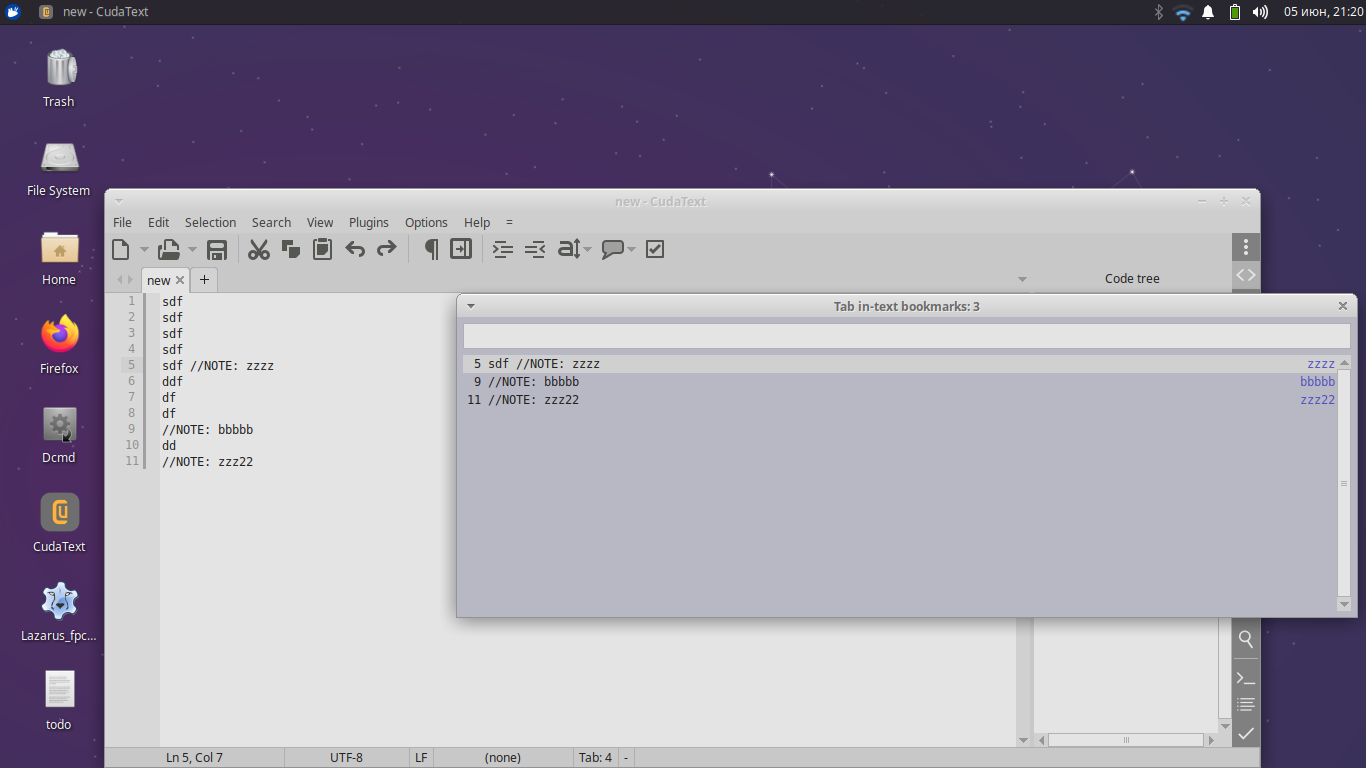
@MiroslavMatas I tested IntextBookmarks and it works for plain text!
Alexey-T
on 5 Jun 2021
Alexey-T
on 5 Jun 2021
- thanks and apologize…
first of all - thanks for this new wiki and for your investigation
secondo - apologize, that I do not check it on pure text files…
my testing was only on markdown, todo and xml…
now I have more questions, but it will be better to create a new thread
like Columbo: _"Just one more thing…"_
for the new/fresh icon for tab feature - doesn't matter if tab/file is member of session or not… if at some project or at three projects… file can be at favorites or not…
every time I will open file with already attached icon, I can see that icon… useful for me
but bookmarks is not the same case - if file is member of two or more sessions - _"Houston, we have a problem"_, because I can see different bookmarks for the same file… if I am working without session, and will use favorites - again… the same file, but not previously set list of bookmarks
I can see something like _inconsistency…_
anyway - usage of in-text bookmarks can be a way… and I will investigate it… but it modify content (add new words/lines) and not sure if is possible to use for lexers like todo, markdown, xml… but, of course, I will look on it
MiroslavMatas
on 5 Jun 2021
if I am working without session, and will use favorites - again… the same file, but not previously set list of bookmarks
it is a useful feature, to have bookmarks depending on session. if you need permanent bookmarks, this needs some rework of Cud. or use 'intext bookmarks'.
@halfbrained @kvichans @OlehL indeed, 'intext bookmarks' are not good for markdown,xml,hml, plain text - maybe idea for a small plugin?
which makes session-independent bookmarks.
Alexey-T
on 5 Jun 2021
I now think maybe we may add an option "where to store bookmarks"- "as now / or in separate bookmark history file, independent of sessions". but not sure it is good for users. Users, maybe you know what editors store bookmarks session-independant, but e.g. caret position - session-dependent?
@tmsg-gh @dinkumoil @OlehL @halfbrained
Alexey-T
on 18 Jun 2021
| editor | bookmarks | note/comment |
|:----------|:----------------------|:----------------------------------------------|
| pspad | per file only | |
| ultraedit | per file only | |
| sublime | per file, per project | vie only current file, view project bookmarks |
| vs code | per file, per project | classic, named, numbered |
| atom | per project | |
| notepad++ | per session | |
- from my perspective - users appreciate if bookmarks will be saved/opened together with file
- because - there are favorites (not related to sessions), because there are projects (also not neccessary connected to sessions)
MiroslavMatas
on 19 Jun 2021
I want to agree on thjis proposal, ie I want to save bookmarks to separate history file. this needs some work, not easy-
- still support (read) old values of bookmarks history
- design file format for usual bookmarks and numbered bookmarks (kind=1..9, supported by plugin NumberedBookmarks), ignore other bookmarks
- maybe add an option for this... not sure
Todo for later.
Alexey-T
on 19 Jun 2021
Made in the beta.
Beta in /c folder.
- add: duplicate bookmarks history to another key inside "history files.json"; later only this new key will be used and old bookmarks-history in session files will be ignored
Please test.
Alexey-T
on 12 Aug 2021
first impression is very good… _works as designed_
will use it at "production" a few next days and update you
MiroslavMatas
on 12 Aug 2021
What to test: delete in 'history files.json' old bookmarks info, check that NEW info (in 'bookmarks' key) is read OK.
I will close the issue in a few days
Alexey-T
on 12 Aug 2021
stable, not negative skills, works fine for me, can be closed and released
thanks again for very good job
MiroslavMatas
on 14 Aug 2021
Related issues
Alexey-T
·
3Comments
 rhinolophus
·
5Comments
rhinolophus
·
5Comments
 JairoMartinezA
·
5Comments
JairoMartinezA
·
7Comments
Alexey-T
·
5Comments
JairoMartinezA
·
5Comments
JairoMartinezA
·
7Comments
Alexey-T
·
5Comments