Cudatext: "Hi"-lite matches broken in 133.5?
I have just updated from 132.1 to 133.5 and the incremental "Highlight matches" in Find seems broken. In 132.1 the caret jumps to the currently found place. Not so in 133.5 where I have to press F3.
Just FYI. I have reverted to 132.1.
 tmsg-gh
All 51 comments
we had a user req, which asks __not to scroll__ to the match if it's above the current screen. so if I type 'cu' at file and, and 'cu' is on top, Cud don't scroll to top. (it depends on 'O' option too).
is it your case?
 Alexey-T
on 1 Jun 2021
Alexey-T
on 1 Jun 2021
I see some regression, now.
Alexey-T
on 1 Jun 2021
Made a fix, beta is in http://uvviewsoft.com/c/
@xcme Pls see it too, relates to #3385
Alexey-T
on 1 Jun 2021
@Alexey-T which is the difference between 133.5 and the latest beta? Hadn't time to check it well, but at the first glance it looks good and works as expected.
not to scroll to the match if it's above the current screen
I'd say "if current view-area has one of mathes, then do not scroll". I used your example from #3385 and it doesn't scroll for "a" and "b" because they are on the screen, and scrolls for "z" and "k" because they are placed behind the screen. That's I expected.
 xcme
on 2 Jun 2021
xcme
on 2 Jun 2021
which is the difference between 133.5 and the latest beta? Hadn't time to check it well,
the patch shows it-- before (broken code) we disabled scrolling to the 1st match (of found-all) if 1st match was before the current screen. now that disabling is removed. we scroll to the 1st match almost always.
Alexey-T
on 2 Jun 2021
I'd say "if current view-area has one of mathes, then do not scroll"
that was done and works now too.
Alexey-T
on 2 Jun 2021
How can I reproduce that on that text example from #3385? For me it looks the same.
xcme
on 2 Jun 2021
using this
- with
Hi, find sample 'text' on line 5000 - press backsp to use 'te', you are on line 5000
- type more to 'teST', and if 'teST' is on line 20, Cud don't scroll - bad!
Alexey-T
on 2 Jun 2021
FWIW (not much as I use Cud only sporadically these days), the old behaviour of 132.1 is still not fully there even in the latest beta. My problem is one of usability. I have a large screen with ~100 lines of code on it at any one time and I absolutely need a strong visible hint in which line a found string is located. This works perfectly well in 132.5 because the background for the line number (in the gutter) always jumps to the current found place. Not so in 133.5. The line marker does jump if it has to scroll to the found place but it remains wherever it was if the found place is already visible on screen... and with ~100 lines I have to look very hard to locate that place.
As it stands, this means I can't use that version so I will continue to work with 132.1. So far that's not much of a difference IMO anyway, as the multi-threaded parsing has no discernible speed advantage on my hardware.
tmsg-gh
on 2 Jun 2021
you are an 'angry user', but I liked that report. made a change/fix. new beta-
cudatext-win-x64-1.133.5.5c.zip
now with option 'find_hi_move_caret':True it puts the caret on 1st match (for Hi mode). even if it don't scroll.
Alexey-T
on 2 Jun 2021
you are an 'angry user'
I think the word you were looking for is not "angry"... it's "incompatible". My personal style of working vs the way Cud advances (and sometimes retreats) as well as my own development philosophy vs yours are simply not compatible. That's all there is to it. Having said that, I am known for having a short fuse and a combustible temperament... but also for always having a few fire extinguishers around.
tmsg-gh
on 2 Jun 2021
Okay. understood. I now updated the beta, to add the option "find_hi_always_scroll_to_1st":false
so you can use it if you always need a scroll. it's to solve this topic and for other users too.
Alexey-T
on 2 Jun 2021
@tmsg-gh sorry, just trying to understand your point. It's still not clear. Do you mean that you expect background highlight as CT shows on line 71 on my screen?
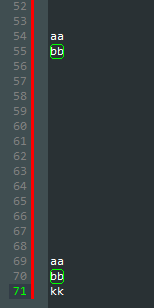
This points to the current line, but at the same time we have rectangle around the match, so it's completely clear where these matches are placed - lines 55 and 70.
xcme
on 2 Jun 2021
@tmsg-gh, and just out of curiosity, do you work with code or text mainly?
Let's imagine I'm checking CT's code and decide to check how often the rCrt variable is used within cmt_toggle_stream function. I double-click this in text, then Ctrl+F and expect it to looks like:
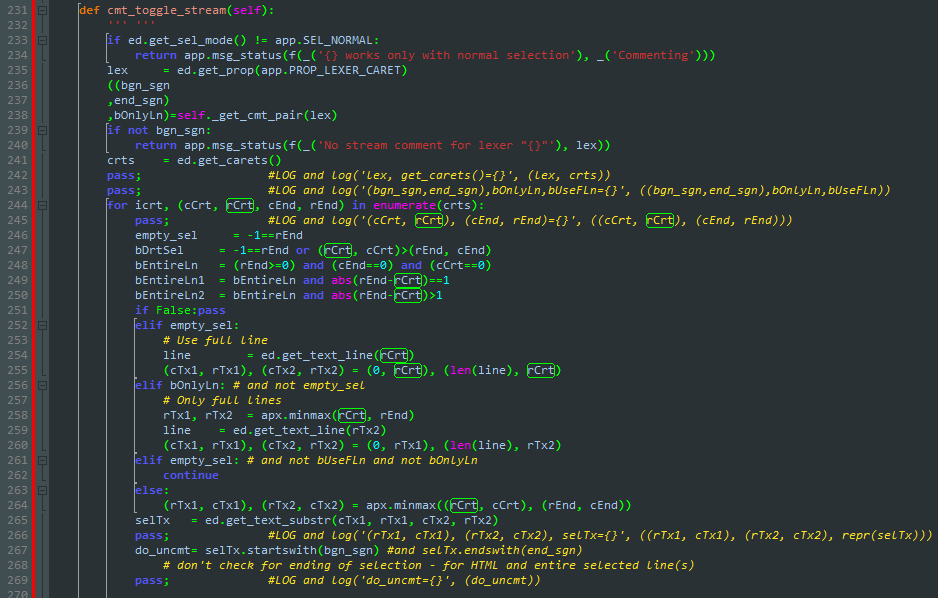
But instead I see this:
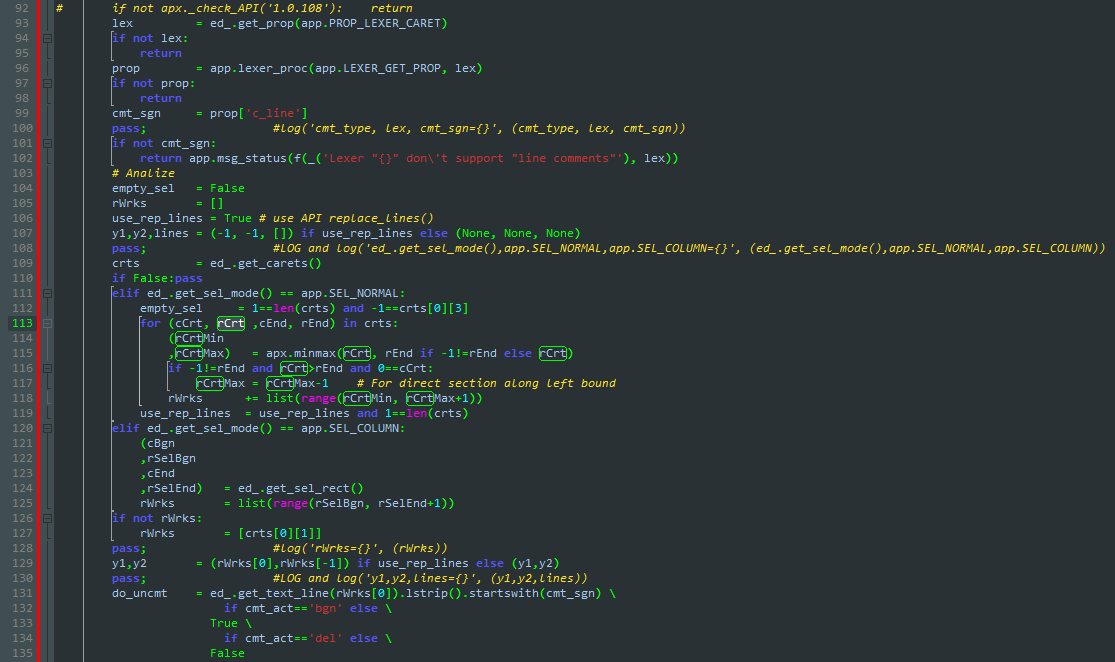
Because it always scrolls up and I need to scroll it down manually every time I'm looking for repeating text and that's very annoying. That was the reason that feature had been requested.
But I believe that the Alexey's solution will solve that issue for any scenarios.
xcme
on 2 Jun 2021
currently Cud works like @xcme wants (1st screenshot), with 'find_hi_always_scroll_to_1st' off
Alexey-T
on 2 Jun 2021
@Alexey-T what about your experience? What do you prefer? Do you use CT, writing CT code, or may be you use ST for that? :)
xcme
on 2 Jun 2021
I use it for plain text and Markdown. I use the IDE for code.
Alexey-T
on 2 Jun 2021
And for Python coding, when I write plugins / small codes.
Alexey-T
on 2 Jun 2021
@xcme This question/issue has nothing whatsoever to do with my actual usage patterns... though I do edit "normal" text files (ie similar to .md or .adoc files) as well as C/C++, Lua and rarely Python files. Not to talk about .yml, .json, .ini... you name it. I do not and will never use an IDE... my text editor simply has to be "good enough" to support makes, starting compilers etc.
@Alexey-T I do understand where @xcme has been coming from all along and I agree with him that a new incremental search operation should by default not scroll back to the start of the file (which it does indeed in 132.1) but continue from the current caret position. That change was not my problem AT ALL.
My problem was and is (as this new option has not solved it) that when the next found place is already on screen (ie no scrolling forward is required) then the next found line's number within the gutter does NOT get highlighted. Again, this is purely a visual thing as I can't easily make out which line is the one where the current incremental search has matched (the SeparLine rectangles around the found places, though very welcome, are simply not strong enough a visual hint for my setup and there are sometimes too many on screen to know where I am in the incremental search).
tmsg-gh
on 3 Jun 2021
Okay, but I cannot 'decipher' from your post what should i do. gutter mark is shown for the caret. caret is placed on the 1st match (it can be above the screen -> so your problem). do you suggest to place caret (+gutter mark) on current screen? if so it's not Ok (put caret on 20'th match)
Alexey-T
on 3 Jun 2021
- IMO any search op (whether classic or incremental) should by default (though the user may change that) start from the current caret position (CCP) downwards (again the user may change that).
- In this mode scrolling to a location upwards of the CCP never happens. Scrolling downwards from CCP may happen if the next incremental search position (ISP) is not on the current screen in which case the ISP is scrolled into view.
- Independently of 2 when a new ISP is found (either because the user has added a character to the Find edit box or pressed F3 (or whatever is defined as Search next)), the ISP line's number in the gutter is highlighted. This happens currently if the ISP has to be scrolled into view but crucially it does not happen if the ISP is already in view.
What currently happens, with 133.5.6 and "find_hi_always_scroll_to_1st": false: CCP is line 54, say, and this number is highlighted in the gutter. I press Ctrl-F, the Find box pops up and the gutter highlight and CCP is still on line 54. Now I press a key, say "Z". If the next "Z" is on screen, say in line 64, it (and other "Z"s on screen) is now surrounded by the SeparLine rectangle but the highlighted line number in the gutter is gone: 54 is not highlighted anymore and 74 is not highlighted either.
NO LINE NUMBER IN THE GUTTER IS NOW HIGHLIGHTED. The only thing I see now is a potentially big number of SeparLine rectangles for all the "Z"s on screen but no way how I can easily identify which one of them is the current ISP.
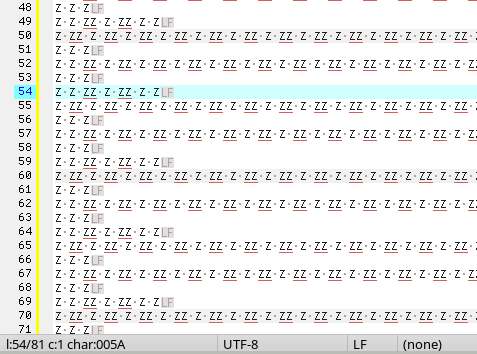
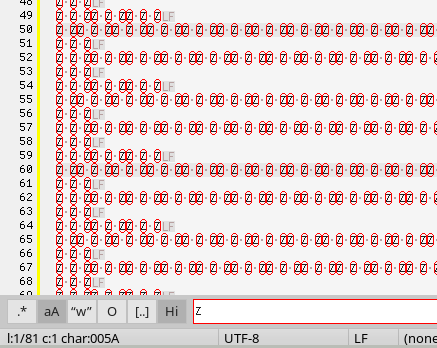
By contrast, if the next "Z" is further down off screen, say line 254, then this part of the file is scrolled into view and the line number in the gutter (254) is highlighted.
The incremental search concept as it stands needs some serious design work IMO. When I started using Cud the classic Find also didn't work as one would expect.
tmsg-gh
on 3 Jun 2021
but the highlighted line number in the gutter is gone: 54 is not highlighted anymore and 74 is not highlighted either.
NO LINE NUMBER IN THE GUTTER IS NOW HIGHLIGHTED.
Have yo checked the first match? It should be there. I can't get the situation where is no highlighting in the gutter.
xcme
on 3 Jun 2021
@Alexey-T, despite CT doesn't scroll window for the first match it moves the "CCP" to that place. ST in opposite, moves the "CCP" as for "Search Next". So, if I'm here
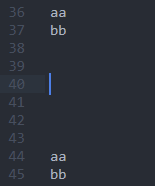
and search for "bb" I will end at the line 45 (in ST) but CT will move CCP to the first match.
Not a big deal, but could it also be changed somehow?
xcme
on 3 Jun 2021
Have yo checked the first match? It should be there. I can't get the situation where is no highlighting in the gutter.
It seems you're right and that's what actually happens... the incremental search simply starts from the top, no matter what, and so a line above the CCP that is not visible and is not scrolled to now has is the ISP and has the highlighting, leaving me totally in the lurch.
ST in opposite, moves the "CCP" as for "Search Next".
And IMO so it should be done, as I explained in my post above. The original Find had a very similar problem IIRC.
Not a big deal, but could it also be changed somehow?
Well, for me it is not the biggest deal of the century but VERY annoying.
tmsg-gh
on 3 Jun 2021
@Alexey-T, is it possible to replace "find first" to "find next" in that case (for Hi option)? It seems it could solve it.
xcme
on 3 Jun 2021
It seems we need new options (+delete 1-2 old options?) like
option-1: how to scroll
0: always scroll to 1st (from top) match
1: scroll to 1st match but don't scroll if any match on screen
2: scroll to match 'next from current caret'
maybe value=3 too: like value=2 but scroll to 1st match if no 'next match from caret'
option-2: where is caret
0: don't change caret
1: caret on 1st match (from top)
2: caret on match 'next from current caret'
2 options will solve any need? and mimic ST3 too?
Alexey-T
on 3 Jun 2021
Oh, no, we need different thing.
not 2 options. we need additional 'find-next' search (in 'Hi' mode) which will puts the caret + scrolls to it. yes? it solves tmsg's wish.
Alexey-T
on 3 Jun 2021
we need additional 'find-next' search (in 'Hi' mode)
It looks like the current behaviour uses 'find first' option. It moves caret to the first line. If then I perform 'find next' then it highlights the first match. But if it's possible to remove 'find first' and add 'find next' then it would solve all things.
xcme
on 3 Jun 2021
Every find op faces similar questions re its workings: where to start (from top of file, from CCP or whatever), whether or not to wrap at the end etc. I do not see why incremental searches should be handled any differently to the classic find ops. I personally almost always want to search from CCP for classic searches (and if not there's a button I can press) and the same is true for incremental searches. But as @xcme has said this currently starts from the top, willy-nilly so that would be the point of attack I think.
tmsg-gh
on 3 Jun 2021
I worked on this hard yesterday. seems better now! let's try. don't be angry if it's not done yet.
beta in /c.
Alexey-T
on 4 Jun 2021
First impression is that this works now as I think it should. However, I have literally used the beta for just a couple minutes, so take that with a big grain of salt. Will report any problems.
tmsg-gh
on 4 Jun 2021
And while I am it... another suggestion... when I do an incremental search I get a succession of messages in the status bar telling me how many fragments were found for the current content of the edit field. V nice. However, at some point I will have entered the full search string (or enough of it) so that I have to go on with F3, ie Search Next if I am not yet at the point I want o be. But when I press F3, that status message is replaced by a bland "Found next match". As you know the number of fragments from the incremental search before why not say something like "Found match 3 of 11" or some such more informative hint?
tmsg-gh
on 4 Jun 2021
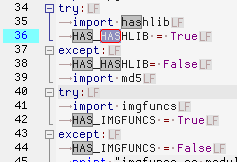
And finally a small oddity... (I am in the mood today :-/ ) When I do an incremental search with case sensitivity on (ie "aA" pressed, that's my search default) then the editor window shows also strings in other cases. See the attached pic where I am searching for "HAS" but the string "hashlib" in line 35 is also highlighted (the search doesn't jump there, it just gets highlighted).
tmsg-gh
on 4 Jun 2021
And while I am it... another suggestion...
I wrote a note for myself. not simple to do.
then the editor window shows also strings in other cases. See the attached pic where I am searching for "HAS" but the string "hashlib" in line
I cannot repro this. :( I always get correct hilite, for 'aA' on/off. and even toggling 'aA' changes the hilite.
@halfbrained @jairomartinezA - if you repro this bug, pls tell the 'steps'.
Alexey-T
on 4 Jun 2021
A small video showing the sequence with "aA" and "Hi" on, the rest is off... HTH.
tmsg-gh
on 5 Jun 2021
We have not only frame around text ! Looks like it is Highligt Occur plugin
Alexey-T
on 5 Jun 2021
so, adjust the HilightOccur plugin settings. I need issues of Cud itself.
Alexey-T
on 5 Jun 2021
Looks like it is Highligt Occur plugin
That's right. I have adjusted its settings and the effect is gone. Perhaps unfortunate that when I change that setting in Cud it doesn't get changed in the plugin. Then again, it's a minor issue. Anyway, riddle solved.
tmsg-gh
on 5 Jun 2021
As you know the number of fragments from the incremental search before why not say something like "Found match 3 of 11" or some such more informative hint?
@tmsg-gh, please check #3247
It has been requested but I have been told it's not so easy to implement that feature. But @MiroslavMatas showed that the Highlight Occurrences plugin has this functionality and it seems you has that plugin as well, thereby you should see that "3/11", right?
xcme
on 5 Jun 2021
@Alexey-T, the behaviour is much better, but the logic still not clear. I'm here:
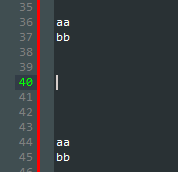
And perform search for 'bb'. It leads me to line 37 (first match on the screen)
Then I add 'bb' on the line 30 and try it again:
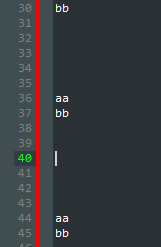
And I end at the line 37 again.
Then I place caret on line 33 and try again:
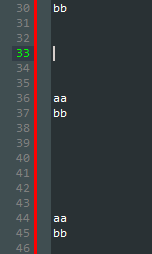
And, again, line 37!
But when I try to search for 'aa' from line 33 it leads me to line 44 (last match on the screen):
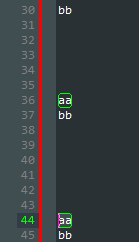
So, sometimes it moves caret up, sometimes down, sometimes to previous occurrence, sometimes to the next one. Could you, please, check?
xcme
on 5 Jun 2021
And also try this, please:
- Put caret in any place, then press Ctrl+F and search for 'aa'
- Press ESC
- Put caret in the same place
- Press Ctrl+F
It will lead you to the same position at before (last 'aa' in that case) despite the search line is empty. So, it remembers the last value and tries to find it despite it shouldn't move. It you repeat last two steps again then you will see that caret doesn't move because there is nothing to search. And that's what we should see on steps 3 and 4.
xcme
on 5 Jun 2021
So, sometimes it moves caret up, sometimes down, sometimes to previous occurrence, sometimes to the next one. Could you, please, check?
Logic is— do find-next from initial caret pos!! Which is got on Find dialog show, not after the dlg show (so hide the dlg and show it- that pos updates)
it’s like in ST, yes?
Alexey-T
on 5 Jun 2021
it’s like in ST, yes?
No, ST always goes down (find next) while current beta could move caret up. And at the moment I couldn't reproduce my steps I posted above.
Which is got on Find dialog show, not after the dlg show (so hide the dlg and show it- that pos updates)
Didn't get that point. Perhaps it's the key for understanding. Could you, please, rephrase it?
xcme
on 5 Jun 2021
'Hi' has embedded incremental search. which uses start-point == the caret pos for "dialog was shown" moment. after Find dialog shows, this starting pos is not changed. inc-search uses this start-point.
Alexey-T
on 5 Jun 2021
@tmsg-gh, have you tried the last beta?
xcme
on 9 Jun 2021
@xcme No, I have been offline (totally, no PC touched) since Sunday... the weather was just too nice to stay home. But I've just downloaded the latest and checked it... so far it seems to work as I think it should.
However, I have a problem (alas not easily repro'ed) in that the incremental search would sometimes fail totally. Example: I have a Python file with both multiple occurrences of the words "screenshot" and "screensaver". A search with "Hi" on finds "screensaver" but not "screenshot" (ie I type "screens" and then when I type an "a" "screensaver" is found but if I type an "h" "screenshot" is NOT found). I have to switch off "Hi" and search conventionally to see "screenshot". But as I said this is not easily repro'ed. But perhaps @Alexey-T has an idea where to look.
tmsg-gh
on 11 Jun 2021
@tmsg-gh,
if I type an "h" "screenshot" is NOT found).
Do you mean it's not highlighted? Does it work without switching "Hi" but if you scroll your mouse wheel on top of the working area as mentioned here?
P.S. Yes, I also have perfect weather these days and have visited High Tatras this Sunday :)
xcme
on 11 Jun 2021
@xcme It's not highlighted and not found (ie the highlighted line number in the gutter doesn't change). Whether wheel scrolling will change this remains to be seen when I run into that effect next time. However, this clearly depends on some not yet clear factors as it happens only sometimes and so far I can't find a pattern. I will report back with more details if I find out more.
tmsg-gh
on 11 Jun 2021
@xcme Late followup...
It has been requested but I have been told it's not so easy to implement that feature. But @MiroslavMatas showed that the Highlight Occurrences plugin has this functionality and it seems you has that plugin as well, thereby you should see that "3/11", right?
I do have and use that plugin but I do not see something like "3/11" once the Find panel is opened and I have pressed F3 (ie find next). Then the plugin messages are replaced by the Find status messages which are a lot less informative. Or is there an option I have to set?
tmsg-gh
on 12 Jun 2021
I have a problem (alas not easily repro'ed) in that the incremental search would sometimes fail totally. Example: I have a Python file with both multiple occurrences
this may happen if
a) option "O" (wrap) is off,
and b) you __activated Find dlg__ iwth the caret after the needed position.
ie after last occurence.
(incremental search runs from that caret-position).
@tmsg-gh
Alexey-T
on 12 Jun 2021
I am closing/locking this overheated topic. let's continue in a new one..
Alexey-T
on 12 Jun 2021
Related issues
 GHNewbiee
·
7Comments
Alexey-T
·
3Comments
GHNewbiee
·
7Comments
Alexey-T
·
3Comments
 EchedeyLR
·
3Comments
Alexey-T
·
5Comments
EchedeyLR
·
3Comments
Alexey-T
·
5Comments
 JairoMartinezA
·
5Comments
JairoMartinezA
·
5Comments
Most helpful comment
And finally a small oddity... (I am in the mood today :-/ ) When I do an incremental search with case sensitivity on (ie "aA" pressed, that's my search default) then the editor window shows also strings in other cases. See the attached pic where I am searching for "HAS" but the string "hashlib" in line 35 is also highlighted (the search doesn't jump there, it just gets highlighted).
