Cudatext: Haiku: info on how to test in Haiku 64bit
Good day,
I'm interested on testing this editor on Haiku 64bit, so I would appreciate any insight on how to do it, provided I download the source code, of course, as I haven't seen any HPKG available.
Thanks in advance.
Regards,
RR
 roired
All 87 comments
this needs the fresh build - but I don't use Haiku now and no wish to install it in VM too (too early betas). so-- you need to compile it your self. Wiki tells how to compile.
but first you must install FPC + Lazarus in Haiku. using FpcUpDeluxe / or other way. install them first
 Alexey-T
on 6 May 2021
Alexey-T
on 6 May 2021
Thanks Alexey,
Don't worry about installing Haiku on VM. I'll test that on my machine and report here any issues I may find, it's going to be slow though. If I can get some free time, I'll do it this weekend. I've been through the wiki already, and hope I can get on with it without much issues.
Thanks again!
Regards,
RR
roired
on 6 May 2021
I saw that Haiku build has that bug
https://bugs.freepascal.org/view.php?id=37268
Alexey-T
on 15 May 2021
Good day Alexey,
Didn't know about that bug. I've been facing some issues though. Mostly the issues arise when I try to install the needed packages to build CudaText. The issue is that:
1- They don't build, because they try to build into a read-only folder (I presume is due to that).
2- They build if I change the building location (a user owned folder with read/write permissions), but then I can't add any package to the Lazarus project via the Install Package menu.
I figured out the read/write issue after I picked a folder inside the /home directory where the user has write permissions, in the "Compiler Options" for Package. With the default Unit output directory, it wouldn't compile the package. Then again, once I get the package compiled in the /home directory, I can't get it installed in the Lazarus IDE so no components appear in the Inspector.
Not sure if the bug is affecting here. I'm running on 64bit on bare metal, and Lazarus launches without issues, that I know of, other than display quirks in the source code window, though I presume this should not have any effect on compiling the packages.
Therefore, I'm stuck at the moment. I have to read more doc on the Lazarus IDE and understand why this is happening. This is the first time I use the Lazarus IDE, and the last time I used Pascal was back in 1990. I'll keep trying to figure out where the issue is in order to correctly compile and add the packages to Lazarus, then will try to get to CudaText.
Opening the CudaText project in Lazarus complains that the other packages are not installed, so I haven't reached the stage where the bug reported at that link should come out.
I'll keep you informed on how this evolves.
Thanks!
Regards,
PS: For the sake of testing, I just did "Run without Debugging" to check if CudaText builds and runs, and it DOES. I can open a python file without issues and highlighting is there. This without any needed package installed. I can't add the picture from Haiku to Github (web browsers issues), but I will add a new forum topic in the Haiku forums to post it.
https://discuss.haiku-os.org/t/cudatext-64bit-sneak-peek/10750
Will keep you posted.
roired
on 18 May 2021
1- They don't build, because they try to build into a read-only folder (I presume is due to that).
2- They build if I change the building location (a user owned folder with read/write permissions), but then I can't add any package to the Lazarus project via the Install Package menu
Hm, here I cannot help, i didn't face such problems on other OS, nor under the Haiku--because i installed Laz using FpcUpDeluxe into the home subdir.... (my dir was writable). can you install Laz via FpcUpDeluxe? like me? Deluxe can install FPC + Laz, just run the Deluxe dialog and several clicks
Alexey-T
on 18 May 2021
Good day Alexey,
I will try that. Up to now I just installed Lazarus and FreePascal from the HaikuDepot. Just checked now that the FpcUpDeluxe is also available on Haiku 64 bit.
When I get time I'll do it and check if I can get the packages installed onto Lazarus. But at least, CudaText runs. That's some start.
Thanks!
Regards,
RR
roired
on 18 May 2021
what would I try for current Laz setup. open each Package's dialog ('Package / Open package file .lpk'). in the package dialog, press Options and set the "unit output path" to writable dir.
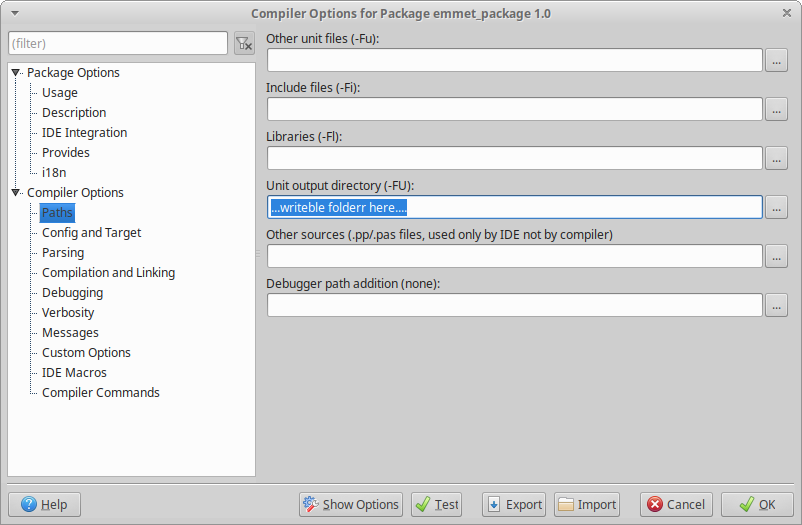
you tried that already.? then IDK.
Alexey-T
on 18 May 2021
Yes I tried that already. I set a Unit Output Directory to a writable folder inside /home. And the packages build, problem is that then I can't add the packages to Lazarus IDE in order for them to be used when building CudaText, which I find odd. I need to dig in how Lazarus works, as first contact with Lazarus is now, when trying to run CudaText... all this is new stuff for me :)
roired
on 18 May 2021
which I find odd
it is looking like an IDE bug, maybe create a forum topic at https://forum.lazarus.freepascal.org/index.php?board=13.0
Alexey-T
on 18 May 2021
Let me check with the Fpcupdeluxe first. I just read the Lazarus IDE doc again, and checked Lazarus does not allow me to install any package to be used by Lazarus (Use>Install after Open lpk file). I can compile them to a writeable dir and that's it, but this turns out useless.
I'll try with FcpUpDeluxe and if it fails, then can open the IDE bug, just to be sure that it's a bug, not an issue with my lack of knowledge ;)
Regards,
RR
roired
on 18 May 2021
I guess now that Laz must __always__ be in a writable dir. why? adding any LPK needs recompile of IDE.
Alexey-T
on 18 May 2021
so... If Haiku Laz installer puts Laz into non-writable dir, its a __big issue for that haiku pkg__
Alexey-T
on 18 May 2021
Good day Alexey,
Today I just built CudaText on Haiku 64 bit. It built, and I can run the software on Haiku. There are issues, of course, but it does build and runs. I updated the info on the Haiku forum with screenshots of CudaText software running, already built without Lazarus. This is good news.
I had issues with fcpupdeluxe, so before trying that path again I am going to test a different approach, which is move Lazarus from the /system/app into the /home folder, which means uninstall the Lazarus package and add the HPKG inside /home/config/packages, so the installation is user based instead of system based. If I can get the packages to install that way, we would be done, and could start with testing CudaText on Haiku.
One issue that is quite obvious is the font rendering, where characters overlap in the code tabs. I tried with different fonts but all show same issue. This issue is also present within Lazarus, and I have no clue on why is that. Nonetheless, this is not important at the moment. The important test I'll carry is moving Lazarus from /system/apps to /home/config/packages and check (this unless Haiku devs tell me otherwise).
I'll keep you posted.
Thanks!!
Regards,
RR
PS.: Just checked the font and changing the font in the settings in CudaText Options>Textfont to a different one and back solves the issue. Strange. :)
Update: after adding the "pylib__haiku" line to the user settings things work better and the Plugin manager is available. Nice!
By the way, would you mind I make an Icon for Haiku? I mean, Haikufy CudaText icon.
roired
on 19 May 2021
thanks for information.
Of course we need the icon and we need the whole package with icon, package in Haiku format.
I don't want to study __how to make the package__ so please do it...
Alexey-T
on 19 May 2021
Good day Alexey,
Don't worry. I'll make the Icon and build the package. I might have some questions though, regarding CudaText files, that might arise when I get on with the package process. Right now, the plan is the following:
1- Make the Icon
2- Package the software (right now it builds but lacks some features)
3- Test the package to find issues with the packaging process
4- Move Lazarus to read/write directory
5- Install the needed packages (lpk) to fully compile CudaText
6- Build CudaText with all the needed packages
7- Test the built CudaText package
If everything goes fine, get a RC ready.
This process is going to go slowly, because I do all this on my free time. Nonetheless, I'll keep you posted.
Regarding the first build, after adding the Python lib, as you can see in the forum post, CudaText loads everything, but Plugins are not available to install. I presume due to the lack of the LPK files at compilation time. This is something I will check again at stage 6.
When I'm ready to package CudaText at stage 2 I'll need to ask you some questions regarding CudaText files. I'll will paste the icon here when it's ready so you can approve it.
Thanks again,
Regards,
RR
roired
on 20 May 2021
I think (not 100%sure) that if app compiles somehow then it's ok already. LPK packages install not needed. it 's needed to __design in the IDE__... (to place components on forms)
Alexey-T
on 20 May 2021
Good day Alexey,
It does compile but there are issues afterwards trying to install Plugins:
Init: cuda_addonman
Traceback (most recent call last):
  File "/packages/python38-3.8.8-3/.self/lib/python3.8/subprocess.py", line 64, in <module>
    import msvcrt
ModuleNotFoundError: No module named 'msvcrt'

During handling of the above exception, another exception occurred:

Traceback (most recent call last):
  File "/Projects/Testing/CudaText/py/cuda_addonman/__init__.py", line 6, in <module>
    import webbrowser
  File "/packages/python38-3.8.8-3/.self/lib/python3.8/webbrowser.py", line 9, in <module>
    import subprocess
  File "/packages/python38-3.8.8-3/.self/lib/python3.8/subprocess.py", line 69, in <module>
    import _posixsubprocess
ImportError: Symbol not found
ERROR: Exception in CudaText for cuda_addonman.do_install_addon: ImportError: Symbol not found
This happens everytime I try to install any plugin. Looks like something is missing or is this related to Python's version?
Changing topic, regarding packaging, I found that after compiling, there is a folder named "app", and inside it, CudaText executable with lots of stuff, folders(backup, cudatext.app, data, lib, py, readme, settings, settings_default) and files (lots of form., proc., treehelper. and cudatext.*) and besides the CudaText executable. Are all of them needed for packaging?
I just tried copying the executable to somewhere else and it does run, though complains that can't find the data folder, thus I presume that the folders are needed. Good thing though is that CudaText searches for the folders in the right system location, which is a hint for packaging.
Thanks again!
Regards,
RR
roired
on 21 May 2021
Two errors mean that there is some issue with Py engine, somehow py engine is not Ok compiled on Haiku, or its bad packaged
IDK how to solve it,
Try to ask on stackoverflow?
files .pas .inc .lfm are not needed for Cud package! Pascal files!
Alexey-T
on 22 May 2021
Good day Alexey,
Could those errors be due to the Python version? I was using 3.8. But maybe another one is the "proper"one to be used. I'll ask at stackoverflow.
Ok. I'll check the thing without those files.
Question: Can I set, before compiling, CudaText config location to the proper location according to Haiku directory hierarchy? Right now, CudaText sets config files inside ~/.config/cudatext
I'd like to change that to /boot/home/config/settings/cudatext, which is the proper location in Haiku filesystem. Is that possible?
Thanks!
I'll keep you posted with the progress.
Regards,
RR
roired
on 24 May 2021
Could those errors be due to the Python version? I was using 3.8.
3.8 is OK, like 3.6... 3.9.
Alexey-T
on 24 May 2021
Folder- I made a patch linked above this comment. pls validate it! I didn't test. You can play with InitDirs() function more then tell me.
Alexey-T
on 24 May 2021
Roger. Will do the testing and report.
Thanks Alexey!
Regards,
RR
roired
on 24 May 2021
now I split InitDirs() to n helper funcs, Haiku is also there.
Alexey-T
on 24 May 2021
so... If Haiku Laz installer puts Laz into non-writable dir, its a big issue for that haiku pkg
This page seems to think otherwise:
https://wiki.lazarus.freepascal.org/Talk:Lazarus_directory_permissions_on_Linux_and_Unix
 korli
on 25 May 2021
korli
on 25 May 2021
@korli I was just guessing. Lazarus has the --pcp command line key to set another options dir.
Alexey-T
on 25 May 2021
Good day Alexey,
I downloaded last version 1.133.1 to check your last patch but it does not compile, nor run. Lazarus spits out this error:
proc_customdialog.pas(1158,19) Error: identifier idents no member "BorderVisible"
This is the first time I get that error. With older version 1.132.9 it didn't come out. With this error I can't build nor run CudaText.
Also, I've done some researching regarding the Python issue with the addons, and though I need to dig a bit more onto it, it seems that the "msvcrt" is a Microsoft specific module. In fact, that module is not available to install with PIP (No matching distribution). So that might be it.
As I still have the 1.132.9 running, once I have the icon finished I'll try the packaging with that one.
Thanks a lot for your help with this!
Regards,
RR
roired
on 25 May 2021
proc_customdialog.pas(1158,19) Error: identifier idents no member "BorderVisible"
that is a new property in ATFLatControls - update ATFlatControls, ok?
Alexey-T
on 25 May 2021
seems that the "msvcrt" is a Microsoft specific module
MS Visual C runtime. I don't know how it came to Haiku?
Alexey-T
on 25 May 2021
And regarding Lazarus, just found out that some packages "can be installed", some "can not". Those that "can be installed" fail to install when Lazarus rebuilds itself with the new package throwing an error:
lazarus.pp(166,1) Error: Error while linking
which is the last line with code: "end."
So it seems Lazarus can't rebuild itself. Meaning I can't do anything with the ATFlatControls at the moment, though this is one of the installable ones. I got the last version but can't install it on Lazarus because always fails to recompile itself with the linking error.
Regarding the msvcrt, I have no idea either. I'll check the python stuff inside cudatext folder.
Regards,
RR
roired
on 25 May 2021
And this is finally the Icon. Check it out and if you want any changes let me know. If you are ok with it, I'll try to make the package with CudaText 1.132.9.
https://gitlab.com/haikustomize/icon.themes/haiku-software-icons/-/blob/master/cudatext0.png
roired
on 25 May 2021
Icon is very good! Let's use it.
Alexey-T
on 25 May 2021
I'll try to make the package with CudaText 1.132.9.
for the 1.132.9, you also __should__ use versions of all packages (ATSynEdit ATSynEdit_Ex,......) with the same release date as of Cud 1.132.9.
Alexey-T
on 25 May 2021
Ops. 1.132.9 is UNSTABLE version, ie
- 1.132.1 is stable not-threaded parser
- 1.132.9.x is UNSTABLE threaded parser
- 1.133.x is stable threaded parser --> use this
Alexey-T
on 25 May 2021
Note: stability fixes are in repos EControl/ATSynedit_Ex, so you should 'git pull' them, like all other repos.
Alexey-T
on 27 May 2021
Good day Alexey,
Noted that. Nonetheless, I had tested moving the whole Lazarus IDE to a different location with read/write permissions. In such location, same thing, some packages can be installed, though "compiling Lazarus" fails with the link error posted above resulting in the package not installed.
But, weird stuff. While Lazarus seems to not recompile itself with the linking error, in this situation, when I install a package that "allows" installation, though it fails, the next time I boot Lazarus, the package is visible in "Packages>Open Loaded Package".
I'm testing right now if all packages end up visible there and then recompile CudaText (still with the 1.132.9) . If works, I'll clone all recent repos, release 1.133, and redo the process.
Fingers crossed with this test.
I'll let you know how it goes.
Thanks!
Regards,
RR
Sorry I closed the issue, just installed Github on the phone and clicked the wrong place.
roired
on 27 May 2021
though "compiling Lazarus" fails with the link error posted above
This is linker (or FPC?) issue which you should report to https://forum.lazarus.freepascal.org or https://bugs.freepascal.org/
Alexey-T
on 27 May 2021
Good day,
Finally got some time to get back to CudaText. Right now I'm trying to compile 1.133.5. The Project Inspector window shows that all required packages are there and doesn't complain when loading CudaText Project. Nonetheless, it's taking ages to Run without Debugging for testing. I still don't understand so much about Lazarus, so not sure if this is normal or not. It didn't behave like this with 1.132.9. But who knows.
Hope the compiling ends soon and can report some success. If not, I'll abort and review the messages spat out which are plenty, mostly Warnings and Hints.
I'll report the linker issue on the sites you pointed out.
I'll keep you posted on any news.
Thanks!
Regards,
RR
roired
on 4 Jun 2021
All right, I don't know why, though I presume that what happened here is that Lazarus doesn't install the required packages the way it should. So when I built CudaText first time Lazarus seemed to stall trying to install the packages that did not install properly in a "package by package" way.
I aborted the process, relaunched Lazarus, verified that all required packages were listed in the project inspector and click on Run Without Debugging: SUCCESS. ;)
I'm going to build it now and see if it works.
Regards,
RR
roired
on 4 Jun 2021
It works. It did build and now I'm running it. And moreover, you did something really great for Haiku with CudaText, that is, adding CudaText settings in the proper folder, and when running CudaText, it did complain that the Data was not in the proper folder. Great! That is a hint to properly package CudaText for Haiku and get things in the right place.
Thanks a lot, really!
I'll update the post on the Haiku forums now with the new version.
Regards,
RR
PS: I'm looking forward to use it daily. Though I need to find an automated way of going over this process again and again... XD to make it easier for me ;)
roired
on 4 Jun 2021
Already done the icon:
https://discuss.haiku-os.org/t/cudatext-64bit-almost-ready/10750/3
Now it's packaging time. When the package is ready will let you know.
Regards,
RR
roired
on 4 Jun 2021
Looking at your interesting posts now..
Alexey-T
on 4 Jun 2021
Good day Alexey,
I just created a repo here on Github (https://github.com/roired/CudaText-Haiku) with the files I'm making to get CudaText to work on Haiku. As I'm quite new to Git and to participate in other projects, I may do things wrong. Nonetheless, I did this so I can work on this from anywhere.
Hope with this I can improve the testing speed.
I'll keep you posted.
Regards,
RR
roired
on 7 Jun 2021
Good to see.
Alexey-T
on 7 Jun 2021
Also, in the repo, I modified the default.json file adding the line for the location of libpython3.6m.so in Haiku.
Also added CudaText files already, though not sure if this is the proper way to do it.
Regards,
RR
roired
on 7 Jun 2021
Good day Alexey,
I released a pre-release on Github. I did it to test how to do a release (1st time). I will need to ask you some questions regarding info that should be available on the Haiku package, though still figuring out how to properly package the software.
The available HPKG already installs fine, though some things don't work yet as I need to find out where to put stuff inside the HPKG in order for the install to set everything correctly.
Will keep you posted.
Regards,
RR
roired
on 9 Jun 2021
https://wiki.freepascal.org/CudaText#Location_of_folders_.27settings.27.2C_.27py.27.2C_.27data.27
The location which is written in the wiki, is not final--if it's needed I may change it
Wiki tell where you should put 'data' and 'py' and 'settings'. but i am not sure where we need to put other files.
Alexey-T
on 9 Jun 2021
Good day Alexey,
Ok. Note taken. I'm working right now on putting the folders 'default_settings', 'py', and 'data' in the right location. The 'settings' folder is created automatically upon CudaText first launch.
There is also a 'lib' folder that I'm placing at '/boot/system/data/cudatext/'. This is for testing. I'll find out the right location, though this is the presumed correct location according to Haiku guidelines (afaik).
Things I need to know:
- Any other files/folders besides py, data, lib, settings_default and settings that are needed for CudaText to properly work.
- Vendor's name. Right now I set it to 'Alexey-T'
- Copyright dates/ownership. Right now I set it to 'Alexey-T'
I'm doing the research on HPKG to properly package CudaText now in order for everything to be on its place. Hopefully I can release something soon.
Thanks a lot!
Regards,
RR
roired
on 10 Jun 2021
Any other files/folders besides py, data, lib, settings_default and
linux tar-ball has all these folders!
- data
- py
- readme - let's not take this on Haiku
- settings_default
- binary file 'cudatext' and PNG icon
Vendor's name. Right now I set it to 'Alexey-T'
OK
Copyright dates/ownership. Right now I set it to 'Alexey-T
OK
Alexey-T
on 10 Jun 2021
Good day Alexey,
Finally I got everything to work properly. The package is available at https://github.com/roired/CudaText-Haiku/releases
Can check the forum:
https://discuss.haiku-os.org/t/cudatext-64bit-ready-test-it-out-and-report/10750
As of today, it seems to work. I had to do a trick, as setting the "pylib__haiku" in the default.json didn't work, so I created the user.json with the "pylib__haiku" line on it, and now CudaText boots with the libpython3.6m.so active on first boot.
If I did everything right, upon install will call for dependencies, libpython3.6m and Qt5. I need others to test it to be sure.
I'll start using it and will report any issue that may appear, and is related to CudaText, not to Haiku.
Thanks a lot!.
Regards,
RR
roired
on 10 Jun 2021
Thanks for this! yes,report any Cud issues (in separate issues).
as setting the "pylib__haiku" in the default.json didn't work,
That option needs the Cud restart. it don't work after restart?
Alexey-T
on 10 Jun 2021
thje patch linked above this comment, sets up the Py path for Haiku.
Alexey-T
on 10 Jun 2021
That option needs the Cud restart. it don't work after restart?
Nope. It doesn't work. Actually, I set the line in default.json before creating the package (hpkg). So, theoretically (at least how I see it), upon first launch CudaText would read default.json and find the "pylib__haiku" line there. It seams that on first launch CudaText doesn't care about default.json. That is why I created a dummy user.json with "pylib_haiku" and the path to libpython. With this, it works.
Restarting CudaText makes no difference. Maybe, recompile would do?
Now I'm trying to figure out why double clicking on a text file launches CudaText but doesn't open the file. This, I presume, is related to Haiku. When I fix it I'll update the package.
No need to thank. :)
Regards,
RR
roired
on 10 Jun 2021
It seams that on first launch CudaText doesn't care about default.json. That is why I created a dummy user.json
It is documented:
https://wiki.freepascal.org/CudaText#Configs
Alexey-T
on 10 Jun 2021
Yes, read that. I should have read it before. Also checked your patch. I'll ask about the Python version in case we should use another version of libpython, if Haiku installs a different by default. I'll let you know.
Someone tried to install the package and it didn't, so I need to find out why. Found it, missing libQt5pas.so, so I'll fix the requirements and add a flag so theoretically when double clicking on a file will open it within CudaText, right now CudaText opens, but does not open the file. Once it's working, next step will be add it to HaikuDepot, as you said.
I'll keep you posted.
Thanks a lot!!
Regards,
RR
roired
on 11 Jun 2021
Getting libqt5pas from the hakilo repo and installing it makes CudaText work. Maybe only need libqt5pas and not the whole Qt5 package?
As the hakilo repo is not default at the moment (people have to explicitly add it), I have to figure out how to pack libqt5pas with CudaText so can be launched without issues after install.
I'll add a new release when it's done.
Regards,
RR
roired
on 11 Jun 2021
Maybe only need libqt5pas and not the whole Qt5 package?
no, both are needed.
Alexey-T
on 11 Jun 2021
Ok. Note taken! I'll add libqt5pas.
Thanks!
Regards,
RR
roired
on 11 Jun 2021
I put the link to ur Github 'releases' on Cud download-page.
Alexey-T
on 15 Jun 2021
Good day Alexey,
I included the lib in the package and @begasus has added it to Haikuports, so it should be available there for install as a requirement as soon as I modify the hpkg.
As I told him, I'm having some issues atm, and won't be able to do any stuff before June 25th. I'll get back to it as soon as I can.
Thanks a lot!
I'll keep you posted.
Regards,
RR
roired
on 16 Jun 2021
Good day Alexey,
Today I had some time with CudaText. We were testing libQt5Pas 1.2.9 which has been added to Haikuports by @Begasus, and it didn't seem to work. We'll have to figure out why it doesn't. For now, I think I'll stuck with 1.2.6 which I added to the hpkg.
I'm not sure if this week I'll have time to deal with fixing CudaText info to be the default app to open text files. If can't be this week, next week sure I'll have time. I have the info, just need the time to get on with it. I'll update here when it works. Once it does work, it will be time to get it to Haikuports.
I'll keep you posted.
Thanks!!
Regards,
RR
roired
on 21 Jun 2021
Thanks...
Alexey-T
on 21 Jun 2021
Good day @Alexey-T,
Yesterday I succeeded building CudaText1.133.7. No success with 1.134.4 nor 1.135.0. Both don't build. Biggest issue here seems to be that some of the dependency packages won't install on Lazarus. Opening the LPK file of said packages doesn't allow the package to be installed, can only be compiled and added to the project.
Not sure if that is the reason why when I try to build 1.134.4 or 1.135.0 Lazarus stalls at compiling for hours without any outcome.
Maybe we have to check the Lazarus package, as I can't find any reason for this to happen, I mean, for some packages not installing.
I expect that this week I'll be able to release 1.133.7 package for Haiku and that it will properly open files.
I'll let you know when it's available.
Thanks.
RR
roired
on 29 Jun 2021
About opening files from explorer: I posted short pascal demo to your github page 'issues'. it can show how command line params are handled. pls run it under Haiku with several cmd-line parameters.
Alexey-T
on 29 Jun 2021
Yes, so I saw. That is one of the tasks for these days. ;)
roired
on 29 Jun 2021
This is the list of the packages that don't install on Lazarus (Haiku 64b):
ATSynedit_cmp
ATSynedit_ex
BGRABitmap
EControl
Emmet
Encconv
The others appear in loaded packages as "auto install static". Those in the prior list appear only if I compile them and add them to the CudaText project.
So looks like we have an issue with Lazarus here. Nonetheless, CudaText 1.133.7 builds and the exec is there.
With CudaText 1.134.4 and 1.135.0, on loading the project, Lazarus complains that 'TATButton' can't be found. And when trying to run CudaText project, Lazarus starts to compile encconv_package and at_flatcontrols which is already installed, and stalls there, so we can't go further this way at the moment.
People are working on updating and making fpc available through HaikuPorts. Not sure if this will help.
I'll let you know. Now I'm going to test the files you provided.
By the way, nice 1.133.7, already has the right python3.6m path and loads it already on first launch. Thanks!!
Regards
RR
roired
on 29 Jun 2021
Lazarus complains that 'TATButton' can't be found.
ATButton is from the ATFlatControls package...
Alexey-T
on 29 Jun 2021
ATButton is from the ATFlatControls package...
Yes, I know. That is why this is way too weird. So I presume the Lazarus package or FPC or both have some issue on Haiku. @Begasus is working on bringing FPC to HaikuPorts, needed for Lazarus, so hopefully we'll get things ironed out.
Regards,
RR
roired
on 29 Jun 2021
Afair, you put Lazarus before to a non writable dir? Did you manage/fix that? Can you overwrite all Cud packages in their dirs?
Alexey-T
on 29 Jun 2021
Good day @Alexey-T ,
Today we got success building the HPKG for it to integrate with Haiku. It's 1.133.7 which is the newest version that can be built on Haiku.
Now it installs, and when properly set as the default app for opening text files, double clicking on a file launches CudaText opening the text file. So for the 1.133.7, everything seems set.
I haven't succeded building newer versions yet, nor I was able to run the small project you pointed to to check the ParamCount. No idea why.
Right now, fpc and sources , and libQt5Pas are available through Haikuports. Next is Lazarus, in order to push CudaText to Haikuports too.
I'll test again to build the newer versions while Lazarus gets added to Haikuports.
Thanks a lot!
Regards,
RR
roired
on 5 Jul 2021
It’s good, not perfect
Alexey-T
on 5 Jul 2021
Next is Lazarus,
So far I haven't been able to build it from source (well, build is ok, linking against libQt5Pas still fails.)
So, people still need to pull the lazarus package from HAKILO, which isn't a official haikuports repository ...
 Begasus
on 5 Jul 2021
Begasus
on 5 Jul 2021
It’s good, not perfect
Hahahahaha.... true, it's not perfect yet. Need to add the pre-uninstall script to cleanup everything before uninstalling and the most important thing, figure out why those Lazarus LPK don't install. Which I think is an important issue. Though this I presume is Lazarus related (unable to install certain LPK and the 'Error while linking' issue).
Afair, you put Lazarus before to a non writable dir? Did you manage/fix that? Can you overwrite all Cud packages in their dirs?
Finally, it doesn't matter the location. I installed Lazarus to default location and also moved it to a user folder with write permissions. The outcome is the same, those LPKs on the list don't get installed, which is weird. Can only compile them and add them to the project, which I presume is not the proper way to do so.
Nonetheless, I'll start using CudaText and see what works, what doesn't and what is half way.
With the work @Begasus is doing, hopefully in the near future CudaText will be added to Haikuports. We'll keep you posted.
Regards,
RR
roired
on 6 Jul 2021
Checked the install earlier and CudaText installs and launches fine on my 64bit native Haiku install. :+1:
Begasus
on 6 Jul 2021
Good day @Alexey-T ,
An issue that I'm seeing quite often is this:
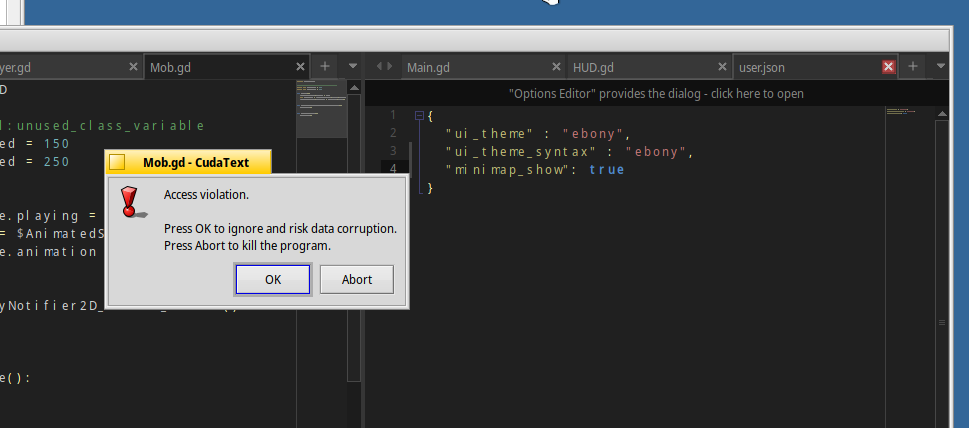
In quite some situations that dialog pops up. Once that happens, if press Abort, CudaText quits and can be relaunched. If press OK until CudaText ends up crashing, CudaText can't be relaunched. Need to reboot to be able to launch CudaText again.
This 'Access Violation' happens, for now, when closing a TAB, though not always.
Regards,
RR
roired
on 6 Jul 2021
- How do you exactly close tab? Ctrl+W, clicking x icon, 'file / close' menu ?
- Does Haiku support 'gdb' debugger? can you run the Cud from IDE under debugger?
I need the stack-trace window look from IDE, or I will try to debug..
Alexey-T
on 6 Jul 2021
Happens Always, when closing a tab, wether it's by clicking the X, right-clicking the tab and select close tab, or from the file menu selecting 'close'.
Yes I have gdb installed. I'll try to do that, run CT from IDE under debugger and let you know.
roired
on 6 Jul 2021
IDE has the menu item 'view / debug windows / call stack'- pls show full contents of it (you can post the text after 'Copy') after the crash.
Alexey-T
on 6 Jul 2021
Good day @Alexey-T ,
today I had some time to check that closing issue on a VMWare virtual machine, and the issue isn't present. I tested the three methods to close the tab. It's a bit weird. Maybe because the VM has a clean system and does not have any unneeded stuff?
If I have time today to check the stack trace window from Lazarus IDE I will tell you te results.
Still working on this, though time is limited.
Regards,
RR
roired
on 12 Jul 2021
So no 'repro' on a VMware VM, weird.
Alexey-T
on 12 Jul 2021
Yep, way too weird. (Edited: nope, also happens in the VM, though not that often as on BM). I have to wait until sources 3.2.2 are merged into Haikuports to do the test with the IDE, now I have fpc 3.2.2 and sources 3.2.0 and Lazarus complains.
Will let you know how it goes when I can do it.
Thanks!!
Regards,
RR
roired
on 13 Jul 2021
I have to wait until sources 3.2.2 are merged into Haikuports
They are already merged a while ago? https://github.com/haikuports/haikuports/pull/6034/files
Begasus
on 13 Jul 2021
Apologies @Begasus ,
Didn't see that. It seemed not to auto update to the new version. I'll check again when I have some time and let you know.
Thanks.
Regards,
RR
roired
on 14 Jul 2021
You probably got yours from HAKILO, that one wont update to the new one on haikuports I presume :)
Begasus
on 14 Jul 2021
Good day @Alexey-T,
This dialog window that appears when closing tabs:
https://github.com/Alexey-T/CudaText/issues/3374#issuecomment-874830214
Also appeared when running Lazarus. Same issue, same problem. So might come from Lazarus and therefore inherited in CudaText.
@Begasus , you were right. Installing the version from Haikuports by hand did the trick. Thanks.
Regards,
RR
roired
on 14 Jul 2021
Hello. Is that error dialog still present in Lazarus and Cud? to solve it, we need to install the lazarus and run the lazarus from lazarus (ie open project ide/lazarus.lpi from IDE). then see where the crash is
Alexey-T
on 19 Aug 2021
@roired
This dialog window that appears when closing tabs:
We had the fix in 1.142.6 (2021/08), did it help?
- fix: regression: sometimes app crashes on closing tabs
Alexey-T
on 31 Aug 2021
Good day @Alexey-T ,
Sorry, I haven't had time to work on CT lately, and I presume I won't be able to do any more stuff before October 4th. I promise I'll get back to it as soon as I get back on track.
Apologies.
Regards,
RR
roired
on 1 Sep 2021
Related issues
Alexey-T
·
7Comments
Alexey-T
·
5Comments
 charliewales
·
4Comments
Alexey-T
·
3Comments
charliewales
·
4Comments
Alexey-T
·
3Comments
 GHNewbiee
·
7Comments
GHNewbiee
·
7Comments
Most helpful comment
Checked the install earlier and CudaText installs and launches fine on my 64bit native Haiku install. :+1: