Cudatext: [Beta 1.132.9] Unable to close a tab
Relate to #3338
With a fresh install.
- Open CudaText.
- Select Options -> Settings - user
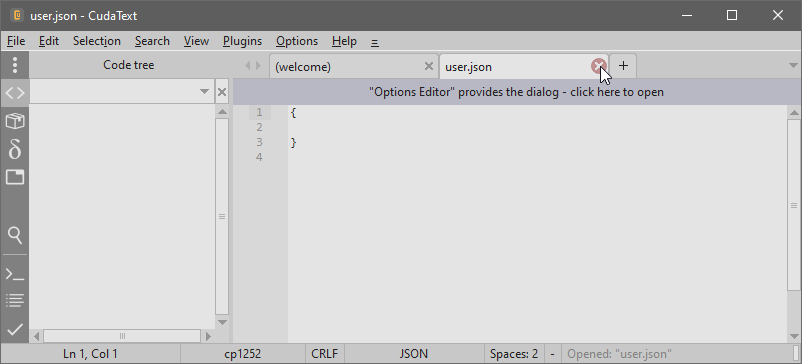
- CudaText open a new empty JSON tab
- In this step, I cannot close the recent tab, even after restart CudaText.
 JairoMartinezA
All 21 comments
Tested on Win10 (and linux); same steps with fresh install-- no repro! tab is closing OK.
@halfbrained
 Alexey-T
on 24 Apr 2021
Alexey-T
on 24 Apr 2021
(that was on last beta from /c/ folder).
Alexey-T
on 24 Apr 2021
Jairo, can u try another ways of tab-closing?
- command palette item
- hotkey for that command (ctrl+W?)
Alexey-T
on 24 Apr 2021
No such problem on Ubuntu 18 or Win7 for me
 halfbrained
on 24 Apr 2021
halfbrained
on 24 Apr 2021
- Is your Windows running as Virtual Machine? I think is related to multi-core, I suppose because you are using multi-threading.
- It is happens as CudaText is not able to finish the "re-paiting"
- The only way to "unlock" the tab is changing to another lexer.
- In my previous image the user.json is opened with JSON lexer instead JSON^ (Lite), Is the same with you?
Testing again with /c release.
JairoMartinezA
on 24 Apr 2021
Same with a fresh download.
If I change the lexer to JSON^ I can close the tab, but If a change again to JSON, the tab remains unclosable.
JairoMartinezA
on 24 Apr 2021
as I said I also used clean Cud, no settings, and cannot repeat that. I tried linux+win10.
Alexey-T
on 24 Apr 2021
Jairo, so you used the 1-core VM? so it seems it messed the work. could you change VM settings to have 2-3 cores? ie CPUs.
Alexey-T
on 24 Apr 2021
@MiroslavMatas
You have Windows10, right? Could you help us to test the same issue please!
JairoMartinezA
on 24 Apr 2021
Jairo, so you used the 1-core VM? so it seems it messed the work. could you change VM settings to have 2-3 cores? ie CPUs.
I have no VMs, I am using directly an PC with Windows10:
Processor Intel(R) Core(TM) i5-4210U CPU @ 1.70GHz, 2401 Mhz, _2 Core(s), 4 Logical Processor(s)_
JairoMartinezA
on 24 Apr 2021
okay, so we cannot find the reason. yet.
Alexey-T
on 24 Apr 2021
But yes Alex, the only way to close the tab is changing to JSON^, that is why I think the "problem" happens when CudaText is not finishing in right way the lexer painting thread, you know when you use threads you need to ensure close or terminate them in order to give the control to the main thread, the UI thread in this case.
JairoMartinezA
on 24 Apr 2021
I found the 'bad code', working to fix
Alexey-T
on 24 Apr 2021
reproduced somehow. and solved? beta in /c folder updated. pls test.
Alexey-T
on 24 Apr 2021

No yet 😭 I mean, with this version the problem persists.
JairoMartinezA
on 24 Apr 2021
strange. I renamed the files on server. maybe you got cached files...
Alexey-T
on 24 Apr 2021
That is my idea if you can upload files increasing the build number, but let me try with another browser.
JairoMartinezA
on 24 Apr 2021
uploaded with a new file name.
Alexey-T
on 24 Apr 2021
Works for me just the first time, after reopen the user.json I couldn't not close again by a second time. :(
I need to move away from home, I will test restarting Windows, considering something is cached in Windows, but I can sure the first time I could close the tab.
JairoMartinezA
on 24 Apr 2021
Something happened, I missed one previous comment, but basically for me worked ok just the first time after I downloaded, but in the second time I got the same problem. I had to restart the PC considering if something was cached by Windows (One handle maybe).
Now I tested again and all seems is OK, I will be testing more in the next hours.
JairoMartinezA
on 24 Apr 2021
_@MiroslavMatas_
You have Windows10, right? Could you help us to test the same issue please!
- sorry for late response…
- just for sure, build cudatext-win-x64-1.132.9.0a.zip was verified here on real Win10 (i7, 8core) and also on VM: Win10 + Win2016 - one core and multicore
- all cases - close tab is ok, doesnt matter what lexer
 MiroslavMatas
on 24 Apr 2021
MiroslavMatas
on 24 Apr 2021
Related issues
 EchedeyLR
·
3Comments
EchedeyLR
·
3Comments
 jczanfona
·
5Comments
Alexey-T
·
5Comments
jczanfona
·
5Comments
Alexey-T
·
5Comments
 charliewales
·
4Comments
Alexey-T
·
4Comments
charliewales
·
4Comments
Alexey-T
·
4Comments