Find dialog keeps search history after calling Find next from drop-down menu or just pressing Enter. But it doesn't work for pressing hotkeys and calling function from command palette. So, when I press F3 or Ctrl+Shift+P -> find, next it doesn't save history. For me it's the most common case. Could it be fixed?
 xcme
xcme
All 8 comments
So, when I press F3 or Ctrl+Shift+P -> find, next it doesn't save history
what history can it save? find-next is not giving a new string. to history.
 Alexey-T
on 17 Apr 2021
Alexey-T
on 17 Apr 2021
History of search. Press this button (highlighted line) and it will save it in history:
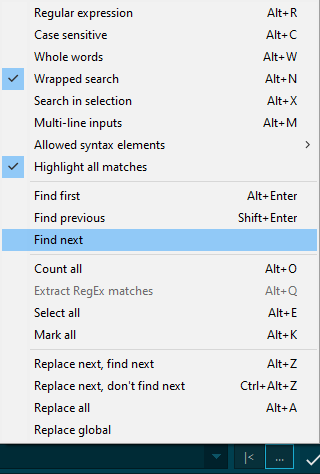
But it won't be saved after calling the same command from command palette or by hotkey. I suggest save it any time when any find-related action is performed because it makes sense.
xcme
on 17 Apr 2021
but the text already must be in history (coz find-first was pressed before).
Alexey-T
on 17 Apr 2021
My use case. For example I have something like that. I usually click twice or select text I want to search, for instance true.
  "bracket_highlight" : true,
  "caret_blink_en" : true,
  "comment_move_down" : false,
  "find_hidden_buttons" : "npe",
  "find_indent_vert" : 128,
  "find_suggest_cur_word" : false,
  "find_suggest_sel" : true,
....
Then I press Crtl+F and then F3 (Find, next). It works, but when I want to search for true next time I should type it manually or repeat the procedure, because I see no such entry in history. The same from calling command from command palette. But if I press the button on the picture above, then it saves true in history.
xcme
on 17 Apr 2021
Sounds good, will work on it
Alexey-T
on 17 Apr 2021
seeems fixed now, will be in next beta.
Alexey-T
on 17 Apr 2021
beta is here - http://uvviewsoft.com/c/
Alexey-T
on 17 Apr 2021
Thanks. It seems it works. Now I see last string in history after pressing F3 or after calling it from command palette
xcme
on 18 Apr 2021
Related issues
Alexey-T
·
7Comments
 GHNewbiee
·
7Comments
Alexey-T
·
5Comments
Alexey-T
·
5Comments
Alexey-T
·
5Comments
GHNewbiee
·
7Comments
Alexey-T
·
5Comments
Alexey-T
·
5Comments
Alexey-T
·
5Comments
Most helpful comment
My use case. For example I have something like that. I usually click twice or select text I want to search, for instance true.
Then I press Crtl+F and then F3 (Find, next). It works, but when I want to search for true next time I should type it manually or repeat the procedure, because I see no such entry in history. The same from calling command from command palette. But if I press the button on the picture above, then it saves true in history.