Cudatext: Undo/Redo animation fixing
made new topic. to discuss 'minimal animation' on undo/redo. how it works: if undo must jump to not-yet-visible area, it jumps and shows 'current line highlight' and makes a pause.
so if we have 3 changes on lines 20, 200, 300, we have 3 pauses.
new beta at
http://uvviewsoft.com/c/
@xcme @halfbrained
 Alexey-T
All 49 comments
When this works it is very helpful...
But now if I make several (~4) changes throughout the document, then holding Ctrl+Z to undo everything - some changed lines will not be reverted. ~100% reliable.
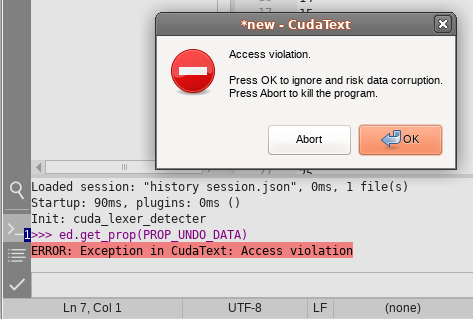
And occasionally while playing with Undo/Redo I get to the state where trying to one of the Undo/Redo will give "Access Violation" popup every time. (might be related to me moving caret with mouse or PageUp/PageDown while doing Undo/Redo :) )
 halfbrained
on 26 Mar 2021
halfbrained
on 26 Mar 2021
then holding Ctrl+Z to undo everything - some changed lines will not be reverted. ~100% reliable.
ah, it is App.ProcessMessages call, which breaks it. working on it.
Alexey-T
on 26 Mar 2021
made new beta.
now during undo/redo (if undo pause>0) I do 'enabled= false' for control. it gives gray BG color. IMO it's ok.
crash solved?
Alexey-T
on 26 Mar 2021
All is well now, no crashes. Thanks
halfbrained
on 26 Mar 2021
made new topic. to discuss 'minimal animation' on undo/redo. how it works: if undo must jump to not-yet-visible area, it jumps and shows 'current line highlight' and makes a pause.
Right
so if we have 3 changes on lines 20, 200, 300, we have 3 pauses.
Not quite. It should make a pause every jump, not every line. In that cause we have 2 pauses: between 20 and 200 and then between 200 and 300. And there shouldn't be any delay between 300 and 303, for example.
 xcme
on 26 Mar 2021
xcme
on 26 Mar 2021
If if really does pause for each line it could explain why I got this case (3rd entry).
xcme
on 26 Mar 2021
In that cause we have 2 pauses: between 20 and 200 and then between 200 and 300. And there shouldn't be any delay between 300 and 303, for example.
yes, it must work like this already.
Alexey-T
on 26 Mar 2021
it's already so: pause is running only on screen-scrolling-jump.
Alexey-T
on 26 Mar 2021
But how can I get issue with delay on each line?
Will try to reproduce...
xcme
on 26 Mar 2021
@xcme if you are Ru-speaking welcome to Discord chat
https://discord.gg/z7JcRN3e
invite will end after 1 day.
Alexey-T
on 26 Mar 2021
Yes, I'm. I use English just to make sure other people can participate and google some issues once. And for practice purpose.
But I don't have Discord yet. Perhaphs I will register it a bit later.
xcme
on 26 Mar 2021
But how can I get issue with delay on each line?
maybe you __hold__ ctrl+z for seconds?
Alexey-T
on 26 Mar 2021
I will show one demo with similar problem within 10 minutes.
xcme
on 26 Mar 2021
blinking_and_delay_in_visible_area.zip
As you can see it uses delay and blinks even in visible area.
xcme
on 26 Mar 2021
yes, special case at end-of-file! thanks. made a fix,
beta updated.
Alexey-T
on 26 Mar 2021
Ok, will check soon!
xcme
on 26 Mar 2021
Now it works for undo but blinks for redo. Another issue for redo - #3269. Seems, similar root cause.
- Try any symbol + enter for 5-7 times in a new file.
- Then several times undo
- Then several times redo
You will see as it blinks on redo.
But it you perform changes not at the end of file it seems it works as it should.
xcme
on 26 Mar 2021
animation_bug.zip
Another animation bug. I posted it here because this issue is for animation.
xcme
on 26 Mar 2021
You will see as it blinks on redo.
thanks, seems fixed now. beta updated.
animation_bug.zip
I dont get what is hapening here. seems you run Undo and it undoes line by line, and when it reaches first non-shown line it does animation? then it's ok. you Undo 40 typed lines and after some N lines you must see animation (caret out of view)
Alexey-T
on 26 Mar 2021
I dont get what is hapening here.
No, I pressed undo hotkey once and it caused this chain reaction. The same then for redo - only one time also.
xcme
on 26 Mar 2021
is this reaction in the new beta too? (my previous comment)
Alexey-T
on 26 Mar 2021
Sorry, will test it tomorrow.
xcme
on 26 Mar 2021
I updated beta just now- more minor fixes. @xcme
Alexey-T
on 26 Mar 2021
You will see as it blinks on redo.
Seems fixed
I see that 'chain reaction of pauses' is fixed (still same beta)
Seems fixed
Minor issue/question:
- I think CT considers the area as visible area based on caret position, but what if we just scroll the window a bit? From CT's point of view it's still visible, but from user's isn't
xcme
on 27 Mar 2021
Nope, CT considers it ignoring the caret position
Alexey-T
on 27 Mar 2021
OK, you are right.
Try to test next animation issue then:
- Type something in line 100
- Scroll screen to line 1 (to hide line 100 from the screen)
- Perform undo
In my case I see _blink_ but don't see the change itself on the line 100.
xcme
on 27 Mar 2021
thanks, will work on it.
Alexey-T
on 27 Mar 2021
seems fixed. new beta-- pls test?
Alexey-T
on 27 Mar 2021
Yes, looks like that!
xcme
on 27 Mar 2021
In #3271 I can see chain reaction again:
- Set "wrap_mode" to 1
- Open new tab
- Press Enter 4 times
- Perform undo, then redo
You will see "chain reaction" with blinking and delay between each line.
xcme
on 28 Mar 2021
Good thing is: i know what to fix.
Alexey-T
on 28 Mar 2021
beta updated.
note: sometimes I see the 'animation' on redo at end-of-file if "last_line_on_top" + "wrapped". hard to fix it and it's minor
Alexey-T
on 28 Mar 2021
Last beta, clean installation, no settings at all:
- New tab
- 100 empty lines (via Enter)
- Undo
- Redo
Now this animation is present for both undo and redo. And it removes all 100 lines. As far I understand, if the final position is the line 1, then it should jump to the line 1, wait once and then perform undo.
xcme
on 28 Mar 2021
yes, confirm,it is that hard case which is not 100% OK. during 100 lines undo-redo I see it, hard to fix yet, I tried
but it is not slowing the work.
EDIT
maybe I'll keep it as is.
Alexey-T
on 28 Mar 2021
but it is not slowing the work.
That the point, it is. It's also almost the first issue I saw after launching beta, so all new users will see it. Please, take your time, don't hurry. You may find a solution or workaround next days :)
xcme
on 28 Mar 2021
fixed anothere 'chain reaction of pauses'. beta updated.
- big file
- Ctrl+A, Del
- Undo
Alexey-T
on 29 Mar 2021
I see, now it's fixed for redo, but for undo issue is still there. But it's a progress!
xcme
on 29 Mar 2021
I think I must do a pause only when at least 1-2sec was passed since last pause.
Alexey-T
on 29 Mar 2021
As a workaround? Could you describe what the problem with this case?
xcme
on 29 Mar 2021
- do Enter 100 times
- Undo: each undo step (1 line) goes 1 line upper-- lot of pauses appear
that is a problem.
Alexey-T
on 29 Mar 2021
Placed new beta. now I'm not use I fixed all cases, lets see
Alexey-T
on 29 Mar 2021
* Undo: each undo step (1 line) goes 1 line upper-- lot of pauses appear
As I said before "if the final position is the line 1, then it should jump to the line 1, wait once and then perform undo." The initial request implies one undo = one jump:
I propose just to change sequence:
jump to the right line
wait for very short period
undo/redo in the visible area
jump to the right position
P.S. Will check the beta
xcme
on 29 Mar 2021
Now I see only one jump in that case and it very quickly. Don't see problems now, but let me check it tomorrow also.
xcme
on 29 Mar 2021
of course, let's test it for N days.
Alexey-T
on 29 Mar 2021
The only small issue - it performs redo a bit long sometimes. It looks like there are 2 or 3 pauses instead of 1. But in other tab I can't reproduce.
long_redo.zip
xcme
on 29 Mar 2021
@Alexey-T did you watch the last demo?
xcme
on 31 Mar 2021
yes I did, but I don't understand it, and no repro....
Alexey-T
on 31 Mar 2021
Will try to reproduce again...
xcme
on 1 Apr 2021
let's post it later to a new issue. this is overheated. closing.
Alexey-T
on 1 Apr 2021
Related issues
Alexey-T
·
5Comments
Alexey-T
·
3Comments
 JairoMartinezA
·
7Comments
JairoMartinezA
·
7Comments
 charliewales
·
4Comments
JairoMartinezA
·
5Comments
charliewales
·
4Comments
JairoMartinezA
·
5Comments