Cudatext: 1.126.8 with optimizations in core
Released
- add: internal optimizations in renderer, pls report any bugs
- add: on opening user.json or default.json, program shows information panel about "Options Editor"
- add: option "autocomplete_autoshow_chars" now works with national letters
- add: Addon Manager: don't reinstall CudaLint/CudaFormatter when a linter/formatter is installing
 Alexey-T
All 13 comments
brilliant idea: _add: on opening user.json or default.json, program shows information panel about "Options Editor"_
and nice implementation
 MiroslavMatas
on 23 Feb 2021
MiroslavMatas
on 23 Feb 2021
more optimizations, now for leading tab-chrs in line.
Beta updated!
Alexey-T
on 24 Feb 2021
@Lastique @JairoMartinezA @OlehL @MiroslavMatas
Any feedback about the rendering /scrolling speed?
Alexey-T
on 24 Feb 2021
_>> Any feedback about the rendering/scrolling speed?_
no feedback (^_^)
frankly - it looks really better (appreciate it on my .mkd, .todo and .xml)
sure, my edit sessions are not on huge files, but quick move is must be… and now it looks really really better
thanks a lot
MiroslavMatas
on 24 Feb 2021
I see it's little better on files with leading-tab-chars.
Alexey-T
on 24 Feb 2021
Sorry @Alexey-T
In my case I could don't see the difference, maybe I had not the correct user case. I was testing with an XML file with 3M lines between cudatext-win-x64-1.125.2.0 and cudatext-win-x64-1.126.4.0 using _leading-tab-chars_ but again I could not see any difference.
😕
 JairoMartinezA
on 24 Feb 2021
JairoMartinezA
on 24 Feb 2021
Amendment!!! I was thinking to create a new issue to complain about the rendering but with T-SQL lexer with a file of 3K lines, but I suppose since 1.126.4.0, wow! now yes, I can see the difference!!! before, with each change the "repainting" was noticeable, but now, smoooooooother!!!
Thanks @Alexey-T
Update:
Sorry @Alexey-T my bad, I was validating but by "error" I opened a previous version of my T-SQL file which only had 2K lines, with this version of my file, the "repainting" is smooth, but when I work with my current version of my T-SQL file (3K lines), the repaints is evident. I need to do more testing to try to figure out when happens the "error" with the rendering.
JairoMartinezA
on 25 Feb 2021
don't do testing now, I am doing the next reowrking. I will move minimap painting to a thread.
I see that 40-60% of time is taken by minimap. (if it's on)
it will not be faster with minimap OFF.
@lastique @jairomartineza - so turn the minimap OFF.
Alexey-T
on 26 Feb 2021
Jairo, I put the new beta. with minimap in a thread. let's test it? it's faster here.
Alexey-T
on 26 Feb 2021
major fix in beta! (crash). beta just updated.
@halfbrained @jairomartineza
Alexey-T
on 26 Feb 2021
Hi @Alexey-T
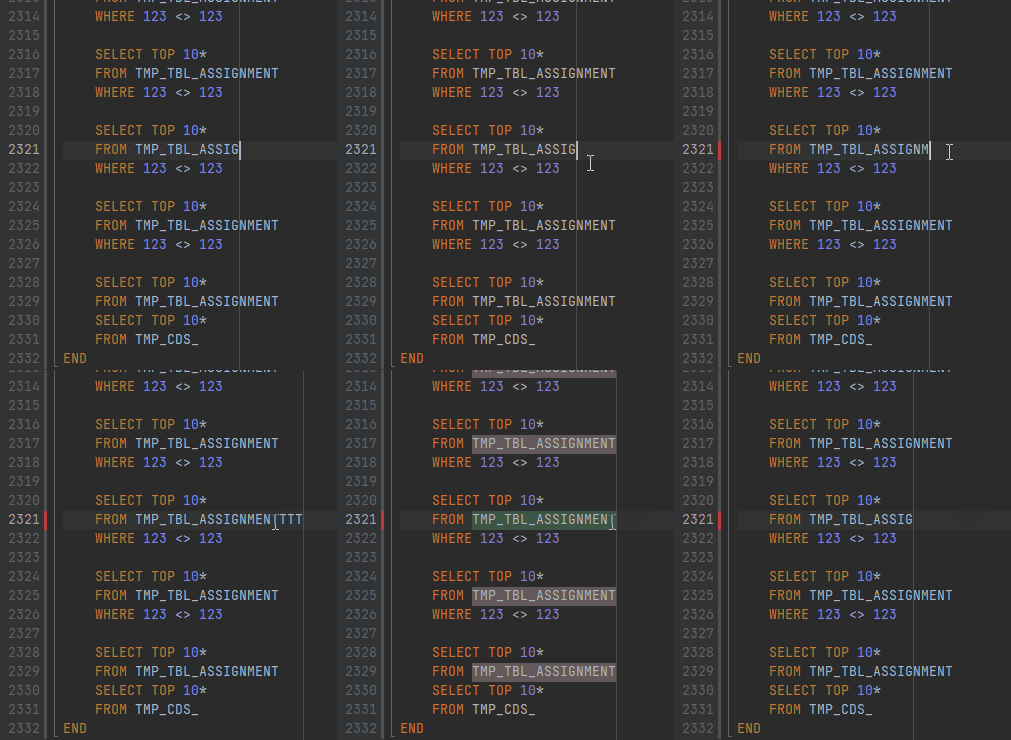
In my specific test case with my T-SQL file of 3K lines the "problem" persists talking about the rendering, as a rule I don't use the minimap because the micromap for me is the sacred feature, in my case the issue I suppose is related to the lexer, because if I use the SQL^ the "repainting" is not noticeable.
I was doing in this moment one testing, my file has the next quantification:
Text Statistics for "dbo.TMP.sql"

Lines: 2332
Words: 6762
Letters: 49521
All chars: 97668
What I can figure out is if I add one more char to the file, appears the "repainting":
JairoMartinezA
on 27 Feb 2021
yes it is old known issue, for example it's here
https://github.com/Alexey-T/CudaText/issues/2976
options lexer_delayed* allow to play with it.
Alexey-T
on 27 Feb 2021
closing,and making the topic about last beta.
Alexey-T
on 27 Feb 2021
Related issues
 junguler
·
5Comments
JairoMartinezA
·
5Comments
Alexey-T
·
7Comments
Alexey-T
·
5Comments
junguler
·
5Comments
JairoMartinezA
·
5Comments
Alexey-T
·
7Comments
Alexey-T
·
5Comments
 rhinolophus
·
5Comments
rhinolophus
·
5Comments
Most helpful comment
yes it is old known issue, for example it's here
https://github.com/Alexey-T/CudaText/issues/2976
options lexer_delayed* allow to play with it.