Cudatext: Beta 1.120; discuss the "Highlight matches" button in Find dialog
beta http://www.uvviewsoft.com/c/
1.120
- add: Find dialog has new toggle button "Hi", it means "Highlight all matches". Matches are highlighted with a rounded border, which color is taken from "SeparLine" syntax theme item. Editor also auto-scrolls to the first match, like in Sublime. It is incremental search.

- add: command "find next" in multi-selections now supports "in selection"+"wrapped search" (with the forward search)
- add: option "find_max_lines_for_hi_matches"
- add: option "find_hotkey_op_hi_matches" for "Hi" button
- add: option "find_hidden_buttons" is extended, it can now hide several toggle-button options
- add: option "find_hidden_buttons" is extended, it can now hide text labels "Find:" and "Replace:"
- add: lexer C++: code-tree improvement: change icons for "namespace"; detect "struct name
"; avoid C++ keywords "requires" in code-tree - add: lexer C++: highlight labels, in "goto label;" and "label: statement;"
- add: lexer Bash: highlight numbers in form like "100suffix"
- add: sync Asian code-page convertion code with Lazarus patch (Support EUDC to PUA Microsoft mapping) by @powerpcer
@xcme @dinkumoil @jairo-martinez @OlehL @tmsg-gh @kvichans @iRamSoft
 Alexey-T
All 31 comments
looks good!
rounded border stay visible also after close Find dialog - is it by design?
 MiroslavMatas
on 1 Jan 2021
MiroslavMatas
on 1 Jan 2021
seems i fixed it on dialog close; beta updated.
Alexey-T
on 1 Jan 2021
For your consideration:
- Put marks in Micromap
- Show number of matches
Which are the boundaries to use this functionality?
- Number of lines in file?
- Max length for line?
 JairoMartinezA
on 2 Jan 2021
JairoMartinezA
on 2 Jan 2021
the limit of lines (max count of lines) is given by a new option. see the history.txt.
marks to micromap-- maybe good idea.
Alexey-T
on 2 Jan 2021
I added micromap marks.

Alexey-T
on 2 Jan 2021
beta is updated to 1.119.9.
Alexey-T
on 3 Jan 2021
Great work, I like it! But I can't see this:
Editor also auto-scrolls to the first match, like in Sublime.
Should I change some option to achieve it?
I also have a search-related question. We have in default.json
  //Find dialog: suggest selection (of first caret) as initial search text
  "find_suggest_sel": false,

  //Find dialog: suggest current word (at first caret) as initial search text
  "find_suggest_cur_word": true,
Don't you think it's better to have it vice-versa? The current behaviour implies a user wants to find something under this caret but it might be confusing sometimes. But if we changed it in opposite way the behaviour would be as in Sublime. What do you think?
 xcme
on 3 Jan 2021
xcme
on 3 Jan 2021
But I can't see this: Editor also auto-scrolls to the first match, like in Sublime. Should I change some option to achieve it?
it is so only while the "Hi" toggle option is checked. does it work for you?
do we need to auto-scroll even w/o "Hi", Im not sure?
Alexey-T
on 3 Jan 2021
splitted the question to #2990 .
Alexey-T
on 3 Jan 2021
it is so only while the "Hi" toggle option is checked. does it work for you?
No, see the picture.
The caret on the same position.
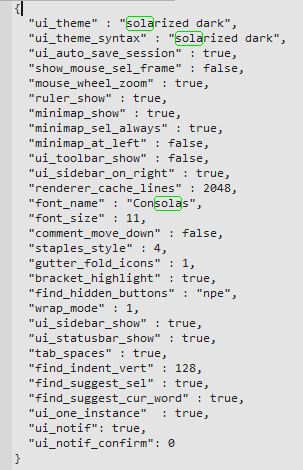
do we need to auto-scroll even w/o "Hi", Im not sure?
I think No, only when it's enabled
xcme
on 3 Jan 2021
The caret on the same position.
the caret and vert-scroll-position are different things. "Hi" makes the auto-scroll, makes vert-scroll-position. caret is not touched here.
Alexey-T
on 3 Jan 2021
Oh, I just understood you wrong. I'd thought it's related to #2314 to achieve the same behaviour as in ST - it moves the caret when it highlights all matches:

What do you think about this feature?
xcme
on 3 Jan 2021
@xcme such behaviour confuses me. because we move caret here and there. OTOH, it may be OK for ST3 users and good. Im not sure.
if you find other editor apps which do it like ST3, pls write.
Beta updated!
- change: option "ui_active_border" changed to integer, allowing setting the border width
- change: changed default values of "find_suggest_sel"/"find_suggest_cur_word" to be like in ST3
Alexey-T
on 3 Jan 2021
@xcme
ST3: it do NOT move the caret when I type "eee" to highlight all matches. gutter indicator shows the caret is near "zz".
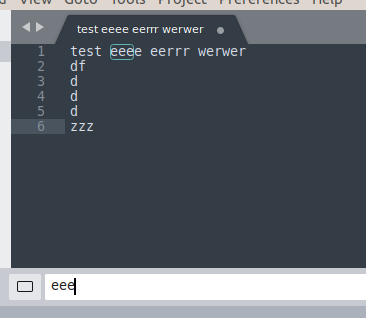
Alexey-T
on 3 Jan 2021
Thanks! Now it much move obvious where I am. It looks nice in my favourite theme (I mean 2px border):
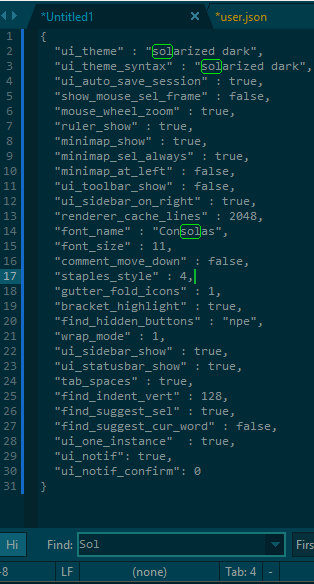
xcme
on 3 Jan 2021
@Alexey-T, so strange... For me it does. My user settings are on the screen. I have enabled just 'Highlight matches' button at the left. The caret initially was on the line 19 but then jumped up to line 4.
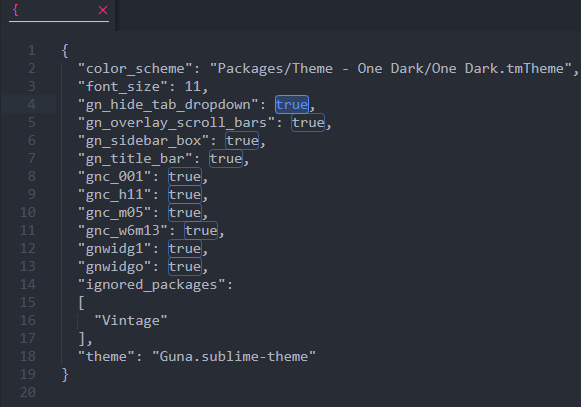
Also, plz read again the first post in #2314 where @Jairo-Martinez says the same.
xcme
on 3 Jan 2021
let's find how to change this in ST3: when caret moves or not. maybe some addon is doing it.
Alexey-T
on 3 Jan 2021
Ok, added the option!
- add: option "find_hi_move_caret"
renamed 2 new opts:
- add: option "find_hi_max_lines"
- add: option "find_hotkey_op_hi"
beta updated.
Alexey-T
on 3 Jan 2021
I've now tried both CURRENT beta versions (fresh downloads today) and both in Windows and in Linux the highlight border remains stubbornly at 1px (other borders work as expected). Perhaps some other thing I have in my config is playing a role, I don't know. It's no great problem, just a little frustrating. But never mind.
 tmsg-gh
on 4 Jan 2021
tmsg-gh
on 4 Jan 2021
pls, post here your user.json file, or send me it - support(at)uvviewsoft.com
Alexey-T
on 4 Jan 2021
@tmsg-gh can you show some screenshot with bad 1 px frame? can it be non-supported control which is 1 pixel because Win10 paints always 1 px blue frame?
Alexey-T
on 4 Jan 2021
done #2994; beta updated just now.
Alexey-T
on 5 Jan 2021
Checked newest beta (120); same thing... so perhaps it's simply a misunderstanding. I thought that this famous "ui_active_border" option also works for the green rounded border around found matches. But does it? If so, it's broken. If not, I was wrong in my assumption.
tmsg-gh
on 5 Jan 2021
Additionally, here are a couple suggestions which (IMO) would make that feature a little better. First, it would be great if Cud would give the number of current matches, eg in the status line (FiF does that and it's helpful).
Second, why do you use just SeparLin's background for the colour? Why not go the whole hog and define this as a full style with font, text and bg colour and even a border definition? On my big screen I have some trouble spotting the matches (that's why I tried the "ui_active_border" thing).
tmsg-gh
on 5 Jan 2021
I agree with to show the number of matches 😄
JairoMartinezA
on 5 Jan 2021
@tmsg-gh
"ui_active_border" option also works for the green rounded border around found matches. But does it?
it does not; the border is shown for : main editor; console inputs (2 of them), code-tree filter, find/replace inputs.
Alexey-T
on 5 Jan 2021
@Alexey-T OK then that's solved. I am probably not the only one who fell or will fall into that trap as this option prominently mentioned in this issue. Perhaps you should mention this somewhere... would've saved me (and you) some trouble.
tmsg-gh
on 5 Jan 2021
and I just added statusbar msg for the count of matches in "Hi" feature.
Alexey-T
on 5 Jan 2021
@tmsg-gh I now show border for matches of 2px size, if "ui_active_border" also has border of 2px+ size. (only 2px size, not 3px or more)
beta update in 5 min.
Alexey-T
on 5 Jan 2021
I like new changes. Took a quick look and it works well. The only question yet - when border width for matches is 2 the border itself doesn't look rounded anymore. Is it expected?
xcme
on 5 Jan 2021
yes, it is normal, we currently don't have style "rounded 2px" so i used "simple 2px". maybe later I will add 'rounded 2px' style. not sure.
released the 1.120 !
Alexey-T
on 5 Jan 2021
Related issues
 EchedeyLR
·
3Comments
Alexey-T
·
4Comments
JairoMartinezA
·
7Comments
Alexey-T
·
5Comments
EchedeyLR
·
3Comments
Alexey-T
·
4Comments
JairoMartinezA
·
7Comments
Alexey-T
·
5Comments
 GHNewbiee
·
7Comments
GHNewbiee
·
7Comments
Most helpful comment
I agree with to show the number of matches 😄