Cudatext: What to do when file is modified in external app, and Cud has Ctrl+S pressed?
http://synwrite.sourceforge.net/forums/viewtopic.php?f=5&t=2561
see my reply at the end.
I am not sure what to do. advice?
@kvichans @tmsg-gh @jairo-martinez @dinkumoil
 Alexey-T
All 19 comments
The problem seems to originate from the fact that when pressing _CTRL+S_ or clicking the _Save_ toolbar button or _(menu) File -> Save_ the document is only saved if its buffer is marked as dirty. I think this should be changed. When a user tells CudaText to save the document it should actually do that, without considering the dirty state.
 dinkumoil
on 4 Oct 2020
dinkumoil
on 4 Oct 2020
Ok, ST3 also does this, so I will do it like this.
Alexey-T
on 4 Oct 2020
You could add a fourth button to the three existing ones: either "Resave" (or similar) to force saving the Cud version or "Mark dirty" (or similar) to set the dirty flag so the next save will indeed save the file.
IMHO, saving the file whenever Ctrl-S is pressed, even when the file is not marked dirty, should be avoided if at all possible.
 tmsg-gh
on 4 Oct 2020
tmsg-gh
on 4 Oct 2020
@tmsg-gh
- 4th button will be overload for reload-panel. complex.
- user will fail if he presses Cancel there
- ST3 does save always!
Alexey-T
on 4 Oct 2020
ST3 does save always!
!sardonic!
This well-reasoned argument of course ends all discussion.
!/sardonic!
IMHO, you have before and are still too slavishly following ST3's way of doing things as if ST3 is the word of God.
If I wanted ST3 I know where to find it.
tmsg-gh
on 4 Oct 2020
Ok, you are right, so I add the option
//Command "File / Save" works always, even with unmodified state of document.
//Otherwise, it works only for modified (dirty) documents, of if the file was deleted outside.
"ui_allow_save_always": true,
Alexey-T
on 4 Oct 2020
I tested it a bit and found no problem at all. Do I understand it right the problem appears on big files only, when CT doesn't update it despite it read it in background? It seems it already has the same behaviour as ST from small files.
 xcme
on 4 Oct 2020
xcme
on 4 Oct 2020
It appears on all files...
Alexey-T
on 4 Oct 2020
It appears on all files...
I can't see the difference with ST. Both of then just renew the content if no changes have been made. So, issues with the state:
file is not modified in Cud (it's modified by external app).
aren't occur
xcme
on 4 Oct 2020
@Alexey-T, please, don't rush to change anything. Let me understand that too. Could you provide step-by-step sequence to reproduce the issue?
xcme
on 4 Oct 2020
Cud 1.113 and older did ignore Save command, (w/o any warning), for unchanged files.
Cud 1.114 saves always (it has new option for it)
Alexey-T
on 4 Oct 2020
Cud does NOT update file if user presses Cancel in file-reload-panel on top.
Alexey-T
on 4 Oct 2020
Cud does NOT update file if user presses Cancel in file-reload-panel on top.
But that's exactly what it's supposed to do, isn't it?
xcme
on 4 Oct 2020
yes. then user presses ctrl+S and he wants to save file from Cud. it didnt work in 1.113.
Alexey-T
on 4 Oct 2020
Looks like I'm missing something. I can't understand the issue. Let's go through it. There are two possible option when an external program changes the file.
- User hasn't changed it. In that case both ST and CT just reload the file and display new content automatically. There is no issue.
- User has changed the file but hasn't save. In that case both ST and CT ask to reload or to ignore. If user presses Cancel the file isn't updated. Then user presses Ctrl+S and it saves the current content. There is also no issue.
So, where is the issue?
xcme
on 4 Oct 2020
with Cud option user can see file-panel with 'cancel' button.
press 'cancel'. with unchanged file. then Cud cannot save file. (1.114 can do it)
Alexey-T
on 4 Oct 2020
@xcme wrote:
User hasn't changed it. In that case both ST and CT just reload the file and display new content automatically. There is no issue.
User has changed the file but hasn't save. In that case both ST and CT ask to reload or to ignore. If user presses Cancel the file isn't updated. Then user presses Ctrl+S and it saves the current content. There is also no issue.
So, where is the issue?
@xcme You missed the third case (in the following I'm talking about Cud v1.113):
- User has changed the file and saved it. Now another program changes the file. Although the file in Cud has been saved it doesn't reload it automatically, instead it asks the user to reload or to cancel (please note: this behaviour differs from case 1.). If the user selects _Cancel_, the file in Cud's buffer remains unchanged, the dirty flag is not set. When the user wants to save the document with the content currently displayed in Cud it is not possible because the save code is not executed because of the non-dirty state of the buffer.
IMO it is not good practice to write such a basic functionality like saving a document in a way that it behaves differently depending on the program's context. In that sense Cud v1.114 is a bug fix I appreciate very much.
dinkumoil
on 4 Oct 2020
@dinkumoil, thanks for the explanation. Now I understood. Just tested it in ST and it seems it doesn't distinguish state 1 from state 3. So, if user saved the file it updates it as if it was just first opening. Thereby, there is no issue in ST but it presents in CT. Got it.
P.S. If it's possible to blur the line between states 1 and 3 the problems will disappear.
xcme
on 4 Oct 2020
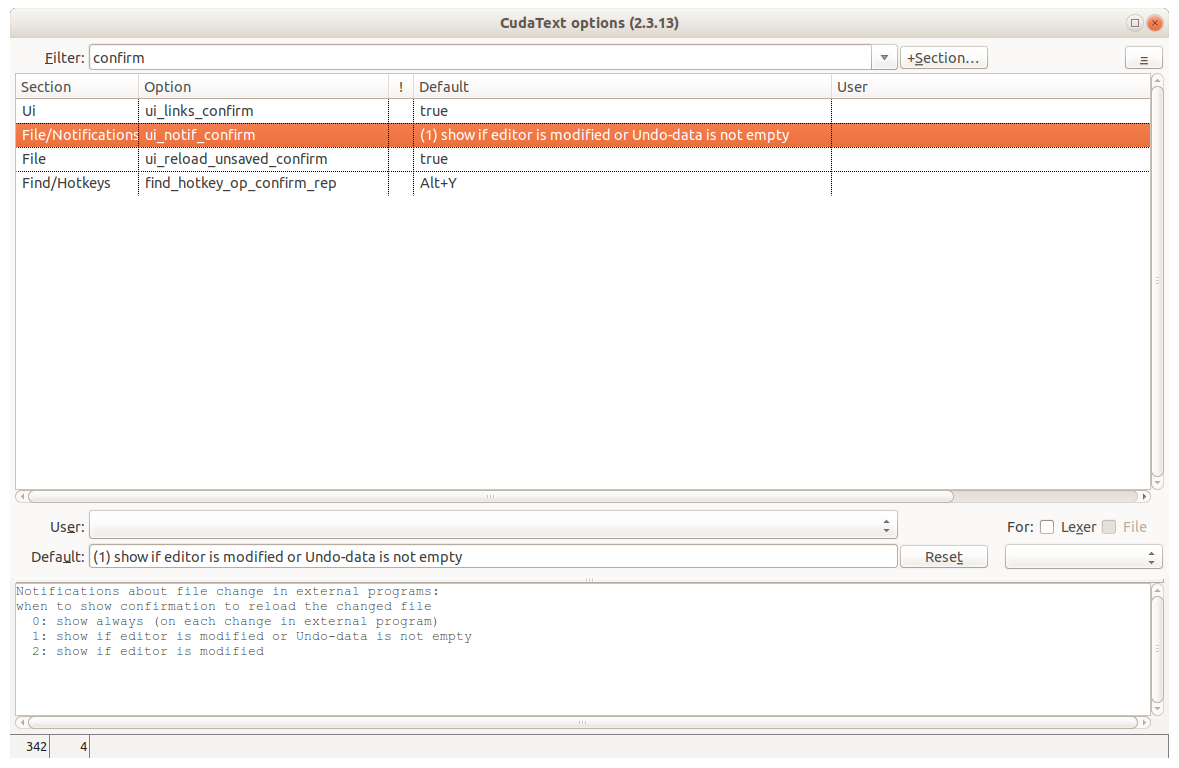
@xcme We have the option, maybe it blurs the line,
if you change value 1 to value 2.
https://github.com/Alexey-T/CudaText/issues/2876#issuecomment-703237362
Alexey-T
on 5 Oct 2020
Related issues
 rhinolophus
·
5Comments
rhinolophus
·
5Comments
 JairoMartinezA
·
5Comments
JairoMartinezA
·
7Comments
Alexey-T
·
5Comments
JairoMartinezA
·
5Comments
JairoMartinezA
·
7Comments
Alexey-T
·
5Comments
 GHNewbiee
·
7Comments
GHNewbiee
·
7Comments
Most helpful comment
@xcme wrote:
@xcme You missed the third case (in the following I'm talking about Cud v1.113):
IMO it is not good practice to write such a basic functionality like saving a document in a way that it behaves differently depending on the program's context. In that sense Cud v1.114 is a bug fix I appreciate very much.