Plugin is updated. You can try it via "Plugins/ Addon manager/ Install from github", URL https://github.com/kvichans/cuda_favorites.
Menu has additional commands

Dlg look is almost the same

Added
- hotkeys
Ctrl+1..9to call items 1..9 (Alt+1..9still work,Alt+0doesn't) - click on
Openwith keyShift- opens the file w/o closing the dialog.
 kvichans
All 33 comments
Great! can I translate post to En? to post link on Cud page?
 Alexey-T
on 8 Jul 2020
Alexey-T
on 8 Jul 2020
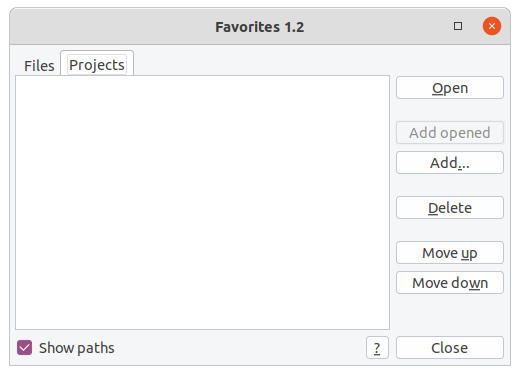
gtk2 - look is OK
Alexey-T
on 8 Jul 2020
Идея "высоту для ярлыков брать из app.app_proc(app.PROC_GET_GUI_HEIGHT, 'button')" сработала. :)
kvichans
on 8 Jul 2020
Let's publish it
Alexey-T
on 8 Jul 2020
ок
kvichans
on 8 Jul 2020
History:
Dialog is fully reworked via new CudaText API.
Added commands in "Plugins/Favorites".
Added Shift+click on "Open" button to open item w/o closing dialog.
Alexey-T
on 8 Jul 2020
Спасибо
kvichans
on 8 Jul 2020
Опубликовал
kvichans
on 8 Jul 2020
Hi @kvichans
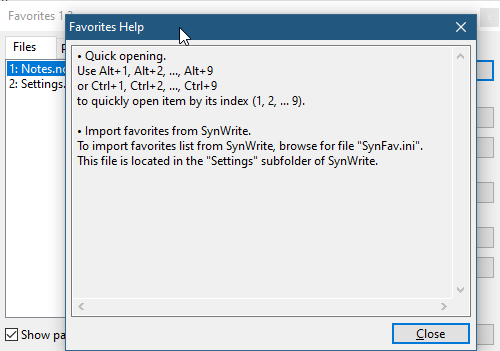
The close button is not working for me:
 JairoMartinezA
on 9 Jul 2020
JairoMartinezA
on 9 Jul 2020
Yes, for me too. To fix.
kvichans
on 9 Jul 2020
Fixed, published
kvichans
on 9 Jul 2020
Before/After update the plugin now I am getting this error trying to open the Favorities dialog:
    Traceback (most recent call last):
      File "C:\Users\Jairo Martinez\Downloads\Apps\Cudatext\py\cuda_favorites\cd_favs.py", line 236, in dlg
        ,   opts    =d(negative_coords_reflect=True)
      File "C:\Users\Jairo Martinez\Downloads\Apps\Cudatext\py\cuda_favorites\cd_kv_dlg.py", line 157, in __init__
        self._setup(ctrls, form, vals, fid)
      File "C:\Users\Jairo Martinez\Downloads\Apps\Cudatext\py\cuda_favorites\cd_kv_dlg.py", line 540, in _setup
        DlgAg._check_data(self.ctrls, ctrls, form, vals, fid)
      File "C:\Users\Jairo Martinez\Downloads\Apps\Cudatext\py\cuda_favorites\cd_kv_dlg.py", line 521, in _check_data
        raise ValueError(f'No name for fid: {fid}')
    ValueError: No name for fid: brow
I don't know if I need to clean some cache?
JairoMartinezA
on 9 Jul 2020
I had to clean the previous cuda_favorites.json file.
JairoMartinezA
on 9 Jul 2020
I could repro, the problem happens when the config json have this value:
"fv_tab": 1,
I see the bug. Sorry!
Fixed+Pub (with prev ver - so update from GH)
kvichans
on 9 Jul 2020
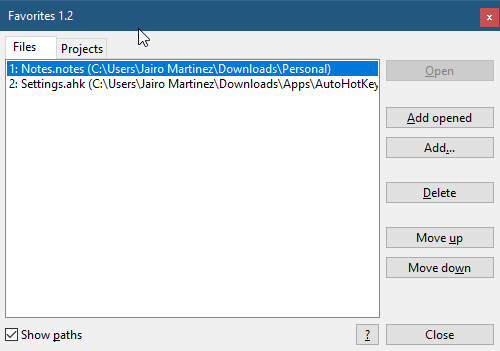
Now the Open button is never enable:
JairoMartinezA
on 9 Jul 2020
:( No ideas
Could you pass cuda_favorites.json to repro?
kvichans
on 9 Jul 2020
It happened when I modified manually the same value to:
"
fv_tab": 1,
JairoMartinezA
on 9 Jul 2020
I have no repro
kvichans
on 9 Jul 2020
My steps:
- Download the plugin from GH
- Close Cud
- Change
cuda_favorites.jsonfor this value to:"fv_tab": 1, - Open Cud
- Open Favorities
- The button Open is not enable
- Close Cud
- The value in
cuda_favorites.jsonis updated to:"fv_tab": 0,automatically by the plugin - Open Cud again
- The Favorities again, now is OK
At the end @kvichans the user don't need to change manually the value of "fv_tab": 1, in my case I get this weird behavior because I had to change manually the value for my first report, you can consider OK I suppose.
JairoMartinezA
on 9 Jul 2020
Need more info about content of cuda_favorites.json:
- Are
fv_filesand/orfv_projsincuda_favorites.json? - How many items in the lists?
kvichans
on 9 Jul 2020
My settings:
JairoMartinezA
on 9 Jul 2020
Thanks - now i catch repro
kvichans
on 9 Jul 2020
Try from GH
kvichans
on 9 Jul 2020
Working good!
Suggested features for consideration:
- Support double click on list of files/projects to open
- In Projects tab when click on Add... button limit filter to Cud Project files, I supposing Projects tab is only for Cud projects.
Thanks.
JairoMartinezA
on 9 Jul 2020
ToDo
kvichans
on 10 Jul 2020
@Jairo-Martinez
Dbl-click and filter: done.
Try from GH
kvichans
on 10 Jul 2020
My unit tests shows all OK.
JairoMartinezA
on 10 Jul 2020
Thanks
Publishing...
kvichans
on 10 Jul 2020
I dont see that dbl-click works in last release (linux gtk2).
Alexey-T
on 11 Jul 2020
Publishing...
kvichans
on 12 Jul 2020
Published
kvichans
on 12 Jul 2020
Ok,thanks.
Alexey-T
on 12 Jul 2020
Related issues
Alexey-T
·
5Comments
Alexey-T
·
7Comments
JairoMartinezA
·
5Comments
JairoMartinezA
·
7Comments
 GHNewbiee
·
7Comments
GHNewbiee
·
7Comments
Most helpful comment
Thanks - now i catch repro