Cudatext: FindInFiles 4: Friendly usage suggestion
Hi @kvichans
I think that by design for Windows users, the Chose folder button needs to add automatically the quotes to From input, but I think also by usability is more practical that the Start search button starts the search without asking for the quotes.
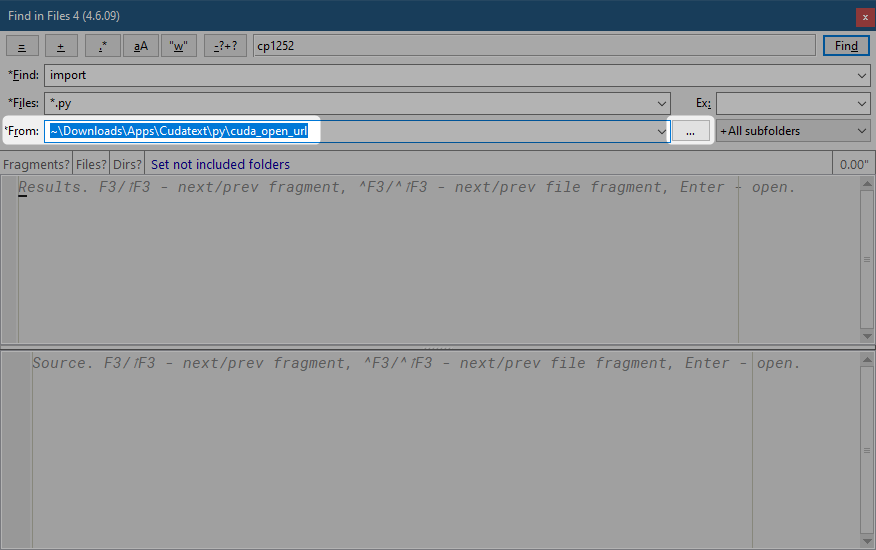
What you think?
 JairoMartinezA
All 42 comments
You are right. The quotation is already added (if path has blanks) - next version will be public soon.
You can test the version by command
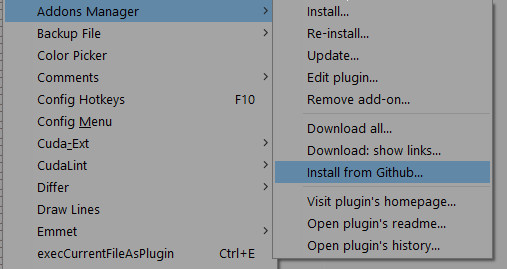
with https://github.com/kvichans/cuda_find_in_files4

 kvichans
on 4 May 2020
kvichans
on 4 May 2020
Yes I've validated with a path with blanks, all seems ok.
Please consider the possibility when the user add the path using a copy-paste from File Explorer, I think that the user does not need to add manually the quotes.
JairoMartinezA
on 4 May 2020
I don't want to prevent/help/correct of user copy-paste and other edit actions. It is too dangerous.
kvichans
on 4 May 2020
Sorry @kvichans
No, the plugin current add the quotes when detects blanks in path, but when the path haven't blanks, the search function no works, I need to add manually the quotes.
JairoMartinezA
on 4 May 2020
You can separate your paths by ;.
kvichans
on 4 May 2020
I don't want to prevent/help/correct of user
copy-pasteand othereditactions. It is too dangerous.
Yes I know @kvichans , IMHO, why the user needs to add the quotes? why not simply you add the quotes when you are doing the Searching process?
JairoMartinezA
on 4 May 2020
Plugin has no way to decide: is the blank separate paths or it is included in a path.
It is your decision.
kvichans
on 4 May 2020
Sorry I so sorry my comments @kvichans , I just doing it thinking as a normal user, just to have the things clear :)
In Windows is normal to have spaces as part of path, so I think that the plugin need to be smart when found a path with spaces at least in Windows systems. If the user enter just one path without quotes and with spaces, consider it just as a one path, If the users needs to search in many paths he need to add the quotes or enter the paths in semicolon-separated way.
Sorry the comparison with SublimeText: Find in Files, in this case I need to add the path, add what I need to looking for, add maybe a file filter, and that's all, Search. In Find in Files for Cuda, I need to add the quotes, or maybe the ;, so I think the plugin need to be more user-friendly.
JairoMartinezA
on 4 May 2020
- Plugin prefers to use blank as delimiter not as path part (except ";" delimiter in From).
- If path is appeared from plugin command it is quoting (if need).
- Other paths (from user) are not controlled
kvichans
on 5 May 2020
@Jairo-Martinez
Sorry I failed to see that you are right. FiF4 can be friendly in the special case: if in field From there is one path with blank(s). Next version of FiF4 will test the From content to "existing folder".
kvichans
on 8 May 2020
@Jairo-Martinez
Fixed
Could you test the version from GitHub?
kvichans
on 8 May 2020
One test:
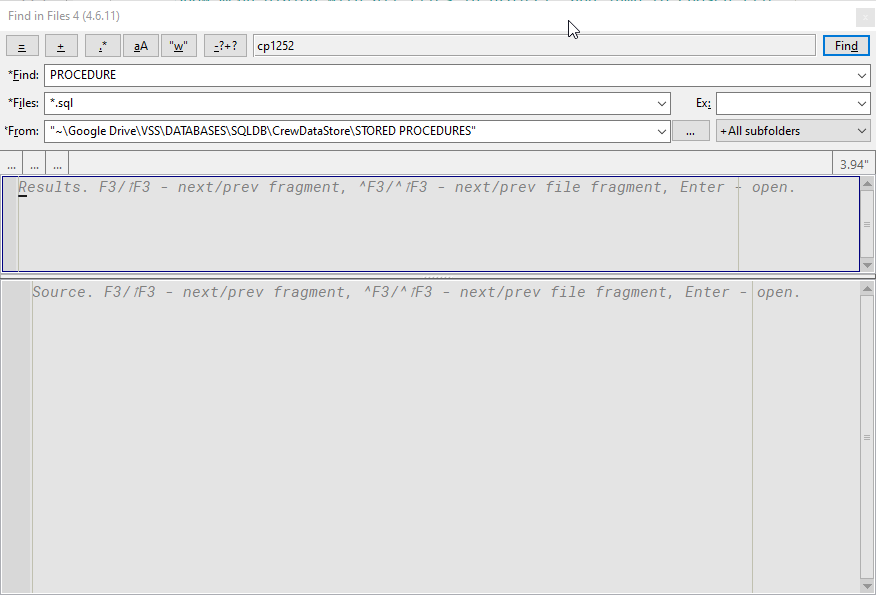
Console error:
Init: cuda_find_in_files4
Init: cudatext
[ 0.00"]Fif4D.work:2376 Traceback (most recent call last):
  File "C:\Users\Jairo Martinez\Downloads\Apps\Cudatext\py\cuda_find_in_files4\cd_fif4.py", line 2374, in work
    fifwork(m.observer, m.rslt, walkers, fragmer, frgfilters, m.reporter)
  File "C:\Users\Jairo Martinez\Downloads\Apps\Cudatext\py\cuda_find_in_files4\cd_fif4.py", line 2906, in fifwork
    reporter.add_frg(fn, frgs)
  File "C:\Users\Jairo Martinez\Downloads\Apps\Cudatext\py\cuda_find_in_files4\cd_fif4.py", line 3075, in add_frg
    self.rfrgs.append(          newRF(fn, frg))
  File "C:\Users\Jairo Martinez\Downloads\Apps\Cudatext\py\cuda_find_in_files4\cd_fif4.py", line 3064, in newRF
    sts = LexHelper.get_src_line_styles(ed4lx, wfrg.r)
  File "C:\Users\Jairo Martinez\Downloads\Apps\Cudatext\py\cuda_find_in_files4\cd_fif4.py", line 2653, in get_src_line_styles
    ,st=LexHelper.get_lexer_token_style(lex, tkn['style'])))
  File "C:\Users\Jairo Martinez\Downloads\Apps\Cudatext\py\cuda_find_in_files4\cd_fif4.py", line 2464, in get_lexer_token_style
    raw_sts = {sid:th_sts[rr_ids[sid]] for sid in raw_sts}
  File "C:\Users\Jairo Martinez\Downloads\Apps\Cudatext\py\cuda_find_in_files4\cd_fif4.py", line 2464, in <dictcomp>
    raw_sts = {sid:th_sts[rr_ids[sid]] for sid in raw_sts}
KeyError: 'Marked block'
Thanks for testing.
- The error on copying lexer colors from source file.
- Pass me one problem file (need to detect such file)
- To work with FIF4 (bypass error) - turn off the copying:
- Set engine option
copy_stylesto `false' (for all searches) - Or run with
Fast search(Shift+F2) (for one search)
- Set engine option
kvichans
on 8 May 2020
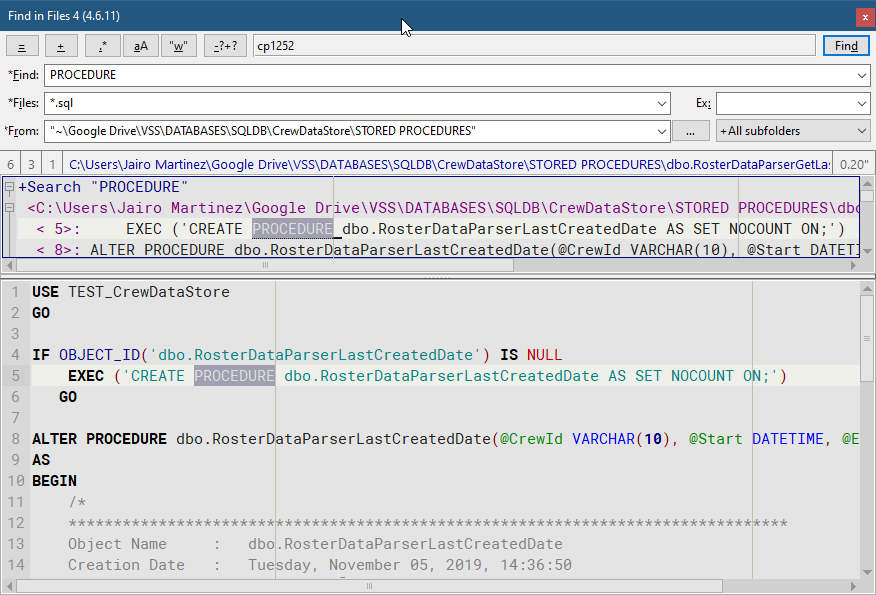
Disabling copy_styles, works:
The kind of file is T-SQL, but I see the lexer applied correctly.
JairoMartinezA
on 8 May 2020
I see: you turn off colors after : for all lines in Results panel.
Can you detect file with color problem and pass it me?
kvichans
on 8 May 2020
@Jairo-Martinez
Please test From without quotes.
kvichans
on 8 May 2020
@Jairo-Martinez
Do you know how to show shorter filenames in Results? See menu =

kvichans
on 8 May 2020
I see: you turn off colors after
:for all lines in Results panel.Can you detect file with color problem and pass it me?
JairoMartinezA
on 8 May 2020
@Jairo-Martinez
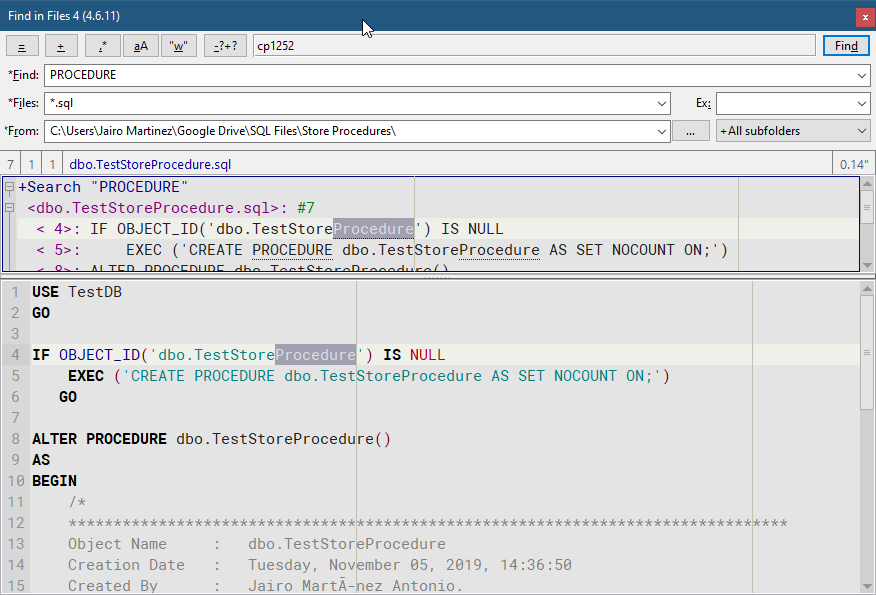
Please testFromwithout quotes.
It is working well:
JairoMartinezA
on 8 May 2020
@Jairo-Martinez
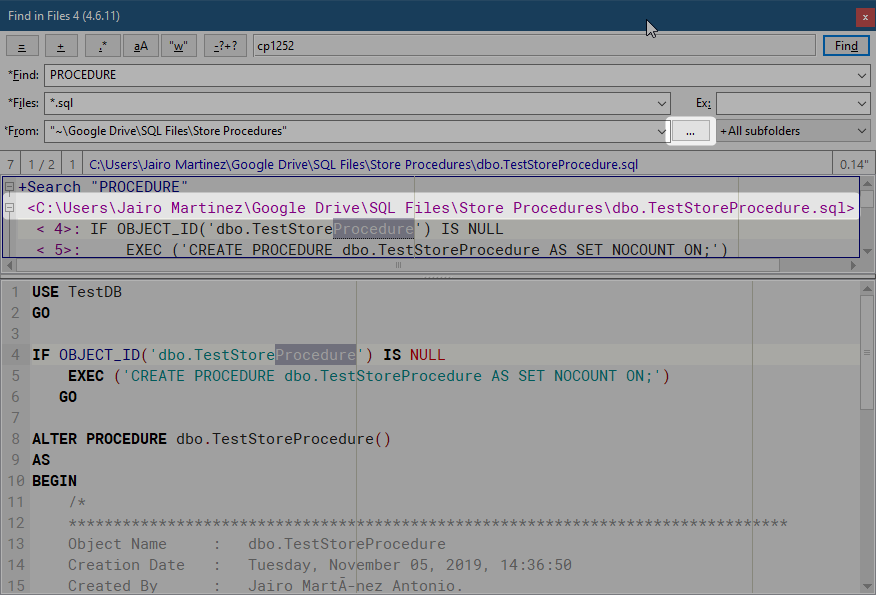
Do you know how to show shorter filenames in Results? See menu=
This feature is enable by default but it doesn't works when I use the Choose Folder button:
JairoMartinezA
on 9 May 2020
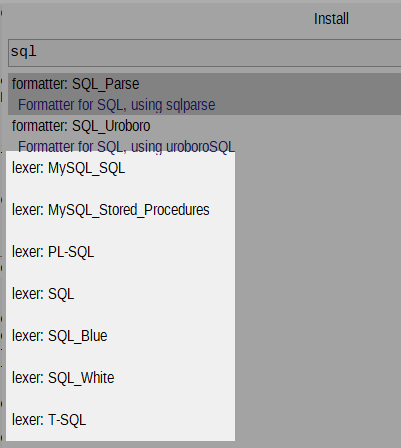
What is lexer for SQL?
kvichans
on 9 May 2020
This feature is enable by default but it doesn't works when I use the Choose Folder button:
Bug: quotes are guilty (not Choose).
kvichans
on 9 May 2020
What is lexer for SQL?
I am using T-SQL in Cud
JairoMartinezA
on 9 May 2020
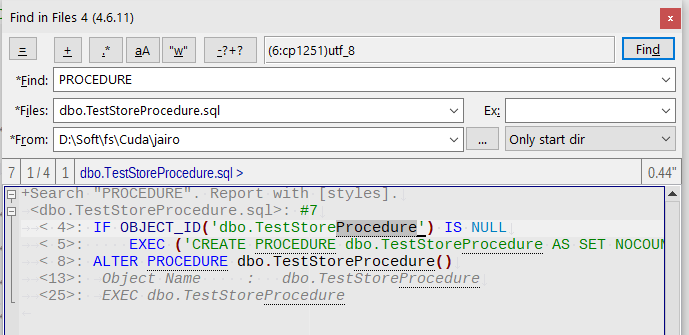
No repro of color bug
kvichans
on 9 May 2020
Are you using FIF4 with default options? I get the error with defaults in Windows 10 1909
JairoMartinezA
on 9 May 2020
I've retried with def opts. No repro :(
kvichans
on 9 May 2020
I am busy with others things, maybe in the next week I could debug the plugin and give you more info.
JairoMartinezA
on 9 May 2020
Thanks
kvichans
on 9 May 2020
Hi @kvichans,
I had a lot of work 👨💼
I add this prints in file: cd_fif4.py:
2465: print(raw_sts)
2466: print(rr_ids)
2467: print(th_sts)

2469: raw_sts = {sid:th_sts[rr_ids[sid]] for sid in raw_sts}
I am attaching the file with logs for each line. I don't know if it can help you or maybe you can attach me your responses to compare if you are getting the same dictionaries and list. The error is being raised because rr_ids have not the key: Marked block that exists in raw_sts.
JairoMartinezA
on 19 May 2020
I need repro steps:
- source files (one file is better)
- options to search ("CudaText\settings\cuda_fif4.json" is the best)
Can you prepare and pass these things to me?
kvichans
on 19 May 2020
No problem.
Store Procedures.zip
JairoMartinezA
on 19 May 2020
No repro :(
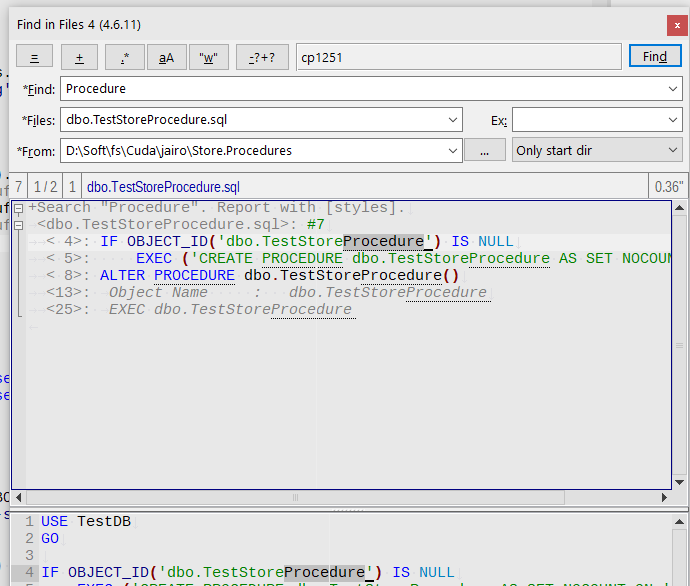
What is version of Cud on your steps?
kvichans
on 19 May 2020
1.100.0.0
Yes in a previous comment you already test it with no success. One help for me is see what you get with these lines (I passed it to you the log in yesterday comment):
2465: print(raw_sts)
2466: print(rr_ids)
2467: print(th_sts)

2469: raw_sts = {sid:th_sts[rr_ids[sid]] for sid in raw_sts}
Because the error is with the key: Marked block. I don't know in your case if this key also exists in rr_ids or in the other hand it doesn't exist in raw_sts.
JairoMartinezA
on 19 May 2020
Log cannot help me. Only repro can.
kvichans
on 19 May 2020
Ok what you get in this objects?
2465: print(raw_sts)
2466: print(rr_ids)
2467: print(th_sts)
Success! I have repro on pure 1.100+FiF4
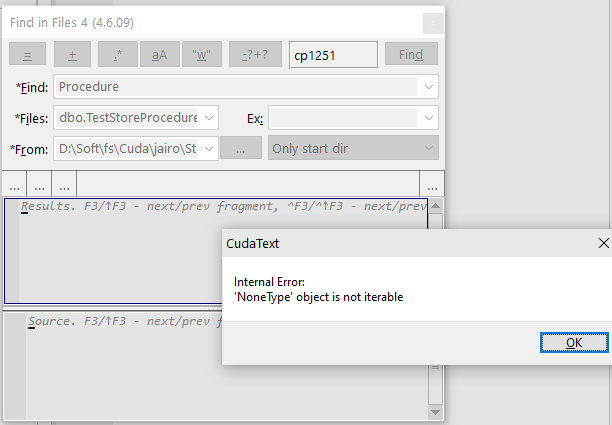
kvichans
on 19 May 2020
Same error???
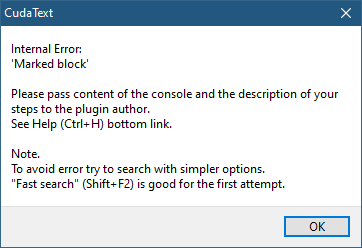
JairoMartinezA
on 19 May 2020
Not the same
I hope both have common reason
kvichans
on 19 May 2020
what is the progress here?
 Alexey-T
on 25 May 2020
Alexey-T
on 25 May 2020
I have repro steps and will search bug
kvichans
on 25 May 2020
some progress?
Alexey-T
on 21 Jun 2020
fixed
kvichans
on 22 Jun 2020
Related issues
Alexey-T
·
7Comments
JairoMartinezA
·
7Comments
Alexey-T
·
3Comments
Alexey-T
·
7Comments
Alexey-T
·
5Comments