Cudatext: Windows context menu handler
Currently I'm working on a context menu handler for Windows Explorer. I wrote it in Delphi and was able to port it to Lazarus/FPC. It runs fine.
Installation of the handler is done via regsvr32 "<path-to-DLL-file>" and requires admin rights. The handler needs the path to _CudaText_ in order to be able to run it. Currently I place the DLL file in the same directory like _CudaText_, thus I'm able to retrieve Cud's path by retrieving the DLL path and adding CudaText.exe.
What is your opinion about storage path of the DLL? What do you think is the best way of integrating the handler's installation into _CudaText_?
 dinkumoil
All 25 comments
Storage path can be [cudatext_dir]\cudatext_shell64.dll and cudatext_shell32.dll (two files are needed).
Intergating handler installation: we can put to distro files install_shell64.bat, install_shell32.bat.
 Alexey-T
on 25 Nov 2019
Alexey-T
on 25 Nov 2019
OK, thank you.
Currently I'm stuck in adding an icon to the Explorer context menu entry. Sounds to be a simple task but under Windows it is not. The deeper I dig into that topic the more I get confused which of the possible paths I should go. I sighted miles of C++ code and never thought that one has to write so much code for a merely nice-to-have gadget.
How important is a _CudaText_ icon besides its context menu entry for you? Do you know some project/code (preferably written in Pascal) which has solved that problem?
dinkumoil
on 25 Nov 2019
I am not sure about this icon- where it's needed besides the context menu. WinRAR has an option to enable icon in context menu. Maybe see here?
https://github.com/pyscripter/MustangpeakVirtualShellTools/tree/master/Source
Alexey-T
on 25 Nov 2019
Info
https://github.com/DelphiPraxis/The-Drag-and-Drop-Component-Suite-for-Delphi/issues/25
components
https://torry.net/pages.php?id=515
Alexey-T
on 25 Nov 2019
Thank you for the links, especially the _DelphiPraxis_ one seems promising.
I am not sure about this icon- where it's needed besides the context menu.
Sorry for my bad english. I meant: How important is a _CudaText_ icon left of the text of its context menu entry for you?
dinkumoil
on 25 Nov 2019
Not important to have Cud icon in the context menu, menu can be w/o icon.
Alexey-T
on 25 Nov 2019
OK. A few more questions:
As already said, the project now is a _Lazarus_ project. AFAIK that means it is not Unicode aware, right? I tried the compiler option _{$MODE DelphiUnicode}_. When it came to showing message boxes with error messages I saw only asian characters, the indicator that ANSI encoded text is displayed by code which is Unicode aware.
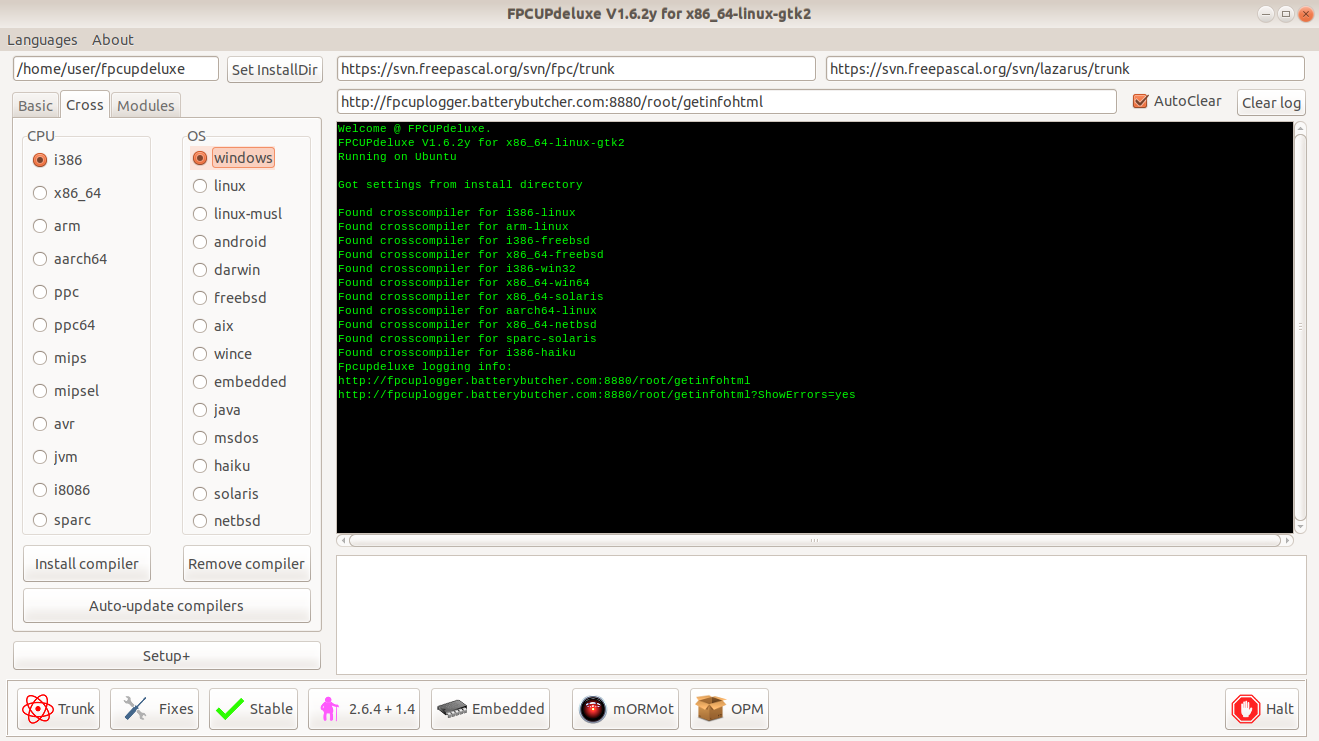
I tried to build a 32 bit version of the DLL but _Lazarus_ told me that the build target _Win32-i386_ is not supported. That means I have no 32 bit compiler and I guess I have also no 32 bit _FPC_ runtime libs. Please note: I've set up my build environment using _FPCUpDeluxe_.
The last days I was ill and was able to spend my time for playing around with this project, but tomorrow I have to go back to work and I have no more time for the project. I have also no more time to fiddle around with these Unicode and build target issues.
Thus I think it would be the best if you include the project into the main _CudaText_ repo and take over maintenance. What do you think?
dinkumoil
on 25 Nov 2019
Lazarus is unicode aware, it only uses utf8 encoding in string var's, and it converts utf8 strings to Wide strings on calling Win API (it calls W functions).
Alexey-T
on 25 Nov 2019
you have Lazarus for Win64? then you must run fpcudeluxe, click is CROSS tab, and install there Win-i386 cross compiler. you will be able to compile for win32 then.
Alexey-T
on 25 Nov 2019
Alexey-T
on 25 Nov 2019
please publish the project (CudaText_shell_extension repo) and I will try to compile it for Win32.
Alexey-T
on 25 Nov 2019
Done.
dinkumoil
on 25 Nov 2019
I compiled win64+win32 DLL, will test both DLLs later, Im on Linux now.
Alexey-T
on 25 Nov 2019
On my german Windows I have created a _*.txt_ file with cyrillic characters in its name. Because the context menu handler was compiled using the _{$MODE Delphi}_ compiler switch, it was not able to process that file name correctly. _CudaText_ showed a message that file _???????.txt_ doesn't exist and if it should create such a file.
What can be done to solve this issue? Simply using compiler switch _{$MODE DelphiUnicode}_ only causes other errors.
dinkumoil
on 28 Nov 2019
In theory the dll must get filenames using W functions, to WideString or UnicodeString var, then assign this WideString var to string var (in FPC 3 string is AnsiString- in objfpc and Delphi modes), using utf8encode function, it’s all
Alexey-T
on 28 Nov 2019
@dinkumoil Made PULL req, tested with filename ╚₸ὣ ╚₸ὣ 3.txt
Alexey-T
on 28 Nov 2019
Ok, thank you. I will have a look at it in the evening, after work.
dinkumoil
on 28 Nov 2019
Merged your PR. Thank you again.
I found an article (including some code) about how to add a program's icon to the Explorer context menu. The article discusses the various ways to do that and their pitfalls in a very understandable way.
The contained code is written in C++. I think at the weekend I will have time to port the code and include it into the project. So, please do not start integration of the shell handler into _CudaText_ releases until I'm done with the icon stuff.
dinkumoil
on 29 Nov 2019
I want to put your dll and cmd files to distribute- this is the integration, is it ok? Or do you want some new menu items?
Alexey-T
on 29 Nov 2019
Since the context menu handler is a Windows-only solution no additional menu items are required. Simply put the DLL and the install and uninstall batch scripts to the same directory like _CudaText_ itself.
Please note: _CudaText_ 32 bit requires both 32 bit and 64 bit versions of the DLL and the batch scripts since it can be installed on 64 bit Windows too.
dinkumoil
on 29 Nov 2019
I'm done with the context menu handler, it's ready for integration. I think it would be good to do some testing at your site, too.
dinkumoil
on 1 Dec 2019
@kvichans @vhanla @iRamSoft @OlehL
Can you pls test the shell DLL?
If all OK, I will put them to Win32/Win64 distro.
- see readme at https://github.com/dinkumoil/cuda_shell_extension
- get .dll files from "Releases" in that GH repo
- get .cmd scripts from GH repo too
- put .dll and .cmd to Cud folder
Alexey-T
on 1 Dec 2019
I just use registry keys to "Open with Cuda".
What is the context menu handler for? Is it different?
 vhanla
on 4 Dec 2019
vhanla
on 4 Dec 2019
@vhanla
With a context menu entry based on simple registry keys it is not possible to open more than 15 files. If you select more than 15 files in an Explorer window, the context menu entry disappears.
Moreover, with a context menu entry based on simple registry keys Explorer starts an instance of _CudaText_ for every selected file. My context menu extension starts only one instance of _CudaText_ for every packet of 125 files. Thus, startup speed increases significantly.
dinkumoil
on 4 Dec 2019
Ok, I am closing this, DLLs will be in next Cud release
Alexey-T
on 7 Dec 2019
Related issues
Alexey-T
·
7Comments
Alexey-T
·
7Comments
 JairoMartinezA
·
5Comments
Alexey-T
·
3Comments
JairoMartinezA
·
5Comments
Alexey-T
·
3Comments
 jczanfona
·
5Comments
jczanfona
·
5Comments
Most helpful comment
@vhanla
With a context menu entry based on simple registry keys it is not possible to open more than 15 files. If you select more than 15 files in an Explorer window, the context menu entry disappears.
Moreover, with a context menu entry based on simple registry keys Explorer starts an instance of _CudaText_ for every selected file. My context menu extension starts only one instance of _CudaText_ for every packet of 125 files. Thus, startup speed increases significantly.