Cuckoo: Detect ransomware that is just renaming files
My issue is:
My test ransomware just renames files on the desktop and adds .w to the filename but this behavior is not detected
My Cuckoo version and operating system are:
Ubuntu 16.04 with cuckoo version 2.0.6
What is your suggestion?:
Detect processes that are just renaming files
What is the goal of this change/addition?
To detect some kind of ransomware that is not encrypting files, but just simply renaming it
This can be reproduced by:
Submitting the attached .jar file below
The log, error, files etc can be found at:
Anfrage Angebot.zip
Analyzer Log.txt
Cuckoo Log.txt
Hope this belongs in this repository and hopefully, I did no config mistakes
 Clevero
All 6 comments
Hi Clevero,
Thanks for posting an issue. It is always appreciated.
The behavior itself should be detected, meaning it should be in the actual behavioral logs. The changed/renamed files are likely in one of the file_* in the json report.
I am assuming your suggestion is to add a Cuckoo signature for it? :smile: It is certainly possible! It should probably not be marked as malicious behavior, though. But purely informational. Something like "This file changed X file names".
Signature suggestions are probably best made in the Cuckoo Sandbox community repository, though. https://github.com/cuckoosandbox/community. This is the repository that contains all the Cuckoo signatures. :smile:
 RicoVZ
on 9 Jul 2018
RicoVZ
on 9 Jul 2018
Thank you for the quick reply! :)
Hope I understood you right, that the actual behavior should already be logged and the only thing that needs to be done is writing a signature for it?
As far as I can see, in my current setup, those file renaming is not tracked. My reports/report.json shows the following:
"file_opened": [
                        "",
                        "C:\\Users\\krist\\Desktop\\Pornos aka Tierdokus.zip",
                        "C:\\Users\\krist\\AppData\\Local\\Temp\\Anfrage Angebot.jar",
                        "C:\\Program Files (x86)\\Java\\jre1.8.0_171\\lib\\i386\\jvm.cfg",
                        "C:\\",
                        "C:\\Users\\krist\\AppData\\Local\\Temp\\hsperfdata_krist",
                        "C:\\Program Files (x86)\\Java\\jre1.8.0_171\\bin\\client\\jvm.dll",
                        "C:\\Users\\krist\\Desktop\\Jahresabschlussbericht 2017.docx",
                        "C:\\Users\\krist\\Desktop\\Firmenausflug 2018.pptx",
                        "C:\\Users\\krist\\Desktop\\desktop.ini",
                        "\\Device\\NamedPipe\\",
                        "C:\\Program Files (x86)\\Java\\jre1.8.0_171\\bin\\client\\classes.jsa",
                        "C:\\Program Files (x86)\\Java\\jre1.8.0_171\\lib\\meta-index",
                        "C:\\Program Files (x86)\\Java\\jre1.8.0_171\\lib\\ext\\meta-index",
                        "C:\\Users\\krist\\Desktop\\Quartalsbericht 2018 Q2.xlsx",
                        "C:\\Users\\krist\\Desktop\\Notizen.txt",
                        "C:\\Program Files (x86)\\Java\\jre1.8.0_171\\lib\\rt.jar"
                    ],
"file_written": [
                        "C:\\ProgramData\\Oracle\\Java\\.oracle_jre_usage\\cce3fe3b0d8d80db.timestamp"
                    ],
"file_exists": [
                        "C:\\Users\\krist\\Desktop\\Pornos aka Tierdokus.zip",
                        "C:\\Program Files (x86)\\Java\\jre1.8.0_171\\lib\\ext\\sunjce_provider.jar",
                        "C:\\Users\\krist\\Desktop\\Jahresabschlussbericht 2017.docx",
                        "C:\\Program Files (x86)\\Java\\jre1.8.0_171\\lib\\ext\\jfxrt.jar",
                        "C:\\Program Files (x86)\\Java\\jre1.8.0_171\\lib\\ext\\jaccess.jar",
                        "C:\\Windows\\System32\\icacls.exe",
                        "C:\\Users\\krist\\AppData\\Local\\Temp\\Anfrage Angebot.jar",
                        "C:\\Program Files (x86)\\Java\\jre1.8.0_171\\lib\\endorsed",
                        "C:\\Program Files (x86)\\Java\\jre1.8.0_171\\lib\\ext\\localedata.jar",
                        "C:\\Program Files (x86)\\Java\\jre1.8.0_171\\lib\\ext\\access-bridge-32.jar",
                        "C:\\Program Files (x86)\\Java\\jre1.8.0_171\\lib\\ext\\sunec.jar",
                        "C:\\ProgramData\\Oracle\\Java\\.oracle_jre_usage",
                        "C:\\Program Files (x86)\\Java\\jre1.8.0_171\\bin\\zip.dll",
                        "C:\\Users\\krist\\Desktop\\Quartalsbericht 2018 Q2.xlsx",
                        "C:\\Windows\\Sun\\Java\\lib\\ext",
                        "C:\\Program Files (x86)\\Java\\jre1.8.0_171\\lib\\ext\\sunmscapi.jar",
                        "C:\\Users\\krist\\Desktop\\desktop.ini",
                        "C:\\Program Files (x86)\\Java\\jre1.8.0_171\\lib\\ext\\sunpkcs11.jar",
                        "C:\\Program Files (x86)\\Java\\jre1.8.0_171\\lib\\ext\\nashorn.jar",
                        "C:\\Windows\\Sun\\Java\\lib\\ext\\meta-index",
                        "C:\\Users\\krist\\Desktop",
                        "C:\\Users\\krist\\Desktop\\Notizen.txt",
                        "C:\\Program Files (x86)\\Java\\jre1.8.0_171\\lib\\ext\\cldrdata.jar",
                        "C:\\Program Files (x86)\\Java\\jre1.8.0_171\\lib\\ext\\dnsns.jar",
                        "C:\\ProgramData\\Oracle\\Java\\.oracle_jre_usage\\cce3fe3b0d8d80db.timestamp",
                        "C:\\Program Files (x86)\\Java\\jre1.8.0_171",
                        "C:\\Users\\krist\\AppData\\Local\\Temp\\hsperfdata_krist",
                        "C:\\Program Files (x86)\\Java\\jre1.8.0_171\\lib\\ext\\zipfs.jar",
                        "C:\\Users\\krist\\Desktop\\Firmenausflug 2018.pptx",
                        "C:\\Program Files (x86)\\Java\\jre1.8.0_171\\lib\\management\\usagetracker.properties",
                        "C:\\ProgramData\\Oracle\\Java\\usagetracker.properties",
                        "C:\\Program Files (x86)\\Java\\jre1.8.0_171\\bin\\msvcr100.dll",
                        "C:\\Program Files (x86)\\Java\\jre1.8.0_171\\lib\\ext",
                        "C:\\Program Files (x86)\\Java\\jre1.8.0_171\\lib\\ext\\meta-index"
                    ],
"file_read": [
                        "C:\\Users\\krist\\AppData\\Local\\Temp\\Anfrage Angebot.jar",
                        "C:\\Program Files (x86)\\Java\\jre1.8.0_171\\lib\\i386\\jvm.cfg",
                        "C:\\Program Files (x86)\\Java\\jre1.8.0_171\\bin\\client\\classes.jsa",
                        "C:\\Program Files (x86)\\Java\\jre1.8.0_171\\lib\\meta-index",
                        "C:\\Program Files (x86)\\Java\\jre1.8.0_171\\lib\\ext\\meta-index",
                        "C:\\Program Files (x86)\\Java\\jre1.8.0_171\\lib\\rt.jar"
                    ],
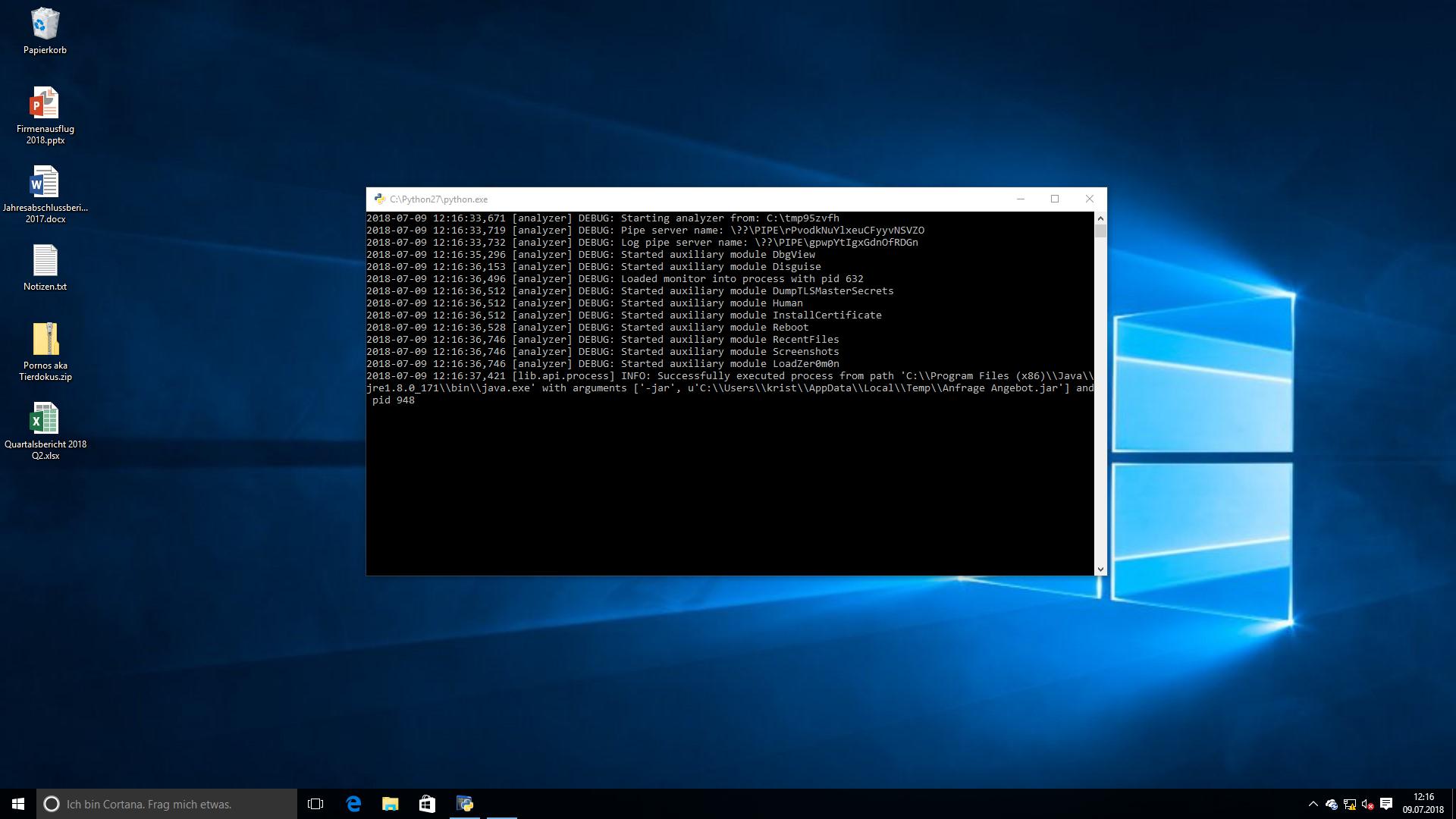
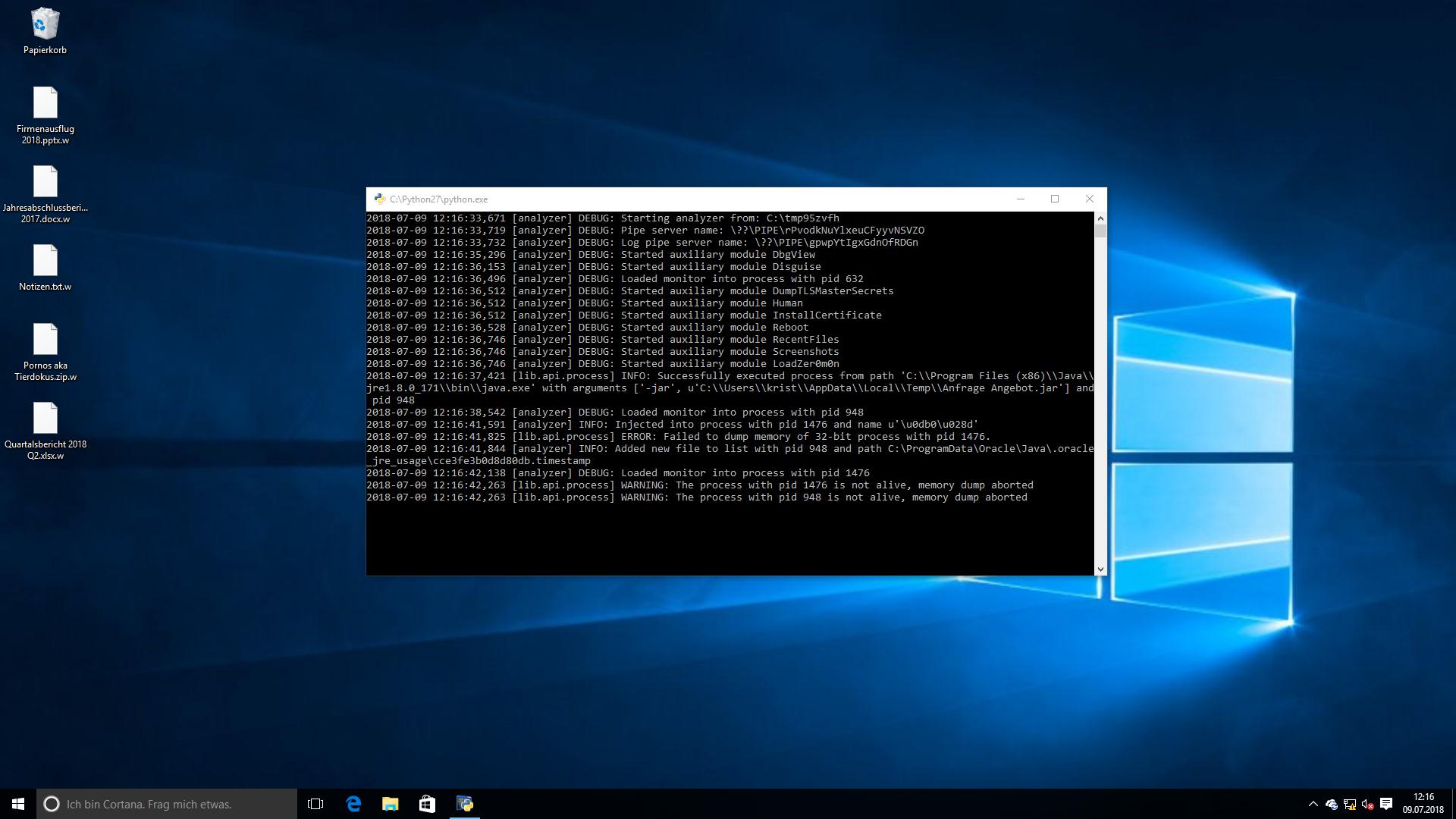
But the files are renamed (according to the screenshots).
I will head into writing own signatures
Clevero
on 10 Jul 2018
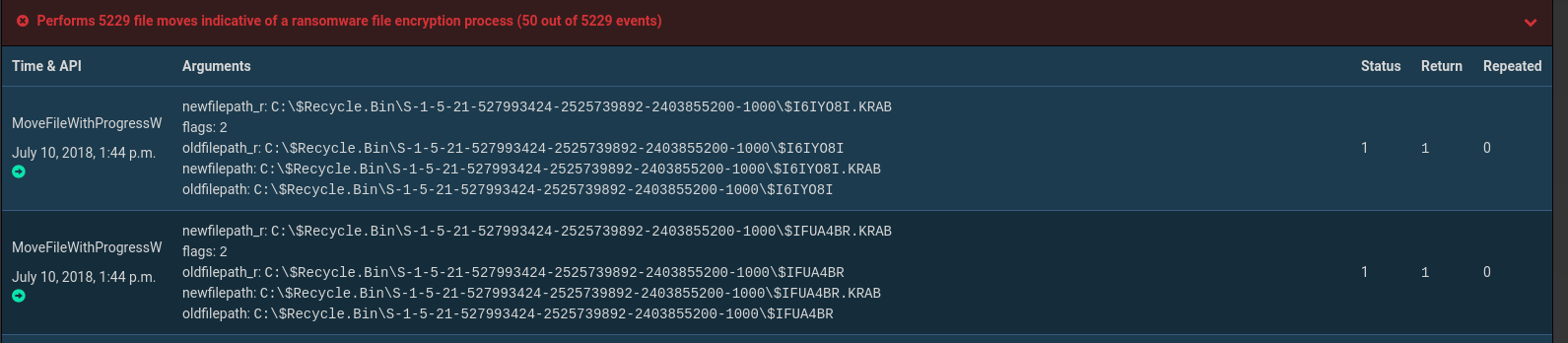
There is already a signature for this in the community repository.
For Example:
 lillypad
on 10 Jul 2018
lillypad
on 10 Jul 2018
Thanks @lillypad for the hint.
I looked at the code and saw that this signature is "alerting" if 50 and above files are deleted.
In the first run, I've tested it with just 5 files that have been deleted in my vm, and this is explaining why it was not "detected".
I've tested it now with around 1.000 files and the signature you mentioned is "alerting".
After consultation, I came to the point that it would not fit our needs if that behavior is just detected if 50 files and above are deleted. In our opinion, it's also harmful when it deletes just one file.
I wrote an own signature for our use case.
I appreciate your help!
Clevero
on 17 Jul 2018
@Clevero you're welcome 😄
lillypad
on 17 Jul 2018
Just for the record:
I need to admit I've tested yesterday with the wrong sample that is really deleting the files and not renaming it. I just looked at the score and was happy^^ But another signature was responsible for this high score.
I've retested with the sample that is renaming files, with 60 txt files on the desktop. And yet the ransomware_filemodications.py signature is not triggered.
Also, the renamed files are not mentioned at report.json in any kind. But at least 60 files are really renamed, according to the screenshots.
I opened an issue in the community repo for asking about the ransomware_filemodications.py signature.
https://github.com/cuckoosandbox/community/issues/426
I will report back if appropriate.
Clevero
on 18 Jul 2018
Related issues
 PointerWild
·
8Comments
PointerWild
·
8Comments
 adricnet
·
7Comments
adricnet
·
7Comments
 ishaansharma
·
3Comments
ishaansharma
·
3Comments
 rodkinal
·
6Comments
rodkinal
·
6Comments
 capnspacehook
·
3Comments
capnspacehook
·
3Comments
Most helpful comment
Thanks @lillypad for the hint.
I looked at the code and saw that this signature is "alerting" if 50 and above files are deleted.
In the first run, I've tested it with just 5 files that have been deleted in my vm, and this is explaining why it was not "detected".
I've tested it now with around 1.000 files and the signature you mentioned is "alerting".
After consultation, I came to the point that it would not fit our needs if that behavior is just detected if 50 files and above are deleted. In our opinion, it's also harmful when it deletes just one file.
I wrote an own signature for our use case.
I appreciate your help!