Hey,all.
I configured cuckoo,reporting.conf n mongodb.But it's still dose not work.
Ubuntu 16.04
`ock@ubuntu:~$ cuckoo
eeee e e eeee e e eeeee eeeee
8 8 8 8 8 8 8 8 8 88 8 88
8e 8e 8 8e 8eee8e 8 8 8 8
88 88 8 88 88 8 8 8 8 8
88e8 88ee8 88e8 88 8 8eee8 8eee8
Cuckoo Sandbox 2.0.5
www.cuckoosandbox.org
Copyright (c) 2010-2017
`
`ock@ubuntu:~$ mongo
MongoDB shell version: 2.6.10
connecting to: test
^C
bye
`
`[mongodb]
enabled = yes
host = 127.0.0.1
port = 27017
db = cuckoo
store_memdump = yes
paginate = 100
MongoDB authentication (optional).
username =
password =
`
What's wrong in here?
Thanks
 DragonQuestHero
All 15 comments
I forget say.cuckoo -d will work
DragonQuestHero
on 31 May 2018
I seed this.https://github.com/cuckoosandbox/cuckoo/issues/1724
But i can't found any other reporting.conf
DragonQuestHero
on 31 May 2018
Without log impossible to say something
 doomedraven
on 31 May 2018
doomedraven
on 31 May 2018
@doomedraven
Thx first.
Which log?/.cuckoo/cuckoo.log?
When i use 'cuckoo web runserver 0.0.0.0:777' start cuckoo.Don't have any log output
DragonQuestHero
on 31 May 2018
cuckoo -d web ....
doomedraven
on 31 May 2018
Hi DragonQuestHero,
Yes, the cuckoo.log is also useful.
Try starting web like this: cuckoo --debug web -H 0.0.0.0 -p 777, instead of using runserver. Using that is not required. Verify if it does work after this, if not, please post the output generated by starting it this way.
 RicoVZ
on 31 May 2018
RicoVZ
on 31 May 2018
One thing if you dont have authbind, you meed to start as root as till port 1024 you cant use
doomedraven
on 31 May 2018
@doomedraven @RicoVZ
Thx two guys.
but does not work.
The output in here:
ock@ubuntu:~$ cuckoo web runserver 0.0.0.0:777
In order to use the Cuckoo Web Interface it is required to have MongoDB up-and-running and enabled in Cuckoo. Please refer to our official documentation as well as the $CWD/conf/reporting.conf file.
ock@ubuntu:~$ cuckoo --debug web -H 0.0.0.0 -p 777
In order to use the Cuckoo Web Interface it is required to have MongoDB up-and-running and enabled in Cuckoo. Please refer to our official documentation as well as the $CWD/conf/reporting.conf file.
ock@ubuntu:~$ cuckoo --debug web -H 0.0.0.0 -p 7777
In order to use the Cuckoo Web Interface it is required to have MongoDB up-and-running and enabled in Cuckoo. Please refer to our official documentation as well as the $CWD/conf/reporting.conf file.
ock@ubuntu:~$ cuckoo --debug web -H 0.0.0.0 -p 8080
In order to use the Cuckoo Web Interface it is required to have MongoDB up-and-running and enabled in Cuckoo. Please refer to our official documentation as well as the $CWD/conf/reporting.conf file.
DragonQuestHero
on 1 Jun 2018
Thanks @DragonQuestHero for the update. :smile:
Mhmm,, cuckoo --debug web -H 0.0.0.0 -p 8080 should work if MongoDB was enabled in the file /home/<youruser>/.cuckoo/conf/reporting.conf.
At what file path have you edited the reporting.conf file?
It looks like your Cuckoo is using a working directory (CWD) at which MongoDB was not configured.
RicoVZ
on 5 Jun 2018
@RicoVZ thank u response
The reporting.conf file path is:/home/username/.cuckoo/conf
And MongoDB working.
When i modify reporting.conf file,nothing changed.Maybe somewhere have other reporting.conf file?
DragonQuestHero
on 6 Jun 2018
When i modify reporting.conf file,nothing changed.Maybe somewhere have other reporting.conf file?
The file you have edited is the correct reporting.conf. But only if you do not start Cuckoo web with the --cwd argument and Cuckoo is not being run as a different user. The latter would cause the reporting.conf to be read from the user home of the user Cuckoo is being run by.
Please try the following to start Cuckoo web
cuckoo --cwd /home/<youruser>/.cuckoo --debug web -H 0.0.0.0 -p 8080
This tells Cuckoo to use the specified working directory.
RicoVZ
on 6 Jun 2018
@RicoVZ
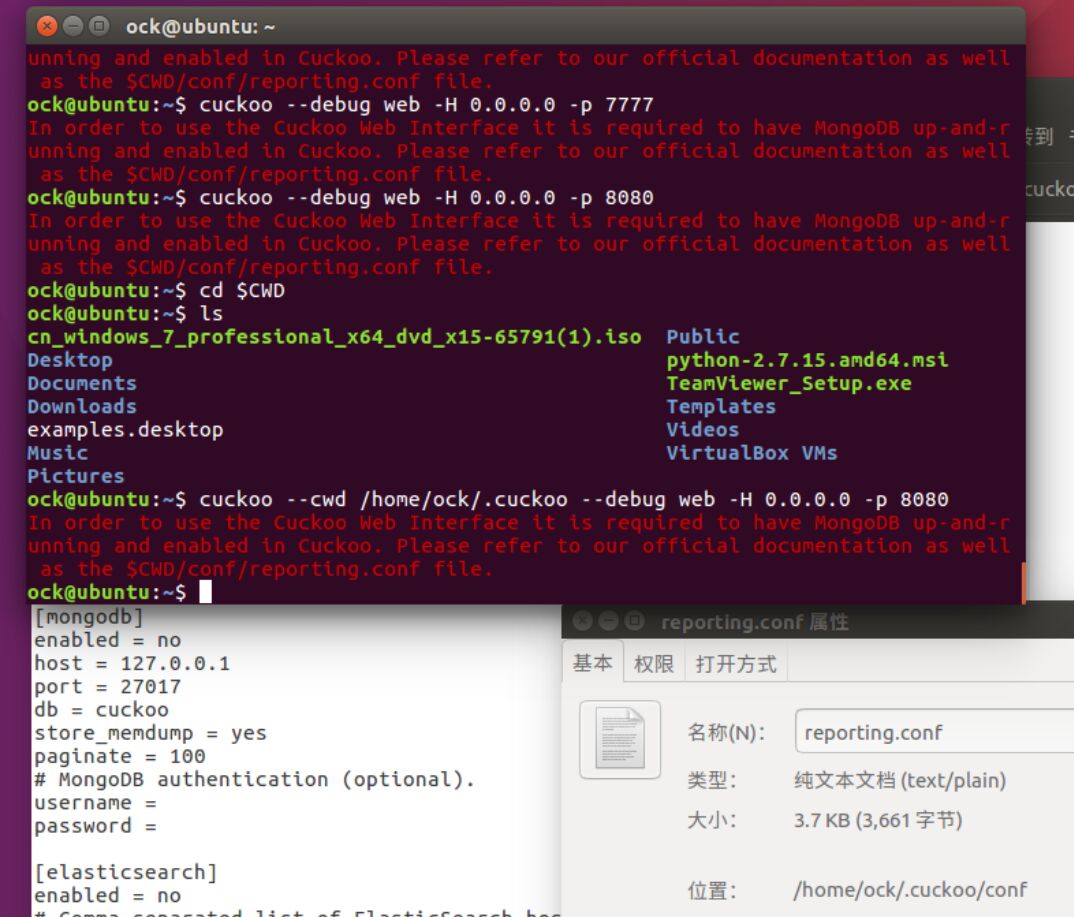
Can not.
Did i have something wrong???
DragonQuestHero
on 7 Jun 2018
yes enabled=no
doomedraven
on 7 Jun 2018
@DragonQuestHero
Yes, your MongoDB reporting module is disabled.
Change enabled = no to enabled = yes
RicoVZ
on 7 Jun 2018
@RicoVZ @doomedraven
Think u guys.
I forget that lol.cuckoo web working now
DragonQuestHero
on 8 Jun 2018
Related issues
 ishaansharma
·
3Comments
ishaansharma
·
3Comments
 myhsu
·
5Comments
myhsu
·
5Comments
 adricnet
·
7Comments
adricnet
·
7Comments
 shafaqat1
·
6Comments
shafaqat1
·
6Comments
 mokkkeakn
·
6Comments
mokkkeakn
·
6Comments
Most helpful comment
yes enabled=no