For some reason on my system Cubic is not scaling the waterfall images and other GUI elements with the rest of the window. Here is a screenshot:
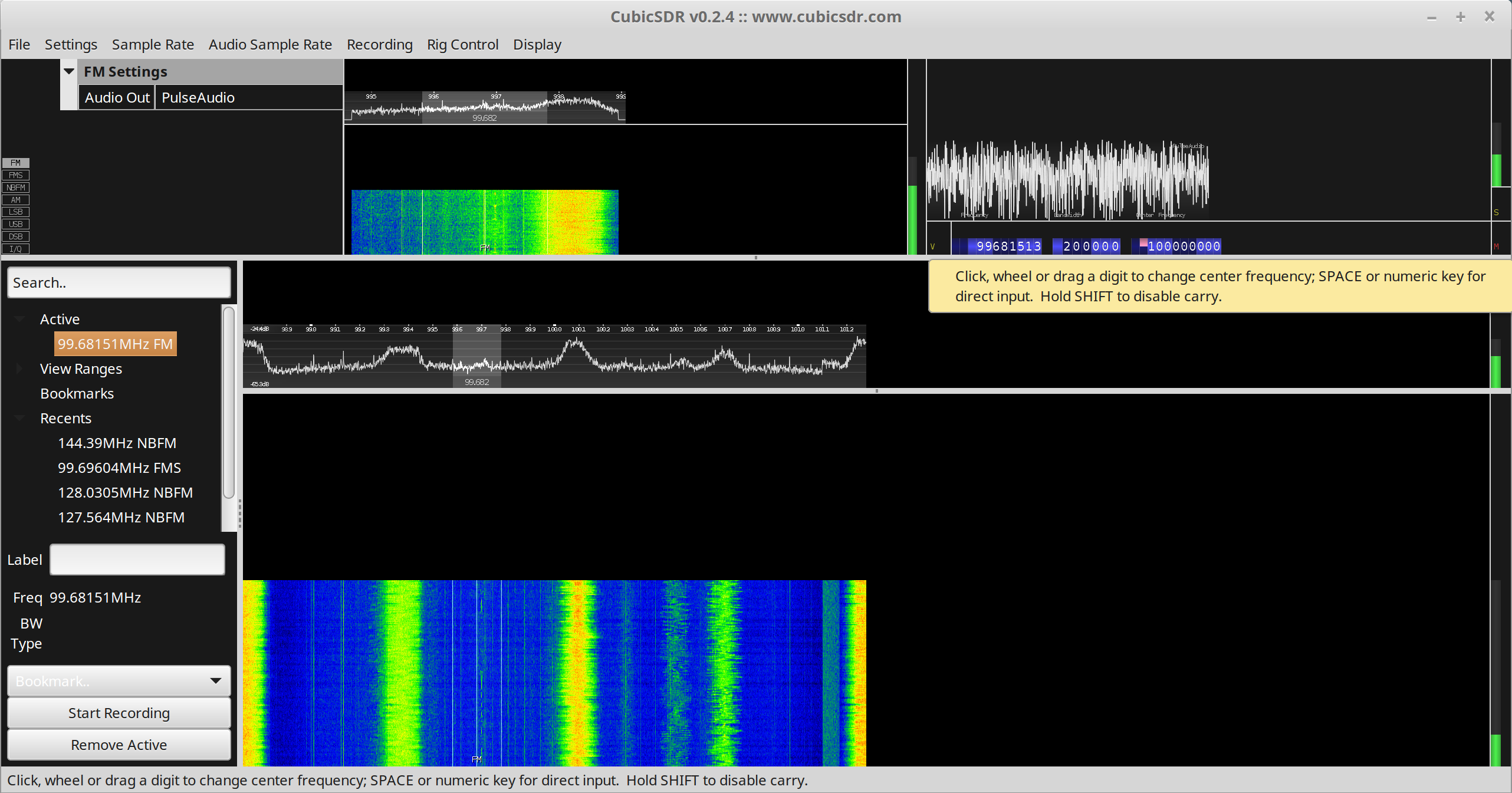
It wouldn't be so bad if it didn't also think the mouse cursor is to the left of where it actually is. As suggested elsewhere here I also installed wxWidgets 3.1.2 but unfortunately it had no effect, unless it requires a reboot or something.
 LightningStalker
All 10 comments
I think it would help in determining what caused this if you could specify the operating system and how you installed CubicSDR (appimage vs from source)
 Dantali0n
on 8 May 2019
Dantali0n
on 8 May 2019
I'm seeing the same thing. I built it on ubuntu 18.10 using the instructions from https://github.com/cjcliffe/CubicSDR/wiki/Build-Linux.
Each individual GL-rendered part of the screen is rendered at half scale but the mouse cursor interaction is happening at full scale within each window.
 joelsk
on 9 May 2019
joelsk
on 9 May 2019
And this happens on my Dell XPS 9560 with both the integrated Intel video hardware or the discrete nvidia hardware.
joelsk
on 9 May 2019
OS is Mint using the appimage
LightningStalker
on 13 May 2019
Just realized that I have a Hidpi (4k) display and I had the ubuntu desktop display scaling set to 200%. I set it back to 100% and, although tiny, the UI of CubicSDR renders correctly and the mouse clicks are in the right places. I suspect the system-rendered bits of the interface respect the scaling but the opengl bits don't.
joelsk
on 14 May 2019
The same thing happens on my system. Setting the User interface scaling to anything other than normal will cause this. I think I'm going to stick to Gqrx for now.
LightningStalker
on 6 Jun 2019
same trouble on macOS. tried latest wxwidgets from master and a few patches (PR) for HiDPI without success.
 ra1nb0w
on 24 Sep 2019
ra1nb0w
on 24 Sep 2019
Hello Linux users, could you please test PR #769 and report if it solves your issues, thanks.
 vsonnier
on 19 Apr 2020
vsonnier
on 19 Apr 2020
you should try https://github.com/cjcliffe/CubicSDR/pull/769 that fix font also (to enable use -DUSE_OSX_RETINA=1)
ra1nb0w
on 19 Apr 2020
So how do I apply a patch?
I downloaded CubicSDR 0.2.6a from the SDRPlay web site.
I don't want or know how to patch /compile.
Where can I get the executable file from to test?
 Paul-Nuneaton
on 9 Oct 2020
Paul-Nuneaton
on 9 Oct 2020
Related issues
 cjcliffe
·
5Comments
cjcliffe
·
5Comments
 romeojulietthotel
·
5Comments
romeojulietthotel
·
5Comments
 iglooxpp
·
5Comments
iglooxpp
·
5Comments
 leeguang517
·
6Comments
leeguang517
·
6Comments
 hhrhhr
·
5Comments
hhrhhr
·
5Comments
Most helpful comment
Just realized that I have a Hidpi (4k) display and I had the ubuntu desktop display scaling set to 200%. I set it back to 100% and, although tiny, the UI of CubicSDR renders correctly and the mouse clicks are in the right places. I suspect the system-rendered bits of the interface respect the scaling but the opengl bits don't.