Csvhelper: Convert 12.8570 as decimal and display as decimal
Hello,
In my csv file I have this decimal: 12.8570 Every data is separated by a , so for example it looks like this:
[etc],12.8570,[etc]
My model has this for the decimal:
public decimal PERCENT { get; set; }
And this is the mapping _at the moment_ for the decimal:
Map(m => m.PERCENT).Default("0.0000");
My controller:
List<QPCatDetViewModel> QPCatDetView = new List<QPCatDetViewModel>();
            TextReader readQP = new StreamReader(@"CSV/QPCategoryDetails.csv");
            var csvQP = new CsvReader(readQP);
            csvQP.Configuration.HasHeaderRecord = false;
          //csvQP.Configuration.TypeConverterOptionsCache.GetOptions(typeof(decimal)).NumberStyle = NumberStyles.AllowThousands | NumberStyles.AllowDecimalPoint | NumberStyles.AllowTrailingSign;
            QPCatDetView = csvQP.GetRecords<QPCatDetViewModel>().ToList();
            csvQP.Configuration.RegisterClassMap<QPCatDetViewModelMap>();
            csvQP.Configuration.Delimiter = ",";
What I want to achieve:
I want to display the 12.8570 in my view. But when I want to, I get this error:
CsvHelper.TypeConversion.TypeConverterException: 'The conversion cannot be performed.
Text: '12.8570'
MemberType: System.Decimal
TypeConverter: 'CsvHelper.TypeConversion.DecimalConverter''
What I have tried:
I have tried using stuff like:
Map(m => m.PERCENT).Default("0.0000").TypeConverterOption(decimal); But it wont work. So now is my question: Can you help me to display the number as decimal?
csvQP.Configuration.TypeConverterOptionsCache.GetOptions(typeof(decimal)).NumberStyle = NumberStyles.AllowThousands | NumberStyles.AllowDecimalPoint | NumberStyles.AllowTrailingSign;
When I use this is my controller ^^ It displays like this in my view: 128570
Kind Regards!
 bjaeken
All 7 comments
If you don't have a header record and are using a mapping, how are you determining the field that is used for the property?
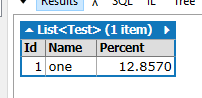
There must be something else going on because this works fine.
void Main()
{
var s = new StringBuilder();
s.Append("1,one,12.8570\r\n");
using (var reader = new StringReader(s.ToString()))
using (var csv = new CsvReader(reader))
{
csv.Configuration.HasHeaderRecord = false;
csv.Configuration.RegisterClassMap<TestMap>();
csv.GetRecords<Test>().ToList().Dump();
}
}
public class Test
{
public int Id { get; set; }
public string Name { get; set; }
public decimal Percent { get; set; }
}
public class TestMap : ClassMap<Test>
{
public TestMap()
{
Map(m => m.Id).Index(0);
Map(m => m.Name).Index(1);
Map(m => m.Percent).Index(2);
}
}
 JoshClose
on 26 Sep 2018
JoshClose
on 26 Sep 2018
Dear Josh,
I tried adding the .Index() after my mapping for decimal and it will still display as 128570. Also, When I remove this(I tried to use this to display the decimal point):
csvQP.Configuration.TypeConverterOptionsCache.GetOptions(typeof(decimal)).NumberStyle = NumberStyles.AllowThousands | NumberStyles.AllowDecimalPoint;
in my controller I still do get an error:
CsvHelper.TypeConversion.TypeConverterException: 'The conversion cannot be performed.
Text: '12.8570'
MemberType: System.Decimal
TypeConverter: 'CsvHelper.TypeConversion.DecimalConverter''
It crashes at:
QPCatDetView = csvQP.GetRecords<QPCatDetViewModel>().ToList();
Do I maybe need to set a cultureInfo or something else? The easiest way out would be to set it to a string but I am not allowed to do that...
My current code:
Model:
public decimal PERCENT { get; set; }
Map(m => m.PERCENT).Default("0.0000").Index(15);
Controller:
List<QPCatDetViewModel> QPCatDetView = new List<QPCatDetViewModel>();
TextReader readQP = new StreamReader(@"CSV/QPCategoryDetails.csv");
var csvQP = new CsvReader(readQP);
csvQP.Configuration.HasHeaderRecord = false;
// csvQP.Configuration.TypeConverterOptionsCache.GetOptions(typeof(decimal)).NumberStyle = NumberStyles.AllowThousands | NumberStyles.AllowDecimalPoint;
QPCatDetView = csvQP.GetRecords<QPCatDetViewModel>().ToList();
csvQP.Configuration.RegisterClassMap<QPCatDetViewModelMap>();
csvQP.Configuration.Delimiter = ",";
Can you give a small failing example? Like the one I posted, but broken.
JoshClose
on 27 Sep 2018
Hi Josh,
When you set your current culture to nl-NL, it will fail. The decimal separator for dutch is a comma.
After setting my current culture to en_US, it worked. But since my website has multiple languages, I need to know how to set the mapping so it is language independent.
The csv file is in a fixed format. I cannot use different csv files for the languages.
Kind regards, Bjorn
bjaeken
on 27 Sep 2018
Hi Josh,
I added this is to my controller
csv.Configuration.CultureInfo = CultureInfo.InvariantCulture;
And I got it working without changing my culture. I still want to thank you fro replying!
Kind regards, Bjorn
bjaeken
on 27 Sep 2018
Ah. Yes, if you're in a different culture, you'll to change how the number is parsed.
Map(m => m.Percent)
    .Index(2)
    .TypeConverterOption.CultureInfo(new CultureInfo("nl-NL"))
    .TypeConverterOption.NumberStyles(NumberStyles.Any);
Alternative solution is to customize the culture's default number of decimal places:
c#
var customizedCulture = (CultureInfo)CultureInfo.CurrentCulture.Clone();
customizedCulture.NumberFormat.NumberDecimalDigits = 4;
return new CsvHelper.Configuration.CsvConfiguration(customizedCulture);
 jzabroski
on 29 Apr 2020
jzabroski
on 29 Apr 2020
Related issues
 Wagimo
·
4Comments
JoshClose
·
4Comments
Wagimo
·
4Comments
JoshClose
·
4Comments
 KuraiAndras
·
5Comments
KuraiAndras
·
5Comments
 DmitryEfimenko
·
3Comments
DmitryEfimenko
·
3Comments
 hellboy81
·
6Comments
hellboy81
·
6Comments
Most helpful comment
Ah. Yes, if you're in a different culture, you'll to change how the number is parsed.