Csvhelper: Setting Culture in TypeConverterOptions
I'm trying to convert a csv with nullable doubles in Spanish format. The culture info is set at the reader config and the type converter option in the mapper at the specific value to be converted.
I am getting an exception that the conversion cannot be performed. I noticed that in the exceptions ReadingContext/ReaderConfiguration/TypeConverterOptionsCache that the culture is still set to neutral for the double I'm trying to convert.
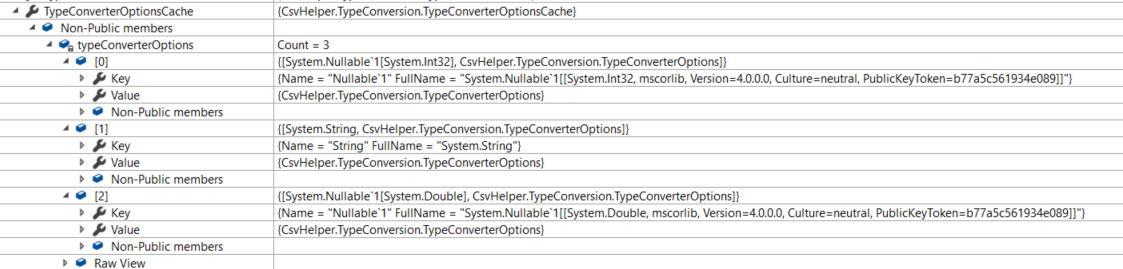
It is set correctly for the reader and MemberMapData.
Am I missing something as to where/how the culture is set?
static void Main(string[] args)
        {
            System.Threading.Thread.CurrentThread.CurrentCulture = CultureInfo.GetCultureInfo("es-ES");
            string data = @"1;one;3.173,9;";
            using (var reader = new StreamReader(GenerateStreamFromString(data)))
            using (var csv = new CsvReader(reader))
            {
               csv.Configuration.CultureInfo = new CultureInfo("ES");
               csv.Configuration.RegisterClassMap<TestMap>();
               csv.Configuration.HasHeaderRecord = false;
               csv.Configuration.Delimiter = ";";

                IEnumerable<Test> records = csv.GetRecords<Test>().ToList();

                foreach (Test record in records)
                {
                    Console.WriteLine(record.Id + " : " + record.Name + " : " + record.DoubleNum);
                }
            }
            Console.ReadKey();
        }
        public class Test
        {
            public int? Id { get; set; }
            public string Name { get; set; }
            public double DoubleNum { get; set; }
        }
        public class TestMap : ClassMap<Test>
        {
            public TestMap()
            {
                CultureInfo culture = new CultureInfo("ES");
                Map(m => m.Id);
                Map(m => m.Name);
                Map(m => m.DoubleNum).TypeConverterOption.CultureInfo(culture);
            }
        }
        public static Stream GenerateStreamFromString(string s)
        {
            MemoryStream stream = new MemoryStream();
            StreamWriter writer = new StreamWriter(stream);
            writer.Write(s);
            writer.Flush();
            stream.Position = 0;
            return stream;
        }
EDIT:
Turns out the culture is working fine
The issue is with DoubleConverter setting NumberStyle to Float and not Number so it doesn't handle thousands.
        public override object ConvertFromString( string text, IReaderRow row, MemberMapData memberMapData )
        {
            var numberStyle = memberMapData.TypeConverterOptions.NumberStyle ?? NumberStyles.Float;

            double d;
            if( double.TryParse( text, numberStyle, memberMapData.TypeConverterOptions.CultureInfo, out d ) )
            {
                return d;
            }

            return base.ConvertFromString( text, row, memberMapData );
        }
Is there anyway to set this to Number as default for all values in a ClassMap instead of setting it individually for each of them? Not doing this
var numberStyle = NumberStyles.Number;
Map(m => m.DoubleNum).TypeConverterOption.NumberStyles(numberStyle);
Just having this in the map with the type converter option set elsewhere.
Map(m => m.DoubleNum)
 JMCNAM
>All comments
var doubleOptions = new TypeConverterOptions
{
    CultureInfo = new CultureInfo("es-ES"),
    NumberStyle = NumberStyles.Number
};
csv.Configuration.TypeConverterOptionsCache.AddOptions(typeof(double), doubleOptions);
 JoshClose
on 12 Jul 2018
JoshClose
on 12 Jul 2018
Related issues
 NeilMeredith
·
4Comments
NeilMeredith
·
4Comments
 Wagimo
·
4Comments
Wagimo
·
4Comments
 SuperSkippy
·
5Comments
SuperSkippy
·
5Comments
 GraceYuJuSong
·
4Comments
GraceYuJuSong
·
4Comments
 marcselman
·
4Comments
marcselman
·
4Comments
Most helpful comment