Csswg-drafts: [css-variables][css-cascade] Proposal: additional CSS-Wide Keyword, "ignore" (primarily for css variable fallbacks)
In CSS, if the value of a property is invalid, the previously valid value in the cascade is used instead.
For example:
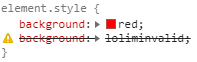
the background will be red
However, there is is no valid-path to this built-in fallback behavior, it only happens in error. Since CSS Variable references are valid values, there is no way to fallback to the previous valid value if the referenced value is a guaranteed invalid value (initial).
For example:

the background will be the default value, none ... because it's invalid at run time.
Proposal:
Provide another CSS-Wide Keyword, ignore (or skip, maybe) that will emulate the built in invalid-value fallback. This would do nothing at all on it's own if you wrote background: ignore; but it becomes quite useful as a value to use with --CSS-variables.
Scenario:
There is a 3rd party component with its own default styles but wants to provide CSS Variables that override them.
The DOM inside the component may be varied based on options, or otherwise complex, and may also change over time with new releases.
These --component-vars prevent the consumer from needing to inspect and write unstable selectors targeting that DOM in order to make a change.
For example:
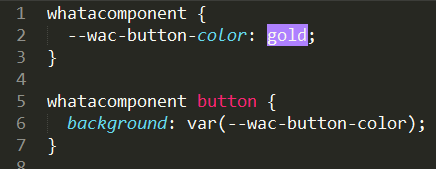
Alternatively, they may provide a component with equally complex/varied DOM that is unstyled by default but has CSS Variables to make it easier for the user to consume:

Problem:
Both of these are much better than writing selectors that may need to change or miss some use case, but now the user has to supply the --component-variables. And more complicated, they have to supply a value that fits the theme of their site, which may change based on a selected theme, lightmode/darkmode, or depend on the context where the component is consumed.
This adds a lot of complexity back onto the plate of the consumer. The consumer can't, for example, just rely on the site's already written global value for a button's background.
Solution:
It can be made much easier with an ignore keyword.
In the first case, where the component is pre-styled but allows overrides, their CSS could be:
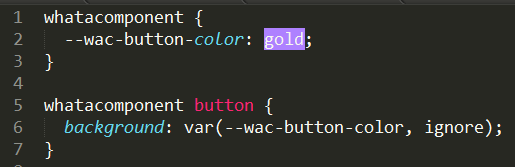
Which would allow the consumer to provide a value of ignore or initial to the variable(s) and their site's existing style would style it as they expect within the theme/context/etc.
In the case where the component is not styled by default, the CSS could be:

in which case the consumer doesn't have to do anything at all for the variables and it will just use the site's existing styles, but could very easily override it if necessary.
Spec links:
CSS-Wide Keywords
revert keyword // this is similar but rolls back the cascade at a higher level
 James0x57
All 5 comments
This assumes that CSS-wide keywords work well in variable fallbacks. It may be better to clarify that first, #5325
 Loirooriol
on 15 Jul 2020
Loirooriol
on 15 Jul 2020
Central to the design of css-variables is the idea that whatever their value, the cascade doesn't change. This proposal would change that assumption. I do like this idea, but I have a hunch someone familiar with browser internals will be along at some point to say it's more expensive to implement than it looks.
See for example the following note in css-variables-4:
Note: The invalid at computed-value time concept exists because variables can’t "fail early" like other syntax errors can, so by the time the user agent realizes a property value is invalid, it’s already thrown away the other cascaded values.
 faceless2
on 16 Jul 2020
faceless2
on 16 Jul 2020
But Firefox seems to support revert as a variable fallback just fine. So I guess not all the cascade has been thrown away?
Loirooriol
on 16 Jul 2020
I have another use-case for such a keyword: remove/invalidate styles previously set by specific rulesets, but not all.
Let's say I have a button with the following styles:
<button>Click me</button>
button {
   background-color: red;
   padding: 10px;
}

button:hover {
   background-color: green;
   padding: 20px;
   transform: scale(1.1);
}
Now, I want to create some kind of "variant" of that button, let's call it "cta". In the case of that variant, I want to change a bit the styles on hover. I don't want any change to padding and transform compared to the original styles, but I do want the background to change. So, how do I do that today?
Well, I could just override my previous style for padding and transform with a new :hover ruleset, like so:
<button>Click me</button>
<button class="cta">Click me</button>
button {
   background-color: red;
   padding: 10px;
}

button:hover {
   background-color: green;
   padding: 20px;
   transform: scale(1.1);
}

button.cta:hover {
   padding: 10px;
   transform: none;
}
But this is not want I want, because I don't necessarily know the declarations inside the button ruleset, and there also could be other changes to it through other pseudo-classes, which I will want to have. I just want to remove some styles defined inside the button:hover ruleset here.
A far better way to do it would be to use the :not pseudo-class like so:
button {
   background-color: red;
   padding: 10px;
}

button:hover {
   background-color: green;
}

button:hover:not(.cta) {
   padding: 20px;
   transform: scale(1.1);
}
But this starts to get complicated. I have to split my ruleset into two different rulesets, and one of them now has a higher specificity than the other. This will quickly get out of hand.
Now, if we had an ignore keyword, we could do something like that:
button {
   background-color: red;
   padding: 10px;
}

button:hover {
   background-color: green;
   padding: var(--padding, 20px);
   transform: var(--transform, scale(1.1));
}

button.cta:hover {
   --padding: ignore;
   --transform: ignore;
}
Now we have our style change for background-color, but we removed it for padding and transform while keeping our cascading simple. This gives us the ability to precisely "unset" previously set styles without going back to the initial value.
 brunostasse
on 17 Jul 2020
brunostasse
on 17 Jul 2020
Note that won't work by itself. If you use --padding: ignore, and ignore is a CSS-wide keyword, it will be resolved on --padding, basically setting it to the initial guaranteed-invalid value. So in var(--padding, 20px) you will still get 20px.
What you want is to keep ignore as a raw token, and resolve it where the variable is substituted. This needs #2749
Loirooriol
on 17 Jul 2020
Related issues
 schenney-chromium
·
3Comments
schenney-chromium
·
3Comments
 tylersticka
·
3Comments
tylersticka
·
3Comments
 ExE-Boss
·
3Comments
ExE-Boss
·
3Comments
 bramdoppen
·
3Comments
bramdoppen
·
3Comments
 litherum
·
3Comments
litherum
·
3Comments
Most helpful comment
Note that won't work by itself. If you use
--padding: ignore, andignoreis a CSS-wide keyword, it will be resolved on--padding, basically setting it to the initial guaranteed-invalid value. So invar(--padding, 20px)you will still get20px.What you want is to keep
ignoreas a raw token, and resolve it where the variable is substituted. This needs #2749