Css-loader: Resolving import/compose css paths in node_module with version 2.0.0
- Operating System: OS X
- Node Version: 10.13.0
- NPM Version: 6.4.1
- webpack Version: 4.27.1
- css-loader Version: 2.0.0
Expected Behavior
Actual Behavior
Importing with css compose and import to a node module. In version 1.0.1 the ~ was not needed. In 2.0.0 it is. While in my local project I can change any references to this with no issue. However in the node_module/package/file.css if it doesn't have that same ~ then webpack/css loader can't resolve the path.
Code
Below works with 1x and partially with 2x,
also in the test of css, I am excluding a series of local node_modules, internal only packages. This may be some of the issue.
{
   loader: "css-loader",
              options: {
                modules: true,
                localIdentName: "[name]__[local]-[hash:base64:5]",
                url: false,
                importLoaders: 1
              }
            },
How Do We Reproduce?
Local File:
@value color-grey from "~@localpackage/styles/color.css";

.copyright {
  color: color-grey;
  composes: type-heading from "~@localpackage/theme/styles/typography.css";
  margin: 0;
  padding: 0;
}
Node Module
.type-heading {
  color: red
  composes: type-heading2 from "@localpackage/theme/styles/typography.css";
  margin: 0;
  padding: 0;
}
Error in resolving ☝️ with local webpack build
 mbulfair
All 26 comments
@mbulfair fixing this error introduce problems in resolving algorithm and can introduce more bugs in future (other developers can forget about using ~ for modules and it is introduce more error for next releases). i need more time to investigate how better solve this problem. As workaround we can create simple loader and add this in documentation for this package.
 alexander-akait
on 10 Dec 2018
alexander-akait
on 10 Dec 2018
Why it is not easy. Let's see on:
a {
background: url(@images/image.png);
}
Note: @ is valid symbol in any filesystem (known for me).
Now we resolve this as ./@images/image.png, but if we return resolving without ~ this can be resolving as:
- ./@image/image.png
- node_modules/@images/image.png
What is right resolving? Nobody knows, so we introduced ~ characters. it allows us to distinguish module requesting (from node_modules) and usual require.
In JS this problem doesn't exists because we have RFC on require where described what require('@images/image.png') mean load image.png from @image repo in node_modules. There is no such thing in css.
Why we interpreted url('image.png'), url('something/image.png') and url(@something/image.png) as relative request (i.e. ./image.png, ./something/image.png and ./@something/image.png)? For better compatibility with existing libraries and frameworks.
Feel free to feedback.
alexander-akait
on 10 Dec 2018
Seems to me to be the same issue with sass-loader https://github.com/webpack-contrib/sass-loader/issues/556
Somehow resolving was changed in latest release which breaks many project builds.
Maybe you could add the same fix? https://github.com/webpack-contrib/sass-loader/pull/645/commits/f41f791fbfc315b7cf4f7a56468b108c4f318200
 vertic4l
on 18 Dec 2018
vertic4l
on 18 Dec 2018
@vertic4l it is difference issues, and doesn't exists in css-loader
Somehow resolving was changed in latest release which breaks many project builds
What currently it is break?
alexander-akait
on 18 Dec 2018
@evilebottnawi well, my issue is gone. we had v0.28.x and the minimize options is gone since v1.0.
think i can remove css-loader now because sass-loader can handle the import also.
Thanks anyway! :)
Edit: can't remove it... mini-css-extract-plugin breaks without it.
Edit2: Thanks @evilebottnawi , just re-added css-loader. works as expected to me.
vertic4l
on 18 Dec 2018
@vertic4l without css-loader your @import and urls can't work, also locals (i.e. classes and @value) doesn't work too
alexander-akait
on 18 Dec 2018
What is broken? Issue with css modules resolving as described in first comment?
alexander-akait
on 18 Dec 2018
I'm seeing a similar issue, where the NODE_PATH isn't being respected when using compose
For instance:
my_code/css/component/myModule.css
my_code/js/component/otherModule.css
Having NODE_PATH set to my_code
Used to allow otherModule.css
to compose using
composes: thing from 'css/component/myModule.css'
instead now, only relative paths worth
composes: thing from '../../css/component/myModule.css'
 Amwam
on 19 Dec 2018
Amwam
on 19 Dec 2018
@Amwam what is NODE_PATH? Don't have documentation about NODE_PATH
alexander-akait
on 19 Dec 2018
@evilebottnawi NODE_PATH environment variable allows you to set the module resolution,
If you folder structure is
/home/users/test/thing/code
setting NODE_PATH as export NODE_PATH=/home/users/test/thing
would allow you to require from just code (require('code/myComponent'))
https://github.com/nodejs/node/blob/1f85ea979ccef3c52ec4ca3263306e527b625498/doc/api/modules.md#loading-from-the-global-folders
Amwam
on 19 Dec 2018
@Amwam you need add this path using https://webpack.js.org/configuration/resolve/#resolve-modules
alexander-akait
on 19 Dec 2018
And don't spam in issue what not related to you, feel free to open new issue, comments not related to this problem will be marked as spam and will be ignored, thanks
alexander-akait
on 19 Dec 2018
i need more time to investigate how better solve this problem. As workaround we can create simple loader and add this in documentation for this package.
@evilebottnawi Have you already fixed this problem? We have the same problem, when we want to update from version 1.0.0 to 2.1.0
 daniel-winter
on 11 Jan 2019
daniel-winter
on 11 Jan 2019
@daniel-winter right now no, better always use ~ when you try loading something from node_modules
alexander-akait
on 11 Jan 2019
In the previous version v1.0.1 I was able to use url('~/images/stuf.png)` - now it is impossible, these used to work:
.VideoSlicer-videoTimelineRuler[data-scale="2xr"] {
  background: #aaff33 center left url('~/images/scale3x.png') repeat-x;
}
but now:
ERROR in ./src/project/tools/video-annotator/components/VideoTimeline.css (./node_modules/css-loader/dist/cjs.js!./src/project/tools/video-annotator/components/VideoTimeline.css)
Module not found: Error: Can't resolve '../../../../../../../../../images/scale3x.png' in '/home/istoica/Workspace/studio/src/project/tools/video-annotator/components'
 @ ./src/project/tools/video-annotator/components/VideoTimeline.css (./node_modules/css-loader/dist/cjs.js!./src/project/tools/video-annotator/components/VideoTimeline.css) 9:41-97
 @ ./src/project/tools/video-annotator/components/VideoTimeline.css
 @ ./src/project/tools/video-annotator/components/VideoTimeline.jsx
 @ ./src/project/tools/video-annotator/VideoAnnotator.jsx
 @ ./src/project/tools/video-annotator/Shell.jsx
 @ ./src/project/tools/video-annotator/index.jsx
 @ ./src/project/tools/video-annotator/Descriptor.js
 @ ./src/project/Resources.js
 @ ./src/index.jsx
 @ multi (webpack)-dev-server/client?http://0.0.0.0:5000 @babel/polyfill/noConflict webpack-dev-server/client?http://127.0.0.1:5000/ react-hot-loader/patch ./src/env.patches.js ./src/index.jsx
With a directory structure:
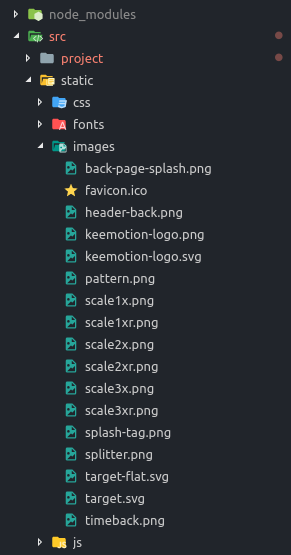
And webpack.config.js :
const resolveConf = {
  modules: [
    path.resolve(__dirname, 'src'),
    'node_modules'
  ],
  alias: {
    project: 'project',
    vendors: 'vendors',
  },
};
I don't know if related, but I wouldn't open a bug for this, I am unable to make it work so I am stuck with 1.0.1
And loader deps:
    "babel-loader": "^8.0.5",
    "css-hot-loader": "^1.4.3",
    "css-loader": "^1.0.1",
    "eslint-loader": "^2.1.1",
    "file-loader": "^3.0.1",
    "postcss-cssnext": "^3.1.0",
    "postcss-import": "^12.0.1",
    "postcss-loader": "^3.0.0",
    "raw-loader": "^1.0.0",
    "style-loader": "^0.23.1",
 iongion
on 25 Jan 2019
iongion
on 25 Jan 2019
@mbulfair
It's important to only prepend it with ~, because ~/ resolves to the home directory. webpack needs to distinguish between bootstrap and ~bootstrap because CSS and Sass files have no special syntax for importing relative files. Writing @import "file" is the same as @import "./file";
Just remove /
alexander-akait
on 25 Jan 2019
@evilebottnawi That does not work either:
ERROR in ./src/project/tools/video-annotator/components/VideoTimeline.css (./node_modules/css-loader!./src/project/tools/video-annotator/components/VideoTimeline.css)
Module not found: Error: Can't resolve 'images/scale3xr.png' in '/home/istoica/Workspace/studio/src/project/tools/video-annotator/components'
 @ ./src/project/tools/video-annotator/components/VideoTimeline.css (./node_modules/css-loader!./src/project/tools/video-annotator/components/VideoTimeline.css) 7:1907-1937
 @ ./src/project/tools/video-annotator/components/VideoTimeline.css
 @ ./src/project/tools/video-annotator/components/VideoTimeline.jsx
 @ ./src/project/tools/video-annotator/VideoAnnotator.jsx
 @ ./src/project/tools/video-annotator/Shell.jsx
 @ ./src/project/tools/video-annotator/index.jsx
 @ ./src/project/tools/video-annotator/Descriptor.js
 @ ./src/project/Resources.js
 @ ./src/index.jsx
 @ multi (webpack)-dev-server/client?http://0.0.0.0:5000 @babel/polyfill/noConflict webpack-dev-server/client?http://127.0.0.1:5000/ react-hot-loader/patch ./src/env.patches.js ./src/index.jsx
@mbulfair why you use ~? Why just don't use ./image?
alexander-akait
on 25 Jan 2019
Because some images are not relative to the css file, but to project source root
@evilebottnawi - solved my issue by doing:
  modules: [
    path.resolve(__dirname, 'src'),
    path.resolve(__dirname, 'src', 'static'),
    'node_modules'
  ],
@iongion modules for modules, you use this as hack and it is expected what it can broken, better avoid this and use ../../../image.js, anyway it should be work, please create minimum reproducible test repo
alexander-akait
on 25 Jan 2019
WIP on this
alexander-akait
on 13 Mar 2019
/cc @daniel-winter can you provide example with bug, maybe we can solve this problem in other way.
alexander-akait
on 13 Mar 2019
/cc @klimashkin looks like won't fix
Why? Here answer https://github.com/webpack-contrib/css-loader/issues/861#issuecomment-445885179
You example:
composes: classname from 'path/to/file.css'
- by default
@importandurlin css works as relative - if we will load
path/to/file.cssfrommoduleswe break other libraries
One idea to solve: we can try to resolve (https://webpack.js.org/api/loaders/#thisresolve) url/@import/from before, if module found we load this as module otherwise we load this as relative request
alexander-akait
on 13 Mar 2019
/cc @jquense sorry for delay, i think we need solve this before next major release :+1: Can you help me with this, thanks!
alexander-akait
on 10 Apr 2019
not sure i understand what the problem is, but it looks related to the resolution changes in v2?
 jquense
on 10 Apr 2019
jquense
on 10 Apr 2019
Let's move discussion in https://github.com/webpack-contrib/css-loader/issues/914
Please give me some feedback, we need search better solution, thanks!
alexander-akait
on 10 Apr 2019
Related issues
 grydstedt
·
3Comments
grydstedt
·
3Comments
 osenvosem
·
4Comments
osenvosem
·
4Comments
 ghost
·
3Comments
ghost
·
3Comments
 Bhushankumar-pawar
·
3Comments
Bhushankumar-pawar
·
3Comments
 Naspo88
·
3Comments
Naspo88
·
3Comments
Most helpful comment
I'm seeing a similar issue, where the NODE_PATH isn't being respected when using
composeFor instance:
Having
NODE_PATHset tomy_codeUsed to allow
otherModule.cssto compose using
instead now, only relative paths worth