Crud: [4.1][Bug] Google address field generates error randomly and breaks all radio fields (leaves them blank, not selected)
Bug report
What I did
Have few radio fields and one google address field.
Do a refresh of some page which is editing one row of a model. Every 3-5th refresh causes google object to be null.
Example of page: https://webapp.com/admin/company/11/edit
What I expected to happen
I expected radio buttons to load values which are set in the database.
What happened
JS throws an error saying: Uncaught ReferenceError: google is not defined
Detailed: Uncaught ReferenceError: google is not defined
at bpFieldInitAddressGoogleElement (edit:1548)
at HTMLInputElement.
at Function.each (bundle.js?v=4.1.20@132be56989a23fd16e0957ed40775c4fba0dfef3:2)
at x.fn.init.each (bundle.js?v=4.1.20@132be56989a23fd16e0957ed40775c4fba0dfef3:2)
at initializeFieldsWithJavascript (edit:1622)
at HTMLDocument.
at c (bundle.js?v=4.1.20@132be56989a23fd16e0957ed40775c4fba0dfef3:2)
at u (bundle.js?v=4.1.20@132be56989a23fd16e0957ed40775c4fba0dfef3:2)

What I've already tried to fix it
I tried looking into JS files, but didn't find what could be the issue.
Backpack, Laravel, PHP, DB version
When I run php artisan backpack:version the output is:
PHP VERSION:
PHP 7.4.9 (cli) (built: Aug 7 2020 19:23:06) ( NTS )
Copyright (c) The PHP Group
Zend Engine v3.4.0, Copyright (c) Zend Technologies
with Zend OPcache v7.4.9, Copyright (c), by Zend Technologies
LARAVEL VERSION:
v7.25.0@fdf3d4a40447eb286ba3820768306cae64bcc0b3
BACKPACK VERSION:
 azaricstefan
All 10 comments
If you are having issues with reproducing, disable cache in browser developer tools and it will show up.
azaricstefan
on 29 Aug 2020
Thank you @azaricstefan ! @pxpm can you take a look please?
 tabacitu
on 30 Aug 2020
tabacitu
on 30 Aug 2020
Hello @azaricstefan and @tabacitu
I am sorry but unable to reproduce this even with cache disabled.
The fields breaking after a JS error is expected for any field that requires JS like the radio field after the error occur.
Can you make sure you did not override address_google field and are using the latest version of the file ?
Maybe it happens when hitting API limits ?
I tried with caching disabled, and using a very slow 3g connection
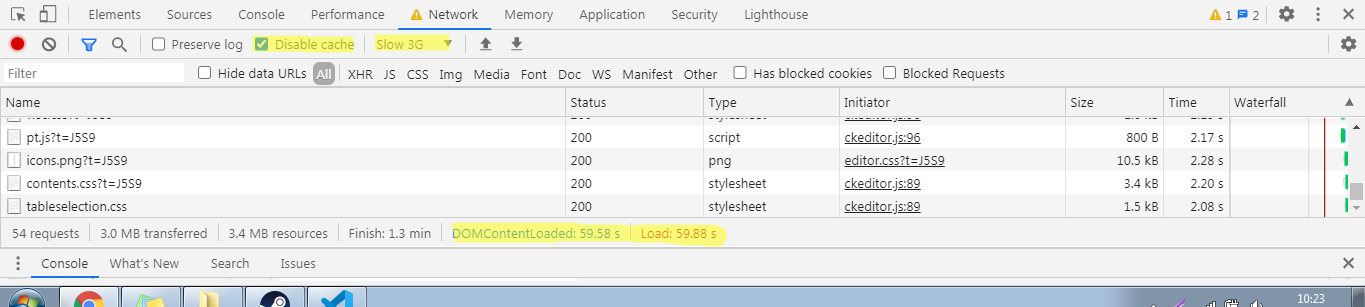
I tried in a full Monster Crud in demo, and in a simpler one with only a ckeditor and the google field.
@azaricstefan can you try to help me to get that error ?
Best,
Pedro
 pxpm
on 31 Aug 2020
pxpm
on 31 Aug 2020
@azaricstefan are you sure it's not because of a missing Google Places API key? Sounds like our key had hit his limit when you tried - like @pxpm said. Check out https://backpackforlaravel.com/docs/4.1/crud-fields#address_google for details on how to get an API key and use it in the field.
tabacitu
on 31 Aug 2020
Hi @pxpm sure, let's try to reproduce it on your side too.
I did customize the address_google field which is with minimal changes (only localization parameter.
I manage to repro with both custom and original field.
Last known good version (which is currently in production) is 4.0.38, I can't reproduce it there.
With latest version 4.1.21 it is failing randomly, sometimes on 10th refresh, sometimes every refresh of that page.
I am using the same field for more than a year and didn't had any issues up until now.
API key is the same in all the tests I run. I don't think that throttling could be the issue, since I am nowhere near the throttling limit.
Here is the diff with the current latest field: https://www.diffchecker.com/NGdpvtIP
This is custom address field:
<!-- text input -->
<?php
// the field should work whether or not Laravel attribute casting is used
if (isset($field['value']) && (is_array($field['value']) || is_object($field['value']))) {
$field['value'] = json_encode($field['value']);
}
?>
@include('crud::fields.inc.wrapper_start')
<label>{!! $field['label'] !!}</label>
@include('crud::fields.inc.translatable_icon')
<input type="hidden"
value="{{ old($field['name']) ? old($field['name']) : (isset($field['value']) ? $field['value'] : (isset($field['default']) ? $field['default'] : '' )) }}"
name="{{ $field['name'] }}">
@if(isset($field['prefix']) || isset($field['suffix']))
<div class="input-group"> @endif
@if(isset($field['prefix']))
<div class="input-group-addon">{!! $field['prefix'] !!}</div> @endif
@if(isset($field['store_as_json']) && $field['store_as_json'])
<input
type="text"
data-google-address="{"field": "{{$field['name']}}", "full": {{isset($field['store_as_json']) && $field['store_as_json'] ? 'true' : 'false'}} }"
data-init-function="bpFieldInitAddressGoogleElement"
@include('crud::fields.inc.attributes')
>
@else
<input
type="text"
data-google-address="{"field": "{{$field['name']}}", "full": {{isset($field['store_as_json']) && $field['store_as_json'] ? 'true' : 'false'}} }"
data-init-function="bpFieldInitAddressGoogleElement"
name="{{ $field['name'] }}"
value="{{ old($field['name']) ? old($field['name']) : (isset($field['value']) ? $field['value'] : (isset($field['default']) ? $field['default'] : '' )) }}"
@include('crud::fields.inc.attributes')
>
@endif
@if(isset($field['suffix']))
<div class="input-group-addon">{!! $field['suffix'] !!}</div> @endif
@if(isset($field['prefix']) || isset($field['suffix'])) </div> @endif
{{-- HINT --}}
@if (isset($field['hint']))
<p class="help-block">{!! $field['hint'] !!}</p>
@endif
@include('crud::fields.inc.wrapper_end')
{{-- Note: you can use to only load some CSS/JS once, even though there are multiple instances of it --}}
{{-- ########################################## --}}
{{-- Extra CSS and JS for this particular field --}}
{{-- If a field type is shown multiple times on a form, the CSS and JS will only be loaded once --}}
@if ($crud->fieldTypeNotLoaded($field))
@php
$crud->markFieldTypeAsLoaded($field);
@endphp
{{-- FIELD CSS - will be loaded in the after_styles section --}}
@push('crud_fields_styles')
<style>
.ap-input-icon.ap-icon-pin {
right: 5px !important;
}
.ap-input-icon.ap-icon-clear {
right: 10px !important;
}
</style>
@endpush
{{-- FIELD JS - will be loaded in the after_scripts section --}}
@push('crud_fields_scripts')
<script>
function bpFieldInitAddressGoogleElement(element) {
var $addressConfig = element.data('google-address');
var $field = $('[name="' + $addressConfig.field + '"]');
if ($field.val().length) {
var existingData = JSON.parse($field.val());
element.val(existingData.value);
}
var options = {
types: ['geocode'],
componentRestrictions: {country: "rs"}
};
var $autocomplete = new google.maps.places.Autocomplete(
(element[0]), options);
$autocomplete.addListener('place_changed', function fillInAddress() {
var place = $autocomplete.getPlace();
var value = element.val();
var latlng = place.geometry.location;
var data = {"value": value, "latlng": latlng};
for (var i = 0; i < place.address_components.length; i++) {
var addressType = place.address_components[i].types[0];
data[addressType] = place.address_components[i]['long_name'];
}
$field.val(JSON.stringify(data));
});
element.change(function(){
if (!element.val().length) {
$field.val("");
}
});
}
//Function that will be called by Google Places Library
function initGoogleAddressAutocomplete() {
$('[data-google-address]').each(function () {
var element = $(this);
var functionName = element.data('init-function');
if (typeof window[functionName] === "function") {
window[functionName](element);
}
});
}
</script>
<script src="https://maps.googleapis.com/maps/api/js?key={{config('services.google_places.key')}}&libraries=places&callback=initGoogleAddressAutocomplete&language=hr®ion=RS"
async defer></script>
@endpush
@endif
{{-- End of Extra CSS and JS --}}
{{-- ########################################## --}}
Possible mitigation
When I remove async defer in this line:
<script src="https://maps.googleapis.com/maps/api/js?key={{config('services.google_places.key')}}&libraries=places&callback=initGoogleAddressAutocomplete&language=hr®ion=RS"
async defer></script>
I am not able to reproduce this issue.
azaricstefan
on 31 Aug 2020
In official docs Google has only defer.
https://developers.google.com/maps/documentation/javascript/overview#Loading_the_Maps_API
When I remove async and leave defer only then it works like a charm.
azaricstefan
on 31 Aug 2020
@azaricstefan thank you very much for your inputs.
Even if I cannot reproduce it, it does not mean it could not happen and by specification using async may lead to that error happening because async does not care about document loading and just parses the script independently.
One of the reasons might be that we call the init function twice.
1 - When the regular form init scripts run
2- When the script is loaded via callback function
Our form init script occurs when jQuery('document').ready(), while using async our event does not wait for this script to load, and run it even if google is not available in page.
I think we have two solutions for this problem.
The first would be to remove the async because defer marks the scripts to be loaded later, but no later than when document ready. This have the downside of the whole page scripts waiting for this script to load before beeing parsed.
The second one, and I think this might be best solution is to add a check if (typeof google !== "undefined") that might happen in our first field initialization but never happen when the script calls the init function as a callback.
Can you please adjust the init function as below and test if you can reproduce the error ?
function bpFieldInitAddressGoogleElement(element) {
                if(typeof google !== "undefined") { //this is the new added line
                var $addressConfig = element.data('google-address');
                var $field = $('[name="' + $addressConfig.field + '"]');

                if ($field.val().length) {
                    var existingData = JSON.parse($field.val());
                    element.val(existingData.value);
                }

                var $autocomplete = new google.maps.places.Autocomplete(
                    (element[0]),
                    {types: ['geocode']});

                $autocomplete.addListener('place_changed', function fillInAddress() {

                    var place = $autocomplete.getPlace();
                    var value = element.val();
                    var latlng = place.geometry.location;
                    var data = {"value": value, "latlng": latlng};

                    for (var i = 0; i < place.address_components.length; i++) {
                        var addressType = place.address_components[i].types[0];
                        data[addressType] = place.address_components[i]['long_name'];
                    }
                    $field.val(JSON.stringify(data));

                });

                element.change(function(){
                    if (!element.val().length) {
                        $field.val("");
                    }
                });
            } //this is the new added line
        }
Basically just encapsulate the bpFieldInitAddressGoogleElement with a check if google is defined in page.
Let me know how it goes so I can submit a PR to address this.
Wish you the best,
Pedro
pxpm
on 1 Sep 2020
Hi @pxpm,
I also prefer option 2, with this check it doesn't fail now!
if(typeof google !== "undefined") { //this is the new added line
I tested with async and I can't reproduce it again.
Thank you for detailed explanation and for the support, I appreciate it! 🍾
Can you add the check for undefined in the next update of backpack/crud?
I would also prefer to flip the condition to avoid indenting the code + it's cleaner. 😄
Like this: if(typeof google === "undefined") { return; }
Issue is solved, we can close it now.
azaricstefan
on 2 Sep 2020
@azaricstefan
Thank you very much for your time and patience helping debbug this error.
I'v just submitted PR: #3180 with your solution, clearly way cleaner than mine, thanks for the tip.
Going to close this, it should be merged at most next Monday.
Wish you the best,
Pedro
pxpm
on 3 Sep 2020
Related issues
 dividy
·
3Comments
dividy
·
3Comments
 mklahorst
·
3Comments
mklahorst
·
3Comments
 GenericHero01
·
3Comments
GenericHero01
·
3Comments
 gotrecillo
·
3Comments
gotrecillo
·
3Comments
 packytagliaferro
·
3Comments
packytagliaferro
·
3Comments
Most helpful comment
@azaricstefan
Thank you very much for your time and patience helping debbug this error.
I'v just submitted PR: #3180 with your solution, clearly way cleaner than mine, thanks for the tip.
Going to close this, it should be merged at most next Monday.
Wish you the best,
Pedro