Crud: [4.0][Bug] Reorder crashes when the tree has over 200 entries
Bug report
What I did
Created a CRUD that has over 200 entries and tried to save from the reorder page. The reorder tree has a maximum depth of 4.
What I expected to happen
Success upon saving.
What happened
Error upon saving.
SQLSTATE[23000]: Integrity constraint violation: 1048 Column 'depth' cannot be null (SQL: updatepostssetparent_id= ?,depth= ?,lft= ?,rgt= ?,posts.updated_at= 2020-02-26 17:38:33 whereid= 178 andmenu= plan-de-soins)
What I've already tried to fix it
I checked the POST data send to the reorder, depth is defined correctly and all seemed fine beyond that.
I had to do a custom operation where I reorder only a part of the tree, meaning only the branches of a specific parent entry, to bypass the error.
Backpack, Laravel, PHP, DB version
When I run php artisan backpack:version the output is:
PHP VERSION:
PHP 7.3.11-1+ubuntu16.04.1+deb.sury.org+1 (cli) (built: Oct 24 2019 18:23:06) ( NTS )
Copyright (c) 1997-2018 The PHP Group
Zend Engine v3.3.11, Copyright (c) 1998-2018 Zend Technologies
with Zend OPcache v7.3.11-1+ubuntu16.04.1+deb.sury.org+1, Copyright (c) 1999-2018, by Zend Technologies
LARAVEL VERSION:
laravel/framework v6.17.1 The Laravel Framework.
BACKPACK VERSION:
backpack/crud 4.0.41 Quickly build an admin interfaces using Laravel 6, CoreUI, Boostrap 4 and jQuery.
backpack/generators 2.0.6 Generate files for laravel projects
backpack/logmanager 3.0.3 An interface to preview, download and delete Laravel log files.
backpack/permissionmanager 5.0.6 Users and permissions management interface for Laravel 5 using Backpack CRUD.
 patlamontagne
All 7 comments
Hi @patlamontagne ,
Thanks for reporting the issue. I wasn't able to confirm it though. Just tried it with 228 entries, depth 4, and it worked fine for me:
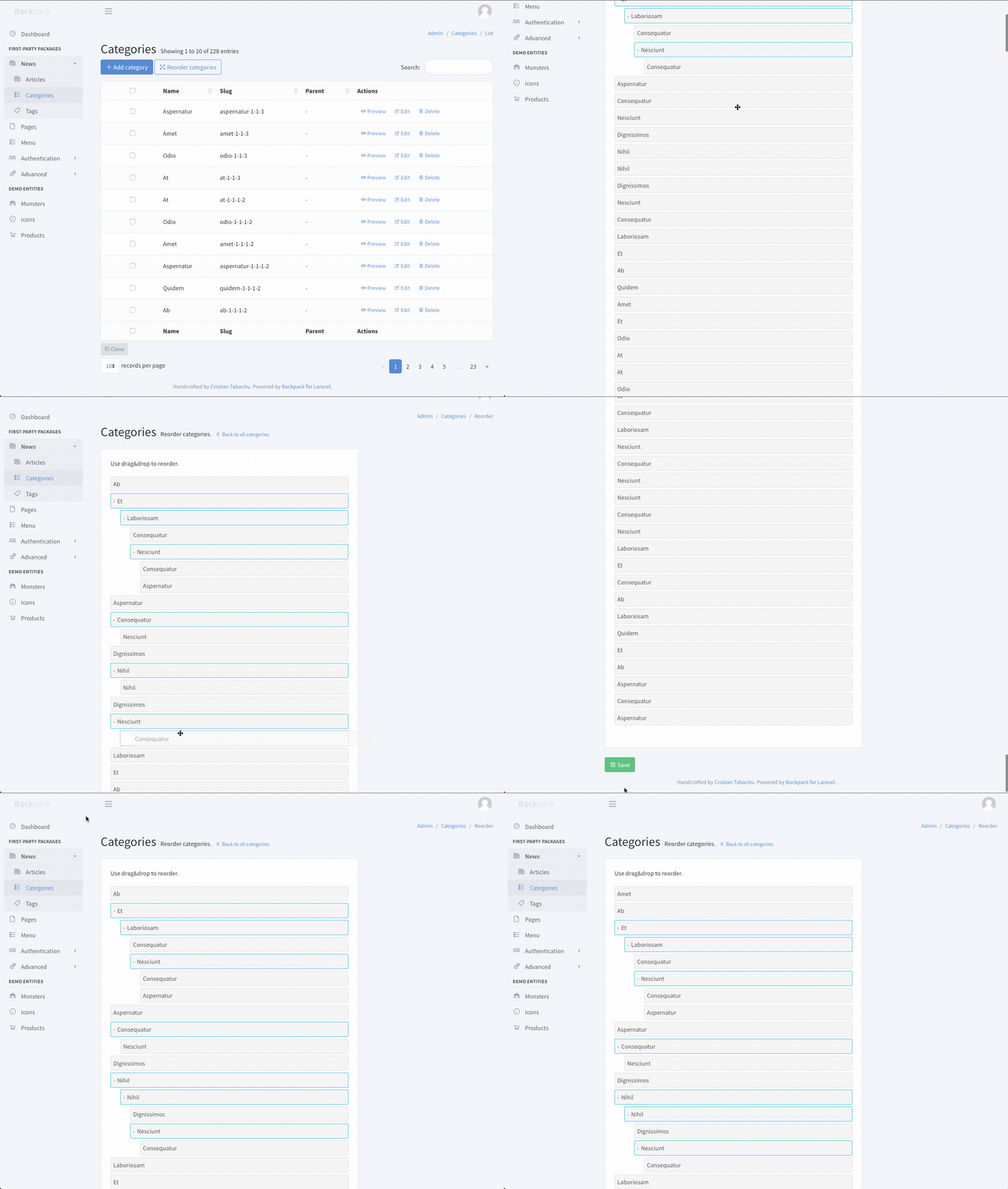
Since I can't confirm it, I'll close this for the time being. Please let me know if you can debug this further and see what the issue was - if it's something that Backpack did, we'll reopen this. To debug this further, maybe you can dump the JSON both:
- in JS, before it's sent through AJAX
- in PHP, when it's received by the operation
And see if they're the same. I imagine a possible cause for you would server variables - maybe post_max_size is a bit smaller than needed, so the JSON gets clipped? It's the only thing I can think of - though in most cases that would trigger a PHP error, I think.
That being said, the Reorder operation isn't really intended for entities that have 200+ entries. The interface gets a bit difficult to use when that many entries are involved - you have to scroll a lot to the bottom, to the Save button. It _works_ - that's why we're using POST instead of GET, so that many entries can be passed. But it definitely won't be the best UX...
Sorry I can't be of more help - since I can't reproduce this I can't debug this. Let me know if you get to the bottom of this - it sounds weird.
Cheers!
 tabacitu
on 1 Mar 2020
tabacitu
on 1 Mar 2020
Hi @tabacitu,
Thanks for having a look.
This is definitely weird, but like you said yourself the reorder operation is not intended for it and it would make for a awful UX.
I needed it anyways so that's one of the reasons why I did a workaround to provide a reorder operation for each root element's children instead, which also happen to fix the bug in my case.
Sadly, since I have a solution already and for deadlines reasons I likely won't be able to go to the bottom of this in a forseeable future as it might not even be linked to this package in the first place.
Cheers :)
patlamontagne
on 2 Mar 2020
Sadly, since I have a solution already and for deadlines reasons I likely won't be able to go to the bottom of this in a forseeable future
Of course, I totally understand - I know deadlines only too well 😆 I think you found a nice workaround. Stick with it! Cheers!
tabacitu
on 2 Mar 2020
Just FYI, I ran into this same issue yesterday. I was able to confirm it on my live server, however, the bug did not occur on a different staging server, that is a different configuration. I will hopefully have some time to debug in the next few days, but my first guess would be a difference in php configurations. Maybe memory, or max post size. In any event, I wanted to let you know the problem had been duplicated, but is likely due to server configuration, not backpack.
 tkerns
on 3 Mar 2020
tkerns
on 3 Mar 2020
Actually easier to debug than I thought. max_input_vars in php.ini was only set to the default of 1000 on that server. I bumped that up to 1500 or 2000 and the problem was solved.
Hope that helps someone who runs across this in the future.
tkerns
on 3 Mar 2020
Thank you for sharing your findings @tkerns - I'm sure someone someday will go through the same thing. They'll be grateful you saved them the pain 😉 🎉
tabacitu
on 4 Mar 2020
Awesome @tkerns, thanks for the info. I'm glad I wasn't the only one after all!
patlamontagne
on 12 Mar 2020
Related issues
 mikael1000
·
3Comments
mikael1000
·
3Comments
 lotarbo
·
3Comments
lotarbo
·
3Comments
 mklahorst
·
3Comments
mklahorst
·
3Comments
 GenericHero01
·
3Comments
GenericHero01
·
3Comments
 bastos71
·
3Comments
bastos71
·
3Comments
Most helpful comment
Actually easier to debug than I thought. max_input_vars in php.ini was only set to the default of 1000 on that server. I bumped that up to 1500 or 2000 and the problem was solved.
Hope that helps someone who runs across this in the future.