Crud: [4.0][Bug] Not all options on dropdown button are shown
Bug report
What I did
Added a button like the edit button in https://demo.backpackforlaravel.com/admin/product
What I expected to happen
Dropdown always is fully visible wherever it is opened
What happened
When having 6+ options, the bottom options of the dropdown are no longer shown
What I've already tried to fix it
Tried to add
data-boundary="viewport"
to the button. Although in theory that should help, it does not ...
Backpack, Laravel, PHP, DB version
PHP VERSION:
PHP 7.3.1-1+ubuntu18.04.1+deb.sury.org+1 (cli) (built: Jan 13 2019 10:19:33) ( NTS )
Copyright (c) 1997-2018 The PHP Group
Zend Engine v3.3.1, Copyright (c) 1998-2018 Zend Technologies
with Zend OPcache v7.3.1-1+ubuntu18.04.1+deb.sury.org+1, Copyright (c) 1999-2018, by Zend Technologies
with blackfire v1.24.3~linux-x64-non_zts73, https://blackfire.io, by Blackfire
LARAVEL VERSION:
laravel/framework v6.9.0
BACKPACK VERSION:
backpack/crud 4.0.30
backpack/generators 2.0.5
eduardoarandah/backpacklogviewer 1.0.6
 timbertens
All 7 comments
Hmm... indeed @timbertens , the dropdown _should_ be visible. Can't replicate this. Can you please send a screenshot and the code from your blade file?
 tabacitu
on 27 Dec 2019
tabacitu
on 27 Dec 2019
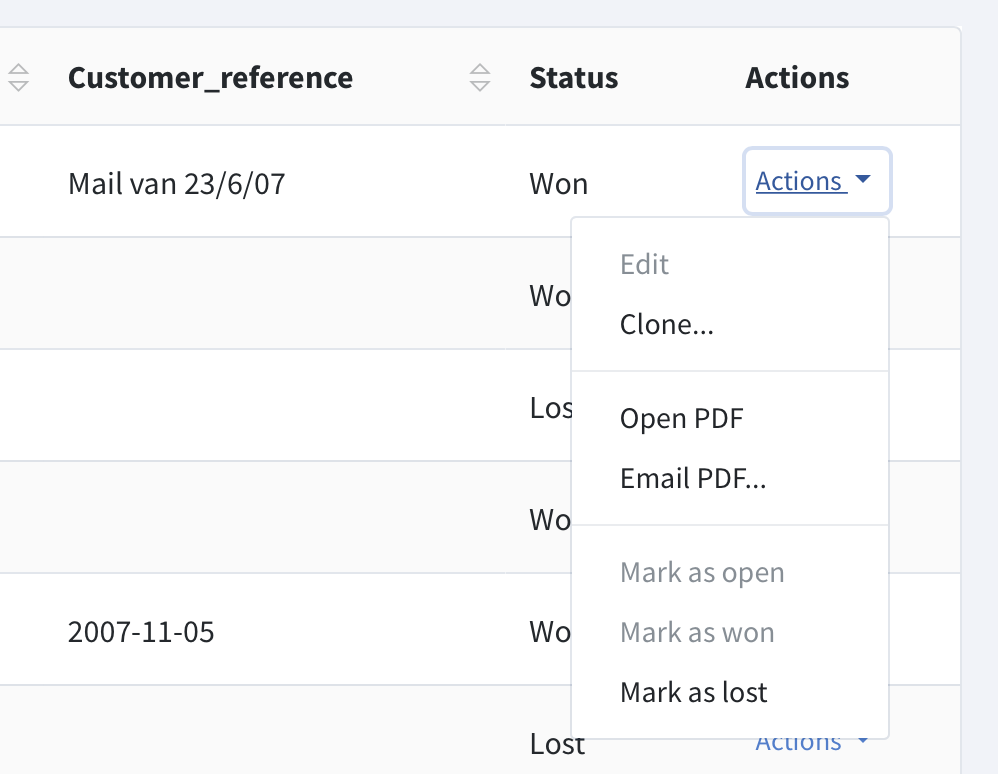
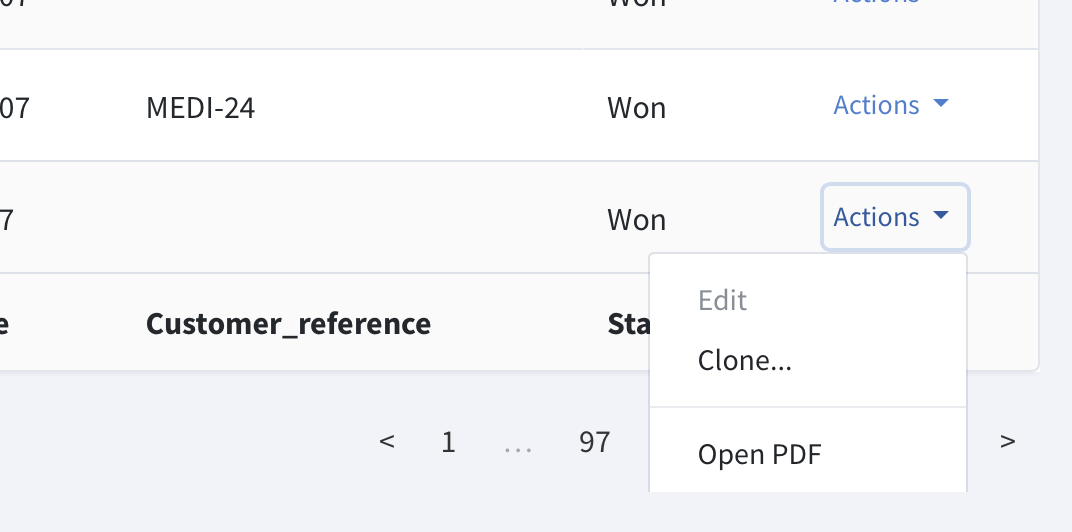
Sorry for the late reply, yes of course. I'm using Safari as a browser, for some reason the action buttons always wants to expand downwards, which makes the issue more occurring. On Chrome the same issue is there, but it is not that visible since most of the time (if there is room) the action button group expands upwards.
When there is enough room below:
Where there is not enough room below:
This is the actual button group code
<div class="btn-group">
  <a href="#" class="btn btn-sm btn-link dropdown-toggle text-primary pl-1" data-toggle="dropdown" aria-haspopup="true" aria-expanded="false">
        Actions <span class="caret"></span>
    </a>
  <ul class="dropdown-menu dropdown-menu-right" >
    <a class="dropdown-item @if($entry->offer_status_id == 3) disabled @endif"
        href="{{backpack_url()}}/offer/{{ $entry->id }}/edit">
      Edit
    </a>
    <a class="dropdown-item" href="{{backpack_url()}}/offer/{{ $entry->id }}/clone">Clone... </a>
    <div class="dropdown-divider"></div>
    <a class="dropdown-item" href="{{backpack_url()}}/offer/{{ $entry->id }}/pdf" target="_blank">Open PDF</a>
    <a class="dropdown-item" href="#" data-toggle="modal" data-target="#myModal{{ $entry->id }}">Email PDF... </a>
    <div class="dropdown-divider"></div>
    <a class="dropdown-item
        @if($entry->offer_status_id == 2 || $entry->offer_status_id == 3)
          disabled
        @endif"
        href="{{backpack_url()}}/offer/{{ $entry->id }}/mark-as-open">
        Mark as open
    </a>
    <a class="dropdown-item
       @if($entry->offer_status_id == 3)
        disabled
       @endif"
       href="{{backpack_url()}}/offer/{{ $entry->id }}/mark-as-won"
       >Mark as won</a>

    <a class="dropdown-item
      @if($entry->offer_status_id == 4)
        disabled
       @endif"
       href="{{backpack_url()}}/offer/{{ $entry->id }}/mark-as-lost"
    >Mark as lost</a>
  </ul>
</div>
I believe this can be solved in vendor/backpack/crud/src/resources/views/crud/list.blade.php on line 51 by changing it to
<div class="mt-2">
and thus removing the overflow-hidden class. I'm not sure of other unwanted consequences but it fixes this issue
timbertens
on 24 Jan 2020
Same thing is happening for the "column visibility" which can be clicked just bellow the table. If you have a lot of options those won't be shown. There will only show 3,4 items instead of all of them.
 azaricstefan
on 24 Feb 2020
azaricstefan
on 24 Feb 2020
@tabacitu Do you think I could be added to one of the following releases?
timbertens
on 19 Jun 2020
Indeed @timbertens thanks for re-surfacing this. Just merged @pxpm 's PR #2953 that fixes this. Will tag in a few minutes, so you'll be able to get it with a composer update backpack/crud.
Sorry for taking so long to squash such a minor bug - must have slipped through the cracks.
tabacitu
on 22 Jun 2020
Update - while the _simple_ fix for this was merged in #2953 . The larger problem (for when there are even more items in the dropdown, and it gets even bigger than the viewport) is not yet solved, we're working on it in #2945
tabacitu
on 22 Jun 2020
Wow didn't know you can do an action dropdown like that! Will revisit this page again in the future
 ziming
on 23 Jun 2020
ziming
on 23 Jun 2020
Related issues
 M0H3N
·
3Comments
M0H3N
·
3Comments
 abewartech
·
3Comments
abewartech
·
3Comments
 sseggio
·
3Comments
sseggio
·
3Comments
 lotarbo
·
3Comments
lotarbo
·
3Comments
 alexgmin
·
3Comments
alexgmin
·
3Comments