Crud: [BUG] No export buttons on version 3.5
Bug report
I believe export buttons feature was forgotten with this update, as far as I understood, the div id='datatable_button_stack' is not in the list.blade.php.
What I did:
Added the export function $this->crud->enableExportButtons();.
What I've already tried to fix it:
I added the div next to the search stack div in the list.blade.php file, and it started to work.
<div class="col-xs-6">
    <div id="datatable_button_stack" class="pull-right"></div>
    <div id="datatable_search_stack" class="pull-right"></div>
</div>
This causes a kind of design flaw, because the buttons there are not very beautiful :)

Backpack, Laravel, PHP, DB version:
CRUD 3.5
 promatik
All 31 comments
Hi, I have the same problem... the problem is with the css, if you enable it (clean installation), the class dt-buttons is broken, and display is none. but if you change the css, you can clic the buttons and all works fine. Thanks.

 chemitaxis
on 24 Nov 2018
chemitaxis
on 24 Nov 2018
I'm new with BackPack, but I would like to know why a class is disabled by default if I have enabled the export options... is this a normal case? I think I'm missing something... thank you so much!
chemitaxis
on 24 Nov 2018
@chemitaxis this was for sure a lapse in this new version, the controls are by default disabled because they are generated by DataTables, and then, Backpack moves those controls in the DOM to other places visually more appealing.
If this was a matter of showing/hiding elements with CSS, I would help with a Pull Request, the problem is this changes the layout/design, so I'll leave this to @tabacitu :)
promatik
on 25 Nov 2018
Hi guys,
Thanks a lot for raising this issue. You're totally right, the export buttons DID NOT show - and that's definitely not intentional. I don't know how/why that display: none got in there.
I've fixed the CSS and pushed it, but it's not tagged yet - it will be in a few minutes after i bundle it with a few more minor fixes. So a:
composer update
php artisan vendor:publish --provider="Backpack\CRUD\CrudServiceProvider" --tag=public --force
should fix it for you guys.
Thanks again. Cheers!
 tabacitu
on 26 Nov 2018
tabacitu
on 26 Nov 2018
@promatik - note that the export buttons have been moved to the bottom-right corner of the screen, that's where they should show.
tabacitu
on 26 Nov 2018
@tabacitu is this supposed to happen:

The export buttons don't look very nice that way ...
promatik
on 26 Nov 2018
@promatik definitely not supposed to happen. Looks like this for me:

Any chance:
- you have some JS errors in the console
- (or)
- you're using a custom
resources/views/vendor/backpack/crud/inc/datatables_logic.blade.php?
tabacitu
on 26 Nov 2018
Very strange, no errors in the console, and I'm not using the custom view, the results comes from this:

All my resources come from vendor:

promatik
on 26 Nov 2018
Same here – they weren't showing at all, and after composer update and doing the artisan publish command above they're displaying as in @promatik's screenshot
 johnpuddephatt
on 26 Nov 2018
johnpuddephatt
on 26 Nov 2018
Just realised this only occurs when there are no bulk action buttons.
johnpuddephatt
on 26 Nov 2018
@johnpuddephatt I just enabled the bulk actions, and it's the same, the buttons are weirdly in the middle.
Also, I don't know if it is supposed to be like this, or if the problem is on windows, but my bulk check-boxes are also a little weird:

No style, very big, and the column width is very large.
By the way, I tried to composer install everything from scratch, and I'm not using custom views, so something weird is happening :)
promatik
on 26 Nov 2018
@promatik did you at least one bulk action button? e.g. $this->crud->addBulkDeleteButton();
That's what 'fixed' it for me.
@tabacitu it looks like the conditional on line 84 of list.blade.php is the culprit, it should be:
@if ( $crud->buttons->where('stack', 'bottom')->count() || $crud->exportButtons()) – this makes it consistent with line 27.
The only problem then is that if there's no bulk action button, the styling isn't quite right; I think the div after #bottom_buttons needs clear:both on it.
johnpuddephatt
on 26 Nov 2018
Oh, I get it now! Thank you @promatik & @johnpuddephatt - so it looked bad without bulk buttons, stupid me, only tested in one place.
@johnpuddephatt I wouldn't really want the export buttons on top of the pagination buttons if bulk buttons are missing - I think they're ok in the middle of the screen, I just seem to have tested this only with big screens and it looks bad on normal resolutions (1280).
Just pushed a fix, so this:
composer update
php artisan vendor:publish --provider="Backpack\CRUD\CrudServiceProvider" --tag=public --force
php artisan view:clear
should make it look like this:


Ended up putting all export buttons under one dropdown, after all - it's something that @johnpuddephatt suggested and i've wanted to do for a while, but just now figured one the _one_ thing that I previously couldn't :-)
Thoughts? Please let me know if you encounter any other problems with this.
tabacitu
on 27 Nov 2018
@promatik about the bulk buttons _column_ - the column should resize like any other column, and might be pretty large if there are few columns in the table. Is the column still this wide if you add more columns?
tabacitu
on 27 Nov 2018
Thanks for the fix @tabacitu
chemitaxis
on 27 Nov 2018
@tabacitu, just did the composer update and vendor:publish, and there is this odd behavior:
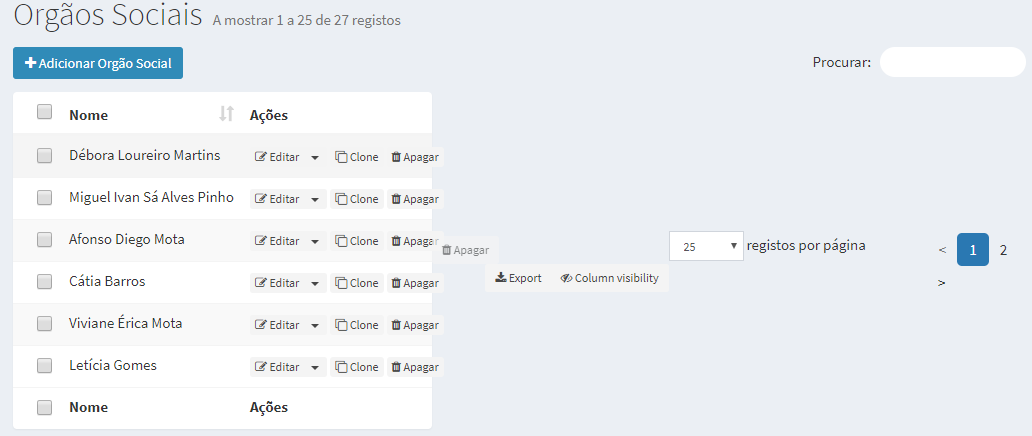
This is being caused by the display: flex on #crudTable_wrapper .
Adding a flex-direction: column; and removing the align-items: center; fixed the problem for me:
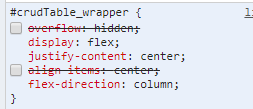
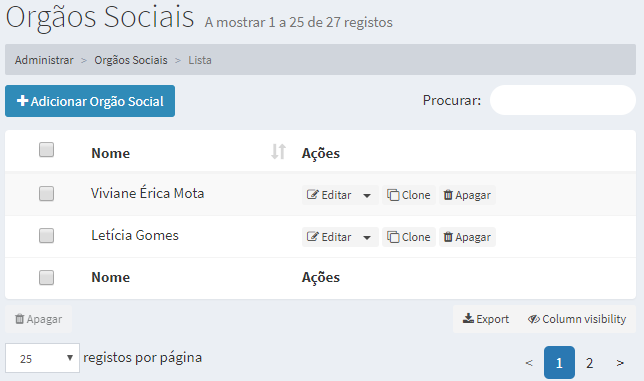
The commit: https://github.com/Laravel-Backpack/CRUD/commit/2513c2c806965761dead4edd1517875e081a56f6
promatik
on 27 Nov 2018
@tabacitu buttons = great! Agree they're fine in the middle if no bulk action button. Might be worth adding <span class="caret"></span> to the buttons' text to show that they're dropdowns?
Can confirm I also experience behaviour @promatik is reporting due to display: flex – @tabacitu did you mean to set display: flex on the row of controls below the table?
johnpuddephatt
on 27 Nov 2018
Hi, I can't see the buttons yet...
I have executed, and the list.css file have been updated, but the problem persists... thanks.
php artisan vendor:publish --provider="Backpack\CRUD\CrudServiceProvider" --tag=public --force
chemitaxis
on 27 Nov 2018
Hi guys,
Very sorry for making this worse and worse. I officially hate hot fixes now.
Just pushed a fix that will solve this once and for all. I've reverted all intermmediary solutions mentioned here, because they did more harm than good. And I fixed the initial problem, which wasn't the CSS - it was the Javascript (_of course_ it was the JS). The change to inline-block was chained to something else, so when that first command failed, the export buttons did not show up (when bulk buttons weren't there). That's fixed now too, because they're two separate commands.
This last commit fixes it, once and for all. Please do:
composer update
php artisan vendor:publish --provider="Backpack\CRUD\CrudServiceProvider" --tag=public --force
php artisan view:clear
Thank you everybody for participating in this, and sorry again for so much back-and-forth for a stupid _stupid_ error on my end. Note to self: no more hot fixes. Lesson learnt.
Cheers!
tabacitu
on 28 Nov 2018
PS. This last commit also makes the export button NOT blink when the page is loaded, or be shown bigger then smaller, because they're shown with JS. Also it centers them in the middle column, which I believe is better. I recommend you get this new CSS even if you've applied other fixes here.
tabacitu
on 28 Nov 2018
Thank you so much!!
chemitaxis
on 28 Nov 2018
Thank you @tabacitu.
Just tested, and everything is working perfectly!
Issue closed for good!
promatik
on 28 Nov 2018

tabacitu
on 29 Nov 2018
$this->crud->enableExportButtons(); does not show the export buttons at the moment.
Laravel Framework 5.7.15
backpack/base 1.0.2
backpack/crud 3.5.9
 howest-ward
on 29 Nov 2018
howest-ward
on 29 Nov 2018
@howest-ward are you sure about that? Note that now the buttons are on the bottom of the page ...
promatik
on 29 Nov 2018
$this->crud->enableExportButtons(); does not show the export buttons at the moment.
@howest-ward аfter updating please do third command:
composer update
php artisan vendor:publish --provider="Backpack\CRUD\CrudServiceProvider" --tag=public --force
php artisan view:clear
 urlportal
on 30 Nov 2018
urlportal
on 30 Nov 2018
php artisan view:clear
Fixed the problem. I'm new to laravel/backpack, I didn't know about this command.
Normally, I just clear the cache and tought that was enough.
Thanks for the help!
howest-ward
on 30 Nov 2018
@urlportal you're totally right, thank you! I've updated my instructions above with php artisan view:clear too, in case people don't read the entire thread. Thanks a lot!
tabacitu
on 5 Dec 2018
@tabacitu, I'm not sure why it's not working. Updated the package, published resources, cleared cache. Still no luck.
bp/crud v3.6.4
 Athuli7
on 7 Mar 2019
Athuli7
on 7 Mar 2019
@Athuli7 , does this not fix it for you?
composer update
php artisan vendor:publish --provider="Backpack\CRUD\CrudServiceProvider" --tag=public --force
php artisan view:clear
If so, please let me know what version of backpack/base/laravel you are running. Should be easy to get using php artisan backpack:base:version - copy-paste the output.
tabacitu
on 12 Mar 2019
PHP VERSION:
PHP 7.2.9 (cli) (built: Aug 23 2018 02:08:27) ( NTS )
Copyright (c) 1997-2018 The PHP Group
Zend Engine v3.2.0, Copyright (c) 1998-2018 Zend Technologies
with Zend OPcache v7.2.9, Copyright (c) 1999-2018, by Zend Technologies
BACKPACK PACKAGES VERSION:
backpack/base 1.1.4 Laravel Backpack's base package, which offers admin authentication and a blank admin panel using AdminLTE
backpack/crud 3.6.6 Quickly build an admin interface for your Eloquent models, using Laravel 5. Build a CMS in a matter of minutes.
backpack/generators 1.2.7 Generate files for laravel projects
backpack/permissionmanager 3.12.6 Users and permissions management interface for Laravel 5 using Backpack CRUD.
backpack/settings 2.1.3 Application settings interface for Laravel 5 using Backpack CRUD.
laravel/framework v5.8.7 The Laravel Framework.
Athuli7
on 27 Mar 2019
Related issues
 deepaksp
·
3Comments
deepaksp
·
3Comments
 sseggio
·
3Comments
sseggio
·
3Comments
 M0H3N
·
3Comments
M0H3N
·
3Comments
 alexgmin
·
3Comments
alexgmin
·
3Comments
 sokvebolkol
·
3Comments
sokvebolkol
·
3Comments
Most helpful comment