Crud: [4.0][Feature req] List View Stacks - choose where to place certain items on the page
Building on @tswonke ’s idea here https://github.com/Laravel-Backpack/CRUD/pull/1675#issuecomment-435070874 . That original PR was meant to “_bring the most important information center-stage_”, but we realized “_the most important information_” might be subjective, or project-specific. So:
I think it would be really great to have options (global/default + per view) to set the position of:
- datatables labels (top, bottom, both)
- bulk buttons (top, bottom, both)
- export buttons (top, bottom, both)
- pagination (top, bottom, both)
I think so too. I think some projects might need top pagination, others not. And it’s a good idea to make it easier for developers to do something without having to overwrite the blade file. Could use a poll on this - could be overoptimization too.
But. If we _do_ do this, I think we can solve it with another idea I had a while back - Stacks. It’s something that Laravel natively supports, something we’ve successfully used for loading js and css assets, something we can use even further, I think.
_What if_ we split the list view into A LOT of stacks, and we allow the developer to push things inside them? Developers could push Backpack views, or they could push _their own views_. Here’s a very crude mockup of how it might be divided:
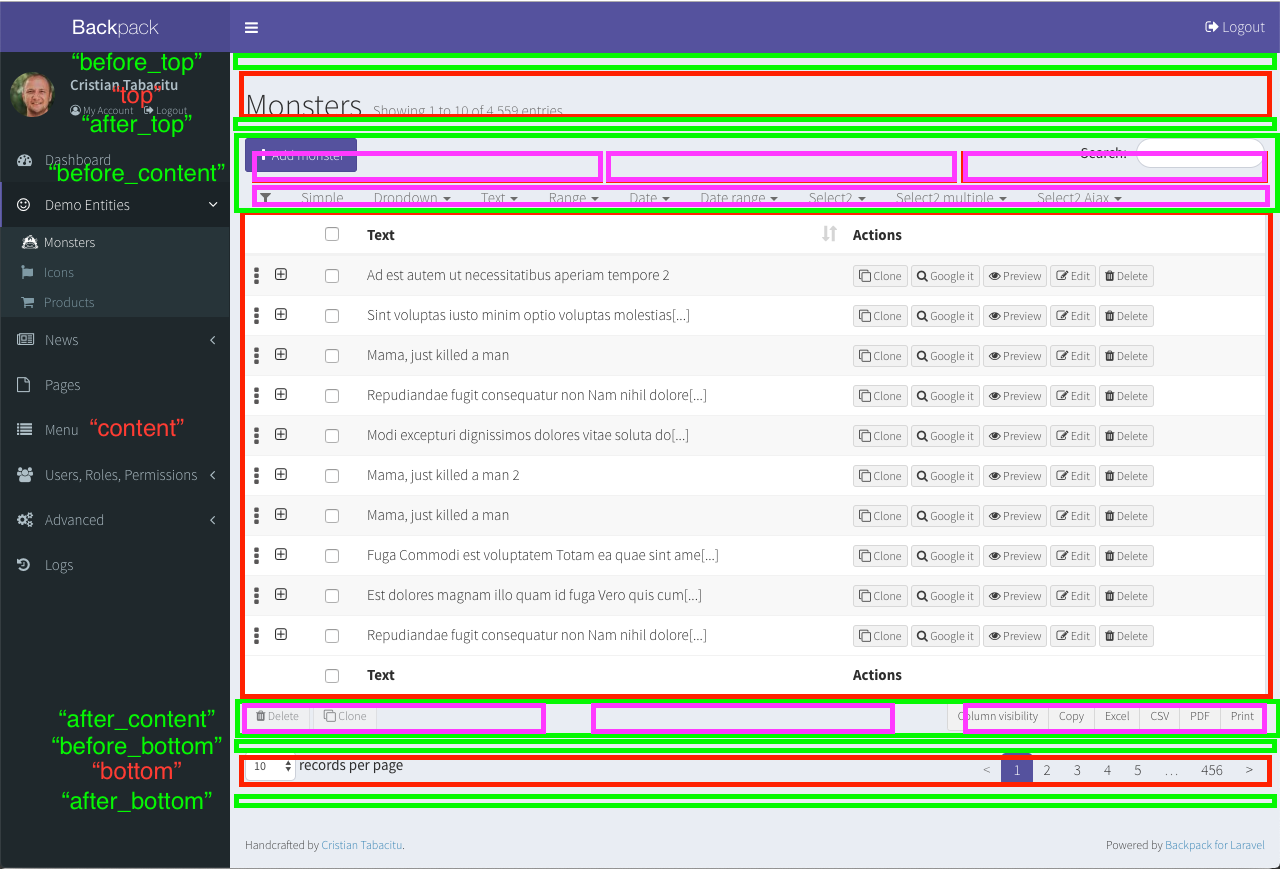
Legend:
- red squares are main sections - “top”, “content”, “bottom”
- green squares are secondary sections - before/after main sections
- purple squares are inserted views, that have been introduced by Backpack’s default settings (
before_content_left,before_content_center,before_content_right,filters,after_content_left,after_content_center,after_content_right)
You, as a developer, could push content inside any of the main sections or secondary sections. You can only push things inside inserted views if those inserted views have an API (ex: $this->crud->addButton(), $this->crud->addFilter()).
 tabacitu
All 5 comments
Basically, the list view would be split into multiple sections / stacks / whatever we call them. Backpack then adds to them, but the developer can add to them too.
So it could allow you to do something like:
$this->crud->addView(‘path/to/my/view’, ‘list’, 'after_top’);
This would add things like charts, or breadcrumbs, or whatever:

Before, after or during the list view. It would also allow you to add functionality to the list view (if we do it right). So you just re-add the pagination view, and it’s added twice. Or add a completely custom view, that adds a few buttons you might need, without using $this->crud->addButton().
Too complicated? In my mind it’s more general, and allow for a bunch of use cases, and I think that’s a good thing.
Thoughts?
tabacitu
on 2 Nov 2018
$this->crud->addView(‘path/to/my/view’, ‘list’, 'after_top’);
I suppose this is also intended to be available for update and create? :-)
 tswonke
on 2 Nov 2018
tswonke
on 2 Nov 2018
@tswonke - yup, since the ListEntries operation would have stacks, I don’t see why the other operations wouldn’t :-) Less useful for Update and Create, but could be _very_ useful for Show.
tabacitu
on 2 Nov 2018
awesome 👍
 imansugirman
on 5 Jan 2019
imansugirman
on 5 Jan 2019
This has been fixed in Backpack/Base, in PR https://github.com/Laravel-Backpack/Base/pull/390 - they're called "widgets" instead of "views", because "views" already exist in Laravel and it would be confusing. Also, fields, columns, etc are also "views".
Either way, what I mentioned above is now possible, and easy to do. For example:
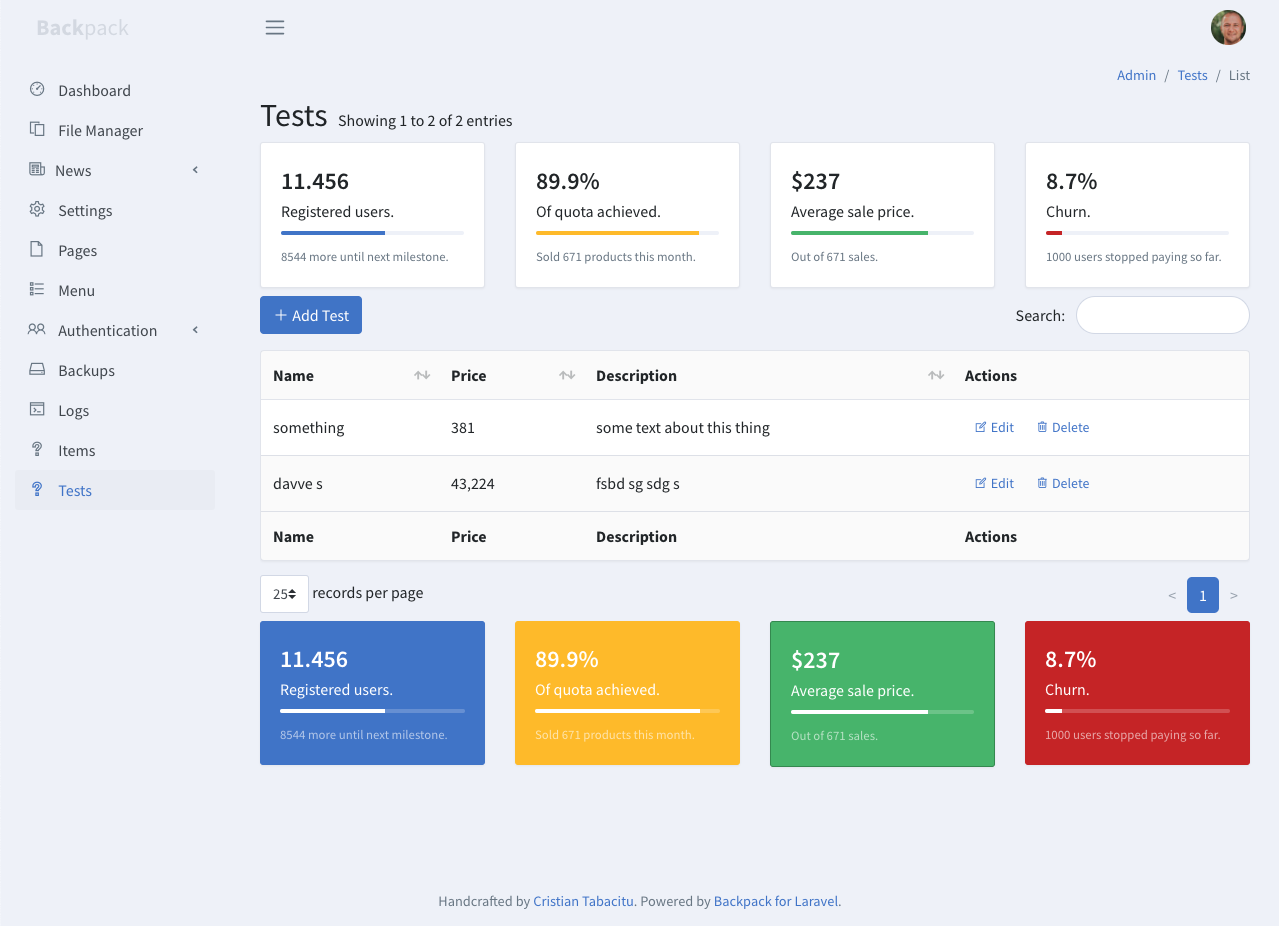
Was made by adding this to setup():
       $this->data['widgets']['before_content'][] = [ 'type' => 'div', 'class' => 'row', 'content' => [
            [
                'type'        => 'progress_white',
                'class'       => 'card mb-2',
                'value'       => '11.456',
                'description' => 'Registered users.',
                'progress'    => 57, // integer
                'progressClass' => 'progress-bar bg-primary',
                'hint'        => '8544 more until next milestone.',
            ],
            [
                'type'        => 'progress_white',
                'class'       => 'card mb-2',
                'value'       => '89.9%',
                'description' => 'Of quota achieved.',
                'progress'    => 89, // integer
                'progressClass' => 'progress-bar bg-warning',
                'hint'        => 'Sold 671 products this month.',
            ],
            [
                'type'        => 'progress_white',
                'class'       => 'card mb-2',
                'value'       => '$237',
                'description' => 'Average sale price.',
                'progress'    => 75, // integer
                'progressClass' => 'progress-bar bg-success',
                'hint'        => 'Out of 671 sales.',
            ],
            [
                'type'        => 'progress_white',
                'class'       => 'card mb-2',
                'value'       => '8.7%',
                'description' => 'Churn.',
                'progress'    => 9, // integer
                'progressClass' => 'progress-bar bg-danger',
                'hint'        => '1000 users stopped paying so far.',
            ],
        ]];

        $this->data['widgets']['after_content'][] = [ 'type' => 'div', 'class' => 'row', 'content' => [
            [
                'type'        => 'progress',
                'class'       => 'card text-white bg-primary mb-2',
                'value'       => '11.456',
                'description' => 'Registered users.',
                'progress'    => 57, // integer
                'hint'        => '8544 more until next milestone.',
            ],
            [
                'type'        => 'progress',
                'class'       => 'card text-white bg-warning mb-2',
                'value'       => '89.9%',
                'description' => 'Of quota achieved.',
                'progress'    => 89, // integer
                'hint'        => 'Sold 671 products this month.',
            ],
            [
                'type'        => 'progress',
                'class'       => 'card text-white bg-success mb-2',
                'value'       => '$237',
                'description' => 'Average sale price.',
                'progress'    => 75, // integer
                'hint'        => 'Out of 671 sales.',
            ],
            [
                'type'        => 'progress',
                'class'       => 'card text-white bg-danger mb-2',
                'value'       => '8.7%',
                'description' => 'Churn.',
                'progress'    => 9, // integer
                'hint'        => '1000 users stopped paying so far.',
            ],
        ]];
Of course, this will add these widgets on ALL crud operation views. Which is rarely the case. Ideally, you'd add the widgets within the action you want (ex: create(), not in setup.
The difference between the initial idea and the actual implementation is that there are only two sections: before_content and after_content. We could decide to add more sections in the future - it'll be easy. There are no sub-sections because it doesn't make sense with widgets - you can achieve a much more customizable grid by specifying the wrapper class (to get 2, 3, x cards in one row, or whatever).
Closing this, as we can consider it complete.
tabacitu
on 24 Aug 2019
Related issues
 genesiscz
·
3Comments
genesiscz
·
3Comments
 abewartech
·
3Comments
abewartech
·
3Comments
 lotarbo
·
3Comments
lotarbo
·
3Comments
 mklahorst
·
3Comments
mklahorst
·
3Comments
 packytagliaferro
·
3Comments
packytagliaferro
·
3Comments
Most helpful comment
Basically, the list view would be split into multiple sections / stacks / whatever we call them. Backpack then adds to them, but the developer can add to them too.
So it could allow you to do something like:
This would add things like charts, or breadcrumbs, or whatever:

Before, after or during the list view. It would also allow you to add functionality to the list view (if we do it right). So you just re-add the pagination view, and it’s added twice. Or add a completely custom view, that adds a few buttons you might need, without using
$this->crud->addButton().Too complicated? In my mind it’s more general, and allow for a bunch of use cases, and I think that’s a good thing.
Thoughts?