Crud: Bug image field, store in fake field (store as base64, not path)
Hello,
I try to store the path of an image in a fake field. And it converts it to "base64", it's a problem.
It works when I specify a field other than "extras" and I create my mutator.
As I have several images on my pages (I use PageManager for simple pages). I need to store a different number on each page, which is why I would like a "fake field" solution, it would keep it flexible.
I try to follow the solution given here by @tabacitu Laravel-Backpack/CRUD#400.
Whatever I do, if I try to store an image in "extras", it converts it to base64 and that bug and even with the following code
public function setImageAttribute($value, $attribute_name = 'image')
    {
        $disk = "public_folder";
        $destination_path = "uploads/folder_1/subfolder_3";

        // if the image was erased
        if ($value==null) {
            // delete the image from disk
            \Storage::disk($disk)->delete($this->image);

            // set null in the database column
            $this->attributes[$attribute_name] = null;
        }

        // if a base64 was sent, store it in the db
        if (starts_with($value, 'data:image'))
        {
            // 0. Make the image
            $image = \Image::make($value);
            // 1. Generate a filename.
            $filename = md5($value.time()).'.jpg';
            // 2. Store the image on disk.
            \Storage::disk($disk)->put($destination_path.'/'.$filename, $image->stream());
            // 3. Save the path to the database
            $this->attributes[$attribute_name] = $destination_path.'/'.$filename;
        }
    }
I try to have something dynamic, otherwise I could post only one entry per column in the DB.
@tabacitu has given information to try to solve this problem. But I can not create it correctly.
So, is there a way to store multiple images from different fields on the same page in a fake-field?
Thank you
PS : Sorry for my english.
 Jimmylet
All 25 comments
To store more then one you will need to set the field 'name' to something different each time. Or a single field to 'upload_multiple'
 AbbyJanke
on 27 Apr 2017
AbbyJanke
on 27 Apr 2017
Yes, But if I change the name, I need a new field in my database, and that's not what I want to do. If I have ten images at different places in my page, I must have 10 fields, this is not ideal.
Jimmylet
on 27 Apr 2017
You can keep it as a fake field, and simply change the field name. The fake
fields "extra" column, will save each "fake" field apart a json string in
the db.
On Thu, Apr 27, 2017 at 2:50 AM Jimmy Letecheur notifications@github.com
wrote:
Yes, But if I change the name, I need a new field in my database, and
that's not what I want to do. If I have ten images at different places in
my page, I must have 10 fields, this is not ideal.—
You are receiving this because you commented.
Reply to this email directly, view it on GitHub
https://github.com/Laravel-Backpack/CRUD/issues/641#issuecomment-297667922,
or mute the thread
https://github.com/notifications/unsubscribe-auth/AAdxdlsOY7Si_WcyUglM2Y5iRL4N0cHIks5r0GTMgaJpZM4NJ4Ao
.
AbbyJanke
on 27 Apr 2017
Yes, but the problem is that if I store the image in a fake field, I don't know why, it tries to convert the image to base64 instead of saving it as a file and only storing the path.

And I don't know how to solve this problem, despite the above code.
Jimmylet
on 27 Apr 2017
There is a new update to the pagemanager with a fix I made. It changes the
"extra" field from TEXT to LONGTEXT.
On Thu, Apr 27, 2017 at 4:02 AM Jimmy Letecheur notifications@github.com
wrote:
Yes, but the problem is that if I store the image in a fake field, I do
not know why, it tries to convert the image to base64 instead of saving it
as a file and only storing the path.[image: errorimagefield]
https://cloud.githubusercontent.com/assets/17065517/25480597/b0b8ee2c-2b49-11e7-9ea0-e1a47ad191d8.pngAnd I do not know how to solve this problem, despite the above code.
—
You are receiving this because you commented.
Reply to this email directly, view it on GitHub
https://github.com/Laravel-Backpack/CRUD/issues/641#issuecomment-297682841,
or mute the thread
https://github.com/notifications/unsubscribe-auth/AAdxdm2S049i0YVKs_DreeTHBtgSOWQCks5r0HXPgaJpZM4NJ4Ao
.
AbbyJanke
on 27 Apr 2017
Thank you @AbbyJanke, I'll look.
Jimmylet
on 27 Apr 2017
@AbbyJanke, I just tested your solution. The image is storing, yes, but it does not solve the problem. It's stored in base64, it should not. This is very bad for a whole lot of thing (except specific items).
There should be a way to store the path only.
Jimmylet
on 27 Apr 2017
I do something like
public function setImageAttribute($value)
{
if ($value == null) {
Storage::disk('news')->delete($this->image);
$this->attributes['image'] = null;
}
if (starts_with($value, 'data:image')) {
$image = Image::make($value)->fit(300, 200);
$filename = md5($value . time()) . '.jpg';
Storage::disk('news')->put($filename, $image->stream());
$this->attributes['image'] = $filename;
}
}
in model being saved. Not sure but you can try to implement similar method for each of your extras image field (keeping duplicate code out).
 erik-ropez
on 27 Apr 2017
erik-ropez
on 27 Apr 2017
Hello @erik-ropez , I've already tried (see my code above) but it does not seem to work. Fake-field are an incredible feature, it could be useful to many but if it doesn't work with the pictures it's annoying.
I don't understand why.
Jimmylet
on 27 Apr 2017
Hello @Jimmylet,
I have been having the same problem, the error was the name of the attribute.
For example:
If the field has the image name, it will be setImageAttribute and if the name is different for example screenshots, it will be setScreenshotsAttribute.
I see in your error that your field is extras then the correct name is SetExtrasAttribute.
I think it's the problem you have, I was having the same problem until I realized the error.
I hope it helps.
 jherediagu
on 18 May 2017
jherediagu
on 18 May 2017
The extras fields cannot be handle the same as any other fields; in fact when they are saved the following code from Line 17 in the FakeFields trait is run.
What the @Jimmylet seems to be trying to do is:
- Store lots of images for a "something" which is represented by a database row
- In that database row, @Jimmylet seems to want to store any number of images.
Nothing wrong yet.
However, the image uploader by design presents the image as base64 encoded data. This isn't a bug - it seems to be how it works. The Image Upload field / widget / thingo in fact doesn't even suggest a "name" or "identifier" for the image - it just gives you the data.
So, storing what the $value from an image upload via an attribute will store the base64 encoded image and that is not a bug.
What @tabacitu suggests to be done with images is something like:
- Make sure that the upload is really a bas64 encoded image
- Convert it using
Intervention\Imagepackage - Save the image to the file system (using the
Illuminate\Support\Facades\Storagefaçade) - Figure out the name for the image
- Store the name in the database
What @Jimmylet needs to do is figure out how to iterate over all the images, put them into the extras column (or whatever he's chosen to call that column).
 lloy0076
on 19 May 2017
lloy0076
on 19 May 2017
Hi, I am using laravel backpack Crud, Laravel 5.4
I've the same issue! neither uploading image nor storing right path to database
MyController
$this->crud->addField([ // image
'label' => "Profile Image",
'name' => "images",
'type' => 'image',
'upload' => true,
]);
Model
protected $fillable = [
'id',
'name',
'images',
'created_at',
'updated_at',
'categorytproduct_id'
];
// my own functions
public function setImageAttribute($value) {
// use Intervention image or whatever you want to process that image
$image=$value;
$input['imagename'] = time().'.'.$image->getClientOriginalExtension();
$img = \Image::make($image->getRealPath());
$destinationPath = public_path('/uploads/product');
$img->resize(750, 450, function ($constraint) {
$constraint->aspectRatio();
})->save($destinationPath.'/'.$input['imagename']);
$destinationPath = public_path('/uploads/product');
$img->resize(100, 100, function ($constraint) {
$constraint->aspectRatio();
})->save($destinationPath.'/'.$input['imagename']);
// $image->move($destinationPath, $input['imagename']); // for no resize
$this->attributes['image'] = strtolower($input['imagename']);
}
string in database like that

Please help me to find the solution thanks
 warisarain
on 5 Jun 2017
warisarain
on 5 Jun 2017
hi @warisarain do you solv this problem my database
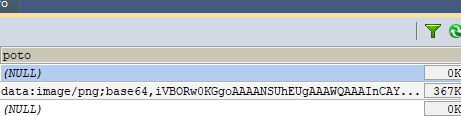
class Peserta extends Model
{
use CrudTrait;
protected $table = 'peserta_tmps';
protected $primaryKey = 'id';
public $timestamps = true;
protected $fillable = ['poto'];
.
.
.
public function setImageAttribute($value)
{
$attribute_name = "image";
$disk = "poto";
$destination_path = "uploads/poto";
// if the image was erased
if ($value == null) {
// delete the image from disk
\Storage::disk($disk)->delete($this->{$attribute_name});
// set null in the database column
$this->attributes[$attribute_name] = null;
}
// if a base64 was sent, store it in the db
if (starts_with($value, 'data:image')) {
// 0. Make the image
$image = \Image::make($value);
// 1. Generate a filename.
$filename = md5($value . time()) . '.jpg';
// 2. Store the image on disk.
\Storage::disk($disk)->put($destination_path . '/' . $filename, $image->stream());
// 3. Save the path to the database
$this->attributes[$attribute_name] = $destination_path . '/' . $filename;
}
}
$this->crud->addField([
'tab' => "Photo",
'label' => "Photo",
'name' => "poto",
'type' => 'image',
'upload' => true,
'crop' => true,
'aspect_ratio' => 0, // ommit or set to 0 to allow any aspect ratio
//'prefix' => 'uploads/images/profile_pictures/' // in case you only store the filename in the database, this text will be prepended to the database value
], 'create');
i want save uploaded images into folder upload/poto
and save images name into field poto on database
thanks alot
 cangak
on 5 Jan 2018
cangak
on 5 Jan 2018
Hello @cangak This is now a bug however the intended design of the Image Upload. See https://github.com/Laravel-Backpack/CRUD/issues/641#issuecomment-302571291 on a possible work around. I say possible as I have not tested it myself yet.
AbbyJanke
on 5 Jan 2018
^^ not a bug, @AbbyJanke 😛
lloy0076
on 5 Jan 2018
This seems like it could be closed, so I am.
lloy0076
on 9 Feb 2018
If
protected $fillable = [
....
'images',
....];
Your mutator name should be SetImagesAttribute
 uhci1980
on 13 Feb 2018
uhci1980
on 13 Feb 2018
and $attribute_name = "images";
uhci1980
on 13 Feb 2018
Hi everyone. Allow me to post this to this closed topic. It could be useful to someone.
Looking for a solution to @Jimmylet post I landed here. I finally managed to store image paths into a fake field. It's not the best solution, as I didn't rewrite the backpack code to add this functionality, but it works. I'm not sure it's a backpack bug, but it's just something the fake fields are not thought for. Nothing mentioned in the documentation though (whether it should work or shouldn't).
As far as I could guess, the moment in the store call stack where actual values are written into the fake fields is inside some of the backpack structure (Model.php). To modify that behavior I should override quite a lot of files, and I didn't want to mess them up. Not now. So, why previous comments didn't work for me:
The getters and setters like getSomeFieldAttribute don't work as we would expect for fake fields. They do work for actual fields in the table. If you try to do setExtrasAttribute and do there the image processing, it also doesn't work, as the extras field is at the same time a "protected $fake" field and a "protected $appends" field.
So, what I did is to surface to the controller itself and insert the following code into the update and create methods. The code basically checks for fields ending with _image, then stores images to disk, gets their filename, and replaces the fake field data (data:image) with the recently created filename. Volià! Don't pay attention to the specific code that you won't need. This code is mostly the part of the setImageAttribute function where images are processed for actual DB fields. The model keeps the getImageAttribute (second part of the code) with the getAttributeValueExtended trick to parse the value to store and read it json_decoded from the fake field.
In the controller:
public function update(UpdateRequest $request)
    {
        $this->addDefaultPageFields(\Request::input('template'));
        $this->useTemplate(\Request::input('template'));

        $fields = array_keys(request()->all());
        foreach ($fields as $field) {
            if (Str::endsWith($field, 'image'))
                $request[$field] = $this->processImage($request, $field, 'extras');
        }
        return parent::updateCrud($request);
    }

    /**
     * Stores the actual image to disk and returns the stored filename. Deletes previous file from disk, if any.
     *
     * @param $request
     * @param $attribute_name
     * @param null $store_in If not null, image is stored in a fake field
     * @return null|string
     */
    private function processImage($request, $attribute_name, $store_in = null)
    {
        $value = $request[$attribute_name];
        $prev_value = $this->crud->getCurrentEntry()->{$attribute_name};
        $type = 'pages';

        $destination_path = env('IMAGES_STORAGE_WRITE_PATH') . $type;

        // if the image was erased
        if ($value == null) {
            $this->deleteImage($prev_value);
            $value = null;
        }

        // if a new image was loaded
        if (Str::startsWith($value, 'data:image')) {
            $this->deleteImage($prev_value);
            $image = \Image::make($value);
            switch ($image->mime()) {
                case 'image/png':
                    $extension = '.png';
                    break;
                default:
                    $extension = '.jpg';
            }
            $filename = $type . '_' . $attribute_name . '_' . md5($value.time()) . $extension;
            \Storage::disk(env('IMAGES_STORAGE_DISK'))->put($destination_path . '/' . $filename, (string)$image->stream());
            $value = $filename;
        }

        return basename($value);
    }

    private function deleteImage($value)
    {
        $type = 'pages';
        if (!empty($value)) {
            $file = basename($value);
            $file_path = env('IMAGES_STORAGE_WRITE_PATH') . Str::plural($type) . '/' . $file;
            \Storage::disk(env('IMAGES_STORAGE_DISK'))->delete($file_path);
        }
    }
In the model:
    public function getHeader1ImageAttribute()
    {
        return $this->retrieveImage('header_1_image', 'extras');
    }

    public function getHeader2ImageAttribute()
    {
        return $this->retrieveImage('header_2_image', 'extras');
    }

    public function getHomeCoverImageAttribute()
    {
        return $this->retrieveImage('home_cover_image', 'extras');
    }

    private function retrieveImage($attribute_name, $stored_in = null)
    {
        $type = Str::snake(class_basename($this));
        $value = $this->getAttributeValueExtended($attribute_name, $stored_in);

        if ($value && Str::contains($value, '_default.')) {
            return env('IMAGES_STORAGE_READ_PATH'). '/' . $value;
        }
        if ($value) {
            return env('IMAGES_STORAGE_READ_PATH') . Str::plural($type) . '/' . $value;
        }
    }

    private function getAttributeValueExtended($attribute_name, $stored_in = null)
    {
        if ($stored_in) {
            if (isset(json_decode($this->{$stored_in})->{$attribute_name}))
                return json_decode($this->{$stored_in})->{$attribute_name};
            return null;
        }

        return $this->{$attribute_name};
    }
Hope this helps someone!
 rampol
on 5 Mar 2019
rampol
on 5 Mar 2019
Thanks for sharing your solution @rampol !
 tabacitu
on 23 Apr 2019
tabacitu
on 23 Apr 2019
Thanks @rampol for doing this. I wish @lloy0076 saw the value of storing images in a fake field, as I outlined here: https://github.com/Laravel-Backpack/CRUD/issues/1198#issuecomment-555232169
I am using Backpack 4.0 on Laravel 6.0 and had to use the following to make this work:
 public function update(PageRequest $request)
    {
        $this->crud->hasAccessOrFail('update');

        $data = $this->crud->getStrippedSaveRequest();

        $fields = array_keys(request()->all());
        foreach ($fields as $field) {
            if (Str::endsWith($field, 'image')) {
                $data[$field] = $this->processImage($request, $field, 'extras');
            }
        }

        // execute the FormRequest authorization and validation, if one is required
        $request = $this->crud->validateRequest();

        // update the row in the db
        $item = $this->crud->update($request->get($this->crud->model->getKeyName()), $data);
        $this->data['entry'] = $this->crud->entry = $item;

        // show a success message
        \Alert::success(trans('backpack::crud.update_success'))->flash();

        // save the redirect choice for next time
        $this->crud->setSaveAction();

        return $this->crud->performSaveAction($item->getKey());
    }
I have to copy/paste the update function from the UpdateOperation.php becauses using return parent::updateCrud($request); doesn't seem to work in Backpack 4.0. The upgrade guide for 4.0 says the function is now return parent::update($request); but that also doesn't work - it says something along the lines of "update function not found".
Also to clarify, $request[$field] = $this->processImage($request, $field, 'extras'); did not work for me - trying to modify the request parameter directly did not seem to show a corresponding reflection in $this->crud->getStrippedSaveRequest(); which was being used as the data for updating the model.
Hopefully this helps someone else too.
 brynnb
on 20 Nov 2019
brynnb
on 20 Nov 2019
Thanks a lot for sharing this @brynnb . I'm sure it will help others indeed.
To re-use the Update operation in Backpack 4, take a look at this section in the Update operation docs (or point 6.2 in the upgrade guide). You should be able to do something like this:
<?php

namespace App\Http\Controllers\Admin;

use Backpack\CRUD\app\Http\Controllers\CrudController;

class ProductCrudController extends CrudController
{
    use \Backpack\CRUD\app\Http\Controllers\Operations\UpdateOperation { update as traitUpdate; }

    // ...

    public function update()
    {
        // do things before save, maybe something like
        $fields = array_keys(request()->all());
        foreach ($fields as $field) {
            if (Str::endsWith($field, 'image')) {
                $data[$field] = $this->processImage($request, $field, 'extras');
            }
        }

        // call the original update function, from the trait
        $response = $this->traitUpdate();
        return $response;
    }
}
(not exact code, just a suggestion)
tabacitu
on 23 Nov 2019
@pxpm I know the original issue here https://github.com/Laravel-Backpack/CRUD/issues/1198 was yours - do you feel like there's something here we should do, to make it easier for people to store Base64 images inside fake fields? Something general enough to be included the Backpack code?
I'm definitely not suggesting using Str::endsWith($field, 'image') all the time to determine if there's an image - that might work well when _you know it's there_, but otherwise it would be some black magic 😄
Worst case - we point people to @brynnb 's solution above, but I'm just wondering if it's something we should support.
I personally would NOT recommend storing Base64 images inside fake fields, I don't think it's a good idea to store Base64 images in the db at all - it's a recipe for disaster in my opinion: the DB size can quickly get out of hand, then the backups will get slower, than retrieving and updating entries will get slower, than everything gets slower; but hey... some people _need_ it, so... I don't know... Your thoughts?
tabacitu
on 23 Nov 2019
@tabacitu Thanks for the correction on using traitUpdate(). Also appreciate all your work on backpack - it's a big reason I was able to convince my current employer to transition to Laravel (and also make my work life much better at the same time).
And to clarify - with my solution I'm only storing a string pointing to filename which is stored on whichever driver is specified. I'm not advocating storing actual image data in the DB.
brynnb
on 25 Nov 2019
Thank you for the kind words @brynnb . You made my day 😄
tabacitu
on 3 Dec 2019
Related issues
 GenericHero01
·
3Comments
GenericHero01
·
3Comments
 packytagliaferro
·
3Comments
packytagliaferro
·
3Comments
 sseggio
·
3Comments
sseggio
·
3Comments
 deepaksp
·
3Comments
deepaksp
·
3Comments
 M0H3N
·
3Comments
M0H3N
·
3Comments
Most helpful comment
Hi everyone. Allow me to post this to this closed topic. It could be useful to someone.
Looking for a solution to @Jimmylet post I landed here. I finally managed to store image paths into a fake field. It's not the best solution, as I didn't rewrite the backpack code to add this functionality, but it works. I'm not sure it's a backpack bug, but it's just something the fake fields are not thought for. Nothing mentioned in the documentation though (whether it should work or shouldn't).
As far as I could guess, the moment in the store call stack where actual values are written into the fake fields is inside some of the backpack structure (Model.php). To modify that behavior I should override quite a lot of files, and I didn't want to mess them up. Not now. So, why previous comments didn't work for me:
The getters and setters like getSomeFieldAttribute don't work as we would expect for fake fields. They do work for actual fields in the table. If you try to do setExtrasAttribute and do there the image processing, it also doesn't work, as the extras field is at the same time a "protected $fake" field and a "protected $appends" field.
So, what I did is to surface to the controller itself and insert the following code into the update and create methods. The code basically checks for fields ending with _image, then stores images to disk, gets their filename, and replaces the fake field data (data:image) with the recently created filename. Volià! Don't pay attention to the specific code that you won't need. This code is mostly the part of the setImageAttribute function where images are processed for actual DB fields. The model keeps the getImageAttribute (second part of the code) with the getAttributeValueExtended trick to parse the value to store and read it json_decoded from the fake field.
In the controller:
In the model:
Hope this helps someone!