Crud: [4.0][Feature] Use modal/popup to add related item "on the fly"
Imagine I want to add a task:

Priorität and Status are selects with related models. Now I would like to add a new item for Priorität on the fly without leaving this page.
A nice solution would be a modal where I could add an item and after saving and closing the select list would be automatically updated.
Does anyone already have implemented such a functionality?
 tswonke
All 36 comments
Found http://stackoverflow.com/questions/40407031/laravel-backpack-creating-related-models-on-the-fly answer from tabacitu
tswonke
on 5 Apr 2017
Hi there! I personally haven't, but would love to see a solution to it. Hope someone has some helpful code to speed up your development. Cheers!
 tabacitu
on 6 Apr 2017
tabacitu
on 6 Apr 2017
My current "sort of" solution is to create a details view something like:
Set a details row:
public function showDetailsRow($id) {
$data = $this->crud->model->find($id);
$address = $data->address()->first();
if (isset($address)) {
print view('customer/customeraddressdetails', ['data' => $address]);
} else {
print view('customer/customeraddaddress', ['id' => $id]);
}
}
View:
<div class="panel" style="margin-top: 15px">
<div class="row">
<div class="col-md-10 col-md-offset-1">
<div class="panel panel-default">
<div class="panel-body">
@if (empty($data->name) && empty($data->email)))
<span>Customer Details are Blank</span>
@else
<table class="table table-bordered table-condensed table-striped">
<thead>
<tr>
<th>Information</th>
<th>Value</th>
</tr>
</thead>
<tbody>
@if (! empty($data->name ))
<tr>
<td>Name</td>
<td>{{ $data->name }}</td>
</tr>
@endif
@if (! empty($data->email ))
<tr>
<td>Email</td>
<td><a href="mailto:{{ $data->email }}">{{ $data->email }}</a></td>
</tr>
@endif
<tr>
<td></td>
<td><a class="btn btn-primary btn-xs" href="{{ url(config('backpack.base.route_prefix', 'admin') . '/customer/' . $data->cust_id . '/edit') }}">Edit</a></td>
</tr>
</tbody>
</table>
@endif
</div>
</div>
</div>
</div>
</div>
It's slightly messy but it works for me :)
I guess that one could make a button view that makes a Modal :)
 lloy0076
on 6 Apr 2017
lloy0076
on 6 Apr 2017
Hi ! I really think this would be a GREAT addition to Backpack. Django admin have this from years ago, and I have found myself doing custom solutions for this all the time, not finding anything usable enought:
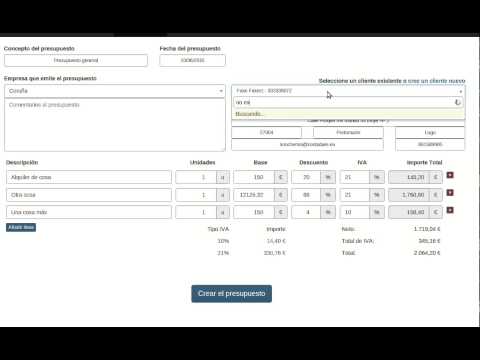
I think the main idea is to create a new custom field, something along the lines "select2_ajax_new", thinking about something like my video:
- You can pass it a "new_route" parameter: example /ajax/modelName/new/
- It opens a bootstrap ajax modal with that route with a defined width/height (or custom trought params)
- It expects an event in the close of the modal (an ["ID" => "value"] to fill the select2 for example) or a "false" (error or close of the modal) that you (that route) are responsible for
Doing it that way should be easy to manage for both parts, but doing this would be SUBLIME
- We already have the Models, Controllers, etc
- So we should be able to draw the forms without all the header/menu/sidebar/etc
- If we could call an special route crafted for this (automatically with each model), something like
/admin/MODEL/create_iframelike in the default/admin/MODEL/create... - That special route would paint the same form as the normal one, etc... but pass us "something" (special field, attribue, whatever) that we could get in the
aftersaveto return the ["id" => "label"] (or even doing this automagically as well using a couple of attributes defining fields: that would make me wetting my pants) - In this "optimal" scenario, we could just define a "select2_ajax_new" field and pass it
- related model
- array of fields to return to the select2 ["id", "modelNameAttribute"]
- custom width/height as optional
I really think this would be a great adition not only to select2_ajax, but to select2 and select2_from_array as well. Sorry for the mess in my explanation, I would love to ellaborate if you find it interesting.
 MarcosBL
on 11 Apr 2017
MarcosBL
on 11 Apr 2017
Similar aproach in Sonata Project (Sf bundles) http://smadqu.demo.sonata-project.org/admin/app/commerce-invoice/create
Login with admin/admin


MarcosBL
on 12 Apr 2017
For my purposes any way to do this would need to avoid or make it optional for having any dropdowns that contained a list of ALL the things in a table (I'd like to use a select2 but with 19K+ items that's somewhat infeasible :P).
The video is good and I'm fairly certain that's one way that Django does this functionality in its admin scaffolding.
lloy0076
on 12 Apr 2017
+1 to the @MarcosBL 's proposal. The video shows exactly the behavior I had in mind. It's angry to leave the form just for some addition (or open a new tab or whatever...). In fact it's something like a link to the add form and be able to render the form "headless".
 oscarmlage
on 12 Apr 2017
oscarmlage
on 12 Apr 2017
I have found another use for the "headless forms for models" as @oscarmlage named it :smile:
I am implementing a MorphTo model on all my "People" models, I mean: Teachers, Stundents, Schools, etc... all of them share a common table of "Events", where I store the events of that Model.
I used a custom view to draw the events:
php
$this->crud->addField([
'name' => 'crm_view',
'type' => 'view',
'view' => 'admin/crm/list',
'tab' => 'CRM',
'wrapperAttributes' => ['class' => 'form-group col-md-12'] ],
'update');
That generates this:

Deleting one of those events is trivial, I can just add a javascript confirm button, do an ajax call, and delete the element from the list with javascript.
But Adding and Editing is tricky, my options now are:
- Doing everything via inline forms with ajax, drawing my own forms, doing my own validation, etc
- Doing everything via modals with ajax/iframes, drawing my own forms, doing my own validation, etc
If I had the "draw model form headless", I could link the add button, and the edit buttons, to the CRMEvents model headless URLs, in a modal, via ajax or iframe, and get EVERYTHING done, forms, validation, etc... avoiding a lot of duplicate code and custom work.
Just 2 cents more :smile:
MarcosBL
on 13 Apr 2017
@MarcosBL , completely agree with the video, and your course of action.
One thing we need to take into consideration, though, would be the validation in that pop-up. In order to make the create/update forms truly headless/reusable, I think we first need to switch to AJAX validation, instead of refreshing the page. That would:
- make the "create new" implementation better (no iFrames)
- allow us to show the edit/create forms in pop-ups (or sidebar) on the LIST view, which I think would make for much better visual hierarchy
Soo... I think this "headless forms" is pretty tied to switching the validation to AJAX. Wouldn't you agree?
tabacitu
on 18 Apr 2017
My main concern with Ajax popups is:
- In most cases, the popup for adding items to select fields will be inside a form itself, so we must ensure the HTML we create is NOT inside any other form (new form, with unique name/id, attached to the end of body, destroyed on close, something like that), otherwise we could end injecting new fields inside the "master" form, thus sending unwanted fields on "master" form submit.
- AJAX validation would be a nice addition (and in fact a MUST HAVE for this new feature) if we don't replace the normal Backpack usage: SPA are nice, but browsers tend to behave weird after some time
Stupid side note (just working on this right now)
- We will not be able to “see” the debug bar form the loaded content, as it is not a real iframe, minor annoyance of course, is the developer's work to enable/disable it for Ajax calls, etc

PROS
- I would LOVE an AJAX functionality to be able to edit/create any CRUD model, first thing I would implement would be hiding the “normal” edit button for a pop up for models with 3-4 simple fields. With that AJAX functionality, we could avoid atrocities like this

- We could make great interfaces for editing/deleting inside lists, increasing the usage speed of our interfaces, in this list, the edit button would do an edit in a popup, the delete button could do an ajax call after confirm and remove the element from the list, if not Backpack native, at least creating custom buttons


So... all in all:
- Ability to draw forms headless would be helpful even with only iframes, maybe it would be a nice first little step
- Adding ability to submit and validate using ajax would be perfect for editing on lists (popup or sidebar), speedup of interfaces, etc...
- I agree with you the "final product" would need the full Ajax support
$this->feature->push()->me
MarcosBL
on 18 Apr 2017
@tabacitu @MarcosBL Any progress on this?
lloy0076
on 13 Jun 2017
@tabacitu - should we push this into ideas, close it for want of a PR, or figure out someone who might do the PR?
lloy0076
on 12 Aug 2017
The issue with this is we first need the Ajax calls to create/update entries and for getting the view for creating/updating
 OliverZiegler
on 12 Aug 2017
OliverZiegler
on 12 Aug 2017
I think this would be a great idea indeed. Also, maybe the documentation could be extended to allow for the API to add new values, and so, a request via ajax could just return (maybe) the last ID inserted (allowing for future changes/alterations);
 niladam
on 21 Aug 2017
niladam
on 21 Aug 2017
I already have a working version with ajax for creating/editing entries.
Would anyone like to contribute to adding related item "on the fly" with some design or ideas?
 Gaspertrix
on 5 Dec 2017
Gaspertrix
on 5 Dec 2017
PR for ajax crud:
1149
Once it is approved, I will start working on the option to add a related item on the fly.
Gaspertrix
on 9 Dec 2017
I have a working version to add a related item on the fly. It still needs some work, but it works fine with select fields:
https://youtu.be/puIQRH89F60
Gaspertrix
on 10 Dec 2017
@Gaspertrix - boy, you've really outdone yourself. Thanks a lot for the PR. It might take me some time to analyze all the possible implications of this, sorry if I'll be a little late with the reply.
Cheers!
tabacitu
on 18 Dec 2017
@Gaspertrix WOW, impressive work, congrats !
MarcosBL
on 20 Dec 2017
WOW, WOW, WOW...
what is the best way to start using and testing this new feature?
 cerelli
on 20 Dec 2017
cerelli
on 20 Dec 2017
@cerelli You can see my branch with this feature here: https://github.com/Gaspertrix/Backpack-CRUD/tree/feature/Item_on_the_fly
You must re publish public assets:
php artisan vendor:publish --provider="Backpack\CRUD\CrudServiceProvider" --tag="public" #publish CRUD assets
Add this inside your _EntityCrudController::create()_ / _EntityCrudController::edit()_ to enable ajax item on the fly:
$this->crud->enableAjaxCrud();
Edit your _$this->crud->addField([...]);_ and add:
'ajax_crud' => [
    'route' => '{route}',
    'name' => '{text}',
],
_{route}_ is the crud route of the item to add
_{text}_ is the text to display in modal title: _Add new {text}_
For example:
$this->crud->addField([
    'label' => 'Status',
    'type' => 'select2',
    'name' => 'status_id',
    'entity' => 'status',
    'attribute' => 'name',
    'model' => '\App\Common\Models\Status',
    'ajax_crud' => [
        'route' => 'admin/statuses',
        'name' => 'status',
    ]
]);
Currently, there is a limitation, nested modals are not supported yet, I am working on that.
Gaspertrix
on 22 Dec 2017
@tabacitu do you need any help testing this?
 indra1
on 7 Feb 2018
indra1
on 7 Feb 2018
I made a package for this (our needs) and tried to do this as simple as possible as long as such a function is not implemented in the core of Backpack:
https://github.com/webfactor/laravel-backpack-instant-fields
Nested/Stacked modals also seem to work.
Maybe this can help some of you.
P.S. I didn‘t dive into Gaspertrix solution before implementing my solution, because I started nearly from scratch to get our needed functionality.
tswonke
on 23 May 2018
Great job @tswonke -- maybe @tabacitu could borrow some of that and add it into backpack.
For some reason your link is incorrect in the post (the email displayed it correctly) so i'll post it again as this will probably help others too.
The package @tswonke is referring to is webfactor/laravel-backpack-instant-fields;
niladam
on 23 May 2018
Thank you for correcting the link, I also updated my post 😊
tswonke
on 24 May 2018
Hi everyone, you may have everything on its track, I just step by to show you how I handled an n-n relation through another table.
The issue here, is, I wanted to show a table with all the related items of that relation.
My setup is;
There are Processes of abandoned animals, and there are Godfathers who donate money to rescue those animals, and there are Donations with the process_id, godfather_id and the donation amount.
The admins need to be able to enter in a process, and view the list of donations, and the same thing the other way, enter in a godfather and view his list of donations.
This is also possible with filters, but by having a table with that information in the edit view makes it easier.
I created a relation_table.blade.php field, and here is the result:
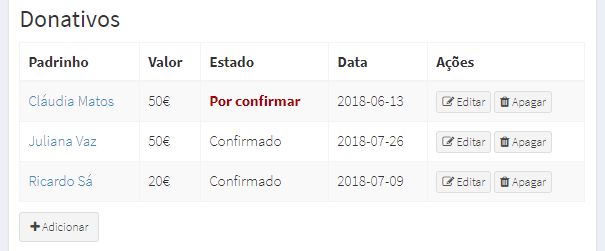
ProcessCrudController.php
$this->crud->addField([
    'label' => __('Donations'),
    'name' => 'donations',
    'type' => 'relation_table',
    'route' => '/admin/donation',
    'columns' => [
        'name' => [
            'label' => __('Godfather'),
            'name' => 'godfather',
        ],
        'value' => [
            'label' => __('Value'),
            'name' => 'value',
        ],
        'date' => [
            'label' => __('Date'),
            'name' => 'date',
        ]
    ]
]);
relation_table.blade.php
https://gist.github.com/promatik/0649a6997cc73a6febbf3b08e82927b7
This will be much more convenient when the PR from @Gaspertrix is implemented, as we may be able to create and edit on the fly!
 promatik
on 29 Jul 2018
promatik
on 29 Jul 2018
@promatik this looks very interesting! Do you like to show us your field code?
tswonke
on 29 Jul 2018
@tswonke yes of course!
I tried to make it as much dynamic as possible, there is no extra JS or CSS and the setup is pretty simple (as shown above). I had to make a small change to crud::buttons.delete for it to remove the table td after a successful delete.
Here is the code:
https://gist.github.com/promatik/0649a6997cc73a6febbf3b08e82927b7
promatik
on 29 Jul 2018
thx!
tswonke
on 30 Jul 2018
@promatik, you could show the code of what you changed in crud::buttons.delete for it to remove the table td after a successful delete.
I'm also curious about this delete button error:

 kkpriscila
on 3 Oct 2018
kkpriscila
on 3 Oct 2018
Claro que sim @kkpriscila!
To make the delete button work on my relation tables and also keep it working on crud tables, I removed the selector #crudTable from the line 14 of the file delete.blade.php:
var row = $("#crudTable a[data-route='"+route+"']").closest('tr');
It became:
var row = $("a[data-route='"+route+"']").closest('tr');
This is where the table row (tr) is selected, after you click the delete button, by default, it has a selector to #crudTable, but in my case, my relation tables don't have the ID #crudTables.
Don't forget to copy the file delete.blade.php from the vendor folder, to your resources folder (\resources\views\vendor\backpack\crud\buttons) before proceed with this changes, so if the crud is updated you won't lose your changes.
Also, the problem with jQuery ($) is because the crud table serves the content by ajax, so jQuery is already initialized, but in the case of these relation tables, it is not, so, moving the code $("[data-button-type=delete]").unbind('click'); inside of a DOMContentLoaded listener solves the problem.
...
document.addEventListener("DOMContentLoaded", function(event) {
    $("[data-button-type=delete]").unbind('click');
});
...
Hope it solves the problem for you! It does for me!
promatik
on 4 Oct 2018
@promatik, thank you. Solved it for me, yes.
kkpriscila
on 18 Oct 2018
This is good stuffs!
 ziming
on 24 Jan 2019
ziming
on 24 Jan 2019
How far is this thing?
 GregaUNK
on 18 Nov 2019
GregaUNK
on 18 Nov 2019
@GregaUNK there's a PR for it here - https://github.com/Laravel-Backpack/CRUD/pull/2280 from @pxpm which works perfectly on Backpack v4. There are a lot of changes to be made before we merge it, though, we really want to be sure we merge a long-term solution, that we can support for a long long time. So it might take a while to get merged.
tabacitu
on 7 Dec 2019
Update: PR #2311 is the one to follow. Let's close this and move the conversation there.
tabacitu
on 26 Jan 2020
Related issues
 sonoftheweb
·
3Comments
sonoftheweb
·
3Comments
 gotrecillo
·
3Comments
gotrecillo
·
3Comments
 lotarbo
·
3Comments
lotarbo
·
3Comments
 sokvebolkol
·
3Comments
sokvebolkol
·
3Comments
 alexgmin
·
3Comments
alexgmin
·
3Comments
Most helpful comment
@cerelli You can see my branch with this feature here: https://github.com/Gaspertrix/Backpack-CRUD/tree/feature/Item_on_the_fly
You must re publish public assets:
Add this inside your _EntityCrudController::create()_ / _EntityCrudController::edit()_ to enable ajax item on the fly:
Edit your _$this->crud->addField([...]);_ and add:
_{route}_ is the crud route of the item to add
_{text}_ is the text to display in modal title: _Add new {text}_
For example:
Currently, there is a limitation, nested modals are not supported yet, I am working on that.