Crud: How to customize search query?
Hey there!
I have to say, this was a wonderfully pleasant surprise to find. I've been looking for a usable Admin package for laravel for a few days and boom! Yours showed up. Wonderful work!
I wanted to check in with you before I started diving in to deep: the model tables currently sort based on the entries currently in the view, but is there any wiring in place to order based on all the models in the database? If not, I'll dive in and see what I can contribute!
 nathanielks
All 35 comments
Aha! That's what the $this->crud->enableAjaxTable(); does! Brilliant!
nathanielks
on 8 Sep 2016
Actually, the next question would then be How do I customize the search query? I've got a model that's primarily ids of other models (SurveyResult, so it's connected to a User and a few other models). Currently the search works if I'm searching against ids, but I'd love to expand that to search against user names or other values.
nathanielks
on 8 Sep 2016
:-)) hi @nathanielks ,
Glad to hear the package gave was a nice surprise to you.
Well, I see 3 ways:
(1) if your primary model does NOT have a lot of entries (>1000), you can use the table without ajax enabled; and then the datatables search will look through all table columns; so if the username is set up to be shown in the table, it will be searchable;
(2) if your primary model has >1000 rows, you can:
- use
$this->crud->enableAjaxTable();in your constructor; - extend the
CrudController::search()method in yourExampleCrudController; you can customize the search completely; _by default_ it only searches within the shown columns; but you can "add columns" in this method, and they won't be added anywhere else; so for example:
    /**
     * Respond with the JSON of one or more rows, depending on the POST parameters.
     * @return JSON Array of cells in HTML form.
     */
    public function search()
    {
        // any columns added at his point will NOT be show in the table [that's the index() mothod]
        // but the WILL be searched through;

        // EXAMPLE: if you also want its username searched
        $this->crud->addColumn([ // 1-n relationship
         'label' => "User", // Table column heading
         'type' => "select",
         'name' => 'user_id', // the column that contains the ID of that connected entity;
         'entity' => 'user', // the method that defines the relationship in your Model
         'attribute' => "username", // foreign key attribute that is shown to user
         'model' => "App\Models\User", // foreign key model
        ]);

        // EXAMPLE: if you also want its product's categories names searched through
        $this->crud->addColumn([ // n-n relationship (with pivot table)
        'label' => "Product", // Table column heading
        'type' => "select_multiple",
        'name' => 'products', // the method that defines the relationship in your Model
        'entity' => 'products', // the method that defines the relationship in your Model
        'attribute' => "name", // foreign key attribute that is shown to user
        'model' => "App\Models\Product", // foreign key model
        ]);

        return parent::search();
    }
If you're joining with 2 or more models I also recommend using a "with" statement (query should run faster):
$this->crud->addClause('with', 'user');
$this->crud->addClause('with', 'products');
$this->crud->orderBy('username');
Never tried this myself, but it SHOULD work. If you do try it, please tell me if it does. I'm curious :-)
(3) if your model >1000 rows and you don't want to add bogus columns because it's uncomfortable you can just extend the search() method and replace it's logic entirely:
/**
     * Respond with the JSON of one or more rows, depending on the POST parameters.
     * @return JSON Array of cells in HTML form.
     */
    public function search()
    {
        $this->crud->hasAccessOrFail('list');

        // add the primary key, even though you don't show it,
        // otherwise the buttons won't work
        $columns = collect($this->crud->columns)->pluck('name')->merge($this->crud->model->getKeyName())->toArray();

        // HERE'S WHAT I'VE JUST ADDED
        $this->crud->addClause('with', 'user');
        $this->crud->addClause('with', 'product');
        $this->crud->orderBy('username');
        $columns = $columns->merge(['username', 'products.name']);
        // END OF WHAT I'VE JUST ADDED

        // structure the response in a DataTable-friendly way
        $dataTable = new DataTable($this->crud->query, $columns);

        // make the datatable use the column types instead of just echoing the text
        $dataTable->setFormatRowFunction(function ($entry) {
            // get the actual HTML for each row's cell
            $row_items = $this->crud->getRowViews($entry, $this->crud);

            // add the buttons as the last column
            if ($this->crud->buttons->where('stack', 'line')->count()) {
                $row_items[] = \View::make('crud::inc.button_stack', ['stack' => 'line'])
                                ->with('crud', $this->crud)
                                ->with('entry', $entry)
                                ->render();
            }

            // add the details_row buttons as the first column
            if ($this->crud->details_row) {
                array_unshift($row_items, \View::make('crud::columns.details_row_button')
                                ->with('crud', $this->crud)
                                ->with('entry', $entry)
                                ->render());
            }

            return $row_items;
        });

        return $dataTable->make();
    }
Again, never tried this myself, but it SHOULD work. Tell me if you try it and it doesn't.
Hope this helps.
Cheers!
 tabacitu
on 8 Sep 2016
tabacitu
on 8 Sep 2016
Dude. This is wonderful. Thanks again for such a great framework!
nathanielks
on 9 Sep 2016
Same question for sorting... would it be possible to sort based on the value presented in the column vs the value on the model? IE: I'm displaying the object's name attribute in the table, but the table is sorting based on the object's id (which is what is stored on the model).
nathanielks
on 9 Sep 2016
Actually, interesting. Disabling the AJAX form causes sorting to work based on the values presented in the table. I see that when I enable AJAX the table hits the /search endpoint and just presents whatever it's fed, so I'm going to dive deeper in there!
nathanielks
on 9 Sep 2016
Hi @nathanielks ,
The sorting can be customized by adding a $this->crud->addClause('orderBy', 'name'); to the query, in the constructor. This will sort them this way for the first page load.
That's all we have right now. In the future, advanced sorting may come using Datatables order() method, but I don't really have the API in mind or how it would best work. Suggestions are welcome, of course.
Cheers!
tabacitu
on 11 Sep 2016
Hi @nathanielks ,
All good on this, can I close the issue?
Cheers!
tabacitu
on 19 Sep 2016
P.S. I'll go ahead and close this issue so we don't clog the section. Feel free to open it again if you encounter problems or comment if you have follow-ups.
tabacitu
on 22 Sep 2016
@tabacitu , you wrote the same comment for _name_ and _entity_.
'name' => 'products', // the method that defines the relationship in your Model
'entity' => 'products', // the method that defines the relationship in your Model
Could you please correct this ?
 franciscocorrales
on 29 Sep 2016
franciscocorrales
on 29 Sep 2016
Hi @franciscocorrales , thanks for the heads-up. Actually, the comment _should_ be the same for the n-n relationship. It makes little sense to define the same thing twice, I know. It's defined this way to make the definitions very very similar between 1-n and n-n fields and columns. But in the near future these definitions will be simplified a lot, while keeping backwards-compatibility.
Buuut... thanks to you I did discover that the comment for 1-n relationship was the same, which was wrong :-)
Changed it here:
        $this->crud->addColumn([ // 1-n relationship
         'label' => "User", // Table column heading
         'type' => "select",
-         'name' => 'user_id', // the method that defines the relationship in your Model
+         'name' => 'user_id', // the column that contains the ID of that connected entity;
         'entity' => 'user', // the method that defines the relationship in your Model
         'attribute' => "username", // foreign key attribute that is shown to user
         'model' => "App\Models\User", // foreign key model
        ]);
And in the docs too.
Thanks, cheers!
tabacitu
on 2 Oct 2016
possible to get count from groupby clause?
I need to have count if field name in group by like:
$this->crud->addClause('count', 'phrase');
and how can use it in my columns?
 bahman2216
on 11 Mar 2017
bahman2216
on 11 Mar 2017
@baam2216 you can use $this->crud->query inside the setup() method. Manipulate it any way you want, as long as you don't overwrite it. So you should be able to do smth like this:
$count = $this->crud->query->groupBy()->count()->etc();
Hope it helps. Cheers!
tabacitu
on 11 Mar 2017
It's ok but i mean about using this field in column:
$this->crud->addColumn(
            [
                'name'  => 'count',
                'label' => trans('my_label'),
                'type'          => 'text',
            ]
        );
In name section how can use count value to display count.
bahman2216
on 11 Mar 2017
Hi @bahman2216 ,
If you intend on using the value inside a column, I think the best place to calculate that value would be inside an Accesor, on the Model. You would then be able to use that attribute like any other, in a "text" column.
Hope it helps. Cheers!
tabacitu
on 13 Mar 2017
Hi @tabacitu
while trying to add columns to search function the added column value replace the Actions Column!
Any suggestion?
 vigiplus
on 21 Apr 2017
vigiplus
on 21 Apr 2017
In case anyone else was having issues doing a filter on concatenated columns, like a full name (first name + last name), you can add the column as an array of the two column names.
So in extending the search method described previously in this thread, add the one-liner at the end of this code block:
        // create an array with the names of the searchable columns
        $columns = collect($this->crud->columns)
            ->reject(function ($column, $key) {
                // the select_multiple, model_function and model_function_attribute columns are not searchable
                return isset($column['type']) && ($column['type'] == 'select_multiple' || $column['type'] == 'model_function' || $column['type'] == 'model_function_attribute');
            })
            ->pluck('name')
            // add the primary key, otherwise the buttons won't work
            ->merge($this->crud->model->getKeyName())
            ->toArray();


        // Add this!
        $columns[] = ['first_name', 'last_name'];
I wish there was an easier way of interacting with the columns without needing to extend this method.
 zschuessler
on 18 Jul 2017
zschuessler
on 18 Jul 2017
@zschuessler - currently working on it ;-)
Best naming i have so far is:
$this->crud->addColumnToSearch('column_name');
$this->crud->addColumnToSearch(['column_name', 'column_name']);
$this->crud->removeColumnFromSearch('column_name');
$this->crud->removeColumnFromSearch(['column_name', 'column_name']);
Solution suggested by @zschuessler working very well, but adding a column 1-n in search method doesn't work, what I'm doing wrong?
// Machine.php
public function brand()
{
    return $this->belongsTo(Brand::class);
}
```php
// Brand.php
public function machines()
{
return $this->hasMany(Machine::class);
}
```php
// MachineCrudController.php
public function search()
{
    $this->crud->addColumn([ // 1-n relationship
        'label' => "Marca", // Table column heading
        'type' => "select",
        'name' => 'brand_id', // the column that contains the ID of that connected entity;
        'entity' => 'brand', // the method that defines the relationship in your Model
        'attribute' => "name", // foreign key attribute that is shown to user
        'model' => "App\Models\Brand", // foreign key model
    ]);

    return parent::search();
}
 quiquegarcia
on 15 Sep 2017
quiquegarcia
on 15 Sep 2017
@quiquegarcia if you've installed Backpack\CRUD 3.3, the above doesn't really apply any more. All tables are now AJAX tables, and you can overwrite or cancel a column from being in search using the searchLogic parameter.
Check out:
- the upgrade guide
- the searchLogic() docs
Hope it helps.
Cheers!
tabacitu
on 14 Dec 2017
Hello tabacitu, congrats for this amazing framework , i have simple relation to 1-1 in my ddbb, then i have a first table (parent) with the basic info , and a second with the options linked to parent with a foreign key , my request is /
How in the edition view i can to do a system based in tabs by example , in the first part show the attributes editables for parent, in second tab put the attributes of table children options
In the same way for the creation, i need that the father exist by create the new option table and will have the id of the parent created, then i can create the new children with the id of father linked and update the option, then for the creation i need only load the first tab and in second tab show something like, you must create /save the parent by could edit this options
have you some idea from how i can develop this ?
 FelipeOneHouse
on 26 Apr 2018
FelipeOneHouse
on 26 Apr 2018
For resume we can say that really i have the info of one entity cut in 2 eloquent models , and i not want 2 diferents url for do this because its not so intuitive, is working ok for performance purposes in the ddbb, but for this case i need show the info together from 2 tables because is more intuitive but not idea how i can to do
FelipeOneHouse
on 26 Apr 2018
Was trying to disable Ajax to resolve the ajax search issue and then discovered the searchLogic :)
Great!
Thx @tabacitu
 dividy
on 4 Jun 2018
dividy
on 4 Jun 2018
I think one thing to keep in mind - that if you attach custom search logic to 1 column - it will overwrite the search logic for ALL columns.
So you cannot have a custom searchLogic on each column, you need to put it on maybe the 1st column, and handle all the searching in there - it cant stack up
 OwenMelbz
on 4 Jun 2018
OwenMelbz
on 4 Jun 2018
@OwenMelbz - whaat?! That's not intentional... Thanks, I'll test and see.
tabacitu
on 4 Jun 2018
😅
We spent a while confused what was happening, but ended up having to do this
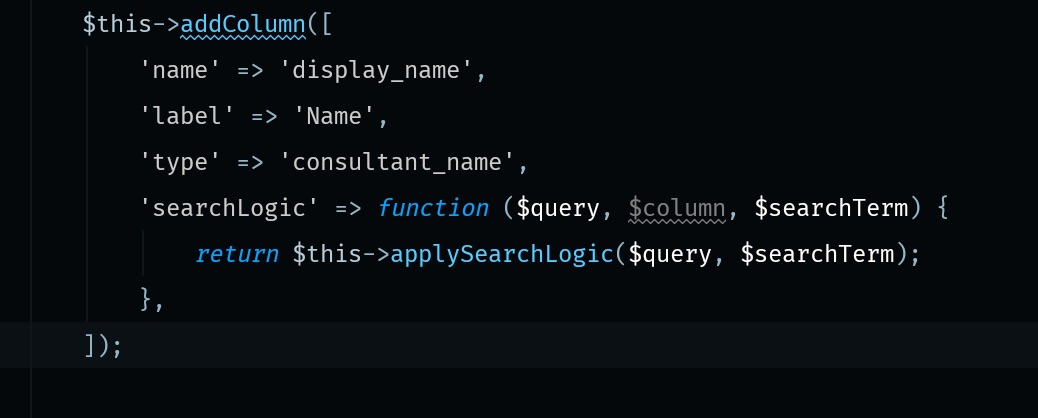
and
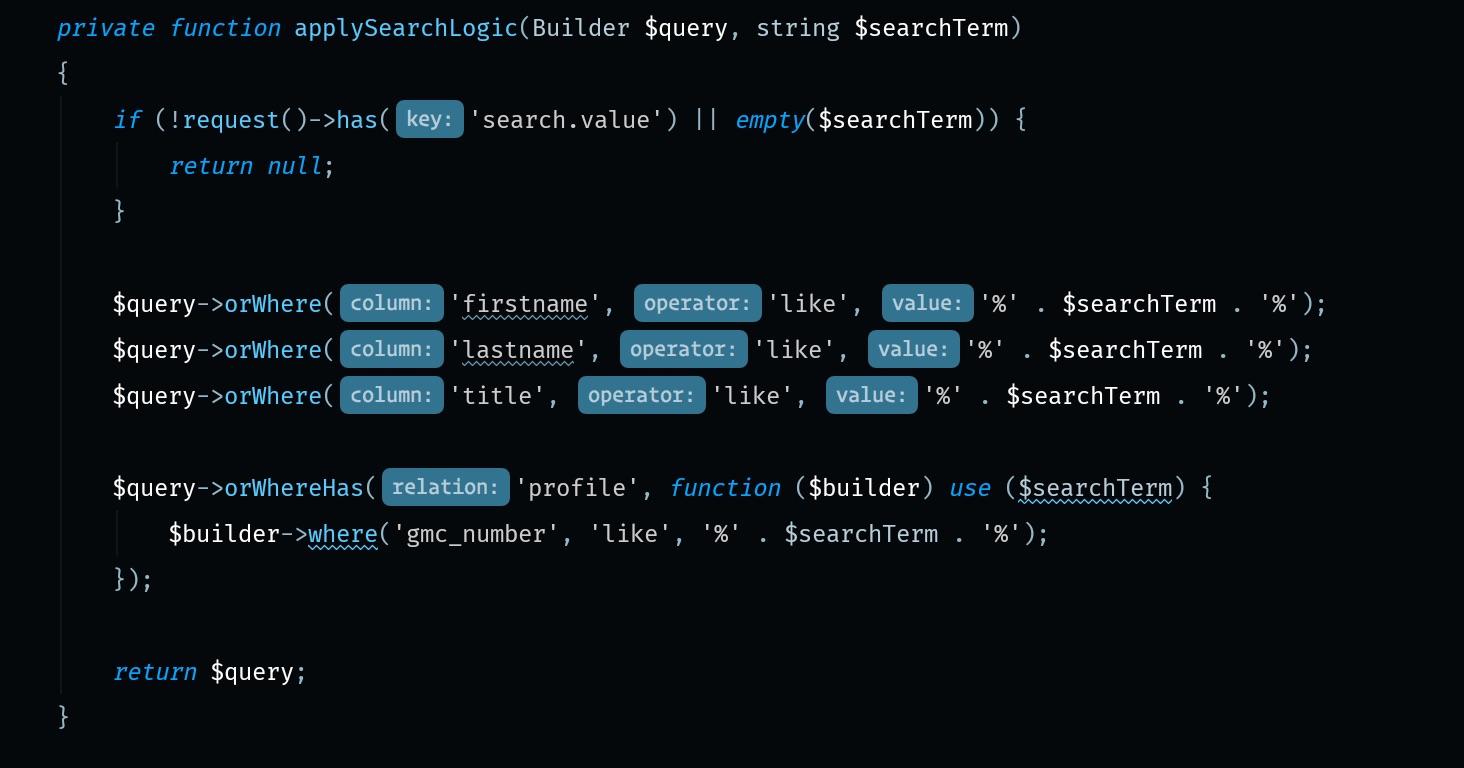
OwenMelbz
on 4 Jun 2018
Whoow... @OwenMelbz sorry you had to go to so much trouble.
But I've just checked the code, tested and double-tested - the searchLogic is applied PER COLUMN. One searchLogic won't overwrite another one. I have this working in my MonsterCrudController:
$this->crud->addColumns([
            [
               // show both text and email values in one column
               // this column is here to demo and test the custom searchLogic functionality
               'name'          => 'getTextAndNumberAttribute',
               'label'         => 'Text and Number', // Table column heading
               'type'          => 'model_function',
               'function_name' => 'getTextAndNumberAttribute', // the method in your Model
               'searchLogic'   => function ($query, $column, $searchTerm) {
                   $query->orWhere('text', 'like', '%'.$searchTerm.'%');
                   $query->orWhere('number', 'like', '%'.$searchTerm.'%');
               },
            ],
            [
               'name'          => 'email',
               'label'         => 'Email', // Table column heading
               'type'          => 'text',
               'searchLogic'   => function ($query, $column, $searchTerm) {
                   $query->orWhere('email', 'like', '%'.$searchTerm.'%');
               },
            ],
            'textarea',
        ]);
and I get valid results for text, email, number and textarea.
Are you sure your solution above is needed? My guess is that your applySearchLogic() method now gets called a bunch of times, once for every time you have a searchLogic() defined. You should be able to see if this is the case using DebugBar, or seeing the final query in another way. If you have the same OR WHERE a bunch of times, it's not needed.
tabacitu
on 4 Jun 2018
Hmm this was a while ago now, so can't remember the exact instance, i'll have to have a look!
However... I'm wondering if it is because you need to use orWhere on it - as maybe if it was using where it would explain why it's getting overwritten?
OwenMelbz
on 4 Jun 2018
Oooh... Yup, I think you're right - that must have been the issue. where instead of orWhere :-) Don't you just hate it when two characters bring hell? :-)
tabacitu
on 4 Jun 2018
where should be added the
public function search().
I am getting an error
local.ERROR: Method Partners\Http\Controllers\PartnerCrudController::search does not exist.
 gurdji
on 13 Apr 2020
gurdji
on 13 Apr 2020
@gurdji you might be able to find what you are looking for in docs: https://backpackforlaravel.com/docs/4.0/crud-columns#advanced-columns-use
Best,
Pedro
 pxpm
on 14 Apr 2020
pxpm
on 14 Apr 2020
I know the documentation but for search I didnt understand where to put that search function
gurdji
on 14 Apr 2020
@gurdji the searchLogic is passed inside the column definition. Take a look at Owen's first image here https://github.com/Laravel-Backpack/CRUD/issues/101#issuecomment-394313833
tabacitu
on 20 Apr 2020
I see, it works.
I was wondering how to search for a column that is not visible in list setupListOperation but it is in setupCreateOperation so is in the database.
Thank you !
gurdji
on 27 Apr 2020
Hmm... You could change the searchLogic of one of your other columns, and include that one too - https://backpackforlaravel.com/docs/4.0/crud-columns#custom-search-logic-for-columns
tabacitu
on 28 Apr 2020
Related issues
 sokvebolkol
·
3Comments
sokvebolkol
·
3Comments
 alexgmin
·
3Comments
alexgmin
·
3Comments
 lotarbo
·
3Comments
lotarbo
·
3Comments
 mikael1000
·
3Comments
mikael1000
·
3Comments
 deepaksp
·
3Comments
deepaksp
·
3Comments
Most helpful comment
:-)) hi @nathanielks ,
Glad to hear the package gave was a nice surprise to you.
Well, I see 3 ways:
(1) if your primary model does NOT have a lot of entries (>1000), you can use the table without ajax enabled; and then the datatables search will look through all table columns; so if the username is set up to be shown in the table, it will be searchable;
(2) if your primary model has >1000 rows, you can:
$this->crud->enableAjaxTable();in your constructor;CrudController::search()method in yourExampleCrudController; you can customize the search completely; _by default_ it only searches within the shown columns; but you can "add columns" in this method, and they won't be added anywhere else; so for example:If you're joining with 2 or more models I also recommend using a "with" statement (query should run faster):
Never tried this myself, but it SHOULD work. If you do try it, please tell me if it does. I'm curious :-)
(3) if your model >1000 rows and you don't want to add bogus columns because it's uncomfortable you can just extend the search() method and replace it's logic entirely:
Again, never tried this myself, but it SHOULD work. Tell me if you try it and it doesn't.
Hope this helps.
Cheers!