Crouton: Display distorted in ubuntu after switching to chrome os and back - Intel HD Graphics 5500
Using my new chromebook Acer CB5-571 (Intel core i3-5005u with Intel HD Graphics 5500)
In precise or trusty, after switching from Ubuntu to Chrome OS and back, the display is distorted. Mouse cursor image is wrong and the screen flickers. Best shown in a video: https://youtu.be/_CSz9NjMRHM Edit 23-3-2015: Fixed with 01.org Intel Graphics Drivers, see 2nd post
If distorted and switch fast to Chrome OS and back, the display in ubuntu is restored (also shown in video)
Updating display drivers to utopic (or install utopic) results in a flawless switching, only Chrome OS display is gone. Gone as in totally black. Keyboard input is accepted: I can type ctrl-c followed by sudo reboot
Edit 23-3-2015: The black screen in utopic is the problem that persists. Using the updated 01.org Intel Graphics Drivers freezes ubuntu utopic and chrome os is still a black screen.
Please help resolve this issue, I love my chromebook with crouton!
Versie 41.0.2272.89 (64-bit)
Platform 6680.64.0 (Official Build) stable-channel auron_yuna
Firmware Google_Auron_yuna.6301.59.5
crouton: version 1-20150317110704~master:be252afb
release: trusty
architecture: amd64
xmethod: xorg
targets: chrome,keyboard,extension,unity
host: version 6680.64.0 (Official Build) stable-channel auron_yuna
 MAkerboom
All 55 comments
Fixed my own problem in trusty by updating with the 01.org Intel Graphics Drivers:
sudo apt-get install software-properties-common python-software-properties
sudo add-apt-repository https://download.01.org/gfx/ubuntu/14.04/main
wget --no-check-certificate https://download.01.org/gfx/RPM-GPG-KEY-ilg -O - | sudo apt-key add -
wget --no-check-certificate https://download.01.org/gfx/RPM-GPG-KEY-ilg-2 -O - | sudo apt-key add -
wget --no-check-certificate https://download.01.org/gfx/RPM-GPG-KEY-ilg-3 -O - | sudo apt-key add -
sudo apt-get update
sudo apt-get upgrade
Black screen problem in utopic persists, and ubuntu is frozen with the updated drivers from 01.org
MAkerboom
on 22 Mar 2015
Reopening: we definitely want to fix this.
 drinkcat
on 23 Mar 2015
drinkcat
on 23 Mar 2015
My cursor frequently behaves like that in @MAkerboom's YouTube video. My workaround is to log-out/in or switch to CrOs and back to Ubuntu.
crouton: version 1-20150317110704~master:be252afb
release: trusty
architecture: amd64
xmethod: xorg
targets: xfce,keyboard,extension,xorg
host: version 6885.0.0 (Official Build) dev-channel samus
 Watney
on 24 Mar 2015
Watney
on 24 Mar 2015
@Watney did you try updating your Intel display drivers? See the 2nd post, this fixed it for me on trusty
MAkerboom
on 24 Mar 2015
@MAkerboom not yet. I am somewhat reticent, given @drinkcat acknowledgement. I was hoping for an updated crouton fix.
I've installed several chroots on the new Pixel, and even power washed. The cursor was corrupted in every one.
I'm surprised no one else has reported the bug. It's widespread. New Pixel owners must not be using crouton
Watney
on 24 Mar 2015
@Watney: I don't think this is a Crouton issue, we just need the latest drivers from Intel on our new chromebooks with Intel HD Graphics 5500. My guess is @drinkcat wants to fix the black screen issue in utopic.
MAkerboom
on 24 Mar 2015
Great insight @MAkerboom. I'll update per your guide straightaway. Thanks!!
Watney
on 24 Mar 2015
[update for anyone who stumbles onto this thread] The most recent Intel gfx repo solves the graphical (mouse) corruption with the new Pixel (Intel HD Graphics 5500), but the drivers crash Skype. Do not use this driver if you plan to run Skype in a trusty chroot. More positively, the driver seems to play nicely with VirtualBox.
Watney
on 24 Mar 2015
OK, to clarify: if you're on trusty, and use the utopic drivers, trusty works fine, but Chromium OS is all black when you switch back. Same thing happens if you're on utopic using the utopic drivers. Is that right?
 dnschneid
on 26 Mar 2015
dnschneid
on 26 Mar 2015
@dnschneid yes, that's correct...
(If on trusty, with trusty drivers the first start is always good. If you switch to chrome os and don't move the mouse and switch back to trusty, it's still good. If you switch to chrome os and move the mouse and a window and switch back to trusty, the mouse and screen is distorted.
Therefor I don't think it's weird that utopic drivers don't show the issue, because chrome os is black and not updating a framebuffer or something like that. -- my 2 cents)
MAkerboom
on 26 Mar 2015
@dnschneid following up on the bug-report regarding the graphics issues with my Pixel 2 with the Intel HD 5500. For the past week, I've successfully used the Intel graphics repo at https://download.01.org/gfx/ubuntu/14.04/main with my trusty crouton. Aside from breaking Skype, it's working flawlessly.
Watney
on 3 Apr 2015
Got Pixel 2 today. Did -t unity,touch -r trusty. All working fine so far in Ubuntu. But when I use Ctrl + Alt + Back a.k.a. F1, nothing happens. Doesn't switch to ChromeOS. Just stays in Ubuntu chroot. I wonder if this is some kind of recent hot-semi-fix?
When using Pixel 1, I hardly ever switched back to ChromeOS. So I hardly care, today. But I will try updating the video driver, as @Watney described.
 greghendershott
on 15 Apr 2015
greghendershott
on 15 Apr 2015
@greghendershott you're missing Shift
dnschneid
on 15 Apr 2015
Oh wow. So the Shift is new for Pixel 2? Thanks for pointing this out!
So the good news is it switched to ChromeOS and back to Ubuntu with no blank or distorted _screen_. The bad news is that the mouse _pointer_ is distorted (the keyboard cursor per se is OK).
So will try updating the video drivers.
greghendershott
on 15 Apr 2015
Shift has been the standard way to switch for almost two years now.
dnschneid
on 15 Apr 2015
I was having problems with a video game crashing in Trusty (Civilization 5) on Pixel 2. After a lot of searching for fixes, I was able to solve it by doing this:
add-apt-repository ppa:ubuntu-x-swat/x-updates
add-apt-repository ppa:oibaf/graphics-drivers
apt-get update && apt-get dist-upgrade
After this, Civilization 5 worked well, but then the next time I switched over to Chrome OS, it was just a black screen.
I copied/pasted Maker's instructions above in trusty, but unfortunately still can't switch back to Chrome OS without a restart.
 chrisjamesberg
on 16 Apr 2015
chrisjamesberg
on 16 Apr 2015
Device Pixel 2. Running utopic in a crouton VM. Updates to latest Intel Drivers March 2015 using https://download.01.org/gfx/ubuntu/14.10/main.
Same issue as others. While in VM everything runs well. If I switch to ChromeOS I get a blank screen. If I then switch back to Utopic, the screen looks fine, but all mouse actions are ignored. I cannot tell if the keyboard is working.
The only way I have been able to break out is by esc+refresh+power.
@dnschneid do you have any ideas on what I can try to capture for you to provide more information?
 jtryan
on 22 Apr 2015
jtryan
on 22 Apr 2015
Just to report back. With Pixel 2, on trusty after manually installing the 01.org Intel Graphics Drivers: I'm having the same good experience as @MAkerboom and @Watney. :+1: Screen and pointer both 100% OK, throughout 5 days and lots of switching back and forth.
Admittedly I'm not running anything "challenging" like Skype or Civilization. Just emacs, Firefox, and xterm.
(Off-topic: Also, I tried running emacs via xiwi in a ChromeOS window. It is pretty darn awesome. Although I'm not using that approach full-time, I can imagine doing so in the future. Very cool!)
greghendershott
on 22 Apr 2015
I've updated my Intel drivers as above and it has solved the same problem for me, running Trusty 14.04.
Thanks!
 orangganjil
on 23 Apr 2015
orangganjil
on 23 Apr 2015
I am also experiencing the same black screen problem in utopic when switching back to chromeos on my PIxel 2. I also tried to upgrade to vivid from utopic and can verify the issue persists. From my limited testing, I would love to use either release regularly if I could switch back and forth without issue.
 clayvius
on 27 Apr 2015
clayvius
on 27 Apr 2015
Filed a crosbug about the cursor issue. As mentioned elsewhere, making sure your cursor is hidden (i.e., by hitting escape) before switching will avoid the cursor being corrupt in crouton.
dnschneid
on 30 Apr 2015
@MAkerboom is the flickering correlated with the corrupted cursor? I.e., if the cursor isn't corrupt, do you still get flickering?
dnschneid
on 30 Apr 2015
@dnschneid yes correlated, no flickering if cursor is okay.
MAkerboom
on 1 May 2015
OK, then this is likely just a Chromium OS bug.
dnschneid
on 3 May 2015
Hi all, I've the same issues. Updated driver and everything in chroot looks perfect (including civ5!), but switching back to chromeos results in black screen (can switch back). @dnschneid given that it's likely a chromium os bug, do you think we can expect a fix at some point? No hurry, I'm just curious. Love this machine.
 valkenburgh
on 17 May 2015
valkenburgh
on 17 May 2015
I've been having the black screen issue on my Acer C720, in a chroot that I recently updated from trusty to utopic (I did not have this problem previously):
- I start the chroot into GNOME, and everything is fine until I try changing back to Chrome OS.
- At this point, I get a black screen. If/when I try changing back, a single frame is typically rendered (distorted), and from switching back and forth to refresh the render it seems to be accepting trackpad input (the mouse moves as usual, without flickering; clicking just doesn't do anything).
- This is using the 01.org drivers; the line in my sources.list is
deb https://download.01.org/gfx/ubuntu/14.10/main utopic main.
My croutonversion output is posted below:
crouton: version 1-20150516123952~master:8f7245cc
release: utopic
architecture: amd64
xmethod: xorg
targets: extension,gnome,core
host: version 6812.88.0 (Official Build) stable-channel peppy
kernel: Linux localhost 3.8.11 #1 SMP Fri May 8 12:21:21 PDT 2015 x86_64 x86_64 x86_64 GNU/Linux
freon: yes
Cheers!
 so-rose
on 17 May 2015
so-rose
on 17 May 2015
@valkenburgh @so-rose
Enter your chroot via shell:
sudo enter-chroot -n [chrootname]
vi /etc/default/locale
Add the following two files:
LANGUAGE=en
LANG="en_US.utf8"
The absent locale folder breaks this, odd, I know.
 goodroot
on 30 May 2015
goodroot
on 30 May 2015
@kellevan locale file was missing alright, but adding those lines didn't resolve the black screen upon switch to chromeos problem for me.
valkenburgh
on 30 May 2015
@valkenburgh For me, it persisted until the machine was rebooted.
goodroot
on 1 Jun 2015
@gryfxx Doesn't work for me... CrOS still is a black screen
MAkerboom
on 5 Jun 2015
@gryfxx I gave your suggestion a try, with no success: CrOS is still a black screen when switching back. My /etc/default/locale file looks like this (I added the - in UTF8):
LANGUAGE=en
LANG="en_US.UTF-8"
The output of locale is now this:
LANG=en_US.UTF-8
LANGUAGE=en
LC_CTYPE="en_US.UTF-8"
LC_NUMERIC="en_US.UTF-8"
LC_TIME="en_US.UTF-8"
LC_COLLATE="en_US.UTF-8"
LC_MONETARY="en_US.UTF-8"
LC_MESSAGES="en_US.UTF-8"
LC_PAPER="en_US.UTF-8"
LC_NAME="en_US.UTF-8"
LC_ADDRESS="en_US.UTF-8"
LC_TELEPHONE="en_US.UTF-8"
LC_MEASUREMENT="en_US.UTF-8"
LC_IDENTIFICATION="en_US.UTF-8"
LC_ALL=
Still very perplexing. I'm hoping for a solution soon!
so-rose
on 8 Jun 2015
Hi all,
I am using an Acer C720 with an Intel HD 4400 and a crouton/trusty install, and have an similar issue: After starting crouton using xorg, trusty works perfect but switching back to Chrome OS (Ctrl+Alt+F1) gives me only a black screen. The only way to be able to use Chrome OS again, is fully shutting down and restarting.
I am kind of reluctant to try out the 01.org drivers workaround as I am afraid it will break Skype and PlayOnLinux. Is there a simple way to revert back to the standard driver?
Thanks!
 promanczuk
on 8 Jul 2015
promanczuk
on 8 Jul 2015
Backup the crouton beforehand... and restore if it doesn't work as expected
2015-07-08 16:48 GMT+02:00 promanczuk [email protected]:
Hi all,
I am using an Acer C720 with an Intel HD 4400 and a crouton/trusty
install, and have an similar issue: After starting crouton using xorg,
trusty works perfect but switching back to Chrome OS (Ctrl+Alt+F1) gives me
only a black screen. The only way to be able to use Chrome OS again, is
fully shutting down and restarting.I am kind of reluctant to try out the 01.org drivers workaround as I am
afraid it will break Skype and PlayOnLinux. Is there a simple way to revert
back to the standard driver?Thanks!
—
Reply to this email directly or view it on GitHub
https://github.com/dnschneid/crouton/issues/1519#issuecomment-119609317.
MAkerboom
on 8 Jul 2015
Just in case anyone hasn't seen it: "Backups".
greghendershott
on 8 Jul 2015
Pixel 2 user here using trusty with gnome,touch,keyboard,extension.
Just want to chime in the new drivers fixed my graphical issues IMMEDIATELY. Didn't even have to log out and back in again.
Edit: Nevermind. it was just temporary. Seems like I need a command to reset the gfx drivers.
Edit2: Figured out the issue. Now it only corrupts if I'm playing video on chromeOS, I'll get graphical corruption. Once I close the video and slide back in, the corruption is gone. It's probably a hardware acceleration issue
 clshortfuse
on 17 Jul 2015
clshortfuse
on 17 Jul 2015
@clshortfuse
Logging out cleanly of the chroot, then a powercycle of ChromeOS has made it outright disappear and not return for myself.
Pixel 2, gnome, same targets as you.
goodroot
on 18 Jul 2015
Just a quick update: Installing the drivers from 01.org as suggested in the 2nd post does not fix the problem for me (Acer C720, Intel HD Graphics 4400): The black screen once I try to switch to Chrome OS (Ctr+Alt+Shift+F1). A switch back from the black screen to trusty works but if I want to use Chrome OS, I need to reboot.
However, I was able to pin down where the problem started for me: After a clean installation of trusty everything works.
However, there is a bug in the mesa library included in Ubuntu 14.04 (trusty), which breaks the BattleNet client in wine, required to install/play Blizzard games under Linux. Thus following this fix:
http://jeffhoogland.blogspot.com/2015/01/howto-fix-battlenet-client-distortion.html
I installed the newest libmesa packages in the chroot using the ppa:xorg-edgers/ppa repository. This fixes the BattleNet client but breaks the switching back to Chrome OS.
Hope this helps.
Best
promanczuk
on 21 Jul 2015
On a Toshiba Chromebook 2 with the 01.org drivers from the second post and the newest libmesa from ppa:xorg-edgers/ppa I'm experiencing the exact same issue promanczuk. Black screen on switch back to ChromeOS. It was definitely the libmesa drivers from ppa:xorg-edgers/ppa which caused the issue, as it was working perfectly before they were installed.
 mikecsmith
on 21 Jul 2015
mikecsmith
on 21 Jul 2015
Update #2 - I'm getting the same issue in a fresh Debian Sid chroot. Switching back to ChromeOS I get the black screen issue - this is with xfce,keyboard,audio,core,cli-extra,xorg,x11,chrome targets installed.
mikecsmith
on 21 Jul 2015
Same issue for me - switching back to ChromeOS results in a black screen, re-switching to my Linux desktop results in a frozen desktop UI.
I have a 2014 HP Chromebook 14 (Intel Celeron 2955U CPU). I'm running Ubuntu Utopic. I installed the 01.org Intel drivers with the instructions MAkerboom provided in the 2nd post.
Update 9/11/2015
Parsing the other answers above, I decided to delete my Utopic chroot and try again with a fresh download of crouton, using Trusty instead. This works fine for me, although I am not trying to run Windows programs/Skype under Wine. I am able to switch back and forth with the normal crouton key-combos with no problems. I'm on the stable Chrome OS channel.
 mkvalor
on 24 Jul 2015
mkvalor
on 24 Jul 2015
I'm having the same issue as well. Is there any support regarding this issue? It would be greatly appreciated. Thanks! :D
 2MUCHWONG
on 26 Aug 2015
2MUCHWONG
on 26 Aug 2015
I am seeing this issue on the Acer C740. Will try patching display drivers to see if this fixes the issue
 tekstrand
on 8 Dec 2015
tekstrand
on 8 Dec 2015
I have this same issue with Trusty and Chrome OS on the Pixel 2. Switching from Ubuntu back to Chrome OS creates graphical glitches where only the Chrome browser is visible while the rest of the system is black but are still able to be interacted with.
 emran26
on 11 Dec 2015
emran26
on 11 Dec 2015
Hitting Esc before Ctrl + Alt+ Shift + F2 to shift from Chrome OS back to Ubuntu fixes the cursor and flickering graphical glitches on my Acer CB5-571 for some reason.
 maxwintrobe
on 24 Dec 2015
maxwintrobe
on 24 Dec 2015
@maxwintrobe Thanks! This helped for me.
 sandhraj
on 5 Jan 2016
sandhraj
on 5 Jan 2016
Wow - pressing Escape while in ChromeOS then switching fixes the mouse. Thanks @maxwintrobe, random.
 air
on 13 Apr 2016
air
on 13 Apr 2016
Any update for the c740?
 oliveratutexas
on 13 May 2016
oliveratutexas
on 13 May 2016
@oliveratutexas I dumped the 740 and picked up a Dell 13, that 740 was a POS. Same problem here still exists with the dell though. I had some luck installing new video drivers. Best workaround is to press esc before you switch into crouton though, works like a charm.
tekstrand
on 13 May 2016
Hi @dnschneid do you have any insight why pressing esc would help before switching to the chroot?
air
on 13 May 2016
I just got the acer chromebook 14, which is just released. Having a lot of issues getting things working as well as I did on C720P. I'm guessing these drivers might help, but any chance that trying out Xenial (16.04 LTS) would resolve some? Doesn't look like intel has them on the download.01.org site yet.
 jlafitte
on 14 May 2016
jlafitte
on 14 May 2016
I tried 16.04 ... Same issue. No fix from 01.org het.
Op za 14 mei 2016 18:38 schreef John Lafitte [email protected]:
I just got the acer chromebook 14, which is just released. Having a lot of
issues getting things working as well as I did on C720P. I'm guessing these
drivers might help, but any chance that trying out Xenial (16.04 LTS) would
resolve some? Doesn't look like intel has them on the download.01.org
site yet.—
You are receiving this because you were mentioned.
Reply to this email directly or view it on GitHub
https://github.com/dnschneid/crouton/issues/1519#issuecomment-219230048
MAkerboom
on 14 May 2016
Pixel 2 user here. When switching to my trusty chroot (running xfce), I get the weird cursor multiplication issue but not screen flickering or anything else. Notably, pressing escape in chromeos to hide the cursor before switching to the chroot prevents the cursor issue from happening.
 abendebury
on 24 Jun 2016
abendebury
on 24 Jun 2016
Same issue with Toshiba Chromebook 2 (2015) i3. Pressing escape before switching works.
 qtv
on 24 Jun 2016
qtv
on 24 Jun 2016
Same issue with Lenovo N22.
Workaround is from MAkerboom which works (post NO.2)
 BKPepe
on 28 Aug 2016
BKPepe
on 28 Aug 2016
Hi everyone, I've been using Ubuntu trusty with xfce4 on my Chromebook Acer R11, and it runs pretty good for the most part, but I'm having some graphics distortion issues as well. None as bad as the screen going completely black, or flickering on mouse movement, but rather certain graphics/text won't show up until my mouse pointer moves over them. It'd be easier to demonstrate with a screen-captured video but hopefully these screenshots can give you an idea:
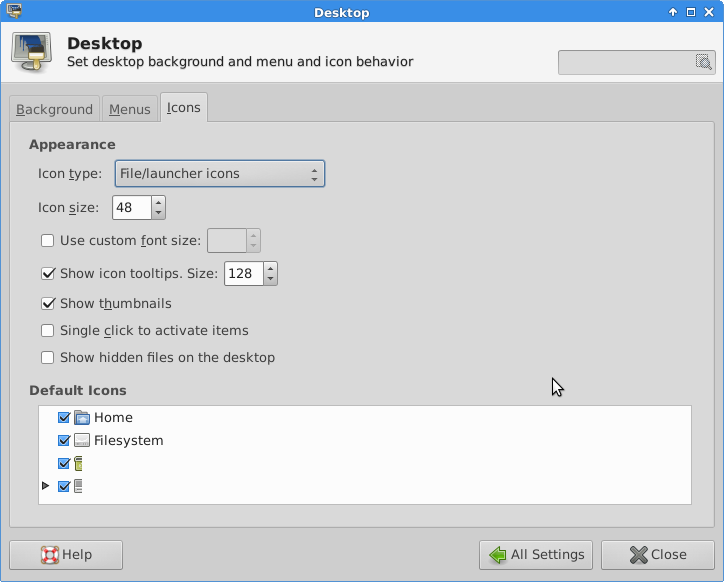
Graphics for the directories on the bottom are cut off
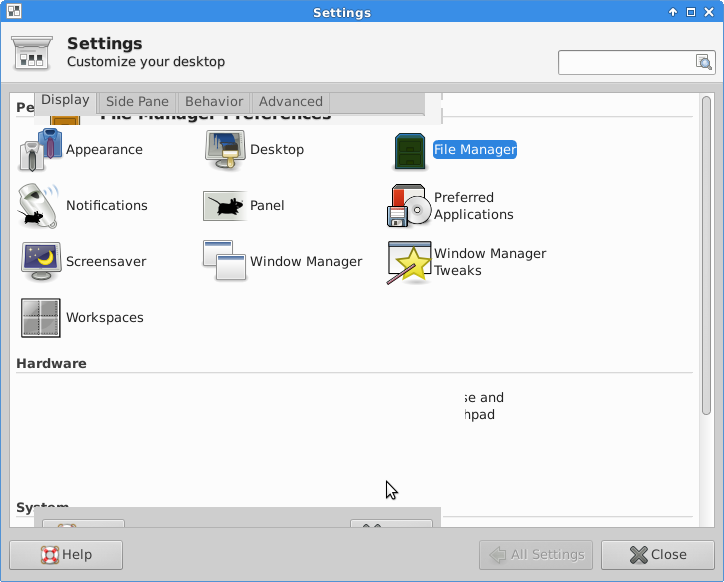
General distortion and things not showing up where they're supposed to
Anyone have any ideas?
 flex-chillrsn
on 8 Nov 2017
flex-chillrsn
on 8 Nov 2017
Related issues
 Taylormsz
·
5Comments
Taylormsz
·
5Comments
 jeremyckahn
·
5Comments
jeremyckahn
·
5Comments
 kiorpesc
·
4Comments
kiorpesc
·
4Comments
 Jacquelinemarie
·
3Comments
Jacquelinemarie
·
3Comments
 rossjrw
·
5Comments
rossjrw
·
5Comments
Most helpful comment
Fixed my own problem in trusty by updating with the 01.org Intel Graphics Drivers:
Black screen problem in utopic persists, and ubuntu is frozen with the updated drivers from 01.org