Crouton: Crouton has segmentation fault
name: xenial
encrypted: no
Entering /mnt/stateful_partition/crouton/chroots/xenial...
WARNING: Unable to register core dump handler.
crouton: version 1-20190902190258~master:9a594a66
release: bionic
architecture: amd64
xmethod: xorg
targets: x11,xiwi,keyboard,xfce
host: version 12607.58.0 (Official Build) stable-channel cave
kernel: Linux localhost 3.18.0-19838-gc647e70c954a #1 SMP PREEMPT Thu Dec 12 22:46:10 PST 2019 x86_64 x86_64 x86_64 GNU/Linux
freon: yes
Unmounting /mnt/stateful_partition/crouton/chroots/xenial...
Please describe your issue:
My crouton just crashed. Here is the last thing to happen in the log:
(II) AIGLX: Suspending AIGLX clients for VT switch
Error org.freedesktop.DBus.Error.ServiceUnknown: The name org.chromium.LibCrosService was not provided by any .service files
method return time=1577190470.666386 sender=:1.66 -> destination=:1.85 serial=2876 reply_serial=2
   boolean true
Error org.freedesktop.DBus.Error.ServiceUnknown: The name org.chromium.LibCrosService was not provided by any .service files
method return time=1577190473.747926 sender=:1.66 -> destination=:1.87 serial=2887 reply_serial=2
   boolean true
[ERROR audio_thread_priority::rt_linux] setrlimit64: 1
(EE)
(EE) Backtrace:
(EE) 0: /usr/lib/xorg/Xorg (xorg_backtrace+0x4d) [0x5784531c5abd]
(EE) 1: /usr/lib/xorg/Xorg (0x57845300d000+0x1bc859) [0x5784531c9859]
(EE) 2: /lib/x86_64-linux-gnu/libpthread.so.0 (0x7adb9741e000+0x12890) [0x7adb97430890]
(EE) 3: /lib/x86_64-linux-gnu/libc.so.6 (0x7adb9702d000+0x18eaed) [0x7adb971bbaed]
(EE) 4: /usr/lib/xorg/Xorg (WriteToClient+0x106) [0x5784531c90c6]
(EE) 5: /usr/lib/xorg/Xorg (WriteEventsToClient+0x272) [0x57845306b432]
(EE) 6: /usr/lib/xorg/Xorg (0x57845300d000+0x13717e) [0x57845314417e]
(EE) 7: /usr/lib/xorg/Xorg (DamageReportDamage+0x7c) [0x578453149a9c]
(EE) 8: /usr/lib/xorg/Xorg (0x57845300d000+0x13d358) [0x57845314a358]
(EE) 9: /usr/lib/xorg/Xorg (0x57845300d000+0x140b6a) [0x57845314db6a]
(EE) 10: /usr/lib/xorg/Xorg (0x57845300d000+0x4eb5a) [0x57845305bb5a]
(EE) 11: /usr/lib/xorg/Xorg (0x57845300d000+0x52e98) [0x57845305fe98]
(EE) 12: /usr/lib/xorg/Xorg (0x57845300d000+0x56ee0) [0x578453063ee0]
(EE) 13: /lib/x86_64-linux-gnu/libc.so.6 (__libc_start_main+0xe7) [0x7adb9704eb97]
(EE) 14: /usr/lib/xorg/Xorg (_start+0x2a) [0x57845304db8a]
(EE)
(EE) Segmentation fault at address 0x0
(EE)
Fatal server error:
(EE) Caught signal 11 (Segmentation fault). Server aborting
(EE)
(EE)
Please consult the The X.Org Foundation support
         at http://wiki.x.org
 for help.
(EE) Please also check the log file at "/tmp/Xorg.crouton.1.log" for additional information.
(EE)
(II) AIGLX: Suspending AIGLX clients for VT switch
Error org.freedesktop.DBus.Error.ServiceUnknown: The name org.chromium.LibCrosService was not provided by any .service files
method return time=1577190953.521874 sender=:1.66 -> destination=:1.118 serial=2924 reply_serial=2
   boolean true
(EE) Server terminated with error (1). Closing log file.
XIO:  fatal IO error 11 (Resource temporarily unavailable) on X server ":1"
      after 11 requests (11 known processed) with 0 events remaining.
xfce4-panel: Fatal IO error 11 (Resource temporarily unavailable) on X server :1.0.
xfce4-session: Fatal IO error 11 (Resource temporarily unavailable) on X server :1.
xfwm4: Fatal IO error 11 (Resource temporarily unavailable) on X server :1.0.
xfdesktop: Fatal IO error 11 (Resource temporarily unavailable) on X server :1.0.
Thunar: Fatal IO error 11 (Resource temporarily unavailable) on X server :1.
Running exit commands...
/usr/bin/xinit: connection to X server lost

waiting for X server to shut down Hangup
Hangup
xfsettingsd: Fatal IO error 11 (Resource temporarily unavailable) on X server :1.0.

Unmounting /mnt/stateful_partition/crouton/chroots/xenial...
Sending SIGTERM to processes under /mnt/stateful_partition/crouton/chroots/xenial...
gpg-agent[11151]: SIGTERM received - shutting down ...
gpg-agent[11151]: gpg-agent (GnuPG) 2.2.4 stopped
Sending SIGKILL to processes under /mnt/stateful_partition/crouton/chroots/xenial...
Sending SIGKILL to processes under /mnt/stateful_partition/crouton/chroots/xenial...
Sending SIGKILL to processes under /mnt/stateful_partition/crouton/chroots/xenial...
Sending SIGKILL to processes under /mnt/stateful_partition/crouton/chroots/xenial...
If known, describe the steps to reproduce the issue:
 Alizter
All 39 comments
I'm not sure if this is related, but here is another weird crash I just got:
[ERROR] User interruption
(EE) Please also check the log file at "/tmp/Xorg.crouton.1.log" for additional information.
(EE)
(II) AIGLX: Suspending AIGLX clients for VT switch
Error org.freedesktop.DBus.Error.ServiceUnknown: The name org.chromium.LibCrosService was not provided by any .service files
method return time=1577363800.087195 sender=:1.65 -> destination=:1.454 serial=11312 reply_serial=2
   boolean true
(EE) Server terminated with error (1). Closing log file.
wrapper-1.0: Fatal IO error 11 (Resource temporarily unavailable) on X server :1.0.
wrapper-1.0: Fatal IO error 11 (Resource temporarily unavailable) on X server :1.0.
XIO:  fatal IO error 11 (Resource temporarily unavailable) on X server ":1"
      after 11 requests (11 known processed) with 0 events remaining.
wrapper-1.0: Fatal IO error 11 (Resource temporarily unavailable) on X server :1.0.
wrapper-1.0: Fatal IO error 11 (Resource temporarily unavailable) on X server :1.0.
Gdk-Message: 12:36:40.320: wrapper-2.0: Fatal IO error 11 (Resource temporarily unavailable) on X server :1.0.

Gdk-Message: 12:36:40.321: wrapper-2.0: Fatal IO error 11 (Resource temporarily unavailable) on X server :1.0.

Gdk-Message: 12:36:40.322: wrapper-2.0: Fatal IO error 11 (Resource temporarily unavailable) on X server :1.0.

/usr/bin/xinit: connection to X server lost

waiting for X server to shut down xfsettingsd: Fatal IO error 11 (Resource temporarily unavailable) on X server :1.0.
Hangup
Hangup
Running exit commands...
Hangup
xfwm4: Fatal IO error 11 (Resource temporarily unavailable) on X server :1.0.
xfdesktop: Fatal IO error 11 (Resource temporarily unavailable) on X server :1.0.
..........
/usr/bin/xinit: X server slow to shut down, sending KILL signal
Unmounting /mnt/stateful_partition/crouton/chroots/xenial...
Sending SIGTERM to processes under /mnt/stateful_partition/crouton/chroots/xenial...
gpg-agent[31997]: SIGTERM received - shutting down ...
gpg-agent[31997]: gpg-agent (GnuPG) 2.2.4 stopped
Here is the log file:
[ERROR] User interruption
[  8465.259] (II) intel(0): resizing framebuffer to 1920x1080
[  8465.266] (II) intel(0): switch to mode [email protected] on eDP1 using pipe 0, position (0, 0), rotation normal, reflection none
[  8465.501] (EE) intel(0): Failed to set backlight intel_backlight for output eDP1, disabling
[171708.721] (EE)
[171708.854] (EE) Backtrace:
[171708.900] (EE) 0: /usr/lib/xorg/Xorg (xorg_backtrace+0x4d) [0x5ed17d083abd]
[171708.900] (EE) 1: /usr/lib/xorg/Xorg (0x5ed17cecb000+0x1bc859) [0x5ed17d087859]
[171708.900] (EE) 2: /lib/x86_64-linux-gnu/libpthread.so.0 (0x7fcae1660000+0x12890) [0x7fcae1672890]
[171708.900] (EE) 3: /lib/x86_64-linux-gnu/libc.so.6 (0x7fcae126f000+0x18eaed) [0x7fcae13fdaed]
[171708.900] (EE) 4: /usr/lib/xorg/Xorg (WriteToClient+0x106) [0x5ed17d0870c6]
[171708.900] (EE) 5: /usr/lib/xorg/Xorg (WriteEventsToClient+0x272) [0x5ed17cf29432]
[171708.900] (EE) 6: /usr/lib/xorg/Xorg (TryClientEvents+0x114) [0x5ed17cf295a4]
[171708.900] (EE) 7: /usr/lib/xorg/Xorg (DeliverEventsToWindow+0x47d) [0x5ed17cf2d33d]
[171708.900] (EE) 8: /usr/lib/xorg/Xorg (DeliverEvents+0x104) [0x5ed17cf2d844]
[171708.900] (EE) 9: /usr/lib/xorg/Xorg (ConfigureWindow+0x521) [0x5ed17cf4d1e1]
[171708.900] (EE) 10: /usr/lib/xorg/Xorg (0x5ed17cecb000+0x4d179) [0x5ed17cf18179]
[171708.900] (EE) 11: /usr/lib/xorg/Xorg (0x5ed17cecb000+0x52e98) [0x5ed17cf1de98]
[171708.900] (EE) 12: /usr/lib/xorg/Xorg (0x5ed17cecb000+0x56ee0) [0x5ed17cf21ee0]
[171708.900] (EE) 13: /lib/x86_64-linux-gnu/libc.so.6 (__libc_start_main+0xe7) [0x7fcae1290b97]
[171708.900] (EE) 14: /usr/lib/xorg/Xorg (_start+0x2a) [0x5ed17cf0bb8a]
[171708.900] (EE)
[171708.900] (EE) Segmentation fault at address 0x0
[171708.900] (EE)
Fatal server error:
[171708.900] (EE) Caught signal 11 (Segmentation fault). Server aborting
[171708.900] (EE)
[171708.900] (EE)
Please consult the The X.Org Foundation support
         at http://wiki.x.org
 for help.
[171708.900] (EE) Please also check the log file at "/tmp/Xorg.crouton.1.log" for additional information.
[171708.900] (EE)
[171708.903] (II) AIGLX: Suspending AIGLX clients for VT switch
[171709.088] (EE) Server terminated with error (1).
Here is another crash, not sure if related.
[ERROR] User interruption
xfsettingsd: Fatal IO error 11 (Resource temporarily unavailable) on X server :1.0.
xfce4-panel: Fatal IO error 11 (Resource temporarily unavailable) on X server :1.0.
Gdk-Message: 12:59:30.198: /usr/lib/firefox/firefox: Fatal IO error 11 (Resource temporarily unavailable) on X server :1.0.

Gdk-Message: 12:59:30.198: /usr/lib/firefox/firefox: Fatal IO error 11 (Resource temporarily unavailable) on X server :1.0.

Gdk-Message: 12:59:30.199: /usr/lib/firefox/firefox: Fatal IO error 11 (Resource temporarily unavailable) on X server :1.0.

Gdk-Message: 12:59:30.209: firefox: Fatal IO error 11 (Resource temporarily unavailable) on X server :1.0.

Gdk-Message: 12:59:30.200: /usr/lib/firefox/firefox: Fatal IO error 11 (Resource temporarily unavailable) on X server :1.0.

Gdk-Message: 12:59:30.200: /usr/lib/firefox/firefox: Fatal IO error 11 (Resource temporarily unavailable) on X server :1.0.

xfce4-session: Fatal IO error 11 (Resource temporarily unavailable) on X server :1.
Gdk-Message: 12:59:30.246: wrapper-2.0: Fatal IO error 11 (Resource temporarily unavailable) on X server :1.0.

Gdk-Message: 12:59:30.247: wrapper-2.0: Fatal IO error 11 (Resource temporarily unavailable) on X server :1.0.

Gdk-Message: 12:59:30.247: wrapper-2.0: Fatal IO error 11 (Resource temporarily unavailable) on X server :1.0.

Gdk-Message: 12:59:30.248: wrapper-2.0: Fatal IO error 11 (Resource temporarily unavailable) on X server :1.0.

Gdk-Message: 12:59:30.254: xfce4-terminal: Fatal IO error 11 (Resource temporarily unavailable) on X server :1.0.

XIO:  fatal IO error 11 (Resource temporarily unavailable) on X server ":1"
      after 11 requests (11 known processed) with 0 events remaining.
Thunar: Fatal IO error 11 (Resource temporarily unavailable) on X server :1.
xfdesktop: Fatal IO error 11 (Resource temporarily unavailable) on X server :1.0.
Running exit commands...
/usr/bin/xinit: connection to X server lost
Hangup
Hangup
Not unmounting /mnt/stateful_partition/crouton/chroots/xenial as another instance is using it.
Here is another crash
QStandardPaths: XDG_RUNTIME_DIR not set, defaulting to '/tmp/runtime-ali'
QStandardPaths: XDG_RUNTIME_DIR not set, defaulting to '/tmp/runtime-ali'
QStandardPaths: XDG_RUNTIME_DIR not set, defaulting to '/tmp/runtime-ali'

(wrapper-2.0:22388): Gtk-WARNING **: 14:11:53.276: gtk_widget_size_allocate(): attempt to allocate widget with width -3 and height 26
QStandardPaths: XDG_RUNTIME_DIR not set, defaulting to '/tmp/runtime-ali'

(wrapper-2.0:22387): Gtk-WARNING **: 14:11:53.433: gtk_widget_size_allocate(): attempt to allocate widget with width -3 and height 26
kdeconnect.core: KdeConnect daemon starting

(wrapper-2.0:22393): Gtk-WARNING **: 14:11:53.565: Negative content width -3 (allocation 1, extents 2x2) while allocating gadget (node button, owner GtkToggleButton)
kdeconnect.core: onStart
kdeconnect.core: KdeConnect daemon started
kdeconnect.core: Broadcasting identity packet
QStandardPaths: XDG_RUNTIME_DIR not set, defaulting to '/tmp/runtime-ali'
/usr/bin/xbindkeys_autostart: line 24: CONF: unbound variable
QStandardPaths: XDG_RUNTIME_DIR not set, defaulting to '/tmp/runtime-ali'
[ERROR audio_thread_priority::rt_linux] setrlimit64: 1
(II) AIGLX: Suspending AIGLX clients for VT switch
Error org.freedesktop.DBus.Error.ServiceUnknown: The name org.chromium.LibCrosService was not provided by any .service files
method return time=1577456222.167753 sender=:1.65 -> destination=:1.127 serial=4462 reply_serial=2
   boolean true
Error org.freedesktop.DBus.Error.ServiceUnknown: The name org.chromium.LibCrosService was not provided by any .service files
method return time=1577456328.772201 sender=:1.65 -> destination=:1.130 serial=4498 reply_serial=2
   boolean true
free(): invalid pointer
(EE)
(EE) Backtrace:
Gdk-Message: 14:18:50.464: firefox: Fatal IO error 11 (Resource temporarily unavailable) on X server :1.0.

Exiting due to channel error.
Exiting due to channel error.
Exiting due to channel error.
Exiting due to channel error.
(EE) 0: /usr/lib/xorg/Xorg (xorg_backtrace+0x4d) [0x5f28e9036abd]
(EE) 1: /usr/lib/xorg/Xorg (0x5f28e8e7e000+0x1bc859) [0x5f28e903a859]
(EE) 2: /lib/x86_64-linux-gnu/libpthread.so.0 (0x75269e923000+0x12890) [0x75269e935890]
(EE) 3: /lib/x86_64-linux-gnu/libc.so.6 (gsignal+0xc7) [0x75269e570e97]
(EE) 4: /lib/x86_64-linux-gnu/libc.so.6 (abort+0x141) [0x75269e572801]
(EE) 5: /lib/x86_64-linux-gnu/libc.so.6 (0x75269e532000+0x89897) [0x75269e5bb897]
(EE) 6: /lib/x86_64-linux-gnu/libc.so.6 (0x75269e532000+0x9090a) [0x75269e5c290a]
(EE) 7: /lib/x86_64-linux-gnu/libc.so.6 (cfree+0x4cc) [0x75269e5c9e1c]
(EE) 8: /usr/lib/xorg/Xorg (0x5f28e8e7e000+0x1bc369) [0x5f28e903a369]
(EE) 9: /usr/lib/xorg/Xorg (CloseDownConnection+0x7f) [0x5f28e9037a0f]
(EE) 10: /usr/lib/xorg/Xorg (CloseDownClient+0x190) [0x5f28e8ed0370]
(EE) 11: /usr/lib/xorg/Xorg (0x5f28e8e7e000+0x52ed5) [0x5f28e8ed0ed5]
(EE) 12: /usr/lib/xorg/Xorg (0x5f28e8e7e000+0x56ee0) [0x5f28e8ed4ee0]
(EE) 13: /lib/x86_64-linux-gnu/libc.so.6 (__libc_start_main+0xe7) [0x75269e553b97]
(EE) 14: /usr/lib/xorg/Xorg (_start+0x2a) [0x5f28e8ebeb8a]
(EE)
(EE)
Fatal server error:
(EE) Caught signal 6 (Aborted). Server aborting
(EE)
(EE)
Please consult the The X.Org Foundation support
         at http://wiki.x.org
 for help.
(EE) Please also check the log file at "/tmp/Xorg.crouton.1.log" for additional information.
(EE)
(II) AIGLX: Suspending AIGLX clients for VT switch
Can't open display.
xsel: Can't open display: (null)
: Connection reset by peer
Error org.freedesktop.DBus.Error.ServiceUnknown: The name org.chromium.LibCrosService was not provided by any .service files
method return time=1577456330.704792 sender=:1.65 -> destination=:1.133 serial=4499 reply_serial=2
   boolean true
(EE) Server terminated with error (1). Closing log file.
xfsettingsd: Fatal IO error 11 (Resource temporarily unavailable) on X server :1.0.
Thunar: Fatal IO error 11 (Resource temporarily unavailable) on X server :1.
xfce4-panel: Fatal IO error 11 (Resource temporarily unavailable) on X server :1.0.
xfdesktop: Fatal IO error 11 (Resource temporarily unavailable) on X server :1.0.
xfce4-session: Fatal IO error 11 (Resource temporarily unavailable) on X server :1.
xfwm4: Fatal IO error 11 (Resource temporarily unavailable) on X server :1.0.
touchegg: Fatal IO error: client killed
wrapper-1.0: Fatal IO error 11 (Resource temporarily unavailable) on X server :1.0.
wrapper-1.0: Fatal IO error 11 (Resource temporarily unavailable) on X server :1.0.
wrapper-1.0: Fatal IO error 11 (Resource temporarily unavailable) on X server :1.0.
wrapper-1.0: Fatal IO error 11 (Resource temporarily unavailable) on X server :1.0.
/usr/bin/xinit: connection to X server lost
Hangup
Hangup
Running exit commands...
Hangup
Unmounting /mnt/stateful_partition/crouton/chroots/xenial...
Sending SIGTERM to processes under /mnt/stateful_partition/crouton/chroots/xenial...
gpg-agent[22324]: SIGTERM received - shutting down ...
gpg-agent[22324]: gpg-agent (GnuPG) 2.2.4 stopped
I did a powerwash and restored my chroot. I am still getting crashes. Here is the latest one:
kdeconnect.core: KdeConnect daemon starting
kdeconnect.core: onStart
kdeconnect.core: KdeConnect daemon started
kdeconnect.core: Broadcasting identity packet
/usr/bin/xbindkeys_autostart: line 24: CONF: unbound variable
QStandardPaths: XDG_RUNTIME_DIR not set, defaulting to '/tmp/runtime-ali'
QStandardPaths: XDG_RUNTIME_DIR not set, defaulting to '/tmp/runtime-ali'
[ERROR audio_thread_priority::rt_linux] setrlimit64: 1
(EE)
(EE) Backtrace:
(EE) 0: /usr/lib/xorg/Xorg (xorg_backtrace+0x4d) [0x64ae167beabd]
(EE) 1: /usr/lib/xorg/Xorg (0x64ae16606000+0x1bc859) [0x64ae167c2859]
(EE) 2: /lib/x86_64-linux-gnu/libpthread.so.0 (0x72f568953000+0x12890) [0x72f568965890]
(EE) 3: /lib/x86_64-linux-gnu/libc.so.6 (0x72f568562000+0x18eaed) [0x72f5686f0aed]
(EE) 4: /usr/lib/xorg/Xorg (WriteToClient+0x106) [0x64ae167c20c6]
(EE) 5: /usr/lib/xorg/Xorg (WriteEventsToClient+0x272) [0x64ae16664432]
(EE) 6: /usr/lib/xorg/Xorg (0x64ae16606000+0xecc39) [0x64ae166f2c39]
(EE) 7: /usr/lib/xorg/Xorg (0x64ae16606000+0xecd67) [0x64ae166f2d67]
(EE) 8: /usr/lib/xorg/Xorg (0x64ae16606000+0xedf3d) [0x64ae166f3f3d]
(EE) 9: /usr/lib/xorg/Xorg (0x64ae16606000+0xee00c) [0x64ae166f400c]
(EE) 10: /usr/lib/xorg/Xorg (0x64ae16606000+0x52e98) [0x64ae16658e98]
(EE) 11: /usr/lib/xorg/Xorg (0x64ae16606000+0x56ee0) [0x64ae1665cee0]
(EE) 12: /lib/x86_64-linux-gnu/libc.so.6 (__libc_start_main+0xe7) [0x72f568583b97]
(EE) 13: /usr/lib/xorg/Xorg (_start+0x2a) [0x64ae16646b8a]
(EE)
(EE) Segmentation fault at address 0x2900c2937e
(EE)
Fatal server error:
(EE) Caught signal 11 (Segmentation fault). Server aborting
(EE)
(EE)
Please consult the The X.Org Foundation support
         at http://wiki.x.org
 for help.
(EE) Please also check the log file at "/tmp/Xorg.crouton.1.log" for additional information.
(EE)
(II) AIGLX: Suspending AIGLX clients for VT switch
Error org.freedesktop.DBus.Error.ServiceUnknown: The name org.chromium.LibCrosService was not provided by any .service files
method return time=1577495988.079116 sender=:1.13 -> destination=:1.133 serial=35636 reply_serial=2
   boolean true
(EE) Server terminated with error (1). Closing log file.
xfwm4: Fatal IO error 104 (Connection reset by peer) on X server :1.0.
Gdk-Message: 01:19:48.293: xfce4-terminal: Fatal IO error 104 (Connection reset by peer) on X server :1.0.

Gdk-Message: 01:19:48.295: firefox: Fatal IO error 11 (Resource temporarily unavailable) on X server :1.0.

Gdk-Message: 01:19:48.365: wrapper-2.0: Fatal IO error 11 (Resource temporarily unavailable) on X server :1.0.

Gdk-Message: 01:19:48.365: wrapper-2.0: Fatal IO error 11 (Resource temporarily unavailable) on X server :1.0.

Thunar: Fatal IO error 11 (Resource temporarily unavailable) on X server :1.
xfce4-panel: Fatal IO error 11 (Resource temporarily unavailable) on X server :1.0.
Gdk-Message: 01:19:48.366: wrapper-2.0: Fatal IO error 11 (Resource temporarily unavailable) on X server :1.0.

Gdk-Message: 01:19:48.365: wrapper-2.0: Fatal IO error 11 (Resource temporarily unavailable) on X server :1.0.

xfce4-session: Fatal IO error 11 (Resource temporarily unavailable) on X server :1.
xfdesktop: Fatal IO error 11 (Resource temporarily unavailable) on X server :1.0.
XIO:  fatal IO error 11 (Resource temporarily unavailable) on X server ":1"
      after 11 requests (11 known processed) with 0 events remaining.
Sandbox: Unexpected EOF, op 0 flags 02000000 path /etc/localtime
Gdk-Message: 01:19:48.295: /usr/lib/firefox/firefox: Fatal IO error 11 (Resource temporarily unavailable) on X server :1.0.

Sandbox: Unexpected EOF, op 0 flags 02000000 path /etc/localtime
Gdk-Message: 01:19:48.295: /usr/lib/firefox/firefox: Fatal IO error 11 (Resource temporarily unavailable) on X server :1.0.

Sandbox: Unexpected EOF, op 0 flags 02000000 path /etc/localtime
Gdk-Message: 01:19:48.294: /usr/lib/firefox/firefox: Fatal IO error 11 (Resource temporarily unavailable) on X server :1.0.

Sandbox: Unexpected EOF, op 2 flags 00 path /etc/localtime
Gdk-Message: 01:19:48.303: /usr/lib/firefox/firefox: Fatal IO error 11 (Resource temporarily unavailable) on X server :1.0.

wrapper-1.0: Fatal IO error 11 (Resource temporarily unavailable) on X server :1.0.
wrapper-1.0: Fatal IO error 104 (Connection reset by peer) on X server :1.0.
wrapper-1.0: Fatal IO error 11 (Resource temporarily unavailable) on X server :1.0.
wrapper-1.0: Fatal IO error 11 (Resource temporarily unavailable) on X server :1.0.
/usr/bin/xinit: connection to X server lost
Hangup
Hangup
Running exit commands...
Hangup
xfsettingsd: Fatal IO error 11 (Resource temporarily unavailable) on X server :1.0.
Unmounting /mnt/stateful_partition/crouton/chroots/xenial...
Sending SIGTERM to processes under /mnt/stateful_partition/crouton/chroots/xenial...
gpg-agent[26933]: SIGTERM received - shutting down ...
gpg-agent[26933]: gpg-agent (GnuPG) 2.2.4 stopped
From ChromeOS terminal, use
sudo mv /mnt/stateful_partition/crouton/chroots/xenial/usr/share/X11/xorg.conf.d/20-crouton.conf
 /mnt/stateful_partition/crouton/chroots/xenial/usr/share/X11/xorg.conf.d/20-crouton.conf.bak
and then start crouton
 pairwiserr
on 2 Jan 2020
pairwiserr
on 2 Jan 2020
@pairwiserr What does this do and why will it fix things?
Alizter
on 2 Jan 2020
@Alizter Please confirm that this file even exists for you else disregard my solution.
The command above simply renames the file 20-crouton.conf to 20-crouton.conf.bak. I ran into a similar issue when I had 20-crouton.conf in my xorg configuration folder .../xorg.conf.d.
My 20-crouton.conf file is as follows
# Copyright (c) 2016 The crouton Authors. All rights reserved.
# Use of this source code is governed by a BSD-style license that can be
# found in the LICENSE file.

# On Intel platforms with FBC enabled, in order to see anything we need to use
# the SNA driver with the TearFree option.
Section "Device"
     Identifier "Intel Graphics SNA+TearFree"
     Driver     "intel"
     Option     "AccelMethod" "sna"
     Option     "TearFree"    "true"
EndSection
You seem to be on an Asus C302 (Cave) machine which is similar to mine, Samsung Chromebook Pro (Caroline). Both machines default to using sna acceleration method but line TearFree "true" might be causing the segmentation fault.
Also. I just saw that you're trying to use bionic chroot (18.04) for your crouton but your crouton is trying to enter your xenial chroot... Did you go through guide?
pairwiserr
on 3 Jan 2020
@pairwiserr I have unfortunately powerwashed and reinstalled crouton with a bionic build. Occasionally on xorg I still crash however. If it happens again I will document it again.
I looked for your file but I couldn't find it. I only have
10-evdev.conf 10-quirks.conf 11-evdev-quirks.conf 11-evdev-trackpoint.conf 50-synaptics.conf 50-wacom.conf 51-synaptics-quirks.conf
in that directory. My current temporary solution is to use xiwi instead. Sometimes I can free up a lot more memory to make it run faster especially if I kill processes like chrome ppa pepper flash or something.
What I am doing is probably super sketchy but it might help. At first the chromebook looks like it is frozen but it wakes up shortly after.
I had none of these problems a few updates back. I am not sure when but a chromeos update has broken everything. Not to mention memory usage seems to be a lot higher.
Alizter
on 3 Jan 2020
@Alizter
I looked for your file but I couldn't find it. I only have...
Yep, that's normal. For your reference 20-crouton.conf is a copy of /mnt/stateful_partition/crouton/chroots/xenial/etc/crouton/xorg-intel-sna.conf
I've been having a lot of issues with the recent update as well. If you want to stop auto-update follow these instructions.
Relevant part:
A simple way would be to remove or rename /etc/init/update-engine.conf which would prevent the updater from ever running.
/etc/init/update-engine.conf can be accessed from the console from _ChromeOS_ - not inside crouton.
Edit: I've heard that you have to do some additional work to get bionic working. If you don't need features from bionic, I recommend using xenial as it has a lot more support on here.
pairwiserr
on 3 Jan 2020
@pairwiserr Thanks for that link! Do you know if crouton is going to be updated to work on newer versions of chromeos? There doesn't look to be much development activity going on here.
Alizter
on 3 Jan 2020
@Alizter I'm not certain as it's not officially supported by Google. But I don't think crouton is going anywhere any time soon seeing that Crostini still has a lot of functionalities missing.
pairwiserr
on 3 Jan 2020
Sometimes CrOS updates can cause issues with crouton, when that happens the best course of action is to update your chroot(s). See the below for help with that:
Closing. Please re-open if this issue is still a concern.
 DennisLfromGA
on 19 Jan 2020
DennisLfromGA
on 19 Jan 2020
Not sure if the same issue, but I am also getting a segmentation fault everytime i try to enter my chroot with sudo startxfce4 This started a few weeks ago and I have already updated my chroot multiple times but still getting the same error.
Here's the error I get:
crouton: version 1-20200116214215~master:9017d640
release: xenial
architecture: amd64
xmethod: xorg
targets: x11,gtk-extra,xfce,xorg,xiwi
host: version 12607.82.0 (Official Build) stable-channel eve
kernel: Linux localhost 4.4.196-16940-geab5e6346fdb #1 SMP PREEMPT Thu Jan 9 23:24:15 PST 2020 x86_64 x86_64 x86_64 GNU/Linux
freon: yes
xrandr: Output eDP1 is not disconnected but has no modes
xrandr: Output DP1 is not disconnected but has no modes
xrandr: Output DP2 is not disconnected but has no modes
Kicking xrandr again
xrandr: Output eDP1 is not disconnected but has no modes
xrandr: Output DP1 is not disconnected but has no modes
xrandr: Output DP2 is not disconnected but has no modes
Kicking xrandr again
_IceTransmkdir: Owner of /tmp/.ICE-unix should be set to root
xfce4-session: No GPG agent found
(EE)
(EE) Backtrace:
(EE) 0: /usr/lib/xorg/Xorg (xorg_backtrace+0x4e) [0x596632a196ce]
(EE) 1: /usr/lib/xorg/Xorg (0x596632867000+0x1b6a69) [0x596632a1da69]
(EE) 2: /lib/x86_64-linux-gnu/libc.so.6 (0x78103f7ba000+0x354b0) [0x78103f7ef4b0]
(EE) 3: /usr/lib/xorg/modules/drivers/intel_drv.so (0x78103b97b000+0x75dad) [0x78103b9f0dad]
(EE) 4: /usr/lib/xorg/modules/drivers/intel_drv.so (0x78103b97b000+0x40d4c) [0x78103b9bbd4c]
(EE) 5: /usr/lib/xorg/modules/drivers/intel_drv.so (0x78103b97b000+0x42cc1) [0x78103b9bdcc1]
(EE) 6: /usr/lib/xorg/modules/drivers/intel_drv.so (0x78103b97b000+0x46179) [0x78103b9c1179]
(EE) 7: /usr/lib/xorg/modules/drivers/intel_drv.so (0x78103b97b000+0x65abf) [0x78103b9e0abf]
(EE) 8: /usr/lib/xorg/modules/drivers/intel_drv.so (0x78103b97b000+0x6624f) [0x78103b9e124f]
(EE) 9: /usr/lib/xorg/Xorg (0x596632867000+0x13a411) [0x5966329a1411]
(EE) 10: /usr/lib/xorg/Xorg (0x596632867000+0x12fe27) [0x596632996e27]
(EE) 11: /usr/lib/xorg/Xorg (0x596632867000+0x53d9f) [0x5966328bad9f]
(EE) 12: /usr/lib/xorg/Xorg (0x596632867000+0x57e13) [0x5966328bee13]
(EE) 13: /lib/x86_64-linux-gnu/libc.so.6 (__libc_start_main+0xf0) [0x78103f7da830]
(EE) 14: /usr/lib/xorg/Xorg (_start+0x29) [0x5966328a9069]
(EE)
(EE) Segmentation fault at address 0x7c
(EE)
Fatal server error:
(EE) Caught signal 11 (Segmentation fault). Server aborting
(EE)
(EE)
Please consult the The X.Org Foundation support
         at http://wiki.x.org
 for help.
(EE) Please also check the log file at "/tmp/Xorg.crouton.1.log" for additional information.
(EE)
(II) AIGLX: Suspending AIGLX clients for VT switch
Error org.freedesktop.DBus.Error.ServiceUnknown: The name org.chromium.LibCrosService was not provided by any .service files
(EE) Server terminated with error (1). Closing log file.
Thunar: Fatal IO error 11 (Resource temporarily unavailable) on X server :1.
xfdesktop: Fatal IO error 11 (Resource temporarily unavailable) on X server :1.
xfsettingsd: Fatal IO error 11 (Resource temporarily unavailable) on X server :1.0.
xfce4-panel: Fatal IO error 0 (Success) on X server :1.0.
xfwm4: Fatal IO error 11 (Resource temporarily unavailable) on X server :1.0.
xfce4-session: Fatal IO error 11 (Resource temporarily unavailable) on X server :1.
Additional info from Xorg.crouton.1.log
[   155.192] (EE) intel(0): Failed to submit rendering commands (Invalid argument), disabling acceleration.
[   155.294] (II) intel(0): resizing framebuffer to 8x8
[   156.939] (II) intel(0): EDID vendor "SHP", prod id 5258
[   156.939] (II) intel(0): Printing DDC gathered Modelines:
[   156.939] (II) intel(0): Modeline "2400x1600"x0.0  252.75  2400 2448 2480 2560  1600 1603 1613 1646 -hsync -vsync (98.7 kHz eP)
[   157.309] (II) intel(0): resizing framebuffer to 2400x1600
[   157.318] (II) intel(0): switch to mode [email protected] on eDP1 using pipe 0, position (0, 0), rotation normal, reflection none
[   157.471] (EE) intel(0): Failed to set backlight intel_backlight for output eDP1, disabling
[   158.169] (EE)
[   158.169] (EE) Backtrace:
[   158.171] (EE) 0: /usr/lib/xorg/Xorg (xorg_backtrace+0x4e) [0x591dc57456ce]
[   158.171] (EE) 1: /usr/lib/xorg/Xorg (0x591dc5593000+0x1b6a69) [0x591dc5749a69]
[   158.171] (EE) 2: /lib/x86_64-linux-gnu/libc.so.6 (0x7a006c9fb000+0x354b0) [0x7a006ca304b0]
[   158.171] (EE) 3: /usr/lib/xorg/modules/drivers/intel_drv.so (0x7a0068bbc000+0x75dad) [0x7a0068c31dad]
[   158.171] (EE) 4: /usr/lib/xorg/modules/drivers/intel_drv.so (0x7a0068bbc000+0x40d4c) [0x7a0068bfcd4c]
[   158.171] (EE) 5: /usr/lib/xorg/modules/drivers/intel_drv.so (0x7a0068bbc000+0x42cc1) [0x7a0068bfecc1]
[   158.171] (EE) 6: /usr/lib/xorg/modules/drivers/intel_drv.so (0x7a0068bbc000+0x46179) [0x7a0068c02179]
[   158.171] (EE) 7: /usr/lib/xorg/modules/drivers/intel_drv.so (0x7a0068bbc000+0x65abf) [0x7a0068c21abf]
[   158.171] (EE) 8: /usr/lib/xorg/modules/drivers/intel_drv.so (0x7a0068bbc000+0x6624f) [0x7a0068c2224f]
[   158.171] (EE) 9: /usr/lib/xorg/Xorg (0x591dc5593000+0x13a411) [0x591dc56cd411]
[   158.171] (EE) 10: /usr/lib/xorg/Xorg (0x591dc5593000+0x12fe27) [0x591dc56c2e27]
[   158.171] (EE) 11: /usr/lib/xorg/Xorg (0x591dc5593000+0x53d9f) [0x591dc55e6d9f]
[   158.171] (EE) 12: /usr/lib/xorg/Xorg (0x591dc5593000+0x57e13) [0x591dc55eae13]
[   158.171] (EE) 13: /lib/x86_64-linux-gnu/libc.so.6 (__libc_start_main+0xf0) [0x7a006ca1b830]
[   158.171] (EE) 14: /usr/lib/xorg/Xorg (_start+0x29) [0x591dc55d5069]
[   158.171] (EE)
[   158.171] (EE) Segmentation fault at address 0x7c
[   158.171] (EE)
Fatal server error:
[   158.171] (EE) Caught signal 11 (Segmentation fault). Server aborting
[   158.171] (EE)
[   158.171] (EE)
crouton: version 1-20200116214215~master:9017d640
release: xenial
architecture: amd64
xmethod: xorg
targets: x11,gtk-extra,xfce,xorg,xiwi
host: version 12607.82.0 (Official Build) stable-channel eve
kernel: Linux localhost 4.4.196-16940-geab5e6346fdb #1 SMP PREEMPT Thu Jan 9 23:24:15 PST 2020 x86_64 x86_64 x86_64 GNU/Linux
freon: yes
 raffytaruc
on 27 Jan 2020
raffytaruc
on 27 Jan 2020
@raffytaruc I am also still getting seg faults. My solution for now has been running crouton with xiwi instead.
@DennisLfromGA Can you reopen this issue, it definitely has not been resolved, I am really confused why you closed it.
Alizter
on 27 Jan 2020
Thanks!
Alizter
on 27 Jan 2020
Your welcome; I'm not quite sure why I closed it either.
Just holler at me like you did when that happens and I'll jump on it.
-DennisLfromGA
DennisLfromGA
on 27 Jan 2020
After some trial and error, I was able to sudo startxfce4 into my chroot without crashing by doing either of the following first:
Remove or rename /mnt/stateful_partition/crouton/chroots/xenial/etc/X11/xorg.conf
(This was a copy of /etc/crouton/xorg-intel-sna.conf which I created before to force graphics acceleration) This is similar to the recommendation of @pairwiserr above.
OR
Edit /mnt/stateful_partition/crouton/chroots/xenial/etc/X11/xorg.conf and set the TearFree option to false
# Copyright (c) 2016 The crouton Authors. All rights reserved.
# Use of this source code is governed by a BSD-style license that can be
# found in the LICENSE file.

# On Intel platforms with FBC enabled, in order to see anything we need to use
# the SNA driver with the TearFree option.
Section "Device"
     Identifier "Intel Graphics SNA+TearFree"
     Driver     "intel"
     Option     "AccelMethod" "sna"
     Option     "TearFree"    "false"
EndSection
This feels more like a workaround though. While I am able to enter my chroot now and carry out everyday tasks (browsing, writing code), the performance when doing something more graphics intensive (playing games) has been quite bad compared to before.
raffytaruc
on 28 Jan 2020
I just downloaded it about 3-4 days ago and I am having the same problems as is shown before. I am kind of new so please if you can help explain it.
Enter encryption passphrase for xenial:
Entering /mnt/stateful_partition/crouton/chroots/xenial...
/usr/bin/startxfce4: Starting X server
_XSERVTransmkdir: Owner of /tmp/.X11-unix should be set to root
X.Org X Server 1.18.4
Release Date: 2016-07-19
X Protocol Version 11, Revision 0
Build Operating System: Linux 4.4.0-128-generic x86_64 Ubuntu
Current Operating System: Linux localhost 4.14.157-14175-g1706f38e9a13 #1 SMP PREEMPT Thu Feb 27 17:26:26 PST 2020 x86_64
Kernel command line: cros_secure console= loglevel=7 init=/sbin/init cros_secure root=/dev/dm-0 rootwait ro dm_verity.error_behavior=3 dm_verity.max_bios=-1 dm_verity.dev_wait=1 dm="1 vroot none ro 1,0 4077568 verity payload=PARTUUID=80f01406-679b-e849-aa7d-1daa5e21d792/PARTNROFF=1 hashtree=PARTUUID=80f01406-679b-e849-aa7d-1daa5e21d792/PARTNROFF=1 hashstart=4077568 alg=sha256 root_hexdigest=652536b046be04f6887908cf5444c0e3536eb8011abc41eb9c0eafc5c8dec919 salt=a28f97965d13b3d1ac46fedd449ab0eab20dc1b1b64e74495729074f167e02cc" noinitrd vt.global_cursor_default=0 kern_guid=80f01406-679b-e849-aa7d-1daa5e21d792 add_efi_memmap boot=local noresume noswap i915.modeset=1 tpm_tis.force=1 tpm_tis.interrupts=0 nmi_watchdog=panic,lapic
Build Date: 10 August 2018 09:33:05AM
xorg-server 2:1.18.4-0ubuntu0.8 (For technical support please see http://www.ubuntu.com/support)
Current version of pixman: 0.33.6
Current version of pixman: 0.33.6
Before reporting problems, check http://wiki.x.org
to make sure that you have the latest version.
Markers: (--) probed, () from config file, (==) default setting,
(++) from command line, (!!) notice, (II) informational,
(WW) warning, (EE) error, (NI) not implemented, (??) unknown.
(++) Log file: "/tmp/Xorg.crouton.1.log", Time: Mon Mar 9 18:36:33 2020
(==) Using system config directory "/usr/share/X11/xorg.conf.d"
Error org.freedesktop.DBus.Error.ServiceUnknown: The name org.chromium.LibCrosService was not provided by any .service files
xf86EnableIOPorts: failed to set IOPL for I/O (Operation not permitted)
Error executing command as another user: Not authorized
Current version of pixman: 0.33.6
Before reporting problems, check http://wiki.x.org
to make sure that you have the latest version.
Markers: (--) probed, () from config file, (==) default setting,
(++) from command line, (!!) notice, (II) informational,
(WW) warning, (EE) error, (NI) not implemented, (??) unknown.
(++) Log file: "/tmp/Xorg.crouton.1.log", Time: Mon Mar 9 18:36:33 2020
(==) Using system config directory "/usr/share/X11/xorg.conf.d"
Error org.freedesktop.DBus.Error.ServiceUnknown: The name org.chromium.LibCrosService was not provided by any .service files
xf86EnableIOPorts: failed to set IOPL for I/O (Operation not permitted)
Error executing command as another user: Not authorized
This incident has been reported.
crouton: version 1-20200116214215~master:9017d640
release: xenial
architecture: amd64
xmethod: xorg
targets: xfce
host: version 12739.87.0 (Official Build) stable-channel auron_paine
kernel: Linux localhost 4.14.157-14175-g1706f38e9a13 #1 SMP PREEMPT Thu Feb 27 17:26:26 PST 2020 x86_64 x86_64 x86_64 GNU/Linux
freon: yes
xrandr: Output eDP1 is not disconnected but has no modes
xrandr: Output HDMI1 is not disconnected but has no modes
Kicking xrandr again
xrandr: Output eDP1 is not disconnected but has no modes
xrandr: Output HDMI1 is not disconnected but has no modes
Kicking xrandr again
_IceTransmkdir: Owner of /tmp/.ICE-unix should be set to root
xfce4-session: No GPG agent found
xfce4-session: No SSH authentication agent found
This incident has been reported.
crouton: version 1-20200116214215~master:9017d640
release: xenial
architecture: amd64
xmethod: xorg
targets: xfce
host: version 12739.87.0 (Official Build) stable-channel auron_paine
kernel: Linux localhost 4.14.157-14175-g1706f38e9a13 #1 SMP PREEMPT Thu Feb 27 17:26:26 PST 2020 x86_64 x86_64 x86_64 GNU/Linux
freon: yes
xrandr: Output eDP1 is not disconnected but has no modes
xrandr: Output HDMI1 is not disconnected but has no modes
Kicking xrandr again
xrandr: Output eDP1 is not disconnected but has no modes
xrandr: Output HDMI1 is not disconnected but has no modes
Kicking xrandr again
_IceTransmkdir: Owner of /tmp/.ICE-unix should be set to root
xfce4-session: No GPG agent found
xfce4-session: No SSH authentication agent found
(EE)
(EE) Backtrace:
(EE) 0: /usr/lib/xorg/Xorg (xorg_backtrace+0x4e) [0x5bdde99916ce]
(EE) 1: /usr/lib/xorg/Xorg (0x5bdde97df000+0x1b6a69) [0x5bdde9995a69]
(EE) 2: /lib/x86_64-linux-gnu/libc.so.6 (0x7c7acfff6000+0x354b0) [0x7c7ad002b4b0]
(EE) 3: /usr/lib/xorg/modules/drivers/intel_drv.so (0x7c7acc1b7000+0x75dad) [0x7c7acc22cdad]
(EE) 4: /usr/lib/xorg/modules/drivers/intel_drv.so (0x7c7acc1b7000+0x40d4c) [0x7c7acc1f7d4c]
(EE) 5: /usr/lib/xorg/modules/drivers/intel_drv.so (0x7c7acc1b7000+0x42cc1) [0x7c7acc1f9cc1]
(EE) 6: /usr/lib/xorg/modules/drivers/intel_drv.so (0x7c7acc1b7000+0x46179) [0x7c7acc1fd179]
(EE) 7: /usr/lib/xorg/modules/drivers/intel_drv.so (0x7c7acc1b7000+0x65abf) [0x7c7acc21cabf]
(EE) 8: /usr/lib/xorg/modules/drivers/intel_drv.so (0x7c7acc1b7000+0x6624f) [0x7c7acc21d24f]
(EE) 9: /usr/lib/xorg/Xorg (0x5bdde97df000+0x13a411) [0x5bdde9919411]
(EE) 10: /usr/lib/xorg/Xorg (0x5bdde97df000+0x12fe27) [0x5bdde990ee27]
(EE) 11: /usr/lib/xorg/Xorg (0x5bdde97df000+0x53d9f) [0x5bdde9832d9f]
(EE) 12: /usr/lib/xorg/Xorg (0x5bdde97df000+0x57e13) [0x5bdde9836e13]
(EE) 13: /lib/x86_64-linux-gnu/libc.so.6 (__libc_start_main+0xf0) [0x7c7ad0016830]
(EE) 14: /usr/lib/xorg/Xorg (_start+0x29) [0x5bdde9821069]
(EE)
(EE) Segmentation fault at address 0x7c
(EE)
Fatal server error:
(EE) Caught signal 11 (Segmentation fault). Server aborting
(EE)
(EE)
Please consult the The X.Org Foundation support
at http://wiki.x.org
for help.
(EE) Please also check the log file at "/tmp/Xorg.crouton.1.log" for additional information.
(EE)
(II) AIGLX: Suspending AIGLX clients for VT switch
(xfce4-terminal:12618): Gtk-WARNING **: cannot open display: :1.0
/usr/bin/xbindkeys_autostart: line 24: CONF: unbound variable
Error org.freedesktop.DBus.Error.ServiceUnknown: The name org.chromium.LibCrosService was not provided by any .service files
(xfsettingsd:12660): xfsettingsd-ERROR **: Unable to open display.
xcb_connection_has_error() returned true
(xfce4-volumed:12669): Gtk-WARNING **: cannot open display: :1.0
xscreensaver: 18:36:38: Can't open display: :1.0
xscreensaver: 18:36:38: running as onionish/onionish (1000/1000)
xscreensaver: 18:36:38: Errors at startup are usually authorization problems.
But you're not logging in as root (good!) so something
else must be wrong. Did you read the manual and the FAQ?
          http://www.jwz.org/xscreensaver/faq.html
          http://www.jwz.org/xscreensaver/man.html
(EE) Server terminated with error (1). Closing log file.
xfsettingsd: Fatal IO error 11 (Resource temporarily unavailable) on X server :1.0.
Thunar: Fatal IO error 11 (Resource temporarily unavailable) on X server :1.
xfwm4: Fatal IO error 11 (Resource temporarily unavailable) on X server :1.0.
xfdesktop: Fatal IO error 2 (No such file or directory) on X server :1.0.
xfce4-panel: Fatal IO error 0 (Success) on X server :1.0.
Segmentation fault (core dumped)
Running exit commands...
/usr/bin/xinit: connection to X server lost
Hangup
 shmoob
on 10 Mar 2020
shmoob
on 10 Mar 2020
@DennisLfromGA
                 ^
              ^    ^
           ^          ^
@shmoob My current solution is to use xiwi and crouton integration. I just use the crouton terminal and start all my applications in chromeos windows using xiwi.
Alizter
on 10 Mar 2020
ok
shmoob
on 10 Mar 2020
@Alizter
how do you exactly do that
shmoob
on 10 Mar 2020
@shmoob First you will want to run crouton -u -t xiwi from the crosh shell. This will add the "xiwi" target to the crouton environment. Now instead of running crouton normally, use sudo enter-chroot. This will enter your crouton but only at the terminal level. Run xiwi to check that you have it installed, now when you want to start an application such as firefox, you would write xiwi firefox &. The & makes the job run in the background.
By the way this only works if you have the chrouton integration extension for chrome.
here are some more details:
https://github.com/dnschneid/crouton/wiki/crouton-in-a-Chromium-OS-window-(xiwi)
Alizter
on 10 Mar 2020
ok thanks
shmoob
on 10 Mar 2020
@Alizter
when I try the first command from the crosh shell it says command not found.
shmoob
on 10 Mar 2020
What @shmoob exactly did you do?
Alizter
on 10 Mar 2020
I typed crouton -u -t xiwi and it said
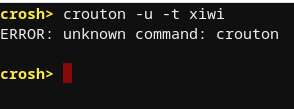
shmoob
on 10 Mar 2020
@Alizter
shmoob
on 10 Mar 2020
@shmoob Like when you previously tried to run crouton, you need to be in shell mode. So just type shell into crosh and you should be in the chrome os shell.
Alizter
on 10 Mar 2020
ok thanks
shmoob
on 10 Mar 2020
but still
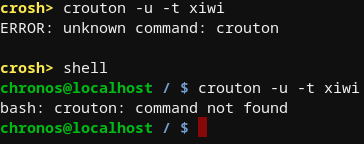
@Alizter
shmoob
on 10 Mar 2020
@shmoob So you've probably only run crouton from the script. You will need to install it. Read the instructions here:
Alizter
on 10 Mar 2020
ok thanks
shmoob
on 10 Mar 2020
@Alizter
I tried to do it and nothing happened

shmoob
on 10 Mar 2020
The xiwi xmethod is a good alternative to xorg, especially in these situations.
Now instead of running crouton normally, use sudo enter-chroot. This will enter your crouton but only at the terminal level. Run xiwi to check that you have it installed, now when you want to start an application such as firefox, you would write xiwi firefox &. The & makes the job run in the background.
Well, that's one way to do it but you can still use the start* scripts from outside your chroot.
See the below for some examples:
- Start your desktop in a window:
sudo startxfce4 -n xenial -X xiwi - Start your desktop full screen :
sudo startxfce4 -n xenial -X xiwi-fullscreen - Start your desktop in a tab :
sudo startxfce4 -n xenial -X xiwi-tab - Start your desktop using xorg :
sudo startxfce4 -n xenial -X xorg
You can also use the startxiwi script to launch Linux apps like the following:
- Start your app in a window:
sudo startxiwi -n xenial xterm - Start your app full screen :
sudo startxiwi -n xenial -F xterm - Start your app in a tab :
sudo startxiwi -n xenial -T xterm
NOTE: You can add the '-b' option to any of the above commands to run in the background.
Hope this helps,
-DennisLfromGA
DennisLfromGA
on 10 Mar 2020
Hi,
I guess I had the misfortune to update CromeOS today and encounter this issue. I was able to work around it by copying /etc/crouton/xorg-intel-sna.conf to /etc/X11/xorg.conf and modify set "TearFree" to false. This at least allows me to launch the chroot.
I feel as though my eyes will start to bleed at some point, the phantom lines and artifacts on screen are pretty bad. Any ideas if there might be a better workaround for this issue (other than using xiwi)?
Cheers,
Piers
 pierslawrence
on 11 Mar 2020
pierslawrence
on 11 Mar 2020
ya I finally figured out what to do thanks to Dennis if anybody wants all you have to do is change Xorg to xiwi
this will change it back to xorg
sudo sh crouton -t xorg,xiwi -u -n chrootname
and this will change it this xiwi
sudo crouton -t xiwi -u -n chrootname
then wait for it to change then do
sudo startxfce4
tranks yall
peace yall
el shmoobo
shmoob
on 11 Mar 2020
I have found editing /usr/share/X11/xorg.conf.d/20-crouton.conf:
    Option     "AccelMethod" "uxa"
-   Option     "AccelMethod" "sna"
+#   Option     "AccelMethod" "sna"
allows crouton Xorg to start. I don't understand the difference, but think uxa is probably less good than sna because playing video in 'mplayer' or 'vlc' doesn't work any more. Playing video in Chrome-under-Crouton still works.
 caev
on 12 Apr 2020
caev
on 12 Apr 2020
Related issues
 jeremyckahn
·
5Comments
jeremyckahn
·
5Comments
 jbaum98
·
4Comments
jbaum98
·
4Comments
 aarwdc
·
5Comments
aarwdc
·
5Comments
 El-t0ro
·
4Comments
El-t0ro
·
4Comments
 anonymouseprogrammer
·
4Comments
anonymouseprogrammer
·
4Comments
Most helpful comment
ya I finally figured out what to do thanks to Dennis if anybody wants all you have to do is change Xorg to xiwi
this will change it back to xorg
sudo sh crouton -t xorg,xiwi -u -n chrootname
and this will change it this xiwi
sudo crouton -t xiwi -u -n chrootname
then wait for it to change then do
sudo startxfce4
tranks yall
peace yall
el shmoobo