Crouton: Can't Initialize ubuntu with crouton
crosh> shell
chronos@localhost / $ sudo startunity
Entering /mnt/stateful_partition/crouton/chroots/xenial...
Unknown username "geoclue" in message bus configuration file
_XSERVTransmkdir: Owner of /tmp/.X11-unix should be set to root
X.Org X Server 1.18.4
Release Date: 2016-07-19
X Protocol Version 11, Revision 0
Build Operating System: Linux 4.4.0-83-generic x86_64 Ubuntu
Current Operating System: Linux localhost 4.4.79-11537-ga1d73b70a6f1 #1 SMP PREEMPT Mon Aug 28 03:09:13 PDT 2017 x86_64
Kernel command line: cros_secure console= loglevel=7 init=/sbin/init cros_secure oops=panic panic=-1 root=/dev/dm-0 rootwait ro dm_verity.error_behavior=3 dm_verity.max_bios=-1 dm_verity.dev_wait=1 dm="1 vroot none ro 1,0 3584000 verity payload=PARTUUID=e4e36f0d-ca2b-5940-a7fe-a61287b5a2d8/PARTNROFF=1 hashtree=PARTUUID=e4e36f0d-ca2b-5940-a7fe-a61287b5a2d8/PARTNROFF=1 hashstart=3584000 alg=sha1 root_hexdigest=98b12ddf2d5e154833ef89a3d7eb0a2b6b5678a2 salt=6bbf8d3c714ce08b545d8f5595ad3d9709caa853452cfaa2d2cfeec9c27d9f8f" noinitrd vt.global_cursor_default=0 kern_guid=e4e36f0d-ca2b-5940-a7fe-a61287b5a2d8 add_efi_memmap boot=local noresume noswap i915.modeset=1 tpm_tis.force=1 tpm_tis.interrupts=0 nmi_watchdog=panic,lapic
Build Date: 17 July 2017 05:05:12PM
xorg-server 2:1.18.4-0ubuntu0.3 (For technical support please see http://www.ubuntu.com/support)
Current version of pixman: 0.33.6
Before reporting problems, check http://wiki.x.org
to make sure that you have the latest version.
Markers: (--) probed, (**) from config file, (==) default setting,
(++) from command line, (!!) notice, (II) informational,
(WW) warning, (EE) error, (NI) not implemented, (??) unknown.
(++) Log file: "/tmp/Xorg.crouton.1.log", Time: Tue Aug 29 18:09:16 2017
(==) Using system config directory "/usr/share/X11/xorg.conf.d"
Error org.freedesktop.DBus.Error.UnknownMethod: Method "ReleaseDisplayOwnership" with signature "" on interface "org.chromium.LibCrosServiceInterface" doesn't exist
xf86EnableIOPorts: failed to set IOPL for I/O (Operation not permitted)
(EE)
Fatal server error:
(EE) no screens found(EE)
(EE)
Please consult the The X.Org Foundation support
at http://wiki.x.org
for help.
(EE) Please also check the log file at "/tmp/Xorg.crouton.1.log" for additional information.
(EE)
Error org.freedesktop.DBus.Error.UnknownMethod: Method "TakeDisplayOwnership" with signature "" on interface "org.chromium.LibCrosServiceInterface" doesn't exist
(EE) Server terminated with error (1). Closing log file.
 eddyhdzg
All 44 comments
No one cares
 Lachlan0E
on 30 Aug 2017
Lachlan0E
on 30 Aug 2017
@eddyhdzg,
Please add more detail.
- Are you running into a blackscreen issue like #2923, #2926, #3368 ???
- Have you added/used the
xiwixmethod successfully ???
-DennisL
 DennisLfromGA
on 30 Aug 2017
DennisLfromGA
on 30 Aug 2017
I'm also seeing this issue after upgrading Chrome OS to current dev channel (62.0.3198.0) on my Samsung Chromebook Pro. This is happening with a xenial chroot with xorg. Running with xiwi still seems to works correctly.
I've attached the full output of "sudo startunity". Let me know if you need anything else to fix this.
croutonerror.txt
 farmerbb
on 31 Aug 2017
farmerbb
on 31 Aug 2017
Also, here's the xorg log file that was generated.
Xorg.crouton.1.log.txt
farmerbb
on 31 Aug 2017
So, I did a little bit of research and it looks like the dbus method calls that crouton uses have changed recently: https://chromium.googlesource.com/chromiumos/platform/frecon/+/059fe66fb49d32e236d358d754d988d4602d9f79%5E%21/#F1
I changed the method calls in src/frecon.c, recompiled crouton, then ran sh crouton -u -n xenial. This fixed the issue. I'd open a pull request, but these changes would break crouton on Chrome OS versions that don't use the updated method calls. Still, it's good to know what the issue was and how to resolve it.
farmerbb
on 31 Aug 2017
Argh, good catch. I suspect the quickest fix for now is to just try and use both interfaces, one after the other...go ahead and make your pull request :)
 dnschneid
on 31 Aug 2017
dnschneid
on 31 Aug 2017
Hi,
I have just experienced the same problem and would really appreciate some guidance.
Pixel 2
Version 62.0.3198.0 (Official Build) dev (64-bit)
I use crouton to boot into XFCE
Questions:
i) Can you give any guidance on when this is likely to work again by default (e.g. after running an update) as opposed to the recompiling etc as mentioned above?
ii) I am assuming trashing Crouton and starting again would just lead me to the same point currently (as the problem is with a change in ChromeOS and Crouton is not yet adapted to it) - correct?
I guess I want to know...
- wait it out for a day or two and then run and update to crouton and everything is fine again
vs - this will take a while... so roll up your sleeves and start fixing it
:)
Any/all help/guidance much appreciated.
Steve
 sadams0
on 31 Aug 2017
sadams0
on 31 Aug 2017
I got the same issue PLEASE HELP MEEE.
 Sandaru-Tissera
on 31 Aug 2017
Sandaru-Tissera
on 31 Aug 2017
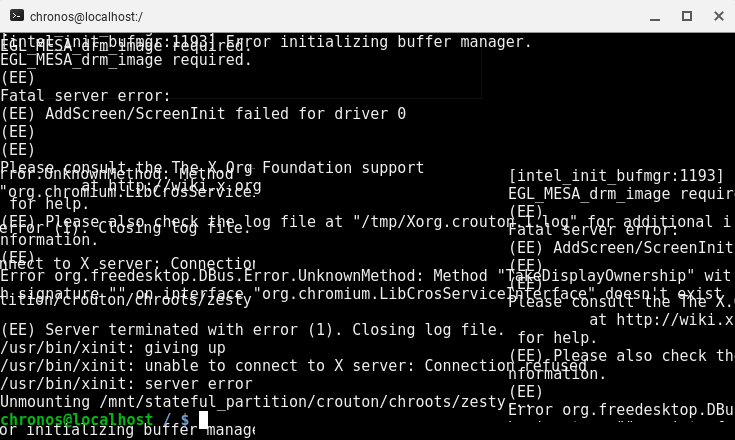
by any chance does it look a bit like
 AlexBigCheese
on 31 Aug 2017
AlexBigCheese
on 31 Aug 2017
Yes @dwaindibbly - that's what I get.
Copy/Pasted as TXT:
Initializing built-in extension XFree86-DRI
Initializing built-in extension DRI2
Loading extension GLX
Error org.freedesktop.DBus.Error.UnknownMethod: Method "ReleaseDisplayOwnership" with signature "" on interface "org.chromium.LibCrosServiceInterface" doesn't exist

xf86EnableIOPorts: failed to set IOPL for I/O (Operation not permitted)
Error org.freedesktop.DBus.Error.UnknownMethod: Method "ReleaseDisplayOwnership" with signature "" on interface "org.chromium.LibCrosServiceInterface" doesn't exist

xf86EnableIOPorts: failed to set IOPL for I/O (Operation not permitted)
Unable to set master
(EE)
Fatal server error:
(EE) AddScreen/ScreenInit failed for driver 0
(EE)
(EE)
Please consult the The X.Org Foundation support
         at http://wiki.x.org
 for help.
(EE) Please also check the log file at "/tmp/Xorg.crouton.1.log" for additional information.
(EE)
Error org.freedesktop.DBus.Error.UnknownMethod: Method "TakeDisplayOwnership" with signature "" on interface "org.chromium.LibCrosServiceInterface" doesn't exist

(EE) Server terminated with error (1). Closing log file.
Yep! we are in the same bucket. try using sudo enter-chroot and you'll probably get the same weirdness, heck even with updating the chroot we get the same madness!
all there is to do now is to wait for the pull request
AlexBigCheese
on 31 Aug 2017
@farmerbb could you make a release so we can edit crouton to get your version at least?
AlexBigCheese
on 31 Aug 2017
@dnschneid OK, pull request created, freon.c will now use both dbus interfaces (if one fails, then it will switch to the other one)
@dwaindibbly here's a binary for those that need these changes right away:
crouton.zip
farmerbb
on 31 Aug 2017
Hi,
Thanks for the support @dnschneid
*At risk of appearing dumb!
Where does that crouton binary actually live (in Chrome OS)?
I've been running "find"s and the only only instances I can see are all in Download folders (in various chroots).
Where do I need to put it?
Cheers, Steve.
sadams0
on 31 Aug 2017
awesome, yes I would ♥♥♥ to see a small guide.
I can imagine many people (like me) wanting to revive their broken X-server.
Idea: creating a new chroot with the new crouton-script, and copying the updated binaries (which?) to their existing chroot.
 coderofsalvation
on 31 Aug 2017
coderofsalvation
on 31 Aug 2017
@sadams0 @coderofsalvation Download the new crouton binary from my last post, unzip it, then run sudo sh ~/Downloads/crouton -u -n <chroot name> and it will update your existing chroot with the fixes.
farmerbb
on 31 Aug 2017
@farmerbb Thank you so much!
do you also by any chance know how to fix the graphical errors(overlapping texts) that appear in the picture @dwaindibbly posted?
 nicholaiTukanov
on 1 Sep 2017
nicholaiTukanov
on 1 Sep 2017
@Nicholai-The-Tree That's a Chrome OS issue and not a crouton issue.
farmerbb
on 1 Sep 2017
@farmerbb do you suspect that it was caused by a recent update to the OS?
nicholaiTukanov
on 1 Sep 2017
@Nicholai-The-Tree Yeah, the overlapping text issue definitely started with 62.0.3198.0 - probably some Chrome rendering bugs that were introduced in this version.
farmerbb
on 1 Sep 2017
ok the update using the shell worked, its alive again :)
Summary of what i did:
chronos@localhost / $ sudo sh ~/Downloads/crouton -u -n xenial
Migrating data from legacy chroots directory /usr/local/chroots to /mnt/stateful_partition/crouton/chroots...
There is data in both /usr/local/chroots and /mnt/stateful_partition/crouton/chroots.
Make sure all chroots are unmounted, then manually move the contents of
/mnt/stateful_partition/dev_image/chroots to /mnt/stateful_partition/crouton/chroots.

(I decided to make some backups of /usr/local/chroots to my pendrive)

chronos@localhost / $ sudo rm -rf /mnt/stateful_partition/crouton/chroots/xenial

chronos@localhost / $ sudo mv /mnt/stateful_partition/dev_image/chroots/xenial /mnt/stateful_partition/crouton/chroots/.

chronos@localhost / $ sudo sh ~/Downloads/crouton -u -n xenial
/usr/local/chroots/xenial already exists; updating it...
Preparing chroot environment...
Installing brightness into the chroot...
Installing croutonpowerd into the chroot...
Installing croutonversion into the chroot...
Installing host-dbus into the chroot...
Installing host-wayland into the chroot...
Installing volume into the chroot...
Installing pulseaudio-default.pa into the chroot...
Installing croutoncycle into the chroot...
Installing croutontriggerd into the chroot...
Installing croutonxinitrc-wrapper into the chroot...
Installing setres into the chroot...
Installing xinit into the chroot...

(..and so on)

Here's some tips:

Audio from the chroot will now be forwarded to CRAS (Chromium OS audio server),
through an ALSA plugin.

Future Chromium OS upgrades may break compatibility with the installed version
of CRAS. Should this happen, simply update your chroot.

You can flip through your running chroot desktops and Chromium OS by hitting
Ctrl+Alt+Shift+Back and Ctrl+Alt+Shift+Forward.

Unmounting /mnt/stateful_partition/crouton/chroots/xenial...
Done! You can enter the chroot using enter-chroot.

chronos@localhost / $ startx # this is an alias for 'sudo enter-chroot xinit'
Boom..X works again
coderofsalvation
on 1 Sep 2017
It works perfectly
Thanks to @farmerbb for the crouton.zip file
eddyhdzg
on 1 Sep 2017
@farmerbb is a boss
On Fri, Sep 1, 2017 at 2:03 PM, Eduardo Hernandez notifications@github.com
wrote:
It works perfectly
Thanks to @farmerbb https://github.com/farmerbb for the crouton.zip file
—
You are receiving this because you were mentioned.
Reply to this email directly, view it on GitHub
https://github.com/dnschneid/crouton/issues/3375#issuecomment-326563194,
or mute the thread
https://github.com/notifications/unsubscribe-auth/AAK_ZHi0bXGeQlMjhPqHZJLNwIIAG5cWks5sd_KUgaJpZM4PGq0C
.
--
/WEBSITE 2wa.isvery.ninja
/MOBILE +31 6 13499604
/LOCATION Netherlands, Drachten. Hongarije, Budapest.
/COMPANYNR. 08124656
/TAGS Rapid Prototyping of ideas/concepts using JavaScript,
Node.js, OpenSource. Growth-hacking partnerships,
lead scraping partnerships.
coderofsalvation
on 1 Sep 2017
Merged @farmerbb's fix, so normal crouton should work for everyone again.
dnschneid
on 1 Sep 2017
@dnschneid I had this problem with the crouton script downloaded today from the main link on the readme. So I resorted to @farmerbb 's crouton.zip file above, which worked. Yet I'm still wondering how I should now get the official latest version of crouton, containing the committed fix. Clue me in? I'm a github newbie, which is probably why I'm dumb here. Thanks.
 PCRyan
on 10 Sep 2017
PCRyan
on 10 Sep 2017
Having the same issue. OG Chromebook Pixel, downloaded Crouton last night. Zip posted earlier doesn't work either. Trying to use artful + gnome
 iansltx
on 6 Oct 2017
iansltx
on 6 Oct 2017
@farmerbb Thanks so much. Sorted me out in no time.
 auldaj
on 11 Nov 2017
auldaj
on 11 Nov 2017
@farmerbb Your script helps me out in no time. Thank you so much!
 nemo-nullius
on 14 Nov 2017
nemo-nullius
on 14 Nov 2017
@PCRyan, @iansltx, @auldaj & @nemo-nullius,
This fix has now been merged so all you have to do us update your chroot via crouton's '-u' option similar to:
sudo sh ~/Downloads/crouton [-n chrootname] -u
Hope this helps,
-DennisL
DennisLfromGA
on 14 Nov 2017
Hello everyone! I entered sudo sh~/Downloads/crouton [-n chrootname] -u to the chroot shell of my Lenovo Chromebook and got the same error message about display ownership. Did I in fact update my chroot or do something else entirely? If the former what am I missing?
 rogue417
on 17 Nov 2017
rogue417
on 17 Nov 2017
Hello guys,I am getting
" cannot be autheticated... -y was used without --allow-authenticated"
and then it will quit
 DanielMitiku
on 17 Nov 2017
DanielMitiku
on 17 Nov 2017
Hello again. Thinking to follow coderofsalvation I thought to try
sh ~/Downloads/crouton [-n chrootname] -u -n Xenial
but I think this just renamed my chroot. I got the same Display Ownership error.
rogue417
on 17 Nov 2017
Hello Dani,
You can solve this by manually installing the package(s) that are listed beneath the "cannot be authenticated.. -y was used....." message. You can do this by first entering into your chroot using the command sudo enter-chroot and installing the missing packages using the command sudo apt-get install package_name where package name is the name of the missing packages.i.e. those packages with authentication issues.
 natitaye
on 22 Nov 2017
natitaye
on 22 Nov 2017
Can anyone help me?
I got:
Errors were encountered while processing:
 mysql-server-5.7
 mysql-server
E: Sub-process /usr/bin/dpkg returned an error code (1)
Failed to complete chroot setup.
I'm using trusty.
EDIT: For someone with the same issue as me, I couldn't find a fix that worked, the problem was that I had mysql server installed on the linux machine and couldn't update it. The 'fix' for me was to wipe the crouton install, update it and reinstall from 0. The only problem was that I lost all my files, but nothing really important was there.
 cor14095
on 22 Nov 2017
cor14095
on 22 Nov 2017
Thanks everyone and esp. @farmerbb for the fix and instructions
 mmrtnt
on 22 Nov 2017
mmrtnt
on 22 Nov 2017
You know what I love about the command line? It is patient. I enter all sorts of things, and it waits until I enter a command it knows how to execute. Thanks @farmerbb
rogue417
on 23 Nov 2017
...until you install enough packages that even your typos become commands.
sudo apt-get install sl
dnschneid
on 23 Nov 2017
Hey, I tried that crouton, still doesn't work. Fun fact, croutonversion is not a command?
 JTJSniperBee
on 8 Dec 2017
JTJSniperBee
on 8 Dec 2017
@JTJSniperBee,
Make sure you update your chroot, this fix has been merged.
Fun fact, croutonversion is not a command?
Ha ;-)
croutonversion is in your chroot under /usr/local/bin/
You can run it inside your chroot or from CrOS with: sudo edit-chroot -all
Hope this helps,
-DennisL
DennisLfromGA
on 8 Dec 2017
Hi all,
I am trying to get Ubuntu on my chromebook, and I have tried all the above steps in order to fully update crouton. However, even after typing in "chronos@localhost / $ sudo startxfce4" I get an error message (among other information, but I think this is the main part):
Error org.freedesktop.DBus.Error.UnknownMethod: Method "ReleaseDisplayOwnership" with signature "" on interface "org.chromium.LibCrosServiceInterface" doesn't exist
method return time=1515547001.761181 sender=:1.11 -> destination=:1.57 serial=1008 reply_serial=2
boolean true
MESA-LOADER: failed to retrieve device information
gbm: failed to open any driver (search paths /usr/lib/arm-linux-gnueabihf/dri:${ORIGIN}/dri:/usr/lib/dri)
gbm: Last dlopen error: /usr/lib/dri/exynos_dri.so: cannot open shared object file: No such file or directory
failed to load driver: exynos
EGL_MESA_drm_image required.
(EE)
Fatal server error:
(EE) AddScreen/ScreenInit failed for driver 1
(EE)
(EE)
Please consult the The X.Org Foundation support
If anyone can help me get "X" to work it would be much appreciated.
 Zertg27
on 10 Jan 2018
Zertg27
on 10 Jan 2018
The crouton update does not work for me, I get:
awk: run time error: redirection not allowed in sandbox mode
Any help available?
 hugobokman
on 26 Feb 2018
hugobokman
on 26 Feb 2018
@Zertg27 & @hugobokman,
Please follow the guide below for troubleshooting steps -
Hope this helps,
-DennisLfromGA
DennisLfromGA
on 27 Feb 2018
rror org.freedesktop.DBus.Error.UnknownMethod: Method "ReleaseDisplayOwnership" with signature "" on interface "org.chromium.LibCrosServiceInterface" doesn't exist
xf86EnableIOPorts: failed to set IOPL for I/O (Operation not permitted)
crouton: version 1-20171230152552~master:de1361af
release: trusty
architecture: amd64
xmethod: xorg
targets: xorg,xiwi,unity
host: version 10176.76.0 (Official Build) stable-channel parrot
kernel: Linux localhost 3.8.11 #1 SMP Sat Feb 24 13:20:05 PST 2018 x86_64 x86_64 x86_64 GNU/Linux
freon: yes
Cannot open /sys/class/tty/tty0/active: No such file or directory
(II) AIGLX: Suspending AIGLX clients for VT switch
Error org.freedesktop.DBus.Error.UnknownMethod: Method "TakeDisplayOwnership" with signature "" on interface "org.chromium.LibCrosServiceInterface" doesn't existError org.freedesktop.DBus.Error.UnknownMethod: Method "TakeDi
Common Issues did not work, get display screen with no launcher. Been this way for about the last 3 weeks after Chrome OS update. Before that was fine for years. Using Unity and Nemo on an Acer C-710 with 16GB ram.
 K1701
on 25 Mar 2018
K1701
on 25 Mar 2018
Getting the same error on 2015 Toshiba running Xenial XFCE xorg. Not sure if it's related, but I notice it in the output when I switch back to Chrome OS after the screen sudden goes dim in the chroot.
 pmccomb
on 24 Aug 2018
pmccomb
on 24 Aug 2018
Related issues
 El-t0ro
·
4Comments
El-t0ro
·
4Comments
 duck955
·
5Comments
duck955
·
5Comments
 jeremyckahn
·
5Comments
jeremyckahn
·
5Comments
 rossjrw
·
5Comments
rossjrw
·
5Comments
 kgingging
·
5Comments
kgingging
·
5Comments
Most helpful comment
@sadams0 @coderofsalvation Download the new crouton binary from my last post, unzip it, then run
sudo sh ~/Downloads/crouton -u -n <chroot name>and it will update your existing chroot with the fixes.