Crouton: Chroot freeze and croutonfbserver+compiz take 100% CPU
name: precise
encrypted: no
Entering /mnt/stateful_partition/crouton/chroots/precise...
crouton: version 1-20161129162558~master:5f2f11f9
release: trusty
architecture: amd64
xmethod: xiwi
targets: xiwi,xorg,xfce,touch,core,cli-extra,unity-desktop
host: version 9460.57.0 (Official Build) beta-channel samus
kernel: Linux localhost 3.14.0 #1 SMP PREEMPT Tue May 30 22:25:21 PDT 2017 x86_64 x86_64 x86_64 GNU/Linux
freon: yes
Please describe your issue:
Every once in a while, looks like triggered by some combination or alternation of keys especially when switching between ChromeOS and the xiwi provided windowed desktop I get the ubuntu desktop environment to freeze responding and both croutonfbserver and compiz both take about 100% of the CPU. Some times after waiting or hitting a few keys it comes out of that state but most of the times it stays like that frozen until I exit the chroot and restart the desktop environment:
top - 16:04:12 up 2 days,  8:36,  0 users,  load average: 3.54, 1.64, 1.34
Tasks: 409 total,   3 running, 405 sleeping,   0 stopped,   1 zombie
%Cpu(s): 81.2 us,  7.5 sy,  0.0 ni, 11.3 id,  0.0 wa,  0.0 hi,  0.0 si,  0.0 st
KiB Mem:  16344888 total, 12973252 used,  3371636 free,   280584 buffers
KiB Swap: 23942704 total,    22112 used, 23920592 free.  4283580 cached Mem

  PID USER      PR  NI    VIRT    RES    SHR S  %CPU %MEM     TIME+ COMMAND
12876 chronos   20   0   46484  23300  13204 R  97.2  0.1  57:36.09 croutonfbserver
13677 chronos   20   0 1709988 315356  41032 S  93.2  1.9  42:51.97 compiz
If known, describe the steps to reproduce the issue:
It happens pretty randomly, I haven't quite figured out what triggers it, but was wondering if this is a known issue that there's a fix/workaround and if other people experienced that before. Do I need to update something just in case?
 robertoandrade
All 13 comments
@robertoandrade,
The 'precise' release has reached end-of-life and is no longer supported.
The 'xenial' release is the new supported default going forward.
You may be able to upgrade your chroot from 'precise' to 'xenial', see the wiki page 'Upgrade chroot release' for details.
Please bear in mind that an upgrade can be problematic so a new clean install of 'xenial' might be the best path forward.
Hope this helps,
-DennisL
 DennisLfromGA
on 7 Jun 2017
DennisLfromGA
on 7 Jun 2017
I must have created the chroot as precise in the beginning as it was the default, but I'm currently on trusty:
$ cat /etc/*release
DISTRIB_ID=Ubuntu
DISTRIB_RELEASE=14.04
DISTRIB_CODENAME=trusty
DISTRIB_DESCRIPTION="Ubuntu 14.04.5 LTS"
NAME="Ubuntu"
VERSION="14.04.5 LTS, Trusty Tahr"
ID=ubuntu
ID_LIKE=debian
PRETTY_NAME="Ubuntu 14.04.5 LTS"
VERSION_ID="14.04"
HOME_URL="http://www.ubuntu.com/"
SUPPORT_URL="http://help.ubuntu.com/"
BUG_REPORT_URL="http://bugs.launchpad.net/ubuntu/"
@robertoandrade,
So sorry I overlooked that detail.
I'm afraid I don't have any chroots with a unity desktop at the moment.
Do you have some 'compiz' settings that may be dragging it down possibly?
I have a trusty chroot with the lxde-desktop target but I haven't run into this issue with it.
I used to tweak 'compiz' settings but I haven't done it on anything I have recently.
-DennisL
P.S. You can rename your chroot using: sudo edit-chroot precise -m trusty
DennisLfromGA
on 7 Jun 2017
Haven't changed anything from default settings. I can try upgrading to the
latest ubuntu but wasn't too sure that was gonna fix it or only bring more
issues.
On Wed, Jun 7, 2017 at 5:18 PM DennisL notifications@github.com wrote:
@robertoandrade https://github.com/robertoandrade,
So sorry I overlooked that detail.
I'm afraid I don't have any chroots with a unity desktop at the moment.
Do you have some 'compiz' settings that may be dragging it down possibly?I have a trusty chroot with the lxde-desktop target but I haven't run into
this issue with it.
I used to tweak 'compiz' settings but I haven't done it on anything I have
recently.-DennisL
P.S. You can rename your chroot using: sudo edit-chroot precise -m
trusty—
You are receiving this because you were mentioned.
Reply to this email directly, view it on GitHub
https://github.com/dnschneid/crouton/issues/3256#issuecomment-306928091,
or mute the thread
https://github.com/notifications/unsubscribe-auth/AATd-aSGv_ZnuPi8NhsPG_2ulIscusX3ks5sBxO1gaJpZM4NzN7h
.
robertoandrade
on 7 Jun 2017
@robertoandrade,
I think 'trusty' is fine, that's what I use mostly.
I have some 'xenial' & 'zesty' chroots but, truthfully, I haven't had any CPU or memory issues with any of them. I do have an i5 with 8GB RAM but the issue you're having would probably happen on any device I'm guessing.
-DennisL
DennisLfromGA
on 7 Jun 2017
I just reset my Chromebook to vanilla latest Chrome OS and reinstalled crouton and a xenial chroot. Installed unity and wixi targets and keep seeing these freezes. Another similar behavior I notice happening is the wixi window going black and unresponsive after a sleep/awake cycle, not sure if it's related at all with my keyboard/screen freeze inside the X window, but thought I'd mention.
No idea what could cause this freeze? I often times notice it happening when I use key shortcuts in my IDE or simply when pressing ENTER during autocomplete of something.
robertoandrade
on 18 Jul 2017
So have been able to reproduce this quite frequently on latest Chrome OS and Ubuntu (xenial) and I notice some key gets "virtually" stuck and the CPU pegs at 100% (between compiz and croutonfbserver).
A workaround I've found is to kill croutonfbserver and restart it with:
DISPLAY=:1 croutonfbserver :1
Then I reconnect via the crouton extension and my unity/compiz session is back to normal, but the key that got it stuck keeps being pressed repeatedly until I press another one after reconnecting.
Any ideas why croutonfbserver could be getting stuck on these random key presses?
robertoandrade
on 29 Jul 2017
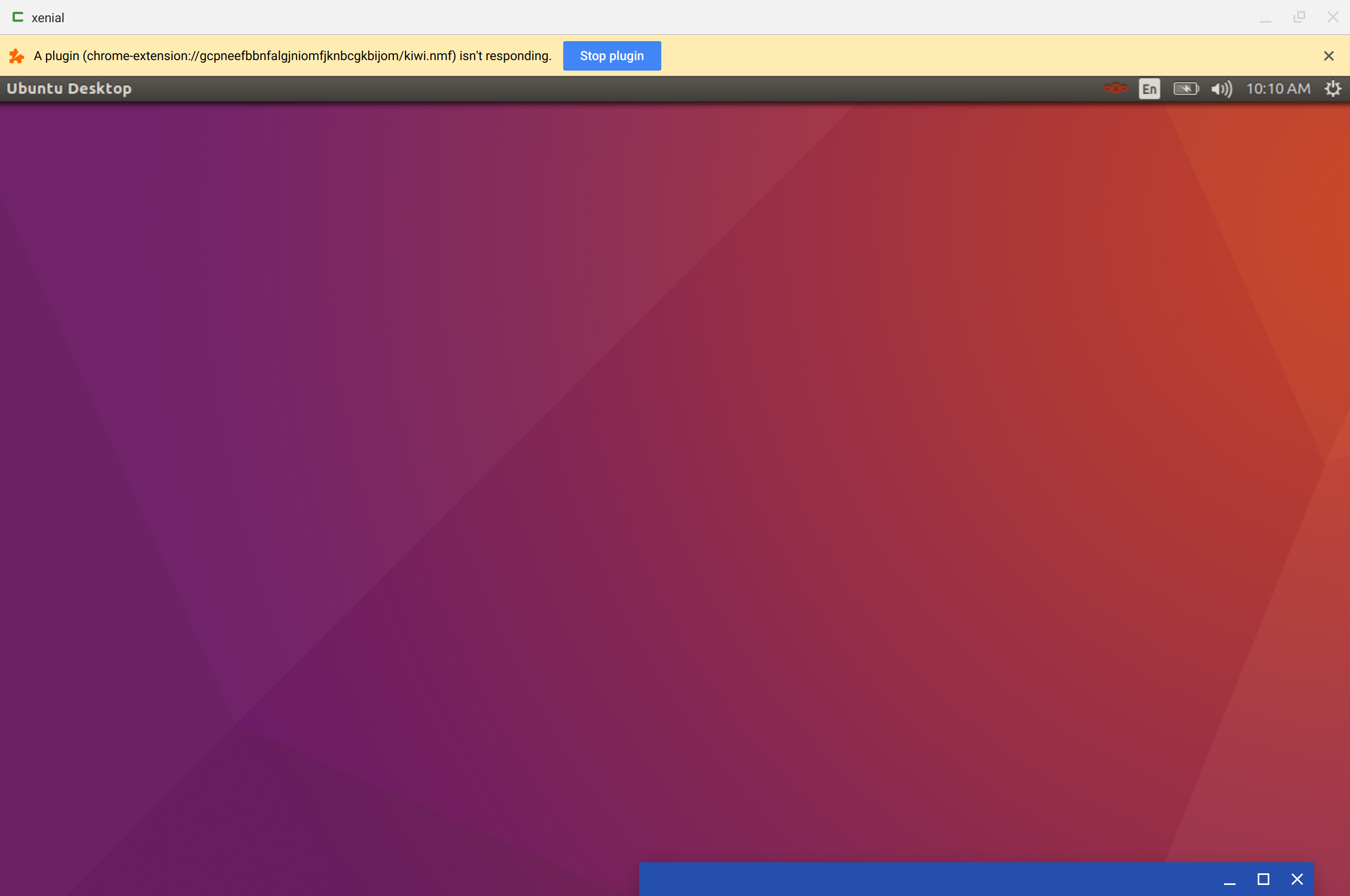
On the latest version of Chrome OS it now tells you the extension is stuck and offers you to kill/restart it, it doesn't do it any good without the workaround I mentioned previously but at least it's now being detected by the OS and offering you a workaround. Doesn't anyone else see this on their crouton installations?
robertoandrade
on 27 Aug 2017
I have the same issue. I doubt it only happens only with low battery levels. If that is true then "disabling tab throttling" might be a solution for the problem https://winaero.com/blog/disable-tab-throttling-google-chrome/
 Ahmed1Elsawy
on 24 Dec 2017
Ahmed1Elsawy
on 24 Dec 2017
I don’t believe that either. When I face this issue it seems to be related
to keyboard presses that key stuck, as soon as I kill and restart
croutonfbserver all is fine for a while until it happens again.
On Sun, 24 Dec 2017 at 08:39 Ahmed1Elsawy notifications@github.com wrote:
I have the same issue. I doubt it only happens only with low battery
levels. If that is true then "disabling tab throttling" might be a solution
for the problem
https://winaero.com/blog/disable-tab-throttling-google-chrome/—
You are receiving this because you were mentioned.
Reply to this email directly, view it on GitHub
https://github.com/dnschneid/crouton/issues/3256#issuecomment-353777442,
or mute the thread
https://github.com/notifications/unsubscribe-auth/AATd-TvQpxEJcOy7SE55m6hyKH1POEYHks5tDin0gaJpZM4NzN7h
.
robertoandrade
on 24 Dec 2017
I've run into this as well; I've been able to save what I was working on a few times thanks to @robertoandrade's workaround, so thanks! :)
I've had it happenwithout any keyboard input (while dragging with the mouse and after resizing the window), which is nicer since there's no stuck key issue after. I haven't found a way to deliberately reproduce it, though.
 rickybrent
on 28 Jan 2018
rickybrent
on 28 Jan 2018
I also have this problem, running trusty on Intel Core m3-6Y30 Processor 900MHz; Google Chrome OS; with 4GB ram. What is almost certain to trigger it is saving a libreoffice file after working on that file for some time - probably an hour or so. Over a shorter period of time it is fine, usually. The autosaves do not trigger it. Also happens some times pressing key combinations, like the window switching (cntrl-tab) that I set up to change windows within the linux window. I also sometimes get the virtual key repeat problem, and some keypress and mouse lag at times, but not often enough or bad enough that I think of it as a problem.
The only way back is to power off and restart the computer, and then restart crouton. If I do that, the crashed window can be opened, labeled "default" and it seems to bring back the crashed session, as one other program I had open re-launches, but unfortunately not the libreoffice, so data loss from last autosave onwards is possible. I have had 1 or two times when just suspending the computer and waking it has solved the problem, but usually not.
I did not have the problem in a previous installation of Trusty on same computer. That installation failed after a time, and so I factory reset and started again only to find this annoying problem.
 aarwdc
on 4 Jul 2018
aarwdc
on 4 Jul 2018
I am seeing a similar problem with Debian Buster (supported). croutonfbserver goes to 100% and the Xiwi window stays black.
So far, the only recovery is to switch to the Crash Shell window that I started the chroot, and press ^C which terminates the entire chroot.
 cvmiller
on 7 Dec 2019
cvmiller
on 7 Dec 2019
Related issues
 tedm
·
3Comments
tedm
·
3Comments
 Joshua10115
·
4Comments
aarwdc
·
5Comments
Joshua10115
·
4Comments
aarwdc
·
5Comments
 Taylormsz
·
5Comments
Taylormsz
·
5Comments
 BRFNGRNBWS
·
3Comments
BRFNGRNBWS
·
3Comments
Most helpful comment
On the latest version of Chrome OS it now tells you the extension is stuck and offers you to kill/restart it, it doesn't do it any good without the workaround I mentioned previously but at least it's now being detected by the OS and offering you a workaround. Doesn't anyone else see this on their crouton installations?