Crossplane: Getting started guide does not work end-to-end for Alibaba
What happened?
Our getting started guide walks through composing a PostgreSQL instance on various clouds, and deploying an OAM application that uses that database. We wrote the example OAM app config such that it assumed all PostgreSQL instances listened on the standard TCP port 5432, but Alibaba uses port 3433.
Normally we'd just propagate the port of each SQL instance from its connection secret, but GCP and Azure don't specify a port in the details of their instance - only AWS and Alibaba do.
How can we reproduce it?
https://crossplane.io/docs/v0.11/getting-started/install-configure.html
Follow the getting started guide up to the point that you create a pod to connect to the database you've defined, composed, and published. You should find that that the Pod won't connect, because it's attempting to use the wrong port.
What environment did it happen in?
Crossplane version:
 negz
negz
All 3 comments
I'm going to reopen this to indicate track that while the bug is fixed in master it needs to be released.
negz
on 22 May 2020
I'm going to reopen this to indicate track that while the bug is fixed in master it needs to be released.
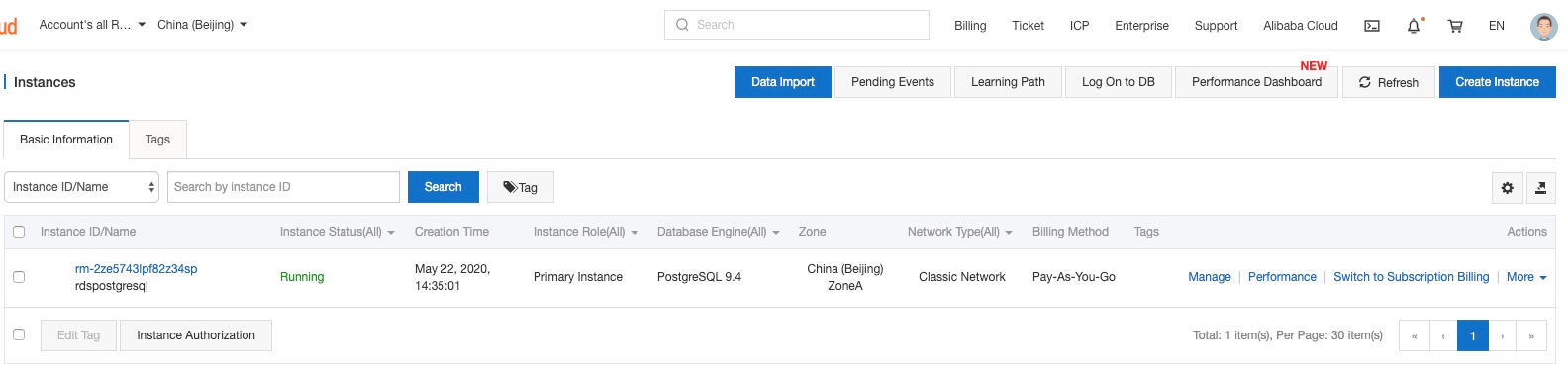
By fixing two doc issues with pull request #1560 #1562 , the end-to-end RDSInstance provisioning succeeded.
➜  /Users/zhouzhengxi/Programming/golang/src/github.com/zzxwill/crossplane git:(master) k get rdsinstance
NAME            READY   SYNCED   STATE     ENGINE       VERSION   AGE
rdspostgresql   True    True     Running   postgresql   9.4       42m
 zzxwill
on 22 May 2020
zzxwill
on 22 May 2020
Thanks @zzxwill! There was another issue to fix to get it working all the way through to consuming it from a pod and an OAM application, which landed as part of v0.11.1.
negz
on 23 May 2020
Related issues
 hongchaodeng
·
4Comments
hongchaodeng
·
4Comments
 hasheddan
·
7Comments
hasheddan
·
7Comments
 vadasambar
·
3Comments
vadasambar
·
3Comments
 tapanhalani
·
4Comments
zzxwill
·
6Comments
tapanhalani
·
4Comments
zzxwill
·
6Comments