Croppie: access Image from amazonaws and apply croppie(cross origin).
Expected Behavior
I am using amazonaws s3. There are some images where I need to apply resize plugIn. But when we hit the button to apply the the plugin it should be able to resize the image.
Actual Behavior
But in actual I am getting this error:
Access to Image at 'amazonserver' from 'otherserver' has been blocked by CORS policy: No 'Access-Control-Allow-Origin' header is present on the requested resource.
What we can do if we have images on cross servers(amazon in this case). Any help is appreciated. Thanks a many.
Edit-1
Basicaly the thing is that image is comming fine from cross origin when landing on page and we can see the image appearing properly but when the same image element passed to plugin to apply the resize functionality it actully return the cross origin error and plugin dont work. However if i have the image on same server there is no error.
 mustkem
All 7 comments
Have you tried following the steps in this documentation? https://docs.aws.amazon.com/AmazonS3/latest/dev/cors.html
 thedustinsmith
on 26 Apr 2018
thedustinsmith
on 26 Apr 2018
I'm facing the same issue with chrome.
Firefox seens ok
That is my cors configuration in s3:
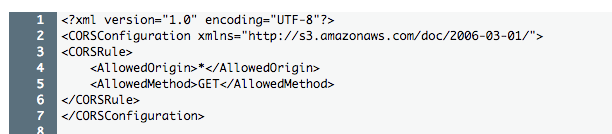
 lucasprochnow2
on 27 Apr 2018
lucasprochnow2
on 27 Apr 2018
@thedustinsmith thank you very much for your kind reply.
As I see now as @lucasprochnow2 raised, this issue is limited to chrome only. I have put some third party images say not from amazon or from my server still issue encounter.
I dont see if amazon configurations have things to do with this schnerio if I am not mistaken.
Please suggest any way to step out from the issue in this specific browser dependent case.
I can look into the js file but before that I want to be sure that if it would be the reasonable way to fix this. Any help is much appreciated.
mustkem
on 2 May 2018
Can one of you provide a link to an image in your s3 bucket?
thedustinsmith
on 2 May 2018
hello @thedustinsmith I have a demo. Here is a amazon bucket image.
https://jsfiddle.net/ejuvkwwh/4/
Demo works fine in firefox but in chrome it generate error and resize functionality would not work.
Please go ahead with this demo and do let me know if you need other information too.
Warm regards
mustkem
on 3 May 2018
Thanks for the jsfiddle. I'm having a hard time replicating the issue, but here's what I think is happening. You have an img tag that loads the image before croppie even handles it. Then your browser is caching that result. Since your image tag doesn't have crossOrigin="anonymous", the result that your browser is caching isn't a cors image. Therefore the image that croppie is given by the browser is the non-CORS version.
In short, try adding crossOrigin="anonymous" to your img.
I modified the fiddle and can't get the issue to occur with that change implemented:
http://jsfiddle.net/ejuvkwwh/8/embedded/result/
thedustinsmith
on 3 May 2018
Yes I think your observations are right. This crossOrigin="anonymous" worked.
Thank you very much for your time and support @thedustinsmith.
mustkem
on 7 May 2018
Related issues
 bmalets
·
6Comments
bmalets
·
6Comments
 Terumi
·
3Comments
Terumi
·
3Comments
 tpilitis
·
5Comments
tpilitis
·
5Comments
 nicolasvahidzein
·
7Comments
nicolasvahidzein
·
7Comments
 oystehei
·
6Comments
oystehei
·
6Comments
Most helpful comment
Thanks for the jsfiddle. I'm having a hard time replicating the issue, but here's what I think is happening. You have an img tag that loads the image before croppie even handles it. Then your browser is caching that result. Since your image tag doesn't have
crossOrigin="anonymous", the result that your browser is caching isn't a cors image. Therefore the image that croppie is given by the browser is the non-CORS version.In short, try adding
crossOrigin="anonymous"to your img.I modified the fiddle and can't get the issue to occur with that change implemented:
http://jsfiddle.net/ejuvkwwh/8/embedded/result/